ログイン

Changelog

Information on the latest updates and additions to the Auth0 platform.

added

Inbound SCIM Groups for Enterprise Connections is now Generally Available!

Copied to clipboard

We’re pleased to announce that support for Groups within Auth0’s Inbound SCIM for Enterprise Connections capability is now Generally Available (GA)!

This release closes the loop between identity provisioning and access control by allowing you to natively map synced groups to Auth0 roles at two levels: globally at the tenant level, or scoped specifically to an organization based on the user’s login context.

Additionally, developers can now accelerate B2B onboarding by empowering their enterprise customers to self-configure SCIM provisioning for groups directly.

What’s new in GA:

Building on our Early Access capabilities, this release introduces the following enhancements to deliver out-of-the-box B2B delegated administration:

  • Associate tenant-level RBAC roles with Enterprise Groups: For global access, you can assign Auth0 tenant-level roles directly to SCIM-provisioned groups. Any member of the synced group will automatically inherit these roles globally.
  • Assign Organization scoped roles to Enterprise Groups: You can now assign organization scoped roles to SCIM-provisioned groups. In tandem with Auto-Membership, your customers' users will automatically inherit workspace-scoped permissions the moment they log in.
  • Self-Service Enterprise Configuration: Empower your enterprise customers (or their IdP administrators) to configure SCIM provisioning for users and groups on their own through the Self-Service flow, accelerating B2B onboarding and removing your support team from the loop.

How to get started:

This feature will be rolled out to all public cloud environments over the next few days and to private cloud environments as per their release pipeline.

SCIM Groups is available for all tenants whose Auth0 plan includes Enterprise Connections. To enable it, navigate to the Auth0 Dashboard, go to Authentication > Enterprise, select your SAML, OpenID Connect, Okta Workforce, or Microsoft Entra ID connection, and toggle Sync user profiles using SCIM to On under the Provisioning tab.

Learn more:

updated

Dashboard Navigation & IA Refresh is now in Beta

Copied to clipboard

We are excited to announce that the redesigned Dashboard navigation and information architecture (IA) is now available in Beta. This update is the first step toward a more unified platform experience across Auth0, making it faster to find what you need and easier to act on everything across the platform. Alongside the IA changes, this beta also includes a significant visual refresh.

What's in the Beta

Flattened navigation

  • Label-only group headers so every item is visible at a glance, reducing clicks and making pages faster to reach.
  • Reorganized around common tasks to surface the pages you use most and match the way you actually work.
  • External actions have moved out of the sidebar and into the top bar, keeping the sidebar focused on tenant configuration.

Consolidated & renamed pages

  • Related functionality grouped together to bring common tasks closer together.
  • Clearer naming to better align functionality across the platform.

Availability

  • Existing bookmarks and deep links will continue to work and you'll be automatically redirected to the new page.
  • This is a navigation, IA, and visual update only. All underlying functionality and APIs remain the same.

Join the beta!

If you're interested in joining the Dashboard Navigation & IA Refresh beta program, please send a request through the Auth0 Support Center or contact your Technical Account Manager (TAM) or Auth0 Sales Executive to help you out with the process.

added

Dashboard Search for Applications Now in Beta

Copied to clipboard

We're excited to announce that Dashboard Search for Applications is now available in Public Beta! Find your applications faster without scrolling through paginated lists. Dashboard Application Search

What's New: Dashboard users can now search and filter applications in real time by application name, client ID, external client ID, metadata, application type, and first-party status.

  • Multiple filter options — Combine up to 5 filters
  • Guided filter menu with Boolean search logic
  • Filters persist in URLs for sharing and bookmarking

Rolling out progressively to Public Cloud tenants starting this week, with broader availability in the coming weeks.

For detailed documentation on search capabilities, visit our Product documentation.

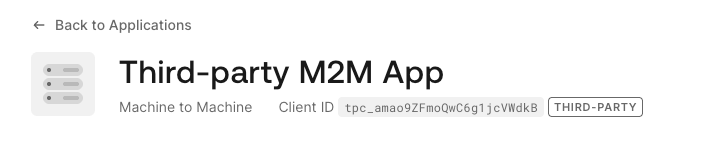
M2M Support for Third-Party Applications is now Generally Available

Copied to clipboard

We're happy to announce that strict third-party applications now support machine-to-machine (M2M) access using the client_credentials grant type.

As you expose your APIs to AI agents and partner backend services that operate without a user in the loop, you need those integrations to work within the same secure-by-default posture as the rest of your third-party application setup. This release makes that possible.

M2M-third-party-app

What's included:

  • client_credentials grant type support for strict third-party applications, available via the Management API and Dashboard.
  • Organization-scoped M2M access: strict third-party applications can request access tokens within the scope of a specific organization, with the same explicit grant requirements that apply to all M2M applications. Learn more about M2M access for organizations.
  • M2M access is intentionally restricted to applications created manually via the Management API or Dashboard. Applications registered via Dynamic Client Registration are excluded to prevent uncontrolled token issuance by unvetted third parties.

To learn more, visit the Third-Party Applications documentation.

added

Auth0 Teams: Delegate tenant management with the new Tenant Manager role

Copied to clipboard

You can now delegate tenant-level user management with the Tenant Manager role. This allows you to offload day-to-day administrative tasks from Team Owners to dedicated managers, providing the autonomy they need without exposing sensitive configuration settings.

Key capabilities:

  • Independent administration: Directly invite, update, and revoke tenant members without escalating to Team Owners.
  • Scoped permissions: Access is limited strictly to assigned tenants; sensitive configurations—such as connections and security logs—remain restricted to Team Owners.
  • Audit trails: All management actions are captured in Team Activity logs for full compliance and visibility.

Use cases:

  • Regional autonomy: Empower regional leads to manage their own tenant members without granting visibility into other regional or global tenants.
  • Separation of duties: Delegate administrative tasks to specific departments while centralizing control of critical security settings at the account level.

Learn more about Teams Roles and Responsibilities.

added

Token Vault with Organization Support Available in GA!

Copied to clipboard

We're excited to announce the GA release of Token Vault with Organization Support! ISVs building multi-tenant B2B SaaS applications and agents on Auth0 Organizations can now use Token Vault to store and exchange third-party tokens within the context of each organization their users belong to.

With this release, Token Vault exchanges and the Connected Accounts flow respect org_id end-to-end. Tokens are scoped to (user, org_id), so each organization maintains its own token records for a given user and data isolation between organizations is preserved by default. Token Vault exchanges that do not carry an org_id claim continue to behave as before.

For complete setup instructions and more, refer to our documentation..

Actions - Access Token Scope Customization - EA

Copied to clipboard

We are excited to announce that we are adding new Credentials Exchange Actions Access Token Scope Interfaces and they are now available in Early Access.

These new interfaces allow you to customize the scopes to be considered when the access token is issued by writing Credentials Exchange Actions, considering the restrictions based on API and Client Grants definitions.

Early Access functionality includes:

Custom Token Exchange - Delegated Authorization now available in Open Early Access

Copied to clipboard

We're excited to announce that Custom Token Exchange now supports Delegated Authorization. This release is available to all Enterprise, B2B Professional, and B2C Professional customers.

Delegated Authorization covers scenarios where a principal (e.g. a human support agent, a backend service, an AI agent) performs actions in the context of a user. Unlike traditional impersonation where the actor's identity is lost, delegated authorization preserves both identities: the sub claim identifies the user being acted for, while a standards-based act claim (per RFC 8693) identifies who is actually performing the action. Every token carries a verifiable record of the delegation.

With the flexibility to define custom actor semantics and authorization logic via Actions, customers now have the tools to address emerging access patterns, including agentic AI flows, alongside traditional delegation scenarios like support tooling and service-to-service chains.

Key highlights of this release:

  • Actor token parameters: Pass actor_token and actor_token_type to convey the acting party's credential
  • setActor() Action command: Developers explicitly control when and how delegation act claim is included in tokens via the new setActor() method
  • Auth0 ID tokens as actor tokens: Automatic validation when the actor is an Auth0-managed user
  • Audit trail: Actor identity captured in tenant logs for compliance and traceability
  • Nesting support: Up to 5 levels of delegation chains for multi-hop service scenarios

To learn more, visit the Custom Token Exchange documentation.

set-Actor-Actions

General availability of DPoP sender constraining for Enterprise Connections

Copied to clipboard

Demonstrating Proof of Possession (DPoP) sender constraining for Enterprise Connections is now generally available. Customers can now establish Okta and OIDC Enterprise Connections with DPoP enabled on those connections. This is available on all plans with Enterprise Connections.

DPoP for Enterprise Connections enables Auth0 to generate DPoP proofs when performing token exchange and calling userinfo endpoints on upstream OIDC and/or Okta connections. DPoP is a core building block of FAPI2 and IPSIE (Identity Proofing and Secure Identity Exchange) ecosystems. It provides a lightweight, standards-based way to enforce proof-of-possession (of a private key) without the operational overhead of mTLS token binding.

Please see product documentation for further details.

Federated Logout for OIDC and Okta enterprise connections is now generally available

Copied to clipboard

Federated Logout is now generally available for OIDC and Okta enterprise connections. When a user logs out with ?federated appended to the logout URL, Auth0 calls the upstream identity provider's end_session_endpoint to terminate the IdP session, closing the gap where a lingering IdP session could silently re-authenticate the user on their next login attempt.

Note: if federated logout is attempted without providing an end_session_endpoint, federated logout will not be able to be completed, and a federated_logout_failed tenant log will be generated. The user will be successfully logged out of Auth0 and redirected back to the application, just as with a standard (non-federated) logout.

With federated logout:

  • Auth0 takes the burden off customers by handling IdP session termination
  • Customers simply indicate if the IdP session should be ended when the Auth0 logout endpoint is reached — no extra setup needed for compliant IdPs
  • Employers and employees have peace of mind that their data is not accessible when they logout from their applications

This feature is available on all plans that include enterprise connections. Read the documentation to learn more.

added

Secure Canonical Domains with New Tenant ACL Signals

Copied to clipboard

We have enhanced Tenant Access Control Lists (ACLs) to provide granular control over upstream proxy infrastructure and canonical domain routing.

With this update, you can now isolate traffic by enforcing distinct rules on your canonical hostnames while keeping your user-facing custom domains open.

What's New?
  • Canonical Hostname Routing
    • Match access rules directly against your canonical hostnames. This allows you to lock down backend default domains while keeping customer-facing custom domains open and accessible to your users.
  • Connecting IP Verification
    • Define precise allowed IPv4 and IPv6 CIDR blocks for the infrastructure (such as reverse proxies or content delivery networks) connecting directly to the Auth0 edge.
  • Expanded Attribute Quotas
    • The limit for Tenant ACL attributes has been increased from 10 to 20 per signal, giving you the additional flexibility needed to scale complex, multi-domain configurations seamlessly.
Resources

To learn more about Tenant ACLs, click here

added

Suspicious IP Throttling for Custom Token Exchange

Copied to clipboard

We have introduced a Dashboard configuration interface for Suspicious IP Throttling, specifically for Custom Token Exchange. This update allows administrators to easily set thresholds to throttle high-velocity traffic from suspicious IP addresses during the token exchange process.

Learn more about Custom Token Exchange attack protection here

updated

Non-Unique Emails is Now Generally Available

Copied to clipboard

Non-Unique Emails is now Generally Available (GA) for all Auth0 customers. This feature allows multiple user accounts to share the same email address within a database connection, supporting real-world use cases like families, small businesses, and multi-role users who need separate accounts tied to the same email.

Key Details:

  • Available on new database connections only (cannot be enabled on existing connections).
  • Requires a different primary identifier (username or phone number) to uniquely distinguish users.
  • All email communications (verification, password reset, etc.) are still sent to the shared email address.
  • Once enabled on a connection, the non-unique email setting is permanent.

Documentation: Non-Unique Emails

added

Secure your Account API with ACR EA

Copied to clipboard

Auth0's ACR EA release empowers you to secure Account API token issuance by enforcing step-up authentication for sensitive scopes. Whether your users are managing their authentication factors via Universal Login or Embedded flows, you can now gate access through Actions-driven policies or enable a secure-by-default toggle. This ensures stronger security for self-service account management while maintaining a seamless experience for low-risk actions. Learn more here: API Settings Auth0 Docs My Account API Docs

added

Online Refresh Tokens is now in Beta

Copied to clipboard

We are excited to announce that our new feature "Online refresh tokens" is now available to all customers in Beta. This powerful new feature is designed to simplify token management and modernize your application architecture, especially for Single Page Applications (SPAs) allowing you to bind refresh tokens to the sessions they originated from, which provides seamless and consistent continuation of a session when cookies are affected by the browser vendor behaviour across different applications.

What's in the Beta

✨ New configuration options

  • Configure specific audiences to provide Online refresh tokens - online refresh tokens configuration is now available under the API > settings page

🔒 Applications Integration

  • New scope — Request the new online_access scope to receive your online refresh tokens, which will be bound to the session
  • Refresh tokens normally — Online refresh tokens will continue your application access while the session exists
  • Revoke a session, revoke its refresh tokens — Once the session is revoked, all its online refresh tokens become invalid, too

🚀 Availability

  • Since online refresh tokens lifecycle is entirely based on their underlying session, online refresh tokens can be issued only in OIDC flows that generate a valid session and can return refresh tokens
  • Following OIDC standards, implicit sessions that do generate a session but shall not return a refresh token, will not provide online refresh tokens either

Documentation Links

Online refresh tokens documentation

Join the beta!

If you're interested in joining the online refresh token beta program, please send a request through the Auth0 Support Center or contact your Technical Account Manager (TAM) or Auth0 Sales Executive to help you out with the process

added

Resend Email Provider is now Generally Available

Copied to clipboard

Resend Email Provider

We're excited to announce that Resend is now Generally Available as an out-of-the-box email delivery provider in Auth0!

With this release, you can now configure Resend as your email delivery provider with built-in configuration directly within Auth0. Resend offers a modern, developer-friendly approach to transactional email with excellent deliverability and a clean API.

Check out our documentation for detailed setup instructions.

Have questions or suggestions? Reach out to us in our community channel and we'd love to hear how Resend is working for you!


This feature is available on all Auth0 plans.

added

Auth for MCP is now Generally Available

Copied to clipboard

We are excited to announce Auth for MCP is now Generally Available.

Auth for MCP gives you a straightforward way to add authentication and authorization to any MCP server, so you control exactly who gets access, and what they get access to. Implement authentication, CIMD registration, and OBO token exchange for AI agents.

Auth for MCP is a product capability that uses the combination of the following features:

Client ID Metadata (CIMD) Registration (GA)

For MCP clients to connect to MCP servers, they need to identify themselves. But how does a server trust a new client it's never seen? The MCP spec solves this by recommending the use of CIMD: each client hosts a document containing its metadata at a URL that identifies the client. In Auth0, tenant admins provide that URL, and Auth0 fetches the metadata, validates it, and displays it for confirmation before creating the client. You get control over which clients can access your MCP server ensuring no surprise registrations.

On-Behalf-Of Token Exchange (GA)

After a user's agent authenticates with an MCP server and issues a request, it needs to call another API like a Salesforce instance or HR system to finish the job. The question is: how does that second API know the request is legitimate and who it's actually for? On-Behalf-Of Token Exchange lets MCP servers trade the user’s access token for one that works with the downstream API, scoped correctly and still tied to the original user. No shared secrets, no service accounts with too much power. And full auditing and visibility into every action.

Resource Parameter Compatibility Mode (GA)

The MCP spec uses "resource" identifiers to indicate which server an agent wants to talk to, rather than the "audience" parameter that OAuth has traditionally used. Auth0 now supports this natively, allowing MCP implementations to stay spec-compliant without workarounds or translation layers.

Enhanced Security Controls for Third-Party Applications (GA)

As you open your APIs to AI agents, partners, and developer ecosystems, third-party applications need to be secure by default. The recently shipped Enhanced Security Controls gives third-party apps a production-ready, secure-by-default posture, with the control you need over what external applications can access.

Documentation Links

Fix for Empty login_hint Parameter on External Identity Providers Requests

Copied to clipboard

What's Changing:

We are fixing an issue where Auth0 was including an empty login_hint query parameter when redirecting users to external identity providers. Going forward, login_hint will only be included in the authorization request when a value is actually present.

Why This Matters: Some external OAuth providers strictly validate request parameters and reject authorization requests that contain empty parameter values. This caused authentication failures for customers whose upstream identity providers do not tolerate empty login_hint values — particularly in scenarios where customers do not control the external IdP and cannot modify its validation behavior.

Rollout Timing: This fix will be rolled out progressively over the next 1–2 weeks.

Action Required: No action is required from customers. If you previously implemented a workaround by overriding connection parameters to suppress the empty login_hint, you may optionally remove that override after confirming the fix is active in your environment.

added

"CMD+K" available now on Auth0 Dashboard

Copied to clipboard

CMD+K Command Palette

We're excited to announce the new CMD+K Command Palette functionality is now available to all users in the Auth0 dashboard. Get instant access to navigation, quick actions and recently visited pages all from a single keyboard shortcut.

What’s new:

  • Globally available: Always accessible from any page by entering CMD+K.
  • Quick navigation: Jump to any page, feature, or setting without leaving the keyboard.
  • Recently visited: Have your last 3 visited pages available at the top.
  • Action shortcuts: Execute common tasks directly from the palette.
  • Contextual actions: Get tasks specific to pages right in CMD+K.

To keep improving this experience, we’ll be continuously adding more contextual actions and capabilities to the CMD+K Command Palette.

Support for Private Key JWT assertions and additional signing algorithms on Okta and OIDC enterprise connections.

Copied to clipboard

Private Key JWT assertions and expanded signing algorithm support are now generally available across Enterprise Okta and OIDC Connections.

Private Key JWT assertions deliver enterprise-grade security by leveraging asymmetric cryptography to authenticate against your upstream Okta and OIDC identity providers. You now have full control over which signing algorithms Auth0 uses when generating client assertion JWTs - giving you the flexibility to align with your security standards and existing infrastructure.

We've also expanded ID token verification on enterprise connections to support additional signing algorithms: RS384, RS512, PS256, PS384, ES256, and ES384. This means fewer integration headaches when connecting to upstream identity providers and greater compatibility across your authentication flows.

These capabilities put you in the driver's seat: choose the cryptographic methods that work best for your environment, eliminate integration blockers, and stay ahead of evolving security standards.

Please refer to the product documentation.

Auth0 Event Streams for Outbound User Lifecycle Management – Now in General Availability

Copied to clipboard

Event Streams is now available for all customers in General Availablity.

Customer can:

  • Subscribe to Auth0 User, Organizations, and Groups (Early Access Limited Release) Events
  • Deliver Events to AWS EventBridge, Auth0 Actions, and Webhooks (including to Okta Workflows via Customer Header Auth)
  • Consume events via the Events API

See the Auth0 Docs and Event Catalog for further instructions.

added

Auth0 FGA Permissions Index Is Now in Developer Preview

Copied to clipboard

What is a Permissions Index?

In relationship-based access control like FGA, checking for permissions requires traversing a complex graph of relationships to find a valid path between a user and an object. The FGA Permissions Index anticipates this time-consuming traversal by pre-calculating every possible permission path and storing them as direct, user-to-object relationships. Whenever an indexed relationship is added or revoked in FGA, an incremental compute engine cleverly remembers which parts of the graph are affected, quickly ‘flattens’ those relationships, and enables a simple, efficient lookup at query time, no real-time graph traversal necessary.

This makes it easier to power traditionally diffucult authorization use cases such as enterprise search and AI retrieval (like RAG) over large datasets without repeatedly traversing the authorization graph every time.

The Developer Preview of FGA Permissions Index is available to any existing FGA enterprise customer. Get started today!

Learn more:

FGA Colocated Permisssions Index

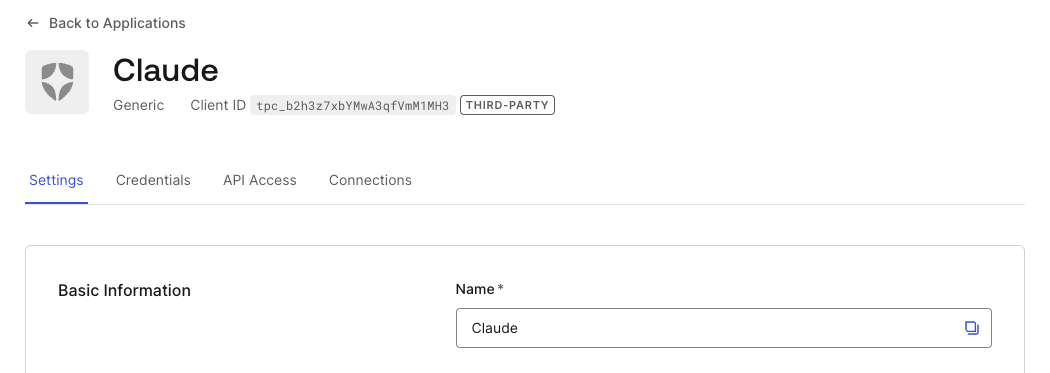
Enhanced Security Controls for Third-Party Applications is now Generally Available

Copied to clipboard

We're excited to announce that Enhanced Security Controls for Third-Party Applications is now Generally Available for all Auth0 customers.

As you open your APIs to AI agents, customers, partners, and external developers, you need strong security defaults for third-party applications. Enhanced security controls give third-party applications a secure-by-default posture, so Auth0 does the heavy lifting, and you stay in control of what external applications can access.

What's included:

  • Strict security mode for third-party applications (third_party_security_mode: 'strict')
  • OAuth 2.1 alignment: mandatory PKCE, restricted grant types
  • Explicit API authorization: third-party applications always require a client grant to access an API
  • Default permissions for third-party applications: configure default API permissions that apply automatically to all third-party applications, including those created via Dynamic Client Registration
  • Open redirect protection: configurable redirection_policy to prevent redirect-based attacks
  • Reduced attack surface: curated property allowlist and feature restrictions

new-stict-3pa

For existing customers using third-party applications: Your existing applications continue to work exactly as they do today — no changes required. A 6-month migration window gives you time to adopt enhanced security controls for new application creation. Review the migration guide for detailed steps.

To learn more, visit the Third-Party Applications documentation.

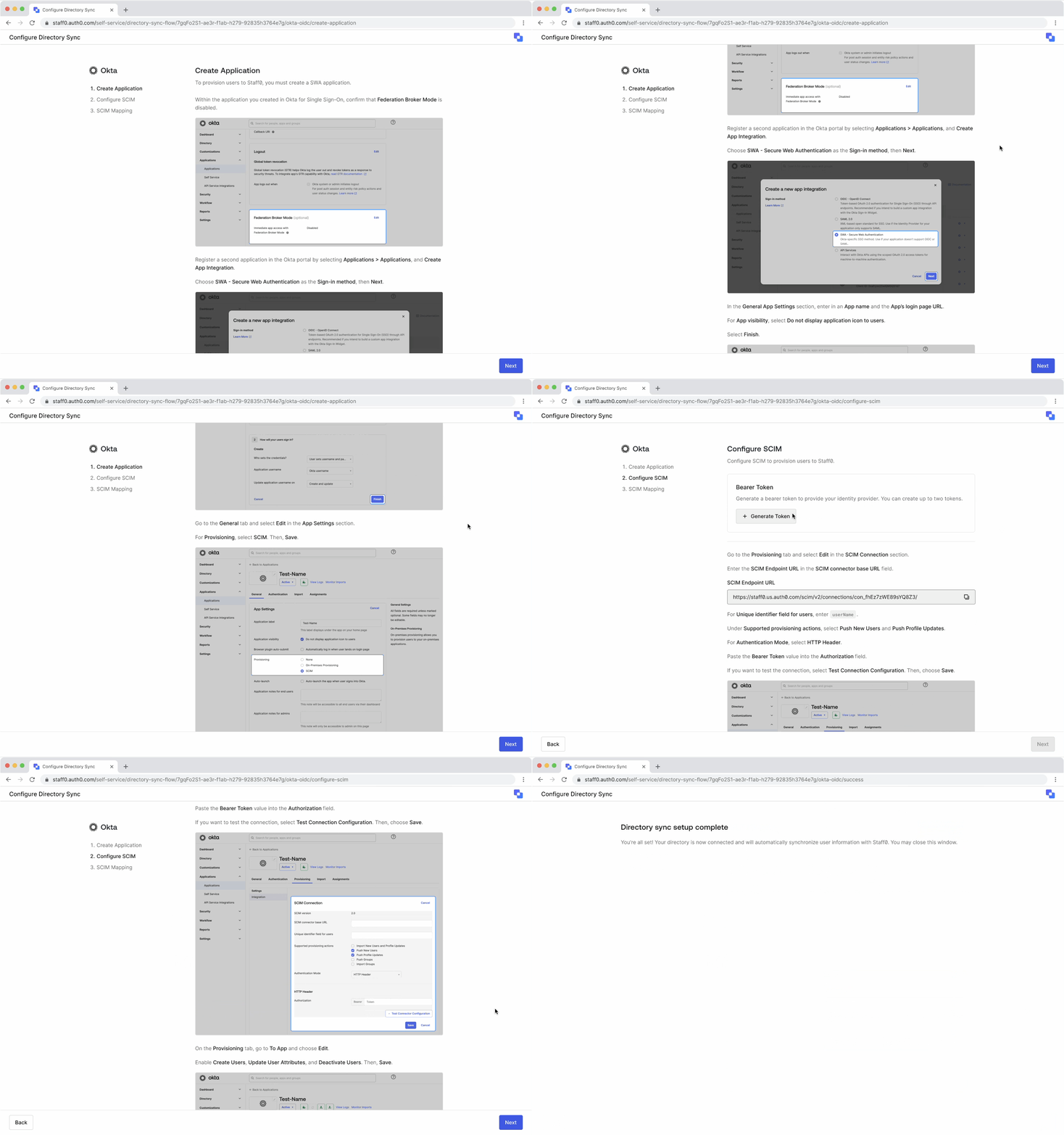
Self-Service Provisioning now in General Availability!

Copied to clipboard

We’re thrilled to announce that the Self-Service Provisioning experience is now in General Availability! Empower your customers' IT teams to handle user onboarding and offboarding themselves, which means less manual work and fewer support tickets for your team.

Key Advantages at a Glance

  • Automation: Allow your customer's admins to manage their own SCIM setup.
  • Interoperability: Ensure seamless integration with a wide variety of customer IdPs.
  • Consistency: Use a single, unified schema for easier support and debugging.
  • Flexibility: Retain the ability to override attribute mappings for specific protocols if needed.

User Provisioning

To dive deeper, please review our updated documented on Self-Service Enterprise Configuration.

Self-Service Domain Verification now in General Availabilty!

Copied to clipboard

We're excited to announce that Self-Service Domain Verification is now in General Availability! Allow your customers' IT admins to verify their own email domains for HRD directly within the SSO setup assistant — no back-and-forth with your team required.

Key Advantages at a Glance:

  • Proven ownership: IT admins verify domains via DNS TXT record.
  • Flexible requirements: Configure domain verification as off, optional, or required — per customer engagement.
  • Domain management: IT admins can now add, re-verify, and delete domains entirely through self-service.
  • Enterprise-ready controls: Pre-configure domains for your customers to verify, or pre-verify domains on their behalf — with verified domains automatically powering Organization Discovery when enabled.

To dive deeper, please review our updated documentation on Self-Service Enterprise Configuration.

Organization Discovery by Domain now in General Availability!

Copied to clipboard

We're thrilled to announce that Organization Discovery by Domain is now in General Availability! Automatically identify your customers' users and route them to the right identity provider based on their email domain — before they even reach the login screen.

Key Advantages at a Glance:

  • Automatic routing: Direct users to their organization's IdP the moment they enter their email — no manual org selection required.
  • Multi-org support: When a single domain maps to multiple organizations, an org picker ensures users land in the right place.
  • Seamless B2B login: Eliminate the friction of Home Realm Discovery by adding full organization context to the pre-login flow.
  • Flexible configuration: Support email-based, org-name-based, or combined discovery to match your customers' login requirements.

To dive deeper, please review our documentation here.

New Identity, Same Great Features: Self-Service SSO is now Self-Service Enterprise Configuration

Copied to clipboard

The new name better reflects the full scope of the suite, which includes:

  • Single Sign-On (SSO): Allow enterprise customers to configure and maintain SSO for their applications.
  • Domain Verification: Self-managed domain verification and mapping for IT admins.
  • Google Directory Sync: Keep user attributes synchronized across systems.
  • User Provisioning: Automate the user lifecycle through SCIM 2.0.

No functional changes — everything works the same. For full details, see the Self-Service Enterprise Configuration documentation.

added

Auth0 Private Cloud Now Available on Azure in Japan

Copied to clipboard

Auth0 Private Cloud is now supported in the Azure Japan East (Tokyo) region!

Japan already has Auth0 coverage through AWS Private Cloud and our Public Cloud environment, and this addition brings Azure into the mix for the first time. Organizations can now deploy Auth0 Private Cloud in-country on Azure, giving them a dedicated identity infrastructure with the latency and data residency benefits of a local deployment.

This expansion reflects our ongoing commitment to meeting customers where they are — on the cloud platform and in the geography that works best for them.

updated

Deploy CLI Dry Run is now GA

Copied to clipboard

We're excited to announce that Dry Run on Auth0 Deploy CLI is now Generally Available — giving developers full visibility into tenant changes before they're applied.

Key Benefits:

  • Preview changes before they hit your tenant. Run a0deploy import --dry-run to see exactly what resources will be created, updated, or deleted — then exit safely. No changes applied, no surprises in production.
  • CI/CD-native by default. Dry Run is now non-interactive out of the box, so it works in GitHub Actions, Jenkins, and any headless pipeline. Use --dry-run --apply to show the plan and deploy without prompting — full visibility, zero manual intervention.
  • Flexible review modes. Need manual control? --dry-run --interactive gives you the review menu to apply, export to JSON, or exit. Choose the workflow that fits: automated gates in CI, manual review locally.

What's new in GA (beyond EA):

  • --dry-run is now non-interactive by default (was interactive-only in EA)
  • --dry-run --apply: preview then deploy without prompting — built for CI pipelines
  • --dry-run --interactive: opt into the EA interactive menu when you want it
  • Backward-compatible Node module API (AUTH0_DRY_RUN: true still works)

Getting Started:

added

Actions - TypeScript Definitions in Github

Copied to clipboard

We are excited to announce the Actions TypeScript definitions are now available on GitHub and npm.

These resources provide the official Actions TypeScript definitions, helping developers and AI agents write better code when building Actions outside of the Management Dashboard's editor.

To learn more, check out the Actions NPM Docs and the Actions Unit Test Docs.

deprecated

Mobile Driver’s License Verification Service Early Access

Copied to clipboard

After May 11, 2026, Auth0 is ending the Free Trial for the Mobile Driver’s License (mDL) Verification Service Early Access and will remove access to the mDL Verification Service for tenants that enrolled in Early Access.

While we are not planning to move forward with mDL Verification Service capabilities as part of the Auth0 product, if you are still interested in capabilities related to verifiable digital credentials (VDCs) and want to learn how Okta is shaping the future with VDCs, visit oktacredentials.dev or read about the Okta Digital ID Verification Beta. To join the Beta and get involved, fill out this short form or email the team directly at [email protected].

added

Google Workspace Directory Sync for Groups - Expanded Early Access (EA)

Copied to clipboard

We are excited to announce the next phase of our Google Workspace Directory Sync for Groups Early Access!

Building on our initial Early Access release, this update introduces Partial Group Sync, giving you exact control over which Enterprise Groups to import from your Google Workspace Directory into Auth0.

What's new:

  • Targeted Group Sync: Instead of syncing your entire directory, you can now choose to synchronize only a specific subset of your Google Workspace groups. Easily manage your selected groups through either the Management Dashboard or Management API.

How to join Early Access: To join the EA program, please complete the EA Terms & Conditions form and contact your Auth0 Account Team to request activation and supporting documentation.

Delegated Administration Extension

Copied to clipboard

v4.8.1 — Custom Domain Hook

Added support for a new Custom Domain Hook in the Delegated Administration Extension. This hook allows you to customize behavior when Multiple Custom Domains are in use.

v4.8.3 — Compatibility fix for deprecation of enabled_clients on connections

The extension has been updated to remove its dependency on the deprecated enabled_clients field on connections. If your tenant uses the Delegated Administration Extension, you may have been seeing deprecation warning errors in your tenant logs. This release resolves that.

Action recommended before July 15: Auth0 is deprecating legacy management of a connection's enabled clients. See the deprecation notice for full details. Updating to v4.8.3 ensures the extension is compatible with this change.

Upgrading

Not on v4.8.x: Manually update the extension in your Auth0 tenant by navigating to Extensions → Installed Extensions, locating the Delegated Administration Extension, and clicking Update.

Already on v4.8.x: No action required — the patch has been automatically applied.

updated

Multi-Resource Refresh Tokens (MRRT) is now Generally Available

Copied to clipboard

Following the successful Early Access period that began on August 11, 2025, we are excited to announce that MRRT is now available to all customers with full production support. This is a powerful enhancement that simplifies token management and modernizes app architecture across both native and web platforms


What's New in GA

✨ Auth0 Dashboard Support

  • Configure MRRT policies directly in the Dashboard — No more Management API-only configuration
  • Visual refresh token policy editor — Easily add, remove, and modify audience/scope policies for your applications
  • Application settings integration — MRRT configuration is now available under the Application > Settings page

🔒 Enhanced Security with Client Grants Integration

  • Client Grants enforcement — MRRT now respects Client Grants restrictions, ensuring applications can only request access tokens for APIs they are authorized to access
  • Improved validation — Better error messages when attempting to configure unauthorized audience/scope combinations

🐛 Bug Fixes and Improvements (based on EA feedback)

  • Fixed: Token exchange now properly validates scopes against both MRRT policy and Resource Server definitions
  • Fixed: Improved error handling when requesting access tokens for deleted or modified Resource Servers
  • Fixed: org_id claim is now correctly preserved in access tokens when using MRRT with Organizations
  • Fixed: Refresh token rotation works correctly when exchanging tokens for different audiences
  • Improved: Better logging in tenant logs (type: sertft) for MRRT token exchanges
  • Improved: More descriptive error messages for unauthorized audience requests

📦 SDK Updates

  • iOS SDK (Auth0.swift) — Full GA support
  • Android SDK (Auth0.Android) — Full GA support

🛠️ Developer Tooling

  • Auth0 CLI — Full support for configuring MRRT policies
  • Terraform Provider — Complete resource configuration for refresh token policies
  • Auth0 Deploy CLI — Full support for managing MRRT configurations in deployment pipelines

Documentation Links

Early Access availability of DPoP sender constraining for Enterprise Connections

Copied to clipboard

Demonstrating Proof of Possession (DPoP) sender constraining for Enterprise Connections is now available in Early Access. Customers can now establish Okta and OIDC Enterprise Connections with DPoP enabled on those connections. This is available on all plans with Enterprise Connections.

DPoP for Enterprise Connections enables Auth0 to generate DPoP proofs when performing token exchange and calling userinfo endpoints on upstream OIDC and/or Okta connections. DPoP is a core building block of FAPI2 and IPSIE (Identity Proofing and Secure Identity Exchange) ecosystems. It provides a lightweight, standards-based way to enforce proof-of-possession (of a private key) without the operational overhead of mTLS token binding.

Please see product documentation for details.

added

My Organization API and Embeddable UI Components - Organization Details and IdP Management in Early Access!

Copied to clipboard

We are excited to announce the Early Access (EA) release of the My Organization API and a library of Embeddable UI Components for Organization Detail and Identity Provider Management. Every B2B product needs an admin console for customers to manage their own members and security. This new feature set empowers B2B SaaS developers to deliver robust self-service experience for admins in a matter of days, not months.

The My Organization API removes the need to build complex interfaces from scratch. With a secure governance layer that integrates seamlessly with your application, developers can easily deliver sophisticated, branded admin portals that meet the needs of even the largest customers without extra operational overhead.

Key Highlights:

My Organization System API: A purpose-built API designed for secure, scalable delegated administration, allowing customers to manage organization details and identity providers directly.

Embeddable UI Components: A library of white-label building blocks that can be dropped into any application to provide instant self-service management for SSO, domains, and members.

Security-First Primitives: Built-in support for cryptographically bound tokens via DPoP and automatic step-up authentication that triggers inline MFA for privileged actions.

Intelligent Onboarding: A new Dashboard-based onboarding wizard that simplifies configuration with safe defaults, automated entity setup, and a test environment.

B2B Observability and Governance: Enhanced tenant logs and per-organization rate limiting ensure full visibility into administrative actions while protecting tenant stability.

Interactive Developer Tools: A modernized API Explorer and extensive SDK support across multiple languages allow developers to integrate and test administrative activity at scale.

Why This Matters:

This release moves beyond simple API access to a unified governance layer for human and machine identity. Modern primitives like automatic least privilege ensures administrative sessions are always secure and context-aware. The result? Enterprise buyers can now get granular access levels and organization-specific rate limits they expect without the complexity of building custom backend middleware yourself.

This feature is available for all tenants. To begin, navigate to the __Applications > APIs __section of your Dashboard to activate the My Organization API.

To learn more, read the My Organization API documentation and if you have any feedback, give us a shout in our community channel!

added

Akamai Supplemental Signals is Now GA

Copied to clipboard

Auth0 Akamai Supplemental Signals is now GA and available across the full authentication lifecycle.

This update allows developers to ingest risk scores and edge intelligence from Akamai Bot Manager and Account Protector into several new Action triggers: Pre-User Registration, Post-User Registration, Post-Challenge, and Post-Change Password.

By integrating these signals directly into the Auth0 pipeline, organizations can stop automated bot signups before an account is created and enforce real-time security logic during critical events like password resets or MFA challenges.

To learn more about Akamai Supplemental Signals and how to set it up review our online documentation here

Universal Login — "Forgot Password" CTA updated to "Reset Password"

Copied to clipboard

The call to action for the Universal Login forgot password flow has been updated from "Forgot Password" to "Reset Password." This aligns all Universal Login CTAs to be action-oriented. The updated text is available across all languages supported by Auth0. Customers who want to keep the original "Forgot Password" text can restore it via language customization at Branding > Universal Login > Edit text and translations.

Learn more: https://auth0.com/docs/customize/login-pages/universal-login/customize-text-elements

added

Express Submission to the Okta Integration Network

Copied to clipboard

Auth0 developers leveraging Express Configuration with Okta now have a more streamlined process for submitting their application to the Okta Integration Network.

The Okta Integration Network (OIN) Wizard has been updated with a new section for Auth0 developers that automatically populates the required configuration fields for OpenID Connect (OIDC), System for Cross-domain Identity Management (SCIM), and Global Token Revocation (GTR) integrations, based on information sourced from the Auth0 Dashboard.

To learn more about Express Configuration with Okta and the Okta Integration Network (OIN), click here.

Multiple Custom Domains General Availability

Copied to clipboard

We’re excited to announce that Multiple Custom Domains (MCD) is now Generally Available.

With Multiple Custom Domains, Enterprise customers can support multiple branded login experiences from a single Auth0 tenant. This helps you deliver more tailored authentication experiences across consumer applications, multi-brand businesses, and B2B SaaS use cases.

MCD GA includes support for:

  • Configuring custom domains at scale within a single tenant
  • A default domain for streamlined development and testing
  • Passkey enrollment on custom domains
  • B2B SaaS Self-Service SSO customizations
  • Custom domain metadata in Advanced Customizations for Universal Login (ACUL)
  • Support across Management SDKs, Authentication SDKs, and Forms

Visit Auth0 docs to get started.

added

Introducing the Developer Preview Release Stage

Copied to clipboard

We are excited to introduce Developer Preview, a new product release stage designed to get upcoming capabilities into your hands faster!

Developer Preview serves as a new release phase for new Auth0 product introductions. We utilize this stage when a new product capability will eventually be a paid feature, but we want to grant you access before the official pricing is applied.

Key Highlights:

  • Free Production Access: You can use Developer Preview features in your production environments for free during the preview period.
  • Clear Expectations: Participating in a Developer Preview provides a clear signal that the feature will include a paid component once it reaches General Availability (GA).
  • Help Shape the Product: Getting these features to you early allows us to collect valuable feedback to iterate on prior to the GA launch.

To participate in an active Developer Preview, you will simply need to sign up and accept the specific opt-in requirements for that feature.

To learn more about how Developer Preview fits into our overall release process, visit our updated Product Release Stages documentation.

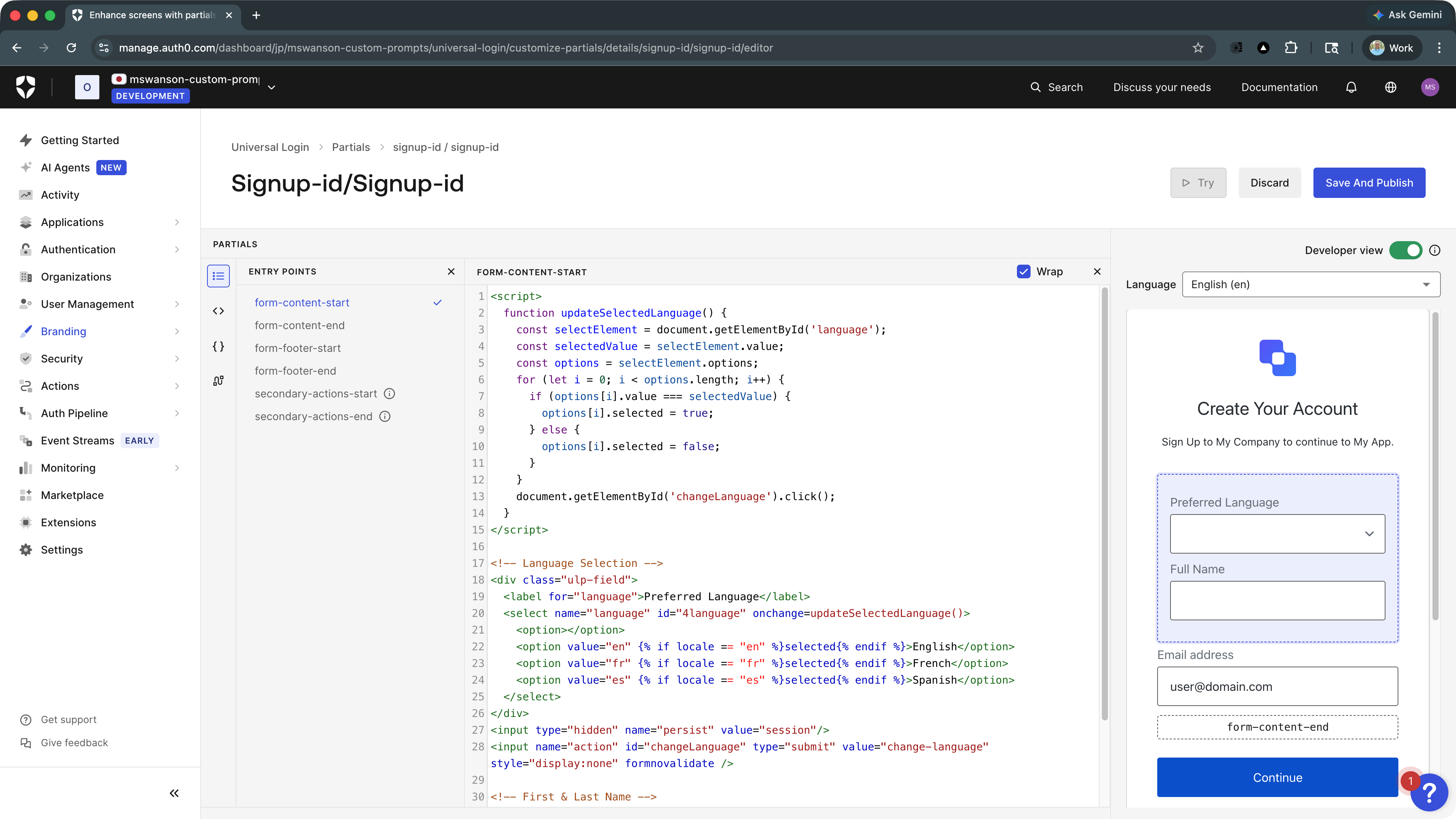
Customize Signup and Login Prompts: Dashboard UI, Passkey Support, and Custom Database Access

Copied to clipboard

You can now manage custom authentication screen partials directly in the Auth0 dashboard with a purpose-built visual editor. Instead of encoding HTML as strings and sending them through the API, you get a proper code editor with syntax highlighting and live feedback.

Custom Prompts Dashboard UI

The editor includes supporting tools:

  • Code snippet library: pre-built snippets for common use cases like first and last name, phone number, terms of service checkboxes, and more, ready to insert with a click
  • Template variable reference: a clickable list of all context variables available in the partial, for quick insertion without leaving the editor
  • Actions shortcut: open Actions in a new window directly from the editor
  • Interactive preview: click into entry points to edit HTML inline, see visually which entry point each element belongs to, and toggle entry point wrappers off to preview what the prompt looks like in the login flow

This update also expands what's possible with partials:

  • Passkey screens: customize passkey authentication screens anywhere they appear in your flow; data capture is supported in the signup flow
  • Custom database connections: data captured from partials is now surfaced in custom database connection scripts

Head over to the Auth0 Docs to learn more.

updated

Session ID Rotation for SAML and WS-Fed Authentication

Copied to clipboard

What's new:                                                                                                  

We've updated session handling in SAML-P and WS-Fed authentication flows to align with industry best practices and our existing OAuth2/OIDC behavior. Following a successful login via SAML-P or WS-Fed, the session ID will now be rotated and a new session cookie will be issued.

What this means for you:                                                                       

If your implementation includes client-side logic, downstream services, or integrations that read or store session IDs across SAML-P or WS-Fed login flows, you will now receive a new session ID after authentication completes. Please review and update any such implementations accordingly.

This change brings SAML-P and WS-Fed session handling in line with the existing behavior of OAuth2 and OIDC flows, ensuring consistent and secure session management across all authentication protocols.

added

Introducing the New Spring Boot API SDK

Copied to clipboard

We are excited to announce the release of auth0-springboot-api, a new official SDK designed to streamline authentication and security for Spring Boot backend applications.

Key Benefits:

  • Supports Spring Boot 3.2+ (Java 17+) and built for the modern filter-chain pattern.Developers can secure an API by injecting Auth0AuthenticationFilter into their SecurityFilterChain — just configure auth0.domain and auth0.audience in application.yml and go.
  • Abstracts the complexity of JWT validation. Developers no longer need to write fragile boilerplate code to check Audiences or Issuers. The SDK handles JWKS fetching, token validation, and scope-to-authority mapping (SCOPE_ prefix) out of the box.
  • Supports DPoP with flexible enforcement modes (Allowed, Required, Disabled). Enterprise customers can enforce proof-of-possession token security per RFC 9449 with a single config property — no controller changes needed.

Getting Started:

added

Google Workspace Directory Sync for Groups - Now in Early Access

Copied to clipboard

We’re excited to announce that Google Workspace Directory Sync for Groups is now available in Early Access (EA)!

This enhancement enables the automatic and reliable sync of group structures and memberships from Google Workspace directly into Auth0 Enterprise Groups.

Key Highlights:

  • Automated group synchronization: Continuously mirror your Google Workspace groups into Auth0 to ensure your roles and access permissions remain accurate and up to date without manual intervention or relying on login events.
  • Streamlined "Sync All" functionality: Enable groups synchronization for your entire Google Workspace Enterprise Connection through either the Management Dashboard or Management API in one step.
  • View groups in Auth0: Groups provisioned using Google Workspace Directory Sync for Groups can be viewed in the Management Dashboard under Enterprise Groups, or retrieved through the Management API.
  • Sync groups from Auth0 to external systems: Users and groups provisioned inbound to Auth0 can be synchronized outbound to external systems using Auth0’s Event streams feature.
  • Use groups in the Post-Login Action: Use group information pushed from Enterprise identity providers in your Auth0 post-login actions to make access control and authorization decisions in Auth0.

To join the EA program, please complete the EA Terms & Conditions form and contact your Auth0 Account Team to request activation and supporting documentation.

Sender constrained tokens using DPoP is now Generally Available on Enterprise plans.

Copied to clipboard

Support for sender constraining tokens using Demonstrating Proof of Possession (DPoP) is now generally available on Enterprise plans.

Demonstrating Proof of Possession (DPoP) as defined in RFC9449, is an application level mechanism for binding tokens issued by Auth0 to the client application that requested that token. This is implemented using asymmetric key cryptography and with keys that are generated and managed by the client application - no public key infrastructure (PKI) is required.

Sender constraining tokens in this way using DPoP helps to:

  • enhance security by mitigating against token theft and misuse by unauthorised parties
  • improve user experience by being able to use longer-lived access tokens without significantly increasing security risk i.e. not requiring frequent user authentication

Additional features since the EA release includes replay protection against client applications sending repeated DPoP proofs, and the ability to require DPoP for public clients only, or all clients.

A number of Auth0 SDKs have shipped with support for DPoP:

  • Authentication SDKs supporting DPoP for client applications: auth0-spa-js, auth0-react, auth0-angular, nextjs-auth0, auth0-flutter, Auth0.Swift and Auth0.Android
  • Authentication SDKs supporting DPoP for APIs/Resource Servers:express-oauth2-jwt-bearer, auth0-api-js, auth0-api-python, aspnetcore-api
  • Management SDKs supporting DPoP configuration: terraform-provider, go-auth0,deploy-cli, node-auth0, auth0.net

For more details, see the product documentation.

added

Customize RPID values for Passkeys EA

Copied to clipboard

Boost Passkey adoption by enabling shared enrollment across subdomains. You can now customize the RP ID to allow a single Passkey to authenticate users across multiple applications under the same root domain.Currently in EA

Learn more about customizing RP ID for Passkeys:

Configure Passkey Policy

Native Passkeys for Mobile Applications - Auth0 Docs - Native Passkeys for Mobile Applications

Passkeys - Auth0 Docs - Passkeys Docs

Real-time API & Rate Limit Metrics Streaming (Beta)

Copied to clipboard

You can now stream real-time metrics for Auth0 Management API usage and rate limit events directly to your observability platform.

These new metric streams give you detailed telemetry on every API request, including success/failure status, specific failure reasons like rate limits, and diagnostic data such as Client ID and request path. This allows you to proactively monitor for rate limit issues, troubleshoot API errors faster, and correlate Auth0 performance with your own application's health, all from within your existing monitoring tools.

We've included out-of-the-box support for Datadog, and you can connect to New Relic, Prometheus, and Splunk using OpenTelemetry.

This feature is now available in Beta. To get started, check out our Metric Streams documentation.

Forms - HTTP Vault Connection New Options

Copied to clipboard

We’re excited to announce that we added new options for Forms HTTP Vault Connections!

This new set of options allows you to configure different authorization methods for your HTTP Request Flow Actions.

http-vault-connection-options

What's new:

  • Client Credentials Support: Configure OAuth Client Credentials and keep the access token fresh for your HTTP Request Flow Actions authorization.
  • API Key Support: Authorize your HTTP Request Flow Actions using an API Key, defining the header or query param key and secret value.
  • Basic Auth Support: Configure and reuse Basic Auth authorization for your HTTP Request Flow Actions, helping you replace the legacy built-in option.

added

Brute Force Protection for Passwordless Notifications

Copied to clipboard

To improve the end-user experience and mitigate message spam, Brute Force Protection now proactively prevents the sending of passwordless email and SMS codes to users who are already blocked.

This update ensures that restricted users cannot continue to trigger unsolicited notifications, closing a gap in our abuse prevention coverage and reducing unnecessary messages

For more information on Brute Force Protection, check out our online documentation.

Actions - Transaction Metadata - GA

Copied to clipboard

We are excited to announce that Actions Transaction Metadata is now GA.

This feature allows you to set, share, and access, custom data between Actions run in the same post-login execution.

Functionality includes:

  • Accessing Transaction Metadata: A new event.transaction.metadata object within post-login Actions that contains the custom key/value pairs, which can be accessed through key.
  • Setting Transaction Metadata: A new api.transaction.setMetadata function within post-login Actions that serves as interface to set the custom key/value pairs.
  • Immediate Access: Values are available immediately after being set in the calling Action and subsequent Actions.
  • Values Types: Values can be boolean, number, string, or string serialization of object and array.
  • Docs: Actions Transaction Metadata

Actions - Modules - EA

Copied to clipboard

We are excited to announce that Actions Modules is now available in Early Access.

This feature allows you to create, manage, and share reusable code across different Actions within your Auth0 Tenant.

Early Access functionality includes:

  • Simplified Code Management: Reduce code duplication and improve organization by writing common logic once and importing it into any Action where it is needed. This makes your Actions easier to maintain and update.
  • Improved Performance: Move expensive initialization work into a module that can be reused across multiple Actions. This avoids re-running the same setup code in every execution.
  • Cross-trigger Access: Actions Modules become available for every Action Trigger type.
  • Independent Secrets and Dependencies: Actions Modules have independent secrets and dependencies from Actions.
  • Docs: Actions Modules

Native to Web SSO is now Generally Available

Copied to clipboard

Description

Native to Web SSO enables seamless single sign-on from native mobile applications to web applications. Users authenticated in a native mobile app can now transition to web content without re-authenticating, providing a frictionless cross-platform experience.

What's New in GA

Building on the Early Access release, GA includes the following enhancements:

  • Auth0 Dashboard Support: Configure Native to Web SSO directly from the Auth0 Dashboard, no longer limited to Management API configuration
  • Refresh Token Metadata in Actions: Access parent refresh token metadata within Session Transfer Actions, enabling richer context for customization and security decisions during the session transfer flow
  • Step-up Authentication Support: Trigger MFA challenges during the Native to Web SSO flow for enhanced security when accessing sensitive web content
  • React Native SDK Support: Native to Web SSO is now available in the Auth0 React Native SDK, supporting both Hooks (useAuth0) and class-based approaches
  • Organizations Support: Use Native to Web SSO with Auth0 Organizations to maintain organization context when transferring sessions from native to web
  • Web SDK Integration Examples: New code examples for Auth0 SPA SDK (@auth0/auth0-spa-js) and Auth0 React SDK (@auth0/auth0-react) for receiving session transfer tokens in web applications
  • Enhanced Monitoring & Troubleshooting: Comprehensive warning log events help developers troubleshoot session transfer validation failures

Core Features

  • Session Transfer Tokens (STT): Native apps can request a secure, short-lived token to transfer the authenticated session to web applications
  • Seamless Web Session Creation: Exchange STT for a web session without user interaction
  • Cross-Platform SSO: Maintain authentication state when moving between native and web contexts
  • Session Transfer Actions: Customize the session transfer flow with Auth0 Actions

How It Works

  1. User authenticates in the native mobile app using Auth0
  2. Native app requests a Session Transfer Token via the Authentication API
  3. When opening web content (WebView or browser), the STT is included in the authorization request
  4. Auth0 validates the STT and creates a web session
  5. User is automatically authenticated in the web application

Benefits

  • Improved User Experience: Eliminate re-authentication friction when moving from native to web
  • Enhanced Security: STTs are short-lived, single-use, and bound to the original session
  • Easy Integration: Works with existing Auth0 mobile SDKs (iOS, Android, React Native)

Getting Started

Availability

This feature is now generally available for all Auth0 Enterprise customers.

New Self-Service SSO Templates for Okta & Auth0 SAML Now Available!

Copied to clipboard

We’ve expanded our Self-Service SSO capabilities with two new, highly-requested IdP templates for Okta SAML and Auth0 SAML. This update streamlines the configuration process for your enterprise customers, enabling faster, more reliable SSO integration.

Guided, Step-by-Step Configuration

Previously, setting up connections for providers like Okta SAML required using a generic template. Now, your customers will get a purpose-built, guided experience. Our new templates provide detailed, step-by-step instructions with screenshots specific to each IdP, reducing complexity and eliminating guesswork for your customers' IT teams.

Key Enhancements:

  • New Templates: A dedicated guide for customers who use Okta or Auth0 as their identity provider, making one of the most common connection types easier than ever.
  • Reduced Support Load: By making the process more intuitive for your customers, we help reduce your team's support burden and speed up your enterprise onboarding flow.

Learn more about Self-Service SSO in the product documentation.

Forms - Flows Auth0 Send SMS and Auth0 Make Call Actions

Copied to clipboard

We’re excited to announce that we added Flows Auth0 Send SMS and Auth0 Make Call Actions!

This new feature allows you to send phone messages from Flows using the customized Phone Provider at your Auth0 Tenant.

auth0-notifications-send-sms-make-call-preview

What's new:

Session Metadata is now Generally Available for all Enterprise customers.

Copied to clipboard

What's New

Session Metadata allows you to attach custom key–value data to a user's session using Actions or the Auth0 Management API. This enables you to persist contextual data throughout the session lifecycle, powering richer integrations, stronger audit trails, and personalized session behavior.

Key capabilities:

  • Set and retrieve metadata in Actions using api.session.setMetadata(key, value) and event.session.metadata
  • Manage metadata via Management API with GET and PATCH on /api/v2/sessions/{id}
  • Delete individual keys using api.session.deleteMetadata(key) or evict all metadata with api.session.evictMetadata()
  • Include session metadata in OIDC Back-Channel Logout tokens for downstream systems to receive context during logout events

Example usage in Actions:

exports.onExecutePostLogin = async (event, api) => {
  api.session.setMetadata("deviceName", event.request.user_agent);
  api.session.setMetadata("loginRegion", event.request.geoip?.countryCode);
  api.session.setMetadata("orgContext", event.organization?.id);
};

Limits:

  • Maximum of 25 key-value pairs per session
  • Each key and value must be a string with max 255 characters
  • Metadata is stored as a flat JSON object (no nesting)

Use Cases

  • Self-service device management: Store device names or login locations for user-facing session management UIs
  • Keep Me Signed In: Persist user preferences to customize session behavior
  • Organization context: Store organization information for multi-tenant applications
  • Audit and compliance: Include session context in logout tokens for downstream audit systems

Availability

Session Metadata is now Generally Available for all Enterprise tenants.

No API or behavior changes from Early Access.


Learn more

added

Credential Guard: Breached Phone Credentials Support

Copied to clipboard

To strengthen defenses across the identity surface, we have added millions of breached phone credentials to our detection capabilities within Credential Guard

This enhancement allows organizations using Phone as an Identifier to proactively identify compromised credentials and trigger automated security responses, such as login blocks or password resets.

This expansion ensures that phone-based authentication is as secure as traditional email-based methods without impacting system performance.

For more information on Credential Guard, check out our online documentation.

Refresh Token Metadata now available in Early Access

Copied to clipboard

We're excited to announce that Refresh Token Metadata is now available in Early Access for Enterprise customers.

Refresh Token Metadata allows you to attach custom key-value pairs to refresh tokens, enabling richer context storage and more personalized authentication experiences.

What's New

Store Custom Data on Refresh Tokens

You can now attach up to 25 custom key-value pairs to each refresh token. This metadata persists throughout the token's lifecycle and can be accessed or modified via the Management API.

// In Post-Login Action
exports.onExecutePostLogin = async (event, api) => {
  api.refreshToken.setMetadata('deviceName', event.request.user_agent);
  api.refreshToken.setMetadata('loginRegion', event.request.geoip?.countryCode);
  api.refreshToken.setMetadata('orgContext', event.organization?.id);
};

Management API Support

Access and manage refresh token metadata programmatically:

  • GET /api/v2/refresh-tokens/{id} - Retrieve token with metadata
  • PATCH /api/v2/refresh-tokens/{id} - Update token metadata
  • DELETE /api/v2/refresh-tokens/{id} - Revoke token

Learn more about Refresh Token Metadata in our documentation

added

Auth0 Agent Skills

Copied to clipboard

We're introducing Auth0 Agent Skills Beta- structured guidance that teaches AI coding assistants how to implement Auth0 authentication correctly across any framework.

Agent Skills are AI-native instructions that work with popular coding assistants like Claude Code, Codex, Gemini CLI, etc... They provide production-ready code patterns, security best practices, and step-by-step implementation flows directly within your development workflow.

Key Features

  • Framework Coverage: Support for React, Next.js, Vue, Angular, Express, Nuxt, React Native, and more
  • Security First: Built-in best practices for MFA, protected routes, and secure token handling
  • Migration Support: Guided migration from Firebase Auth, AWS Cognito, Supabase, and other providers
  • Easy Installation: Install via CLI (npx skills add auth0/agent-skills) or directly in Claude Code plugins
  • Production Ready: Generate complete authentication implementations in minutes

Getting Started

  • Install Auth0 Agent Skills: npx skills add auth0/agent-skills
  • Then ask your AI assistant: "Add auth0 to my app" and you're ready to go.

Learn More

added

Enhanced Bot Detection Accuracy with JA4 Signals

Copied to clipboard

To provide a more robust defense against sophisticated automated threats, Auth0 has integrated JA4 signals into the core of our Bot Detection machine learning engine.

The addition of JA4 signals allows our models to surface and mitigate sophisticated automated threats that traditional signals often miss.

This enhanced security feature is available now to all Enterprise customers with the Attack Protection add-on. The rollout is currently underway and will be completed in the coming weeks, aligned with individual customer release schedules.

To learn more about Auth0's Bot Detection Product, click here

Better Mobile UX: Numeric Keyboards Now Default for OTPs

Copied to clipboard

We’re excited to roll out a highly requested update to the mobile login experience! We know that every tap matters when it comes to user conversion, so we’ve eliminated a common friction point in the authentication journey.

otp_numeric_pad.png

Previously, users might have been met with a standard alphabetical keyboard when prompted for a code. Now, for all SMS and Email OTP challenges, mobile devices will automatically surface the numeric keyboard. This change spans 16+ touchpoints—including MFA enrollment, Passwordless login, and password resets—ensuring your authentication flow feels native, intuitive, and fast.

What do you need to do?

Nothing at all. This optimization is automatically enabled for all customers using the Universal Login experience. Your users are already enjoying a smoother, "fat-finger" proof login today!

Experience it yourself

Trigger an MFA challenge or Passwordless login from your mobile device to see the new flow in action.

added

New FGA Dashboard Logging UI is being rolled out

Copied to clipboard

We are excited to announce the FGA Logging UI! This introduces a web interface to the existing logging API, giving you the ability to view FGA logs directly in the FGA Dashboard.

Users can now filter, sort and inspect access logs directly from the FGA Dashboard, significantly reducing the time required for debugging and troubleshooting issues.

The Logging UI provides an easy-to-use visual interface with capabilities to sort and filter log entries.

  • Visual Interface: Users can now immediately view a list of log entries for operations like Check() and Write() in the main viewing area of the UI. Drilling down into a single log entry will open a side panel for a full detailed view of the log data in JSON format, with a convenient copy-and-paste button to quickly copy and paste log data into another application for viewing or saving.

  • Date/time ranges: Viewing log data can be daunting due to sheer volume. The UI has a convenient date picker to set the time-bound log retrieval window.

  • Filtering: We’ve introduced a simple search box for filtering. Its simplicity does not take away from its power as the search accepts Lucene syntax (a subset) for advanced querying of logs. Now, retrieving all write operations is as easy as typing request.operation:"Write" into the search box.

  • Sorting: The UI supports standard sorting of fields for ascending and descending ordering of data, used in situations, for example, when quickly needing to toggle between seeing “newest first” or “oldest first” log data.

For more details, refer to Auth0 FGA’s logging documentation.

API Access Policies for Applications is now Generally Available

Copied to clipboard

We are pleased to announce that API Access Policies for Applications is now Generally Available (GA) for all Auth0 customers. This feature allows you to specifically control which applications can request access tokens for your APIs, covering both user and machine-to-machine access.

Previously available only via the Management API, these policies can now be fully configured directly within the Auth0 Dashboard. The new UI allows you to easily visualize and manage permissions per API, ensuring that only authorized applications can access sensitive resources.

Key Benefits:

  • Granular Control: Define distinct access policies for user access vs. machine-to-machine access.
  • Enhanced Security: Use the require_client_grant policy to ensure only explicitly authorized applications can obtain tokens for the subset of allowed permissions.
  • Simplified Management: Configure these settings visually through the new Dashboard UI.

To learn more, navigate to Applications > APIs > Application Access in the dashboard or read our reference docs.

API Access Permissions dashboard

added

Roles for the Auth0 FGA Dashboard

Copied to clipboard

We are excited to release the Per-Member Authorization feature that introduces roles to the FGA Dashboard! This allows you to grant appropriate levels of access based on users’ needs.

We are enhancing the permission model from a single admin to Groups that can be assigned roles. Groups are an organizational container for managing permissions and offer convenience when assigning roles to multiple users at once.

  • New Roles: We are introducing three new granular roles to sit alongside the previous admin role (now renamed Account Owner):
    • Group Manager: An account-level role for managing teams without accessing FGA stores directly.
    • Store Editor: A store-level role that can modify models and tuples but cannot manage groups.
    • Store Viewer: A read-only role useful for ops teams or sales engineers who need visibility without the ability to impact systems.
  • Groups: Account Owners or Group Managers can create groups (ex., "IT Group" or "Dev Team") and assign members to them. All members automatically inherit the permissions defined at the group level.
  • Scoping: Crucially, these roles can be scoped to specific stores. For example, this allows a single user, to be an Editor for a "Staging" store but restricted to Viewer for a "Production" store.

For more details, refer to Auth0 FGA Dashboard’s Roles documentation.

added

Self-Service Domain Verification for Organization Discovery now in Early Access!

Copied to clipboard

We’ve integrated Organization Discovery by Domain into the Self-Service SSO workflow, eliminating manual backend configuration and providing a seamless login experience for your enterprise users.

Zero-Touch Discovery Previously, verifying a domain only configured the SSO connection. Now, when a ticket is scoped to a single Organization, verified domains are automatically synced to the Organization record. This enables Organization Domain Discovery instantly, allowing end-users to log in with just their email address.

Key Enhancements:

  • Verify One, Apply Everywhere: Verified domains are added to both the Connection and the Organization simultaneously.
  • Domain Association: If a domain was previously verified for an Organization, customers can now simply associate it with a new connection, skipping repeat DNS TXT steps.
  • Deterministic Routing: By gating this to a 1:1 mapping, we ensure users are routed to the correct IdP every time.

Learn more about Self-Service SSO in the product documentation.

By using Self-Service SSO Domain Verification for Organization Discovery by Domain, you agree to the applicable Free Trial terms in Okta’s Master Subscription Agreement and Okta’s Privacy Policy during use of the Early Access feature. The Free Trial terms can be found within the Master Subscription Agreement at https://www.okta.com/agreements.

added

Inbound SCIM Groups for Enterprise Connections is now in Limited Early Access

Copied to clipboard

We’re pleased to announce that support for Groups within Auth0’s Inbound SCIM for Enterprise Connections feature is now in limited early access!

This release is useful for developers that support users and groups natively in their applications, and need to support integrations with Enterprise identity providers that use SCIM 2.0 to remotely manage these users and groups.

New group capabilities added:

  • SCIM groups endpoint per connection - Each Enterprise connection gets dedicated SCIM /users and /groups endpoints and dedicated credentials that enable provisioning, de-provisioning, and management of the users and groups specific to that connection.

  • Sync groups from Auth0 to external systems - Users and groups provisioned inbound to Auth0 can be synchronized outbound to external systems using Auth0’s Event streams feature.

  • Use groups in the Post-Login Action - Use group information pushed from Enterprise identity providers in your Auth0 post-login actions to make access control and authorization decisions in Auth0.

  • View groups in the Auth0 Dashboard - All groups provisioned using SCIM can be viewed in the Auth0 Dashboard under a new Enterprise Groups tab, as well as per user under the Users section.

How to get access

To join the Limited EA program and access SCIM Groups for Enterprise connections, complete the EA Terms & Conditions form and contact your Auth0 Account Team to request activation and supporting documentation.

added

Google Workspace Inbound User Directory Sync is Now Generally Available!

Copied to clipboard

We’re excited to announce that Google Workspace User Directory Sync is now generally available! This feature keeps Auth0 user profiles up to date by syncing users from your Google Workspace directory into Auth0 - so user profile updates don’t depend on login events.

Key highlights of this release:

  • Dashboard configuration: Enable and manage inbound user directory sync directly from the Auth0 Dashboard on your Google Workspace enterprise connection (including attribute mapping, automated sync, and manual sync).
  • Management API support: Programmatically enable, configure, and run inbound user directory sync using the Management API Connections endpoints.
  • Self-Service SSO experience: Your customers’ IT teams can configure Google Workspace inbound directory sync alongside SSO and SCIM provisioning, and manage user onboarding/offboarding directly.

Learn more:

Screenshot 2026-01-30 at 10.47.49 AM

added

Universal Custom Password Hash for Bulk Import - Now in Limited Early Access!

Copied to clipboard

We’re excited to introduce Universal Custom Password Hash in Limited Early Access (EA), enabling user migrations into Auth0 without disrupting sign-ins - even when your existing system uses custom or legacy password formats.

With Universal Custom Password Hash you can bring existing users over through Bulk Import and use Auth0 Actions to script custom password validation logic for your environment so users can continue signing in with their current credentials.

Key Capabilities:

  • Support for custom password formats during migration: Migrate users from legacy and proprietary systems while maintaining the existing sign-in experience.
  • Custom validation logic with Auth0 Actions: Write and deploy password validation logic that matches your current security architecture using Actions.
  • Seamless end-user experience: Users continue to sign in as usual - less password resets and less support tickets means reduced rollout friction.
  • Built for enterprise migrations: Designed for complex environments where password handling varies across regionals, applications, or historical platforms.

Why It Matters:

  • Accelerate migrations by reducing friction and avoiding user disruption.
  • Lower helpdesk load by minimizing password reset spikes during cutover.
  • Increase confidence in large-scale rollouts with flexible support for legacy password formats.

How to Join EA: Universal Custom Password Hash is available through Limited Early Access enrollment. To request access and supporting documentation, contact your Auth0 Account Team and complete the Limited EA Terms & Conditions process.

deprecated

Legacy Management of Connection's Enabled Clients

Copied to clipboard

The enabled_clients field, within the connection object, is deprecated in the following scenarios:

As an alternative to the deprecated functionality, two new Management API endpoints are available:

We have provided additional information and timelines for enforcing this change across tenants through a dashboard and support center notification. It is important to note that when creating a new connection via the (POST - /api/v2/connections) endpoint, the enabled_clients field remains supported.

Ephemeral Sessions with Actions - General Availability

Copied to clipboard

As part of our Continuous Session Protection, you can now configure ephemeral (non-persistent) sessions using Actions. This allows enterprise customers to dynamically control whether a session is stored in a persistent cookie or only in memory.

Ephemeral sessions:

  • Exist only in memory and are cleared when the browser or app is closed.
  • Are ideal for high-sensitivity workflows such as step-up authentication or use on public devices.
  • Can be configured per session using api.session.setCookieMode("non-persistent") in post-login Actions.

This feature, previously in Early Access, is now in General Availability and available to all Enterprise tenants.

Learn more:

added

Auth0 Private Cloud Now Available on Azure 30x & 30x Burst Tiers

Copied to clipboard

We are pleased to announce the expanded availability of Auth0 Private Cloud on Microsoft Azure, now supporting the 30x and 30x Burst performance tiers.

This update enables enterprise organizations to leverage high-scale, dedicated identity infrastructure while maintaining their commitment to the Azure ecosystem.

Performance at Scale

  • 30x
    • Sustained Capacity: 3,000 RPS
    • Peak Burst Capacity: 3,000 RPS
    • Best for: Consistent, high-volume baseline traffic
  • 30x Burst
    • Sustained Capacity: 1,500 RPS
    • Peak Burst Capacity: 3,000 RPS
    • Best for: Variable traffic with high-intensity spikes

Why This Matters

  • Compliance & Residency: Deploy to the Azure region of your choice to satisfy localized data residency and compliance needs at scale.
  • Financial Strategy: Burn down your existing Microsoft Azure Consumption Commitments (MACC) by investing in the market-leading identity platform.
  • Operational Excellence: Benefit from a fully managed, dedicated instance that provides you infrastructure isolation and flexibility as you grow.

Get Started

These tiers are available immediately for new and existing customers. Please visit Auth0 documentation for more info.

added

Security Center: Unleash Deeper Insights with New Filtering & Pre-defined Groupings

Copied to clipboard

We're excited to announce a significant update to the Security Center, marking the first major enhancement since last year's introduction of Thresholds and Alerts! These new capabilities drastically improve your ability to monitor, analyze, and respond to security threats with greater precision and speed.

What's New:

  • Granular Filtering by Applications and Connections: You can now filter security metrics within the Overview and Threat Monitoring pages by specific applications and connections. This allows for a more detailed examination of your tenant traffic, enabling faster incident triage and more effective troubleshooting by visualizing subsets of data.
  • Deeper Insights into Top Threat Behaviors: We've introduced new charts to highlight the top 5 connections and IPs associated with various security metrics. These groupings provide quick insights into potential anomalies and common threat behaviors, empowering you to identify and address risks more efficiently.
  • Consolidated Threat Monitoring View: The Threat Monitoring page has been revamped to offer a more intuitive and unified experience. This updated view, combined with the new filtering options by application and connection, streamlines your ability to track and respond to threats effectively.

These enhancements are available on all public cloud envirovments and gradually rolling out to private cloud environments.

Explore the updated Security Center today to take control of your security insights and strengthen your security posture!

Custom Token Exchange now available in Open Early Access

Copied to clipboard

We’re excited to announce the Open Early Access (EA) of Custom Token Exchange. OAuth 2.0 Token Exchange allows to trade one security token for another (typically an Access Token). With Custom Token Exchange, you can run Auth0 Actions as part of that exchange, giving you a flexible way to inject custom logic and implement your own authentication and authorization semantics. This lets you validate and authorize the request, and precisely set the user for every token exchange transaction.

Key highlights of this release:

  • Automatic Entitlement: The feature is now automatically available to all Enterprise and B2B Pro customers to be used for testing and production (no manual enablement required).
  • Organizations Support: Full compatibility with Organizations. You can now pass the organization parameter in the request or use the new setOrganization function within your Action.
  • Enhanced Security: Includes Multi-Factor Authentication (MFA) support during the exchange.

CTE-Orgs-sample-code.png

To learn more, read the reference documentation.

Forms - Flows Auth0 Send Email Action

Copied to clipboard

We’re excited to announce that we added Flows Auth0 Send Email Action!

This new feature allows you to send emails from Flows using the customized Email Provider at your Auth0 Tenant.

auth0-notifications-send-email-preview

What's new:

  • Email Providers: take advantage of the supported email providers that can be configured at your Auth0 Tenant.
  • Custom Email Provider: write custom code to send your emails to unsupported email providers using the Custom Email Provider Action.
  • Custom Properties: customize the settings for the outgoing emails including sender, recipient, subject, message, and variables.
  • Liquid Syntax: use Liquid syntax at your email subject and message.

MyAccount API Explorer Experience Updated

Copied to clipboard

The MyAccount API Explorer now has an updated experience! Using MyAccount API, customers can build self-service management experiences at scale, powered directly from their applications.

To learn more about the MyAccount API feature, click here.

The improved MyAccount API Explorer experience includes:

  • modernization of the look & feel
  • interactivity between the response schema and response example
  • full endpoint URL readily available to copy
  • ability to quickly navigate to other API Explorers

Navigate to: https://auth0.com/docs/api/myaccount to try it out!

deprecated

Deprecation of Weak TLS 1.2 Cipher Suites

Copied to clipboard

To ensure the highest security standards for your identity infrastructure, we are retiring specific weak TLS 1.2 cipher suites. This change affects all connections to Auth0 service endpoints and web applications, specifically:

  • Tenant Domains: All default (e.g., [tenant].auth0.com) and Custom Domains for both Public and Private Cloud.
  • Auth0 Tools: The Dashboard (manage.auth0.com), Marketplace, and Support Center.
  • Infrastructure: The Auth0 CDN.

Cipher Suites Scheduled for Removal: The following ciphers are being deprecated. For cross-reference, we have provided the unique Hex Code, IANA name, and a link to the OpenSSL equivalent.

  • 0xC0,0x09 - TLS_ECDHE_ECDSA_WITH_AES_128_CBC_SHA (https://ciphersuite.info/cs/TLS_ECDHE_ECDSA_WITH_AES_128_CBC_SHA/)
  • 0xC0,0x0A - TLS_ECDHE_ECDSA_WITH_AES_256_CBC_SHA (https://ciphersuite.info/cs/TLS_ECDHE_ECDSA_WITH_AES_256_CBC_SHA/)
  • 0xC0,0x23 - TLS_ECDHE_ECDSA_WITH_AES_128_CBC_SHA256 (https://ciphersuite.info/cs/TLS_ECDHE_ECDSA_WITH_AES_128_CBC_SHA256/)
  • 0xC0,0x24 - TLS_ECDHE_ECDSA_WITH_AES_256_CBC_SHA384 (https://ciphersuite.info/cs/TLS_ECDHE_ECDSA_WITH_AES_256_CBC_SHA384/)
  • 0xC0,0x13 - TLS_ECDHE_RSA_WITH_AES_128_CBC_SHA https://ciphersuite.info/cs/TLS_ECDHE_RSA_WITH_AES_128_CBC_SHA/)
  • 0xC0,0x14 - TLS_ECDHE_RSA_WITH_AES_256_CBC_SHA (https://ciphersuite.info/cs/TLS_ECDHE_RSA_WITH_AES_256_CBC_SHA/)
  • 0xC0,0x27 - TLS_ECDHE_RSA_WITH_AES_128_CBC_SHA256 (https://ciphersuite.info/cs/TLS_ECDHE_RSA_WITH_AES_128_CBC_SHA256/)
  • 0xC0,0x28 - TLS_ECDHE_RSA_WITH_AES_256_CBC_SHA384 (https://ciphersuite.info/cs/TLS_ECDHE_RSA_WITH_AES_256_CBC_SHA384/)
  • 0x00,0x9C - TLS_RSA_WITH_AES_128_GCM_SHA256 (https://ciphersuite.info/cs/TLS_RSA_WITH_AES_128_GCM_SHA256/)
  • 0x00,0x2F - TLS_RSA_WITH_AES_128_CBC_SHA (https://ciphersuite.info/cs/TLS_RSA_WITH_AES_128_CBC_SHA/)
  • 0x00,0x9D - TLS_RSA_WITH_AES_256_GCM_SHA384 (https://ciphersuite.info/cs/TLS_RSA_WITH_AES_256_GCM_SHA384/)
  • 0x00,0x35 - TLS_RSA_WITH_AES_256_CBC_SHA (https://ciphersuite.info/cs/TLS_RSA_WITH_AES_256_CBC_SHA/)
  • 0x00,0x3C - TLS_RSA_WITH_AES_128_CBC_SHA256 (https://ciphersuite.info/cs/TLS_RSA_WITH_AES_128_CBC_SHA256/)
  • 0x00,0x3D - TLS_RSA_WITH_AES_256_CBC_SHA256 (https://ciphersuite.info/cs/TLS_RSA_WITH_AES_256_CBC_SHA256/)

Additional information is available through the Auth0 dashboard and Support Center notification.

Advanced Customizations for Universal Login has reached General Availability

Copied to clipboard

We are excited to announce that Advanced Customizations for Universal Login (ACUL) is now generally available. ACUL enables developers to create custom, client-rendered user interfaces for Universal Login using their preferred frontend technologies.

Key capabilities in this release:

  • Full Screen Parity: Support for customizing all Universal Login screens and flows, including Login, Signup, MFA, Password Reset, and more.
  • New SDKs: Production-ready React and TypeScript SDKs to accelerate development.
  • Visual Editor: A new Dashboard UI for managing screen configurations and assets.
  • Improved Developer Tooling: Major updates to Auth0 CLI to support scaffolding (auth0 acul init), local mocking, testing, and CI/CD deployments.
  • Production-Ready Sample App: A robust sample repository featuring implementations of 34 authentication screens built with React 19 and Tailwind 4.

ACUL allows you to leverage all the security benefits of Universal Login, such as bot protection and threat intelligence, while providing complete control over the visual presentation and user journey.

Read the Documentation

Requesting App for Cross App Access (XAA) is now available in Beta.

Copied to clipboard

This new Token Vault capability allows Client Applications to obtain access tokens from third-party APIs (resource servers), through an authorization flow that is coordinated by a common Identity Provider implementing the Identity Assertion Authorisation Grant standard. This new standard enables requesting applications such as AI Agents to obtain access tokens where user consent is managed by policy at the Identity Provider.

To evaluate the Requesting App for Cross App Access, please contact Auth0. For more details, see the product documentation.

Google Workspace User Directory Sync - Now in Early Access

Copied to clipboard

We’re excited to announce that Google Workspace User Directory Sync is now available in Limited Early Access (EA) with major enhancements to configuration, usability, and performance.

This feature automatically synchronizes users from your Google Workspace directory into Auth0 - ensuring user profiles stay accurate and up to date without relying on login events.

What’s New in EA:

  • Management Dashboard Support: You can now enable and configure Google Workspace Directory Sync directly from the Auth0 Management Dashboard.
  • Integrated with Self-Service SSO: We’ve expanded the Self-Service SSO Provisioning flow to include Google Workspace Directory Sync alongside SCIM. Your customers’ IT teams can now configure SSO, SCIM provisioning, and Google Workspace Directory Sync through a unified setup flow, and manage user onboarding/offboarding directly, with less manual work for you.
  • Performance Improvements: Backend optimizations reduce sync latency and ensure stable performance under high load.

Why It Matters:

  • Eliminates reliance on user login events for updating user data in Auth0
  • Reduces identity drift and accelerates user lifecycle management
  • Delegates Directory Sync setup to your customers’ IT administrators.

How to Join EA: To join the Limited EA program and access Google Workspace User Directory Sync, complete the EA Terms & Conditions form and contact your Auth0 Account Team to request activation and supporting documentation.

added

Introducing the New ASP.NET Core API SDK

Copied to clipboard

We are excited to announce the release of Auth0.Aspnetcore.Authentication.Api, a new official SDK designed to streamline authentication and security for ASP.NET Core backend applications.

Key Benefits:

  • Supports .NET 8.0+ and built for the modern "middleware" pattern. Developers can now secure an API with a single line: builder.Services.AddAuth0ApiAuthentication(...).
  • Abstracts the complexity of JWT validation. Developers no longer need to write fragile boilerplate code to check Audiences or Issuers. The SDK enforces security best practices out of the box.
  • Supports DPoP with flexible enforcement modes (Allowed, Required, Disabled). Enterprise customers can now enforce a higher level of security with minimal code changes.

Getting Started:

added

Adaptive MFA: Customizable Device Remembrance

Copied to clipboard

Adaptive MFA now allows administrators to configure device remembrance durations (TTL) for the New Device assessor. The default remains at 30 days, but can now be customized to any value between 1–365 days.

When users log in successfully on a remembered device, that device’s TTL automatically refreshes to the currently configured value.

This enhancement provides greater flexibility to balance security and user convenience, helping teams align device remembrance with organizational policies and login patterns.

Configuration is available through both the Dashboard and the new Adaptive MFA Management API endpoints, enabling automated setup and management of device remembrance.

Learn more about configuration options in our Adaptive MFA documentation.
For details on the new Adaptive MFA Management API endpoints, visit the Risk Assessment API documentation.

added

Express Configuration is now Generally Available for Auth0 SaaS apps in the Okta Integration Network

Copied to clipboard

We’re pleased to announce that Express Configuration with Okta is now generally available for Auth0 applications in the Okta Integration Network!

Express Configuration automates how your enterprise customers using Okta set up identity integrations with your Auth0 application. This includes configuring OpenID Connect (OIDC) for single sign-on, System for Cross-domain Identity Management (SCIM) for automated user onboarding and offboarding, and Global Token Revocation (GTR) for centralized session management with Universal Logout.

To learn more about Express Configuration with Okta, click here.

This feature is available immediately in all public cloud environments, and will be rolled out to private cloud environments as per their release pipeline.

Auth0 for AI Agents is generally available.

Copied to clipboard

We are thrilled to announce a major milestone: the General Availability (GA) of Auth0 for AI Agents!

Auth0 for AI Agents is a suite of features to empower developers to build secure agentic applications and experiences. The solution suite includes updates to: Token Vault for secure token based access to third-party APIs and applications; and Asynchronous Authorization for user approvals to keep the human in the loop for sensitive agent actions.

Here are some highlights of the latest updates to the solution suite:

  • A new connected accounts flow (with connection purpose) to easily establish federated connections, initiated by client applications.
  • Support for Microsoft Entra (Azure AD) and Google Workspace as enterprise connected accounts.
  • Support exchanging a first-party access token for a third-party access token at the Token Vault.
  • Send notifications for asynchronous authorization flows using email or the Guardian App, with client initiated backchannel authentication (CIBA).
  • Revamped Quickstarts and SDKs to delight developers.
  • Pricing and packaging for Essential, Professional, and Enterprise plans.

You can read more about the solution suite and the component features in the Auth0 for AI documentation.

added

Auth for MCP: Now in Early Access

Copied to clipboard

Auth0 is thrilled to announce that Auth for MCP is officially in Early Access! This release extends the power of Auth0’s standards-based authorization platform to the Model Context Protocol (MCP), securing your MCP servers, MCP clients, AI agents and the APIs they interact with.

With Auth for MCP, Auth0 integrates OAuth 2.1 and OpenID Connect directly into the MCP ecosystem, ensuring consistent access control and auditability across every agentic interaction.

Key capabilities include:

  • MCP Server Authorization: Protect your MCP Servers by leveraging Auth0’s Universal Login to authorize access. You can leverage social, enterprise, and custom identity providers with full support for MFA and advanced attack protection.

  • Standards-based discovery and registration: Allow MCP clients and servers to automatically discover authorization endpoints and dynamically register with Auth0. This removes manual setup and ensures consistent configuration across your environment.

  • Leveraging your Existing APIs: Enable MCP clients to securely call internal APIs on behalf of users using short-lived, purpose-scoped tokens.

  • Connecting to Third party APIs using Token Vault: Securely store, refresh, and revoke access tokens for third-party APIs. This lets your MCP applications act on behalf of users across external SaaS systems like Google, Microsoft, GitHub, and more.

  • Developer-ready integration: Explore quickstarts, guides, and sample apps to easily implement Auth for MCP. Auth0 provides ready-to-use examples for securing your MCP server, calling APIs on users’ behalf, and using the Token Vault with JavaScript or Python SDKs.

  • MCP Spec Compliance: Works with Auth0’s Resource Parameter Compatibility Profile and token dialect rfc9068_profile_authz, ensuring that access tokens include the permissions claim required for authorization in MCP.

This Early Access release allows developers to unify authorization across MCP clients, servers, and tools, improving governance of agent actions.

Auth for MCP is available today in Early Access. To participate, please submit the Early Access Form and/or contact your Auth0 Technical Account Manager.

For setup instructions, SDKs, and sample applications, and more, visit the Auth for MCP documentation.

updated

Security Center Threat Behavior Metrics Update

Copied to clipboard

We’ve refined the logic behind how Security Center metrics are calculated to provide more accurate and actionable insights.

Metrics now reflect IP activity using the following logic:

When an IP address triggers more than 10 relevant events for a given metric within a single hour, it will now be counted toward that metric.

This update ensures greater consistency and reliability across event-based metrics within the Security Center.

For more details on which metrics are affected and their updated definitions, see the Security Center Metrics documentation

Exciting Enhancements Now Live in Multiple Custom Domains (MCD) Early Access

Copied to clipboard

We are thrilled to announce a significant expansion of capabilities within the Multiple Custom Domains (MCD) Early Access program for Enterprise customers.

This update delivers powerful branding and white-labeling capabilities with improved flexibility to scale your identity solution from a single Auth0 tenant.

  • Search and filter custom domains via Management APIs and Dashboard to simplify administration.
  • Pixel-perfect branding using ACUL to associate unique asset bundles directly with individual custom domains.
  • Ensure brand consistency by customizing Email and Phone Templates based on the custom domain context.
  • Build tailored, conditional logic using the custom domain name and metadata directly within Actions.

Please refer to Auth0 docs for details - Multiple Custom Domains.

These updates are available automatically to the current participants in MCD Early Access program. If you're interested in joining the MCD Early Access program, please send a request through the Auth0 Support Center and contact your Technical Account Manager (TAM) or Auth0 Sales Executive.

added

New Dynamic Client Registration (DCR) Scope Added to Tenant ACL

Copied to clipboard

Auth0 has added a Dynamic Client Registration (DCR) scope to the Tenant Access Control List (ACL).

This enhancement allows administrators to control access to the /oidc/register endpoint based on a variety of network and client signals, helping prevent unauthorized or automated client creation.

Configuration is available via the Management API.

Learn more about our Tenant Access Control List in our online documentation found here

added

Actions - TypeScript Definitions in NPM

Copied to clipboard

We are excited to announce that Actions Types is now available at npmjs @auth0/actions.

This NPM library currently facilitates TypeScript definitions for Auth0 Actions.

Developers can use this library for:

  • IDE / Code Editor Assistance: By referencing this library, IDEs and code editors can help developers coding with autocompletion, object and functions definitions, and error checking.
  • TypeScript Development: This library enables Actions development using TypeScript which then can be built and deployed to Actions as Common JS.
  • Unit Testing Improvements: This library allows developers to follow best practices and to improve their Unit Testing based on TypeScript definitions.
  • AI Actions Generation: Gives AI assisted IDEs the context they need to generate more accurate and secure Actions code.

Docs: Learn more at Actions NPM Docs and Actions Unit Test Docs.

New Management API endpoints to configure Bot Detection settings

Copied to clipboard

Auth0 now provides Management API endpoints to manage Bot Detection configuration!

Key Capabilities:

Bot Detection Controls: Automate adjustments to the Bot Detection Level (low, medium, or high) and manage your trusted IP AllowList via API.

Challenge Policies: Programmatically control CAPTCHA enforcement for password, passwordless, and password reset flows (options: always, when risky, or never).

CAPTCHA Management: Fully manage your CAPTCHA provider selection and configuration, including Auth0’s native challenge or third-party solutions.

To learn more about the new Bot Detection API endpoints check out our online documentation here

Add Session Metadata to Auth0 Sessions

Copied to clipboard

As part of Continuous Session Protection, you can now attach custom key–value data to a user’s session using Actions or the Auth0 Management API. This allows enterprise customers to persist contextual data (such as device name, organization ID, or custom flags) throughout the session lifecycle.

Session Metadata:

Enables storing and retrieving custom metadata directly within Auth0 sessions

Can be set in Post-Login Actions using api.session.setMetadata(key, value) and accessed through event.session.metadata

Is available via the Management API for reading, updating, or evicting metadata during the session’s lifetime

Can be automatically included in OIDC Back-Channel Logout tokens, enabling downstream systems to receive the same metadata context

This feature expands session extensibility, allowing richer integrations, stronger audit trails, and personalized session behavior across applications.

Availability:

Session Metadata is available to Enterprise tenants in Early Access. To enable this feature, reach out to your Technical Account Manager or open a Support Ticket.

Learn more: Session Metadata Documentation

added

Google Workspace Inbound User Directory Sync Beta

Copied to clipboard

We’re excited to introduce Google Workspace User Directory Sync, now available as part of our Beta program.

This feature allows organizations to automatically synchronize users from their Google Workspace directory into Auth0 - ensuring user data stays accurate and up to date without relying on login events.

What’s New:

  • Automated user synchronization: Automatically sync user profiles from your Google Workspace Enterprise connection into Auth0.
  • Flexible sync cadence: Choose between manual on-demand syncs or automatic syncs that run every 30 minutes.
  • Custom attribute mapping: Map Google Workspace user attributes to Auth0 user profile fields for full control over data consistency.
  • Management API support: Configure, update, retrieve, or delete your Directory Sync settings programmatically - with Postman collection templates included.

Why It Matters: This enhancement eliminates the need for users to log in before their profiles are updated in Auth0, reducing data drift and simplifying identity lifecycle management.

How to Get Started: To join the Beta program and access Google Workspace User Directory Sync, complete the Beta Terms & Conditions form and contact your Auth0 Account Team to request activation and supporting documentation.

Version 202544

deprecated

Prompt for Organization Name Without SSO

Copied to clipboard

Login flows initiated in the context of client applications associated with business users (organization_usage=require) and configured to prompt for the organization at the start of the login flow (organization_require_behavior=pre_login_prompt) will consider an existing authenticated session and allow single sign-on (SSO).

The previous behavior where these flows disregarded SSO is deprecated. We have provided additional information and timelines for enforcing this change across tenants through a dashboard and support center notification.

added

New Private Cloud Region in Thailand

Copied to clipboard

Auth0's Private Cloud footprint is expanding again, this time to the AWS Asia Pacific Thailand Region!

This launch plants our secure identity infrastructure in the heart of one of Southeast Asia's largest digital economies. Customers in the region can now leverage this new presence for significantly reduced latency and enhanced performance. It also provides a robust, in-country solution for organizations managing their data governance and sovereignty objectives.

We are excited to support the rapid growth of Thailand's booming e-commerce, fintech, and digital service sectors with this new deployment.

Organization Discovery by Domain now in Early Access!

Copied to clipboard

We’re excited to announce Organization Discovery by Domain, a new capability that makes enterprise login smarter and more seamless. Together with Prompt for Organizations, it automatically identifies a user’s Organization before authentication, using either their email or organization name — eliminating the need for guessing, manual routing, or dealing with misspellings.

Smarter Login Experience: Users can now enter either their organization name or work email on the Prompt for Organization screen. If the Organization has a verified domain, Auth0 detects the Organization instantly, loads the correct branded login, and routes the user to the right IdP.

Verified Domains: Tenant admins can now associate one or more verified domains with each Organization using the new Domains tab. Verified domains power automatic organization detection and ensure HRD (Home Realm Discovery) runs only against that Organization’s enabled connections.

Unified Enterprise Login Flow: This update enhances the Prompt for Organization experience for both Business and Both (Business + Individual) app types, unifying login flows across personal and enterprise users.

Availability: Rollout is happening now. No opt-in required, it’s ready as soon as it appears in your tenant.

Learn more about Organization Discovery by Domain in our product documentation.

By using Organization Discovery by Domain, you agree to the applicable Free Trial terms in Okta’s Master Subscription Agreement and Okta’s Privacy Policy during use of the Early Access feature. The Free Trial terms can be found within the Master Subscription Agreement at Legal Agreements | Okta.

added

Ignore Duplicate Writes and Missing Deletes in Auth0 FGA

Copied to clipboard

We've enhanced the Auth0 FGA Write API endpoint to help streamline imports and reduce errors. You can now use two new optional parameters:

on_duplicate: "ignore": This will gracefully skip any write operations for relationship tuples that already exist.

on_missing: "ignore": This will gracefully skip any delete operations for relationship tuples that do not exist.

Previously, these common conditions would cause the entire Write request to fail. These new parameters prevent unnecessary failures, eliminating the need for complex client-side retry logic and improving import performance.

This feature is available now via the API and our latest SDKs.

Learn more about Writing Tuples in FGA from our product documentation or API Reference.

added

New Sign in with Shop Social Connection

Copied to clipboard

Auth0 now supports Sign in with Shop, a new social login integration designed for Shopify merchants. This feature allows merchants to offer customers a familiar authentication option using their existing Shop accounts. This new integration provides:

  • Streamlined Experience: Customers can sign in using their existing Shop credentials, reducing friction and simplifying account access.
  • Consistent User Journey: Enables a unified sign-in experience for customers already accustomed to Shopify’s ecosystem.
  • Expanded Capabilities: Combines the trusted Shopify experience with Auth0’s advanced identity features — including enhanced security, single sign-on (SSO), customizable branding, and extensibility.

Login-Sign_in_with_shop

Get started today with our quick start guide to connect your Shopify store to Auth0 and our built-in Sign in with Shop social integration.

Upcoming Changes when using Non-Verifiable Callback URIs

Copied to clipboard

To enhance security and mitigate risks of application impersonation and phishing attacks, we are recommending the transition to HTTPS-based callbacks using Android App Links and Apple Universal Links whenever possible. In addition, we are introducing a change in how the service handles custom URI schemes and loopback URI as callbacks.

More specifically, for authentication requests specifying a custom URI scheme or a loopback URI as the callback, we are introducing a login confirmation prompt used in scenarios that would previously return a response without requiring user interaction. For example, in a single sign-on (SSO) scenario, if authentication request requirements can be satisfied from an existing authenticated session, the service will display the new login confirmation prompt instead of seamlessly returning a response to the specified custom URI scheme / loopback URI callback.

Additionally, authentication requests including prompt=none will be rejected when Applications use non-verifiable callback URIs and are configured to use the new login confirmation prompt.

Review the User Confirmation Prompt section of Measures Against Application Impersonation to learn more about the new prompt.

Tenants created before October 15, 2025, maintain the previous behavior as the default until April 28, 2026. After the October cutoff date, newly created tenants may default to displaying the new login confirmation prompt with some exceptions due to each environment's deployment schedule. For any tenant maintaining the previous behavior, we recommend you opt in beforehand to use the new behavior. Alternatively, you can opt out of using the additional confirmation prompt if strictly required. Additional information on this situation is available at Migrate to Custom URI Scheme Redirect End-User Confirmation.

Login Confirmation Prompt

updated

Enhanced Signup Bot Detection for Stronger Security and Seamless User Experience

Copied to clipboard

We’ve improved our machine learning (ML) model for signup to deliver stronger protection against automated account creation while keeping friction low for legitimate users.

Note: This update applies only to the signup flow. There are no changes to the ML models used for bot detection in login or password reset flows.

Highlights of this update include

  • Expanded detection signals:
    The model now leverages user-agent–based signals, such as operating system and browser version data, to more accurately distinguish between human and automated signup attempts.

  • Smarter traffic classification:
    An updated labeling strategy improves how the model differentiates between malicious and legitimate signup activity, helping it adapt more effectively to evolving attack patterns.

  • Optimized sensitivity settings:
    Adjusted detection thresholds capture a broader range of bot activity while maintaining a low false positive rate, ensuring a smooth experience for valid users.

What this means for you

These enhancements strengthen the signup protection capabilities of Attack Protection, enabling more effective detection of automated signup attempts without adding unnecessary friction for real users.

The rollout is in progress for all Enterprise customers with the Attack Protection add-on and will complete over the coming weeks in line with individual release schedules.

For configuration guidance or to learn more about protecting your signup flows, please refer to our documentation or contact your account team.

Auth0 Events Catalog Explorer Now Available

Copied to clipboard

As part of the Early Access launch of Event Streams, there is now an Events Catalog explorer available in Auth0 Docs to better guide you on the details of each Event -- including examples. The Event Streams feature allows you to discover completed changes to Auth0 Users and Organizations as they happen. You can do this by:

  • Creating an Event Stream in the Manage Dashboard or the Management API
  • Configuring the Event Streams with the desired destination (Webhook or Amazon EventBridge) and selecting the events to receive

View the new Event Catalog Explorer here: https://auth0.com/docs/events/

Learn more about Event Streams here: https://auth0.com/docs/customize/events

added

FGA Logging API Now Generally Available

Copied to clipboard

FGA Logging API Now Generally Available

The Auth0 FGA Logging API is now Generally Available (GA). This dedicated endpoint provides a comprehensive audit trail for every interaction with the FGA system. You can now programmatically retrieve detailed logs for auditing, debugging, and monitoring.

  • Strengthen Audit & Compliance: Retrieve a complete audit trail for all public FGA APIs, including permission changes, access checks, and model updates, to verify who accessed resources and when.
  • Accelerate Troubleshooting & Monitoring: Gain granular insight into API operations to debug issues faster and proactively monitor for unusual activity. Use powerful Lucene query syntax to filter logs by user, IP address, status code, and more.
  • Centralize Your Logs: Easily export log data to your preferred SIEM, log management, or analytics tools to centralize your security and operational visibility.

The FGA Logging API is available for all paid-tier customers. For more information, please read the Auth0 FGA Logging API documentation.

added

Auth0 Nuxt SDK Beta

Copied to clipboard

The first public beta of the Auth0 Nuxt SDK is now available for developers building web apps on the Nuxt framework!

Key Highlights

  • Idiomatic Nuxt 3 Experience: Simple, composable functions (useAuth0) that feel native to Nuxt developers, dramatically reducing time-to-first-login.
  • Advanced Security Out-of-the-Box: We've included support for the latest security standards from day one, including PAR, RAR, and Backchannel Logout.
  • Powerful API Authentication: Seamlessly obtain tokens for backend APIs using the TokenVault integration.

Resources

Here are the helpful resources to explore the new Nuxt SDK and get started:

This SDK is still in Beta and we need your feedback! Please share any feedback, questions or comments on GitHub.

upcoming deprecation

Audience Validation for Private Key JWT Client Authentication

Copied to clipboard

When validating JWT assertions used for client application authentication, Auth0 will impose stricter requirements and accept only a tenant's issuer identifier as a single JSON string value in the "aud" (audience) claim.

The possibility of providing an "aud" claim with either one of the approaches listed below is deprecated, and at a future date will cause the service to consider such JWT assertions invalid:

  • A JSON array of strings, provided that one of the entries contains a valid issuer identifier or endpoint URL for the respective tenant and endpoint the client authenticates against.
  • A single JSON string representing a valid endpoint URL for the respective tenant and endpoint the client authenticates against.

OIDC enterprise connections configured to use Private Key JWT in authenticated requests to the upstream identity provider will also be able to use the applicable issuer identifier represented as a JSON string in the "aud" claim included in JWT assertions.

We have provided additional information and timelines for enforcing this change across tenants through a dashboard and support center notification.

added

Easily Update Your Firewall with the New IP Allow List

Copied to clipboard

We are excited to announce an improvement that makes it faster and easier for you to keep your firewall configurations up-to-date.

Our IP allow list for Auth0's Public Cloud regions is now available in a standardized, machine-readable format. This new format is designed to help you automate updates and ensure the most accurate configuration for your firewall.

What this means for you:

  • Automation: You can now programmatically fetch and parse the list, eliminating the need for manual updates.
  • Accuracy: The structured data ensures you're always using the latest and most accurate IP addresses.
  • Clarity: The changelogs highlight specific additions and removals, so you can easily see what has been updated.

You can access this information at: https://cdn.auth0.com/ip-ranges.json

For more details, please see our documentation on IP allow list.

Akamai Supplemental Signals is Now in Early Access

Copied to clipboard

We’re excited to announce the Early Access release of Akamai Supplemental Signals. This feature allows Auth0 Enterprise customers who have Akamai configured as a reverse proxy in front of Auth0 to forward signals from Akamai Bot Manager and Akamai Account Protector into Auth0.

With this integration, you can enrich your authentication flows with supplemental signals from Akamai and make more dynamic security decisions in post-login Actions and gain visibility through tenant logs.


Key Benefits

  • Combined Risk Context: Leverage Akamai’s bot and user risk signals together with Auth0’s risk assessment for a more complete view of login risk.

  • Adaptive Security Controls: Combine Akamai and Auth0 risk signals to trigger MFA, deny sessions, or revoke access based on risk indicators.

  • Seamless Integration: Configure Akamai to forward signals and use them immediately in post-login Actions and tenant logs.


Availability

  • Available to all Enterprise customers using Akamai as a reverse proxy in front of Auth0.

  • Currently in Early Access.


Learn More

added

Additional Signing Algorithms for OIDC and Okta Enterprise Connections in Limited Early Access!

Copied to clipboard

We’re thrilled to introduce the Limited Early Access release of Additional Signing Algorithm for Okta and OIDC enterprise connections! This release expands flexibility for both Private Key JWT client authentication and ID token verification by adding support for stronger signing algorithms beyond RS256, including:

  • RS512
  • PS256
  • ES256

For Private Key JWT, Auth0 now lets you choose which algorithm is used to sign client assertion JWTs when authenticating requests to an upstream IdP. For ID token verification, Auth0 can validate tokens signed with a wider set of algorithms, ensuring compatibility across OIDC flows. Together, these enhancements give customers more control over cryptographic choices, making it easier to align with security policies and adapt as standards evolve

This release is currently rolling out to all environments. To enable the Additional Signing Algorithms Limited Early Access release in your Auth0 tenant once available in your environment, please contact your Technical Account Manager to request access.

updated

React Native SDK v5.0 (GA)

Copied to clipboard

We are excited to announce the release of the Auth0 React Native SDK v5, a foundational rewrite designed to provide a best-in-class developer experience for one of the world's most popular mobile frameworks. This major update delivers a simpler, more powerful way to integrate secure authentication into your React Native applications while ensuring compatibility with the latest evolution of the ecosystem.

Highlights:

  • Stay on the Cutting Edge of React Native: Deploy with confidence knowing your authentication layer is ready for the future. The SDK is fully compatible with React 19 and Expo 53, and now includes Beta support for React Native's New Architecture (Turbo Modules). This allows you to leverage the latest performance and UI capabilities of the ecosystem without compromising on security.
  • Accelerate Development with a Better DX: We've refactored the entire SDK from the ground up to create a more intuitive and efficient developer experience. With a simpler API surface, unified cross-platform error handling, and an Android layer rewritten in modern Kotlin, you can integrate Auth0 faster and spend less time debugging.
  • Build for More Platforms with react-native-web: The new, robust architecture enables first-class support for react-native-web. Now you can share more of your authentication logic between your native mobile and web applications, streamlining development and ensuring a consistent user experience everywhere.

Get Started Today. The Auth0 React Native SDK v5 is now generally available.

As a major version release, v5 includes breaking changes aimed at improving the long-term health and usability of the SDK. To upgrade, please consult our comprehensive Migration Guide to v5.

For a full list of new features, improvements, and breaking changes, view the complete release notes on GitHub.

Ephemeral Sessions with Actions (Public EA)

Copied to clipboard

As part of the Continuous Session Protection, you can now configure ephemeral (non-persistent) sessions using Actions. This allows enterprise customers to dynamically control whether a session is stored in a persistent cookie or only in memory.

Ephemeral sessions:

  • Exist only in memory and are cleared when the browser or app is closed
  • Are ideal for high-sensitivity workflows such as step-up authentication or use on public devices
  • Can be configured per session using api.session.setCookieMode("non-persistent") in post-login Actions

This feature is available to all Enterprise tenants in Public Early Access and requires no enrolment.

Learn more: https://auth0.com/docs/manage-users/sessions/sessions-with-actions#set-session-persistence-with-actions and https://auth0.com/docs/manage-users/sessions/session-lifecycle

Use Ephemeral Sessions with Actions to configure Keep Me Sign In

Organizations Support for Native Passkeys

Copied to clipboard

You can now use Organizations with your native passkey flows! User sign-in and registration flows can now pass the organization to complete sign up in the organization context. Like Universal Login flows, auto-enrollment into an organization during sign-in is also supported.

Organizations Support for Native Passkeys is in Limited EA - reach out to your Auth0 contact to get started today.

To get started with Passkey APIs and use them with Organizations, please see our documentation or read our blog for getting started with native applications.

Native Passkey Management Now Available On MyAccount

Copied to clipboard

We’re very excited to announce the availability of Native Passkey Management, extending the management of authentication methods using APIs. Customers can now delete passkeys using APIs and list all enrolled authentication methods for a user.

Customers can build end-to-end management of the passkeys directly into their native applications.

Native Passkey Management is in Limited EA - reach out to your Auth0 contact to get started today.

To get started with MyAccount please read our documentation

Cross App Access (XAA) for Resource Applications is now in Beta

Copied to clipboard

We're excited to announce that Cross App Access (XAA) for Resource Applications is now in Beta.

Connecting AI Agents and Third Party Apps in an enterprise introduces two key challenges: poor IT visibility into data sharing and repetitive user consent flows. Cross App Access (XAA) solves this by enabling IT teams to centralize control over these connections, eliminating constant user consent prompts and providing better governance and visibility into data sharing.

This new feature provides built-in support for SaaS providers to get their APIs ready for secure connection by AI Agents and other SaaS Apps in enterprise environments. No code changes needed, simply configure the feature in your Auth0 tenant to instantly support central policy enforcement and a seamless user experience.

This Beta release is for testing purposes only.

To learn more, read our documentation.

XAA-Resource-Apps-Beta

Self-Service User Provisioning now in Early Access!

Copied to clipboard

We’re excited to share that we've expanded the Self-Service SSO experience with User Provisioning (SCIM). Now your customers’ IT teams can manage user onboarding and offboarding directly, reducing manual work for you. This feature is currently in Early Access.

Smarter Provisioning: Your customers can now configure SCIM directly in the Self-Service SSO wizard, streamlining setup and reducing time-to-value.

Unified User Data: This release introduces User Attribute Profiles (UAP), a standardized way to map, normalize, and sync user attributes across identity protocols (SAML, OIDC, SCIM) and Auth0’s Self-Service SSO feature. This ensures consistent data handling across integrations and simplifies ongoing maintenance. Furthermore, when using UAP with the Self-Service Profile and Self-Service SSO, those mappings are now used to populate the Enterprise Connection Mapping object in Auth0.

Key Benefits

  • Automation: Delegate SCIM setup to your customers’ admins
  • Interoperability: Works seamlessly across varied IdPs
  • Consistency: One schema for easier debugging and support
  • Flexibility: Override mappings per protocol when needed

User Provisioning

Rollout is happening now. No opt-in required, it’s ready as soon as it appears in your tenant.

Learn more about Self-Service and User Attribute Profile in our product documentation.

By using Self-Service User Provisioning, you agree to the applicable Free Trial terms in Okta’s Master Subscription Agreement and Okta’s Privacy Policy during use of the Early Access feature. The Free Trial terms can be found within the Master Subscription Agreement at Legal Agreements | Okta.

updated

Auth0