Look and Feel
Get a list of LookAndFeel products.
Section titled “Get a list of LookAndFeel products.”
InstalledLookAndFeels
This program retrieves a list of installed LookAndFeel applications and creates a menu bar for switching between them.
Changes to LookandFeel
Section titled “Changes to LookandFeel”
LookAndFeel
Apply the selected LookandFeel from the menu bar to the currently running application.
Changes to LookAndFeel
Section titled “Changes to LookAndFeel”
LookAndFeelChangeListener
This involves creating a listener to retrieve changes in LookAndFeel, among other things.
Use NimbusLookAndFeel
Section titled “Use NimbusLookAndFeel”
NimbusLookAndFeel
We will search for and retrieve NimbusLookAndFeel by name from the LookAndFeel list and use it.
SystemColor
Section titled “SystemColor”
Get a list of keybindings for a JComponent
Section titled “Get a list of keybindings for a JComponent”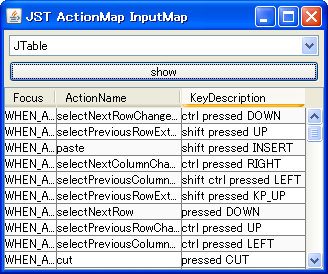
KeyBinding
We obtain the ActionMap and InputMap from the JComponent and create a list of KeyBindings.
Monitor DesktopProperty changes
Section titled “Monitor DesktopProperty changes”
DesktopProperty
Add a PropertyChangeListener to the Toolkit to monitor changes such as double-click speed.
Add AuxiliaryLookAndFeel
Section titled “Add AuxiliaryLookAndFeel”
AuxiliaryLookAndFeel
Add AuxiliaryLookAndFeel to change the behavior when using WindowsLookAndFeel.
NimbusLookAndFeel Color Palette
Section titled “NimbusLookAndFeel Color Palette”
Do not use bold fonts with MetalLookAndFeel
Section titled “Do not use bold fonts with MetalLookAndFeel”
Testing highlighting for disabled JMenuItem
Section titled “Testing highlighting for disabled JMenuItem”
DisabledAreNavigable
We test whether a disabled JMenuItem can be highlighted for each LookAndFeel.
Change the appearance of Nimbus using UIDefaults.
Section titled “Change the appearance of Nimbus using UIDefaults.”
UIDefaultsOverrides
This modifies the appearance of NimbusLookAndFeel partially using UIDefaults.
Set up decorations for resizing in JRootPane
Section titled “Set up decorations for resizing in JRootPane”
WindowDecorationStyle
Remove the decorations from the JFrame itself and set a transparent window decoration for resizing on the JRootPane.
Change the border when a JTree node gains focus.
Section titled “Change the border when a JTree node gains focus.”
DrawsTreeFocus
The border rendering when a JTree node is selected and focuses is changed using UIManager.
Modify the indeterminate state animation in NimbusLookAndFeel for JProgressBar.
Section titled “Modify the indeterminate state animation in NimbusLookAndFeel for JProgressBar.”
IndeterminateRegionPainter
If you are using JProgressBar with NimbusLookAndFeel, this will change its indeterminate state animation.
Resizing a JComponent with NimbusLookAndFeel
Section titled “Resizing a JComponent with NimbusLookAndFeel”
ComponentSizeVariant
If you are using NimbusLookAndFeel, you can change the display size of the component in the client properties settings.
Make the buttons used in JOptionPane the same size.
Section titled “Make the buttons used in JOptionPane the same size.”
SameSizeButtons
When using JOptionPane with NimbusLookAndFeel, this setting determines whether to match the size of the JButtons.
Limit JTree cell selection to nodes instead of entire rows using NimbusLookAndFeel.
Section titled “Limit JTree cell selection to nodes instead of entire rows using NimbusLookAndFeel.”
TreeCellSelectionBackground
This sets the range that JTree fills with the selected cell color to only the node, rather than the entire row as is the default setting in NimbusLookAndFeel.
NimbusLookAndFeel allows you to change the style of node connection lines in a JTree.
Section titled “NimbusLookAndFeel allows you to change the style of node connection lines in a JTree.”
NimbusTreeLinesStyle
This displays the connection lines between JTree nodes in NimbusLookAndFeel and changes their style to dotted lines.
Hide Bumps in the JInternalFrame titlebar of MetalLookAndFeel.
Section titled “Hide Bumps in the JInternalFrame titlebar of MetalLookAndFeel.”
DisableMetalBumps
This code hides the bumps in MetalLookAndFeel's JInternalFrame and changes the title bar to a flat one.
Change the title of JInternalFrame to left-aligned.
Section titled “Change the title of JInternalFrame to left-aligned.”
InternalFrameTitleAlignment
This modifies the title of JInternalFrame, which uses NimbusLookAndFeel, to be left-aligned.
Configure the Synth style using an XML file.
Section titled “Configure the Synth style using an XML file.”
Disable rotation of JTabbedPane tabs and runs.
Section titled “Disable rotation of JTabbedPane tabs and runs.”
RotateTabRuns
This disables run rotation via tab selection, even when wrapping tabs across multiple runs in JTabbedPane.
Disable right-click selection in JMenu and JMenuItem.
Section titled “Disable right-click selection in JMenu and JMenuItem.”
DisableRightClickOnMenu
This setting disables the right-click selection of JMenu and JMenuItem when using WindowsLookAndFeel.
Change the MetalTheme to change the title text color of JInternalFrame.
Section titled “Change the MetalTheme to change the title text color of JInternalFrame.”
MetalTheme
This modifies the MetalTheme to change the title text color of JInternalFrame, including the title text color when it's not active.
Change the background color of the JButton.
Section titled “Change the background color of the JButton.”
ButtonBackgroundColor
This tests how to change the background color of a JButton in a WindowsLookAndFeel environment.
The current value is always displayed at the top of the JSlider.
Section titled “The current value is always displayed at the top of the JSlider.”
SliderPaintValue
This setting will permanently display the current value at the top of the JSlider's knob.
Extends the rendering of tab borders in the second row and above of a JTabbedPane to the tab content area.
Section titled “Extends the rendering of tab borders in the second row and above of a JTabbedPane to the tab content area.”
ExtendTabsToBase
This setting changes whether to extend the rendering of tab borders in the second row and above to the tab content area when NimbusLookAndFeel is applied to a JTabbedPane.
Changing the horizontal alignment of tab text and icons in a JTabbedPane using NimbusLookAndFeel
Section titled “Changing the horizontal alignment of tab text and icons in a JTabbedPane using NimbusLookAndFeel”
NimbusTabbedPaneIcon
This modifies the horizontal alignment and spacing of tab text and icons in a JTabbedPane with NimbusLookAndFeel enabled.
NimbusLookAndFeel toggles whether an uneditable JComboBox displays as a button-like rollover.
Section titled “NimbusLookAndFeel toggles whether an uneditable JComboBox displays as a button-like rollover.”
ComboBoxAsButtonWhenNotEditable
This toggles whether NimbusLookAndFeel displays a rollover state like a JButton when the mouse cursor hovers over a non-editable JComboBox.
Modify NimbusLookAndFeel to retrieve the cell selection color from JList.
Section titled “Modify NimbusLookAndFeel to retrieve the cell selection color from JList.”
RendererUseListColors
This will modify NimbusLookAndFeel to retrieve the cell selection color from JList instead of using the color set in UIDefaults.
Change the color of the JSlider’s scale.
Section titled “Change the color of the JSlider’s scale.”
SliderTickColor
We will test the color change of the JSlider's scales for each LookAndFeel.
Modify the scroll arrow buttons in JTabbedPane using NimbusLookAndFeel
Section titled “Modify the scroll arrow buttons in JTabbedPane using NimbusLookAndFeel”
TabbedPaneUseBasicArrows
This switches whether the scroll arrow buttons of a JTabbedPane with NimbusLookAndFeel applied use BasicArrowButton or SynthArrowButton.
Applying the focus border of a child text component to a parent JScrollPane using NimbusLookAndFeel.
Section titled “Applying the focus border of a child text component to a parent JScrollPane using NimbusLookAndFeel.”
ScrollPaneUseChildTextComponentFocus
This NimbusLookAndFeel toggles whether to apply the focus border of a single text component to the parent JScrollPane when only one text component is placed in the JScrollPane's viewport.
Draw the title panel of JInternalFrame from the frame origin.
Section titled “Draw the title panel of JInternalFrame from the frame origin.”
InternalFrameLayoutTitlePaneAtOrigin
This switches whether the title panel of JInternalFrame is drawn from the frame origin or positioned considering the border.
Override the container border of the JTabbedPane with the selected tab.
Section titled “Override the container border of the JTabbedPane with the selected tab.”
TabbedPaneTabsOverlapBorder
This setting allows you to toggle whether the JTabbedPane container border is overridden by the selected tab.
Change the RolloverIcon of JCheckBox
Section titled “Change the RolloverIcon of JCheckBox”
CheckBoxRolloverIcon
This modifies the RolloverIcon that appears when the mouse hovers over a JCheckBox.
Restore JTable grid line drawing from UIDefaults
Section titled “Restore JTable grid line drawing from UIDefaults”
TableShowGrid
This setting restores the display of JTable grid lines to LookAndFeel's default setting.
Change the cell selection color of a JComboBox using NimbusLookAndFeel.
Section titled “Change the cell selection color of a JComboBox using NimbusLookAndFeel.”
ComboBoxForceOpaque
NimbusLookAndFeel is used to change the background color, cell selection color, and selected text color of a JComboBox.
Change the background color of JPopupMenu
Section titled “Change the background color of JPopupMenu”
PopupMenuBackground
This modifies the background color, border color, and text color of JMenuItem and other child elements of the JPopupMenu.
Modify the selection movement action using the up and down arrow keys in a JComboBox.
Section titled “Modify the selection movement action using the up and down arrow keys in a JComboBox.”
ComboBoxSelectNextPrevious
The selection movement actions using the up and down arrow keys in a JComboBox differ depending on the LookAndFeel, so we will unify them.
Switch the JEditorPane StyleSheet to match the Light or Dark theme.
Section titled “Switch the JEditorPane StyleSheet to match the Light or Dark theme.”
DarkMode
This setting configures JEditorPane's StyleSheet to switch depending on whether the system theme is Light or Dark when the program starts.
Center each tab in the JTabbedPane.
Section titled “Center each tab in the JTabbedPane.”
CenterAlignTabs
If the sum of the widths of all tabs in a JTabbedPane is less than or equal to the tab area, the tabs will be centered instead of left-aligned.
Display the JPopupMenu label as the title.
Section titled “Display the JPopupMenu label as the title.”