JTextField JPasswordField JFormattedTextField
Visualize passwords with JPasswordField
Section titled “Visualize passwords with JPasswordField”
ShowHidePasswordField
Create a button to toggle the display of the password entered in JPasswordField, and place it in the input field or similar location.
Change the echo character of JPasswordField
Section titled “Change the echo character of JPasswordField”
Sets the background color when a JTextField has focus.
Section titled “Sets the background color when a JTextField has focus.”
FocusColor
To make it easier to see which JTextField is being edited, the background color of the focused JTextField is changed.
Make the background color of the JTextField semi-transparent.
Section titled “Make the background color of the JTextField semi-transparent.”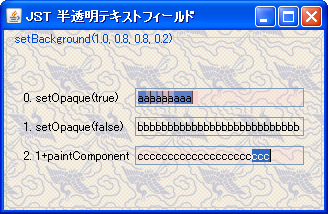
TranslucentTextField
This test will demonstrate how to prevent rendering glitches when selecting text or blinking the caret, even when the background color of a JTextField is semi-transparent.
Display when JTextField has no focus and no text.
Section titled “Display when JTextField has no focus and no text.”
GhostText
If the JTextField does not have focus and the text is empty, its description will be displayed in a light color.
Displaying a watermark image in a JTextField
Section titled “Displaying a watermark image in a JTextField”
WatermarkInTextField
This sets the JTextField to display a watermark image when the text field is empty and the field does not have focus.
Copy from the popup menu in DefaultEditorKit
Section titled “Copy from the popup menu in DefaultEditorKit”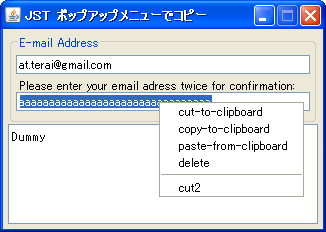
DefaultEditorKit
DefaultEditorKit is used to perform copy, paste, and cut operations using a popup menu in JTextFields and other applications.
Copying and pasting is prohibited in JTextField.
Section titled “Copying and pasting is prohibited in JTextField.”
Setting the margin of a JTextField
Section titled “Setting the margin of a JTextField”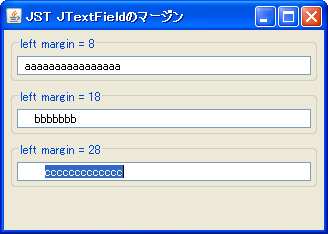
TextFieldMargin
Test the change in inner margins by setting a Margin or double border on the JTextField.
Select all text in the JTextField
Section titled “Select all text in the JTextField”
Add an icon to a JTextField
Section titled “Add an icon to a JTextField”
IconTextField
A margin is created inside the JTextField, and a JLabel with an ImageIcon set is placed there.
Specify the width of JComboBox etc. by the number of columns.
Section titled “Specify the width of JComboBox etc. by the number of columns.”
SetColumns
The widths of JTextField, JPasswordField, JSpinner, and JComboBox are compared by specifying the number of columns.
Restrict input to numbers in JTextField.
Section titled “Restrict input to numbers in JTextField.”
NumericTextField
We will test a method to restrict keyboard input and pasting to JTextField to only numbers.
Perform Undo and Redo operations on a JTextField using UndoManager.
Section titled “Perform Undo and Redo operations on a JTextField using UndoManager.”
UndoManager
We will add an UndoManager to the JTextField document to perform Undo and Redo operations.
Convert the first letter to uppercase using DocumentFilter
Section titled “Convert the first letter to uppercase using DocumentFilter”
FirstCharToUpperCase
Use DocumentFilter to ensure that the first letter of any string is always capitalized.
Round the corners of a JTextField.
Section titled “Round the corners of a JTextField.”
Stop the blinking of Caret.
Section titled “Stop the blinking of Caret.”
Draw a hint string in JPasswordField.
Section titled “Draw a hint string in JPasswordField.”
InputHintPasswordField
If there is no input in JPasswordField, a hint string will be displayed.
Changing the beep sound setting in a JTextField
Section titled “Changing the beep sound setting in a JTextField”
DeleteKeyBeep
This setting changes the beep sound that plays when you press the Delete or Backspace key in a JTextField, etc.
Change the behavior of text selection and pasting using UndoManager.
Section titled “Change the behavior of text selection and pasting using UndoManager.”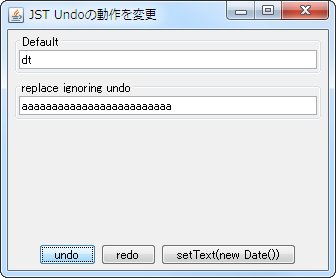
ReplaceUndoableEdit
By setting an UndoManager in a JTextField or similar, you can change the undo behavior after selecting and pasting text.
Add a JTextField to a non-editable JTextPane.
Section titled “Add a JTextField to a non-editable JTextPane.”
TextFieldOnReadOnlyTextPane
This adds a JTextField to a JTextPane that has been made blank and non-editable.
Use a JTextPane as a styleable JTextField by limiting it to one line.
Section titled “Use a JTextPane as a styleable JTextField by limiting it to one line.”
OneLineTextPane
This method limits the number of lines in a JTextPane to one, allowing it to be used as a JTextField with customizable styling options such as text color.
Add an underline to the text in a JTextField.
Section titled “Add an underline to the text in a JTextField.”
TextAttribute
This underlines the text using a font whose text attribute has been set in the JTextField.
Focus shift when the value of a JTextField with InputVerifier set is invalid.
Section titled “Focus shift when the value of a JTextField with InputVerifier set is invalid.”
VerifyInputWhenFocusTarget
This tests the focus movement behavior when the value of a JTextField with InputVerifier set is not in the correct format.
Scroll the display area of a JTextField using a JScrollBar.
Section titled “Scroll the display area of a JTextField using a JScrollBar.”
HorizontalVisibility
This makes the display area of a JTextField scrollable using a JScrollBar.
Perform a highlighting search in JTextArea.
Section titled “Perform a highlighting search in JTextArea.”
HighlightSearch
This function searches for strings within a JTextArea based on specified criteria and highlights all matching strings.
Test the focus navigation of a component with an InputVerifier set.
Section titled “Test the focus navigation of a component with an InputVerifier set.”
InputVerifierFocusOrder
This tests the validation of input and the order of focus movement events for components with InputVerifier configured.
Hide the JSpinner text.
Section titled “Hide the JSpinner text.”
DecimalFormatSymbols
When a JSpinner that uses SpinnerNumberModel is disabled, the numerical value will be hidden.
Do not allow invalid values to be entered in JSpinner.
Section titled “Do not allow invalid values to be entered in JSpinner.”
NumberFormatter
We obtain a JFormattedTextField from JSpinner and configure it to not allow invalid values to be entered.
Using LocalDateTime with JSpinner
Section titled “Using LocalDateTime with JSpinner”
SpinnerLocalDateTimeModel
Instead of using SpinnerDateModel, which uses Date or Calendar, we create a SpinnerModel that uses LocalDateTime, which was introduced in JDK8, and select the date with JSpinner.
Configure the behavior when focus is lost from a JFormattedTextField.
Section titled “Configure the behavior when focus is lost from a JFormattedTextField.”
FocusLostBehavior
Set and test the action to be performed when focus is lost from the JFormattedTextField.
Set a MaskFormatter with a placeholder string added to the JFormattedTextField.
Section titled “Set a MaskFormatter with a placeholder string added to the JFormattedTextField.”
MaskFormatterPlaceholder
Set a MaskFormatter to the JFormattedTextField, adding placeholder characters or strings.
Add an ActionListener to a JTextField
Section titled “Add an ActionListener to a JTextField”
TextFieldActionListener
Add an ActionListener to the JTextField to capture the Enter key input.
Test the drag-and-drop settings for a JTextField.
Section titled “Test the drag-and-drop settings for a JTextField.”
DragEnabledTextComponent
This tests drag-and-drop functionality when the JTextField is in its initial state or is not editable.
Move the focus to the target JTextField before opening JPopupMenu.
Section titled “Move the focus to the target JTextField before opening JPopupMenu.”
FocusBeforePopup
When opening a JPopupMenu set in a JTextField or similar by right-clicking with the mouse, move the focus to it and select all the text.
Validate input to the JTable cell editor.
Section titled “Validate input to the JTable cell editor.”
CellEditorInputVerifier
Use InputVerifier or similar tools to verify whether the input to the JTable cell editor is valid.
Enabling Cut and Copy with JPasswordField
Section titled “Enabling Cut and Copy with JPasswordField”
PasswordFieldCutCopyAllowed
This enables Cut and Copy operations on the text selected in JPasswordField.
When the JTextField gains focus, the top right and left edges of the border are drawn sequentially.
Section titled “When the JTextField gains focus, the top right and left edges of the border are drawn sequentially.”
FocusBorderAnimation
When a JTextField gains keyboard focus, it starts a border animation that draws straight lines along its top right and left edges in sequence.
Configure the Caret to blink even when the JTextField is in an uneditable state.
Section titled “Configure the Caret to blink even when the JTextField is in an uneditable state.”
NonEditableTextFieldCaret
This setting ensures that the Caret continues to blink even when a JTextComponent such as a JTextField is not editable.
Create a PIN code input field using JPasswordField
Section titled “Create a PIN code input field using JPasswordField”
Insert a tab character into a JTextField.
Section titled “Insert a tab character into a JTextField.”
InsertTabIntoTextField
This allows you to insert tab characters or change tab sizes in a JTextField using keyboard input.
Add an Alpha value to the hexadecimal color code displayed in the RGB color selection panel of JColorChooser.
Section titled “Add an Alpha value to the hexadecimal color code displayed in the RGB color selection panel of JColorChooser.”
ColorChooserRgbaHexCode
This changes the hexadecimal color code displayed in the JColorChooser RGB color selection panel from 6 RGB digits to 8 RGBA digits (by adding an Alpha value).
Set a monospaced font for a JFormattedTextField.
Section titled “Set a monospaced font for a JFormattedTextField.”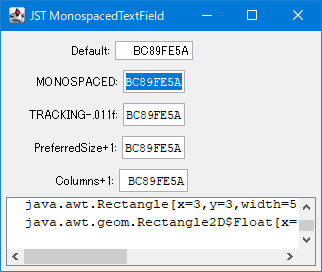
MonospacedTextField
This tool calculates the recommended size for JFormattedTextField and JTextField based on the number of columns and font size.
Set a border for a JTextField that changes its border color depending on whether it has focus or not.
Section titled “Set a border for a JTextField that changes its border color depending on whether it has focus or not.”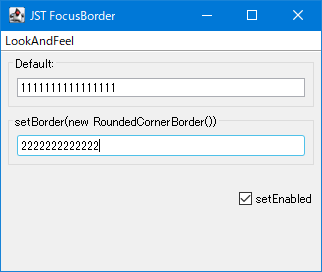
FocusBorder
This sets a border that changes the color of the border around the JTextField and highlights it when it receives focus.
Changing the span of horizontal scrolling using cursor keys in a JTextField
Section titled “Changing the span of horizontal scrolling using cursor keys in a JTextField”
TextFieldCaretScrollSapn
This modifies the scroll span when horizontal scrolling occurs due to cursor key input in a JTextField.
Round down the JSpinner value to the nearest 0.5.
Section titled “Round down the JSpinner value to the nearest 0.5.”
RoundDownToHalfSpinner
This setting will round down or round up to the nearest 0.5 when displaying numbers in JSpinner.
Change only the color of the numbers when visualizing JPasswordField.
Section titled “Change only the color of the numbers when visualizing JPasswordField.”
DigitColoredPasswordField
When the password entered in JPasswordField is visualized, only the numbers are color-coded to make it easier to distinguish them from similar-looking letters.
Highlighting a JTextComponent is rendered by changing the text color.
Section titled “Highlighting a JTextComponent is rendered by changing the text color.”
ForegroundHighlightPainter
We will create a Highlighter that renders the highlight of a JTextComponent by changing the text color instead of filling the background.
Create a tag input component that can be added with a JTextField, displayed with a JLabel, and deleted with a JButton
Section titled “Create a tag input component that can be added with a JTextField, displayed with a JLabel, and deleted with a JButton”
TagInputPanel
Create a tag input component that uses a JTextField to add tags, displays them with JLabels, and allows them to be deleted using JButtons.
Edit text in a JTextField on multiple lines in a JTextArea placed in a JPopupMenu
Section titled “Edit text in a JTextField on multiple lines in a JTextArea placed in a JPopupMenu”
ExpandableTextField
Copy single-line text separated by spaces from a JTextField into a JTextArea placed in a JPopupMenu to enable multi-line editing.
Create a time selection component by combining a JFormattedTextField and increment/decrement JButtons.
Section titled “Create a time selection component by combining a JFormattedTextField and increment/decrement JButtons.”
TimePicker
Create a JSpinner-style time selection component by placing increment/decrement JButtons above and below a JFormattedTextField.