Hyperlink HTML
Displaying hyperlinks using JLabel, JButton, and JEditorPane
Section titled “Displaying hyperlinks using JLabel, JButton, and JEditorPane”
HyperlinkLabel
This code displays a hyperlink using a JLabel, JButton, and JEditorPane, and captures the event that occurs when each is clicked.
Launch browser on desktop
Section titled “Launch browser on desktop”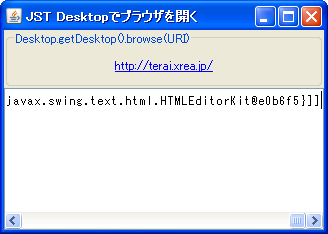
Dropping a Hyperlink into the browser using TransferHandler
Section titled “Dropping a Hyperlink into the browser using TransferHandler”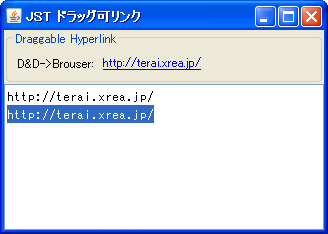
DraggableLinkButton
Set a TransferHandler on the JButton so that you can drop the link into the browser.
Displaying Hyperlinks in JTable cells
Section titled “Displaying Hyperlinks in JTable cells”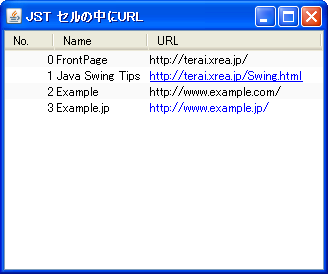
Disabling JLabel and JEditorPane using HTML
Section titled “Disabling JLabel and JEditorPane using HTML”
DisabledHtmlLabel
This tests how the display looks when JLabel and JEditorPane using HTML are disabled.
Disable HTML rendering for JLabels and other elements.
Section titled “Disable HTML rendering for JLabels and other elements.”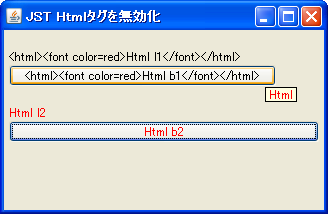
HtmlDisable
This disables HTML rendering for JLabels and other elements, displaying tag strings directly.
Displaying multiple lines using JTextPane, JLabel, etc.
Section titled “Displaying multiple lines using JTextPane, JLabel, etc.”
MultiLineLabel
This example tests multi-line labels using JTextPane, JTextArea, and JLabel.
JToolTip animation
Section titled “JToolTip animation”
AnimatedToolTip
This tests how to animate an icon within a JLabel when a JToolTip is displayed.
Display icons in JToolTip
Section titled “Display icons in JToolTip”
ToolTipIcon
This tests how to display icons in a JToolTip using JLabel, MatteBorder, or HTML tags.
Launch Browser
Section titled “Launch Browser”
Clipping HTML-modified strings
Section titled “Clipping HTML-modified strings”
ClippedHtmlLabel
Modifying a string in HTML prevents it from being clipped, so create a clipped string beforehand before using HTML.
Register and use the font in GraphicsEnvironment.
Section titled “Register and use the font in GraphicsEnvironment.”
RegisterFont
This registers the font in GraphicsEnvironment so that it can be used in HTML tags and other elements.
Add a link to JEditorPane
Section titled “Add a link to JEditorPane”
HyperlinkListener
Click events and other events for links added to the JEditorPane are handled using HyperlinkListener.
Setting ToolTipText in JEditorPane’s HTML tags
Section titled “Setting ToolTipText in JEditorPane’s HTML tags”
ElementAttribute
This explains how to configure JEditorPane to display the title attribute of div and span tags as a tooltip.
Change the listbullet to an image using JEditorPane’s StyleSheet.
Section titled “Change the listbullet to an image using JEditorPane’s StyleSheet.”
EditorPaneListStyle
We retrieve the StyleSheet from JEditorPane's HTMLEditorKit and modify the Listbullet using list-style-image.
Display text modified in JTextPane as HTML source in JTextArea.
Section titled “Display text modified in JTextPane as HTML source in JTextArea.”
HTMLEditorKit
We are testing how to display, edit, and reflect text formatted in JTextPane using HTMLEditorKit as HTML source in JTextArea and JTextPane.
Use JComboBox instead of JSpinner
Section titled “Use JComboBox instead of JSpinner”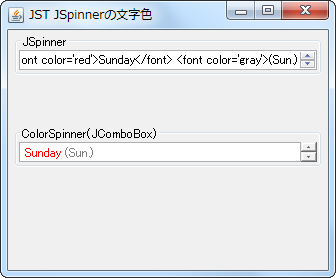
SpinnerTextColor
By using JComboBox instead of JSpinner, we are able to change the text color and other properties of the items.
Retrieve an element from an HTMLDocument in JEditorPane using its ID.
Section titled “Retrieve an element from an HTMLDocument in JEditorPane using its ID.”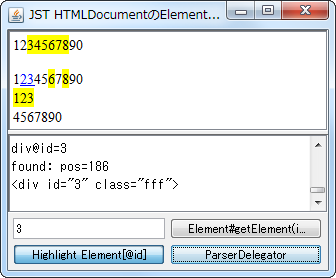
HTMLAttributeID
This program searches the HTMLDocument set in JEditorPane and retrieves the element with the id attribute.
Adding elements to an HTMLDocument in JEditorPane
Section titled “Adding elements to an HTMLDocument in JEditorPane”
InsertHtmlText
This code retrieves a table element from the HTMLDocument in JEditorPane and adds child elements such as tr elements to it.
Setting the alignment when displaying multi-line HTML text in a TableCellRenderer.
Section titled “Setting the alignment when displaying multi-line HTML text in a TableCellRenderer.”
HtmlCellVerticalAlignment
This test examines how line alignment affects rendering when displaying multi-line HTML text in a JTable cell.
Customize the HTML copy of JTables.
Section titled “Customize the HTML copy of JTables.”
HtmlTableTransferHandler
When you select a JTable cell and copy the HTML text to the clipboard, the generated tags will change depending on the class of that cell.
String formatting with HTML tags
Section titled “String formatting with HTML tags”
Change the text color of HTML anchor tags displayed in JLabel.
Section titled “Change the text color of HTML anchor tags displayed in JLabel.”
AnchorTextColor
This will test changing the default text color of HTML anchor tags displayed in JLabel and JEditorPane.
Apply the font set in JEditorPane to HTML text.
Section titled “Apply the font set in JEditorPane to HTML text.”
HonorDisplayProperties
Instead of using the default font size specified for the body tag in HTMLEditorKit, the font set in JEditorPane will be used for the HTML text.
Display an icon in the title of TitledBorder
Section titled “Display an icon in the title of TitledBorder”
Change the text color when the cursor hovers over a link displayed in JEditorPane.
Section titled “Change the text color when the cursor hovers over a link displayed in JEditorPane.”
HyperlinkHoverEffect
We set up a HyperlinkListener to achieve an effect similar to the hover pseudo-class.
Change the border lines of the table tag displayed in the JLabel.
Section titled “Change the border lines of the table tag displayed in the JLabel.”
HtmlTableBorderStyle
This changes the borders of tables drawn using the HTML table tag in components such as JLabel from separate to combined.
Display a checkbox generated using HTML formatted input tags in a JLabel.
Section titled “Display a checkbox generated using HTML formatted input tags in a JLabel.”
InputTypeCheckBox
A checkbox generated using an HTML-formatted input tag is displayed in the TableCellRenderer of the header, which inherits from JLabel, and its state changes when clicked.
Generate a color from HTML hexadecimal color codes.
Section titled “Generate a color from HTML hexadecimal color codes.”
HTMLColorCodes
This tests how to generate a Color from an HTML hexadecimal color code and change the text color of a JLabel.
Retrieving HyperlinkEvents from a JEditorPane configured as a cell renderer for a JList.
Section titled “Retrieving HyperlinkEvents from a JEditorPane configured as a cell renderer for a JList.”
ListCellHyperlinkListener
We will display multiple links in the JEditorPane used as the cell renderer for JList, and configure it to forward mouse click events to generate HyperlinkEvents.
Change the vertical-align of an Img tag placed in JEditorPane.
Section titled “Change the vertical-align of an Img tag placed in JEditorPane.”
HTMLImgBaseline
This changes the vertical-align of the Img tag placed in JEditorPane to baseline alignment.
Highlight text within JTable cells using HTML tags
Section titled “Highlight text within JTable cells using HTML tags”
Display source code with syntax highlighting in JEditorPane.
Section titled “Display source code with syntax highlighting in JEditorPane.”
SyntaxHighlightingEditorPane
We'll configure a StyleSheet in JEditorPane's HTMLEditorKit to display syntax highlighting for source code.
Disable color inversion of selected text in JEditorPane
Section titled “Disable color inversion of selected text in JEditorPane”
SelectedTextColor
This disables the ability to change the color of selected text in JEditorPane by setting the color used for rendering the selected text to null.
Retrieve data submitted from a form displayed in JEditorPane.
Section titled “Retrieve data submitted from a form displayed in JEditorPane.”
FormSubmitEvent
This function retrieves the form submission data displayed in JEditorPane and decodes the percent-encoded string.
Scroll to the location of the link reference within the JEditorPane.
Section titled “Scroll to the location of the link reference within the JEditorPane.”
ScrollToReference
Scroll down to the location where the anchor tags of links placed within the HTMLDocument in JEditorPane are displayed.
Change the inner margin of focus drawing using dotted lines for JButtons and similar elements.
Section titled “Change the inner margin of focus drawing using dotted lines for JButtons and similar elements.”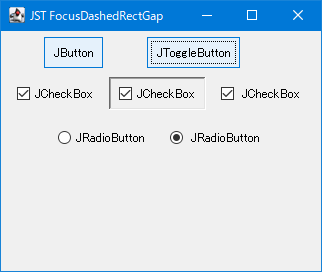
FocusDashedRectGap
This modifies the inner margin of the focus rectangle drawn by a dotted line in a JButton that uses WindowsLookAndFeel or similar effects.
Select JTree nodes in conjunction with scrolling in JEditorPane.
Section titled “Select JTree nodes in conjunction with scrolling in JEditorPane.”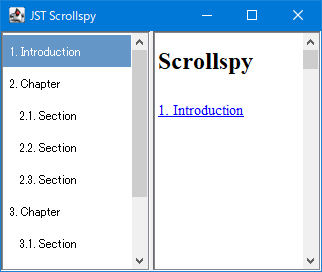
Scrollspy
This function searches for and selects a JTree node with the same name as the link that becomes visible in conjunction with scrolling in JEditorPane.
Using W3C-compliant length units in JEditorPane’s HTML rendering
Section titled “Using W3C-compliant length units in JEditorPane’s HTML rendering”
W3CLengthUnits
JEditorPane's HTML rendering displays absolute units specified for font size and other parameters in W3C-compliant lengths.
Displaying components in a JEditorPane form with HTMLEditorKit applied.
Section titled “Displaying components in a JEditorPane form with HTMLEditorKit applied.”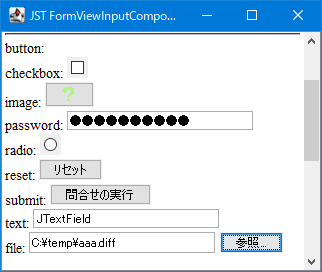
FormViewInputComponent
This tests components that can be displayed using input and select tags in a JEditorPane form with HTMLEditorKit applied.
Generate HTML text from a StyledDocument in JTextPane
Section titled “Generate HTML text from a StyledDocument in JTextPane”
MinimalHTMLWriter
The StyledDocument obtained from JTextPane is converted using MinimalHTMLWriter to generate HTML text.