

Description
Opti-Behavior is the only WordPress analytics plugin that gives you Hotjar-level behavior analytics with complete data privacy — all from your own server.
See exactly how visitors interact with your website through powerful visual heatmaps, detailed click tracking, conversion funnels, and comprehensive real-time analytics. Unlike Hotjar, Microsoft Clarity, or Google Analytics, all your data stays on YOUR WordPress server. No cloud. No third-party access. No data sharing. Period.
Your Data, Your Server
Every other analytics tool sends your visitors’ data to external servers:
- Microsoft Clarity is free, but Microsoft acts as an independent data controller and uses your visitors’ behavioral data for advertising purposes.
- Hotjar sends all data to AWS Ireland — you have zero control over what happens with it.
- Google Analytics uses your data for ad targeting across the web.
- Lucky Orange, Crazy Egg, Mouseflow — your data lives on THEIR servers.
Opti-Behavior is different. Every click, scroll, and interaction is stored in YOUR WordPress database or file system. Your data never leaves your hosting. No DPA required. No cross-border transfer concerns. No cookie consent headaches.
Why Choose Opti-Behavior?
- 100% Self-Hosted – All analytics data stored locally on your WordPress server
- GDPR Compliant by Design – No cross-border data transfers, no third-party sharing
- No Cookie Consent Needed – Session-based tracking without cookies
- No Session Limits – Track every visitor, not just a sample (Hotjar free: 35/day, Mouseflow free: 500/month)
- No Monthly Bills – One-time plugin, no per-session SaaS billing
- Beautiful Visualizations – Modern UI with heatmaps, charts, and interactive maps
- Lightweight – ~15KB minified JavaScript, loads asynchronously (lighter than Hotjar)
- WordPress-Native – Built for WordPress from the ground up, not a script injection wrapper
Core Features (Free)
Visual Heatmaps
- Click heatmaps with color-coded intensity visualization
- Separate Mobile & Desktop heatmap tracking
- Configurable tracking accuracy (High, Medium, Low)
- Page-specific heatmap data with database or file-based storage
Real-Time Analytics Dashboard
- Live visitor monitoring with real-time updates
- 6 key metrics: Visitors, Sessions, Page Views, Avg Session Time, Avg Scroll Depth, Bounce Rate
- Interactive world map with visitor locations (Leaflet + OpenStreetMap)
- Top Pages, Top Engaged Users, Traffic Sources
- New vs Returning Visitors breakdown
- Device, Browser, OS, and Country analytics
- Visited Directories with depth tracking
- Flexible time periods: Today, Yesterday, 7 Days, 30 Days, Custom Range
Conversion Funnels
- Custom funnel builder with multi-step tracking
- Step-by-step conversion analysis with dropout rates
- Device-specific and country-specific funnel filtering
- Funnel status management (active/inactive)
- Visual dropout visualization
Session & Visitor Tracking
- Complete session tracking (duration, pages visited, entry/exit pages)
- Visitor journey mapping across your site
- Referrer and traffic source tracking
- Outbound link click monitoring
- Logged-in user identification
Bot Detection & Filtering
- Automatic server-side bot identification
- Search engine crawler detection (Google, Bing, Yahoo, etc.)
- Separate bot visit tracking for transparency
- Configurable filtering options
Scheduled Email Reports
- Automated report delivery (Daily, Weekly, Monthly)
- Configurable recipient lists
- Report template selection
- Test email functionality
AI-Powered Insights (Comming Soon)
- AI analytics suggestions for optimization
- Automated behavior pattern detection
User Intent Rules
- Advanced behavior pattern analysis
- Intent categorization system
- Custom traffic classification rules
Data Export & Management
- CSV export of all analytics data
- Data retention controls with auto-cleanup
- Smart cleanup tools for database optimization
- Complete data deletion on uninstall (optional)
Privacy & Security
- IP anonymization (optional)
- No cookies required (session-based tracking)
- No third-party data sharing
- Consent management integration support
- WordPress nonce verification on all forms
- Prepared SQL statements throughout
- WP_Filesystem API for file operations
Multilingual Admin
- English (default)
- French (fr_FR)
- German (de_DE)
- Spanish (es_ES)
- Portuguese (pt_BR)
- Italian (it_IT)
Pro Features (Upgrade)
Take your analytics further with Opti-Behavior Pro:
- Session Recordings – Watch real user sessions with full playback, encryption, and privacy controls
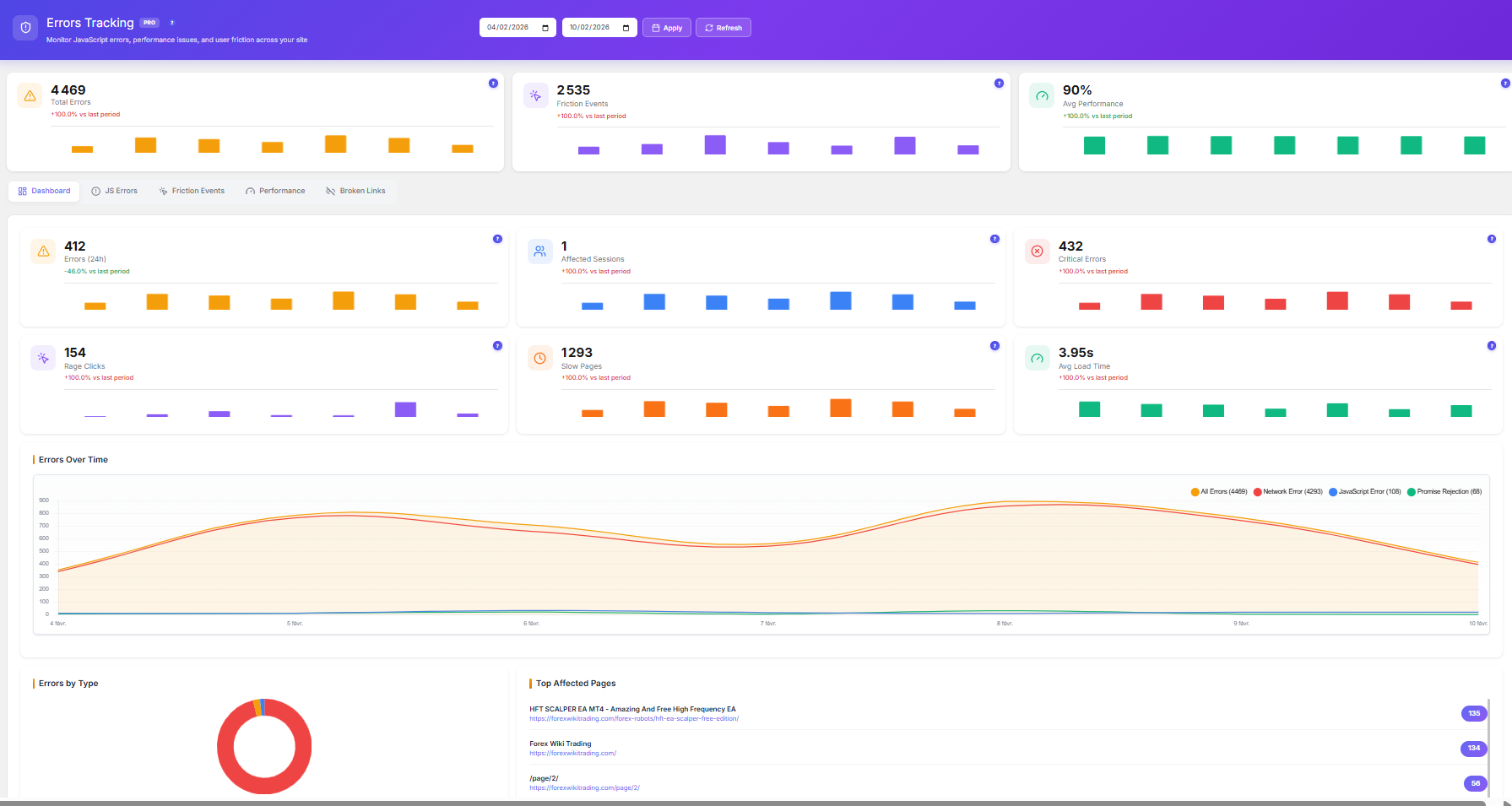
- Error Tracking – Capture JavaScript errors, network errors, and Core Web Vitals (LCP, FID, CLS, INP, FCP)
- Friction Detection – Automatic rage click and dead click identification
- Broken Link Detection – Find and fix broken links across your site
- User Journey Analytics – Beautiful Sankey diagram visualization of visitor paths
- Form Analytics – Field-level interaction tracking (time spent, errors, refills, abandonment)
- Advanced Heatmap Filtering – Filter by country, browser, device, and date range
- Priority Support – Get help when you need it
All Pro features are also 100% self-hosted with local data storage.
Learn more about Opti-Behavior Pro
How Opti-Behavior Compares
Click Heatmaps
Opti-Behavior: Yes | Hotjar: Yes | MS Clarity: Yes | Matomo: EUR 199/yr plugin
Conversion Funnels
Opti-Behavior: Yes | Hotjar: No (Scale only) | MS Clarity: No | Matomo: EUR 99/yr plugin
Real-time Dashboard
Opti-Behavior: Yes | Hotjar: No | MS Clarity: Yes | Matomo: Yes
Bot Detection
Opti-Behavior: Yes | Hotjar: No | MS Clarity: No | Matomo: Partial
Scheduled Reports
Opti-Behavior: Yes | Hotjar: No | MS Clarity: No | Matomo: Yes
AI Insights
Opti-Behavior: Yes | Hotjar: $213+/mo | MS Clarity: Yes | Matomo: No
Self-Hosted Data
Opti-Behavior: Yes | Hotjar: No | MS Clarity: No | Matomo: Yes
No Data Sharing
Opti-Behavior: Yes | Hotjar: Yes | MS Clarity: No (Microsoft) | Matomo: Yes
Session Limits
Opti-Behavior: None | Hotjar: 35/day | MS Clarity: Unlimited* | Matomo: None
Monthly Cost
Opti-Behavior: $0 | Hotjar: $0-$213+ | MS Clarity: $0* | Matomo: $0 + paid plugins
*Microsoft Clarity is free but Microsoft uses your visitors’ data as an independent data controller, including for advertising purposes.
Perfect For
- Privacy-Conscious Website Owners – Keep all visitor data on your own server
- EU-Based Businesses – Self-hosted means no cross-border data transfer concerns
- E-commerce Stores – Optimize checkout flows and product pages without sharing customer data
- Agencies – Provide clients with analytics without per-site SaaS subscriptions
- Healthcare, Finance & Legal Sites – Meet strict data handling requirements with self-hosted analytics
- Content Publishers – Understand reader engagement without third-party tracking
- WooCommerce Stores – Track cart behavior, analyze product pages, optimize conversions
- Small Businesses – Enterprise-grade analytics without enterprise pricing
How It Works
- Install & Activate – One-click installation, starts tracking immediately
- View Your Dashboard – Real-time visitor activity with key metrics
- Analyze Heatmaps – See where visitors click on every page
- Build Funnels – Track conversion paths and find drop-off points
- Export & Optimize – Download reports and make data-driven improvements
Technical Highlights
- WordPress Coding Standards compliant
- Secure by design: prepared SQL statements, nonce verification, capability checks
- ~15KB minified JavaScript with async loading
- File-based storage option for high-traffic sites
- Batch processing for efficient event handling
- Pre-aggregated daily statistics for fast dashboard loading
- Smart database indexing for optimized queries
- Multisite compatible
- REST API ready with hooks and filters
- Compatible with all major caching plugins (WP Super Cache, W3 Total Cache, WP Rocket)
- Works with all page builders (Elementor, Divi, Beaver Builder, WPBakery, Gutenberg)
External Services
This plugin may connect to external services in limited circumstances:
IP Geolocation (ip-api.com)
Purpose: Provides geographic location data (country, city, timezone) for visitor analytics and map visualization.
When Used: Only when a visitor’s location cannot be determined from CloudFlare headers. If CloudFlare is active, no external calls are made.
Data Sent: Only the visitor’s IP address. No personally identifiable information is transmitted.
Caching: Results are cached for 1 hour to minimize API requests.
Privacy:
* Service: https://ip-api.com/
* Terms & Privacy: https://ip-api.com/docs/legal
* Note: ip-api.com may log IP addresses. Review their privacy policy for details.
OpenStreetMap Tiles
Purpose: Displays the interactive visitor location map in your WordPress admin dashboard.
When Used: Only when YOU (the admin) view the real-time visitor map. Not used on the frontend.
Data Sent: Your browser makes direct requests to OpenStreetMap tile servers (standard HTTP headers only).
Privacy:
* Service: https://www.openstreetmap.org/
* Tile Policy: https://operations.osmfoundation.org/policies/tiles/
* Privacy Policy: https://wiki.osmfoundation.org/wiki/Privacy_Policy
Important Note: All analytics data is stored locally on your WordPress server. The services above are only used for optional geographic features and map visualization.
Privacy Policy
Opti-Behavior collects user interaction data to provide analytics insights. This data includes:
- Page URLs and titles
- Click coordinates and target elements
- Mouse movement patterns
- Scroll depth
- Session timestamps
- Referrer URLs
- Browser and device information
- IP addresses (can be anonymized)
- Approximate location based on browser timezone (client-side only, no external services)
Data Storage: All analytics data is stored locally in your WordPress database or file system. No data is sent to external analytics servers.
External Services: This plugin may make API calls to ip-api.com for IP geolocation when CloudFlare headers are not available. Only the visitor’s IP address is sent to this service. See the “External Services” section above for complete details.
No Third-Party Data Sharing: Unlike cloud-based analytics tools, Opti-Behavior does not share, sell, or transfer your visitors’ data to any third party. You are the sole data controller.
User Rights: You have full control over data retention and deletion. Users can request data deletion at any time.
When using this plugin, ensure your site’s privacy policy discloses:
* What data is being collected
* How long it is retained
* Who has access to it
* How users can request deletion
* That data is stored locally and not shared with third parties
Third-Party Libraries
This plugin bundles the following open-source libraries:
Chart.js
- Version: 4.4.0
- License: MIT License
- Homepage: https://www.chartjs.org/
- Used for: Rendering analytics charts and graphs
Leaflet
- Version: 1.9.4
- License: BSD 2-Clause License
- Homepage: https://leafletjs.com/
- Used for: Real-time visitor map visualization
heatmap.js
- Version: 2.0.5
- License: MIT License
- Homepage: https://www.patrick-wied.at/static/heatmapjs/
- Used for: Generating visual heatmaps of user interactions
Lucide
- Version: 0.554.0
- License: ISC License
- Homepage: https://lucide.dev/
- Used for: Icon library for the admin interface
All bundled libraries use GPL-compatible licenses (MIT, BSD 2-Clause, and ISC) and are included locally within the plugin. See THIRD-PARTY-LICENSES.txt in the plugin directory for full license texts.
Credits
Developed by OptiUser
Screenshots

Real-time analytics dashboard with visitor metrics, interactive world map, and traffic breakdown 
Visual click heatmap showing user interaction patterns on a page 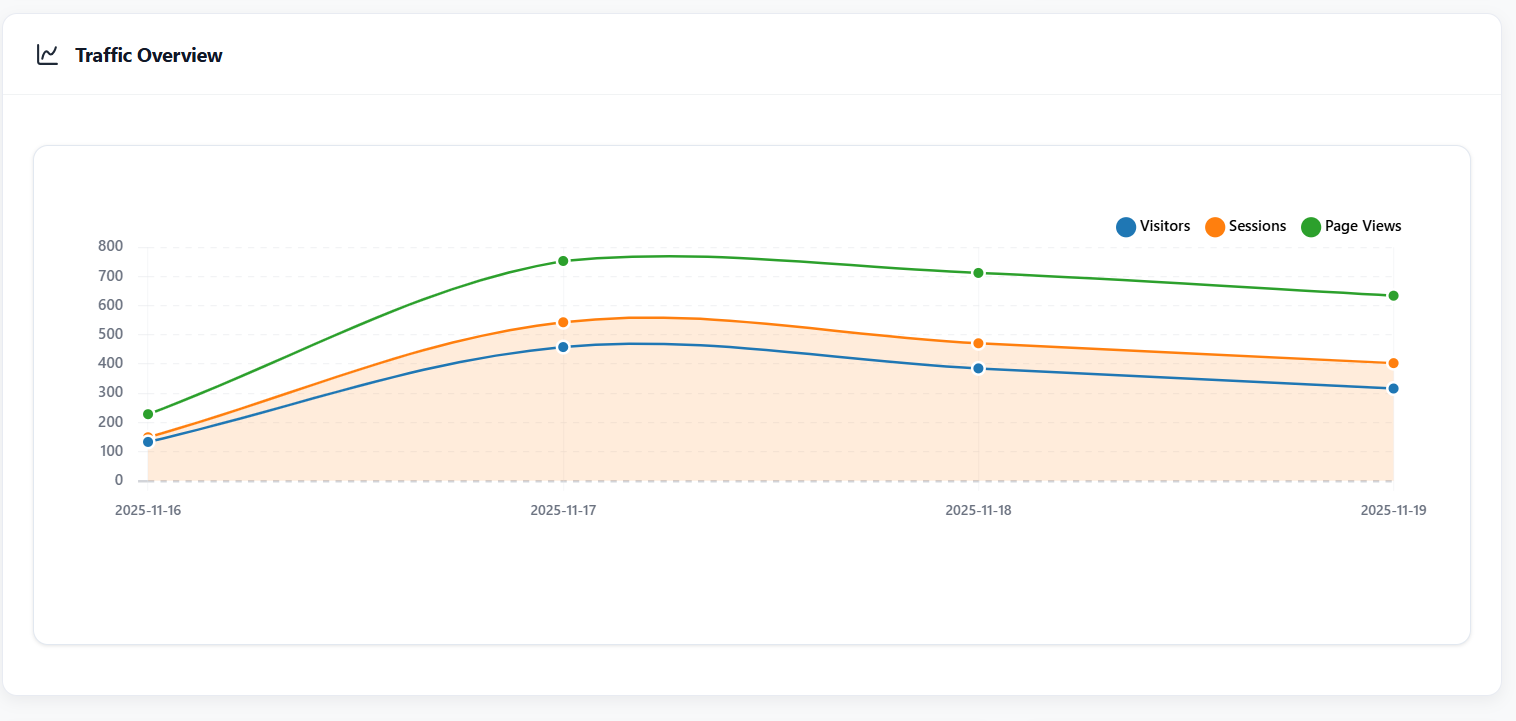
Conversion funnel builder with step-by-step dropout analysis 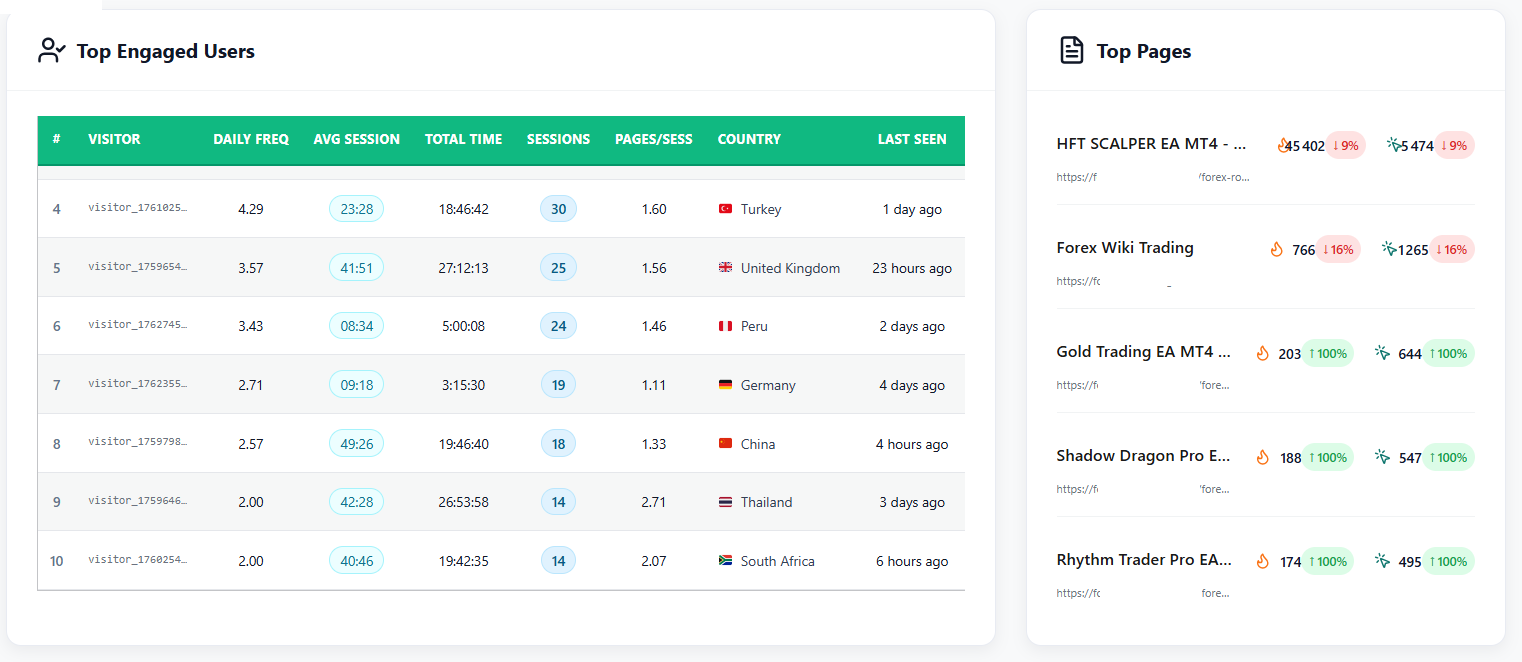
Detailed page analytics with engagement metrics and scroll depth 
Settings panel with privacy controls, data retention, and storage options 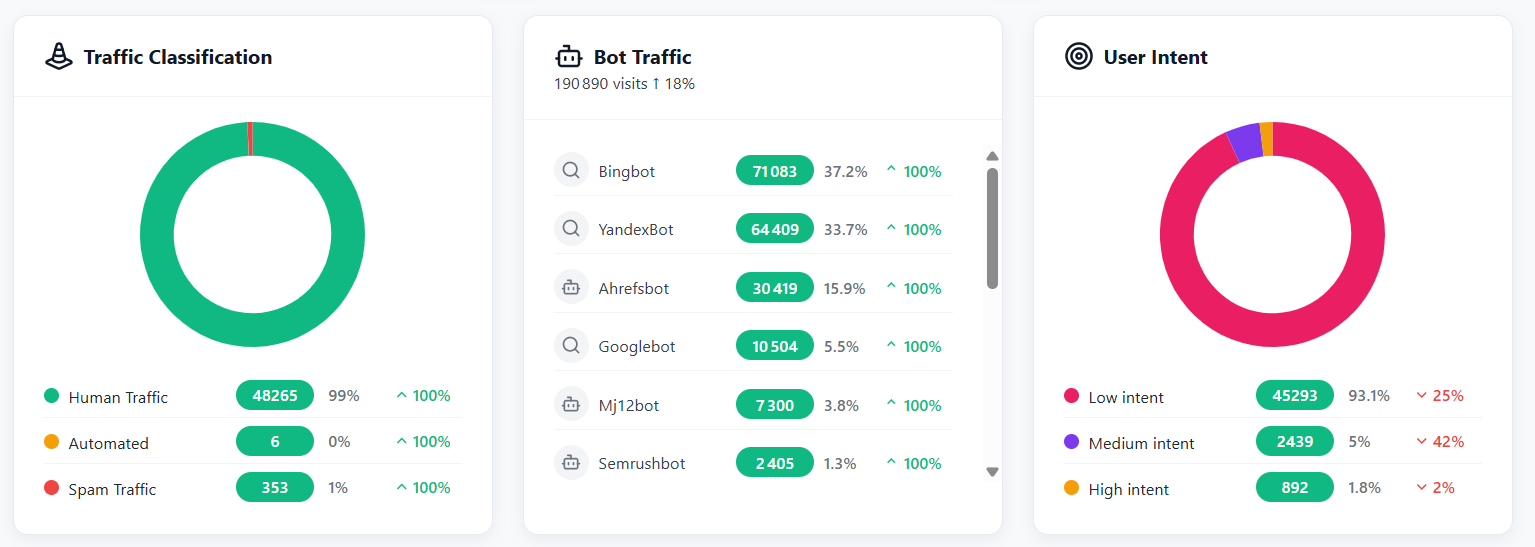
Bot detection showing filtered crawler traffic vs real visitors 
Scheduled email reports configuration 
Mobile vs Desktop heatmap comparison view 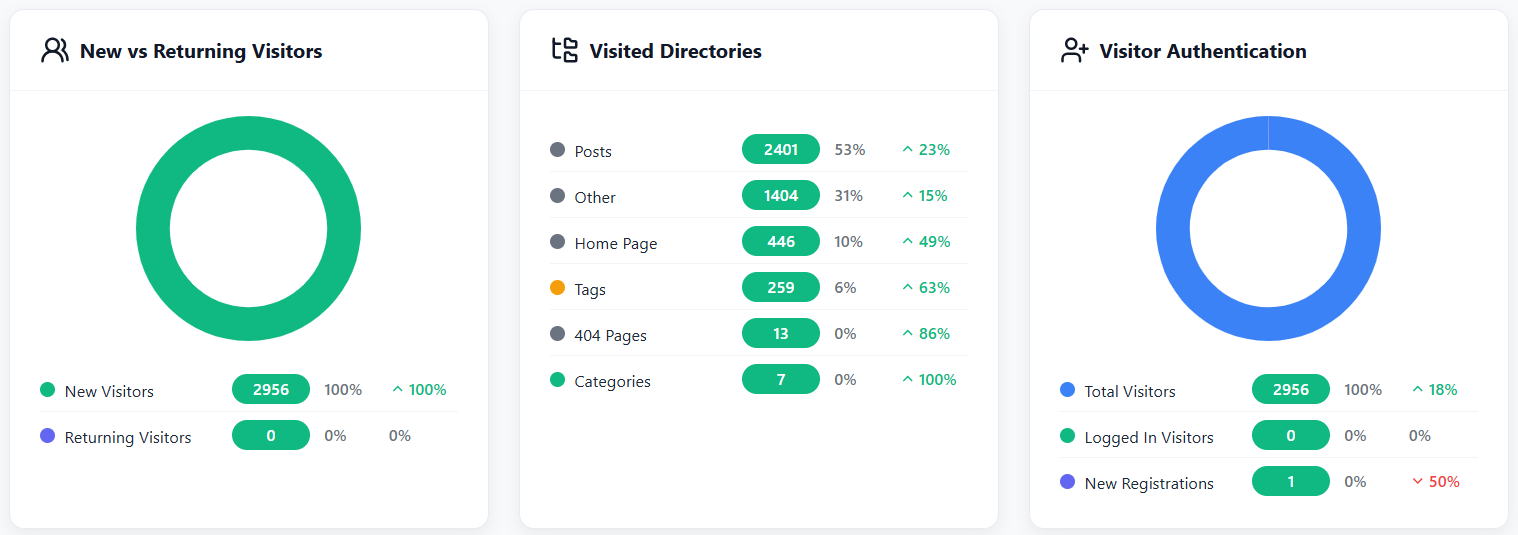
AI-powered insights and optimization suggestions 
Dark mode interface for comfortable nighttime administration 




Installation
Automatic Installation
- Log in to your WordPress admin panel
- Navigate to Plugins > Add New
- Search for “Opti-Behavior”
- Click “Install Now” and then “Activate”
Manual Installation
- Download the plugin zip file
- Log in to your WordPress admin panel
- Navigate to Plugins > Add New > Upload Plugin
- Choose the downloaded zip file and click “Install Now”
- After installation, click “Activate Plugin”
After Activation
- Navigate to Opti-Behavior in your WordPress admin menu
- The plugin starts tracking automatically – no configuration required!
- Visit the Dashboard to see real-time visitor activity
- Go to Heatmaps to view click patterns on your pages
- Check Funnels to set up conversion tracking
- Adjust Settings to customize tracking behavior and privacy options
That’s it! Opti-Behavior works out of the box with smart defaults.
FAQ
-
Does this plugin slow down my website?
-
Not at all! Opti-Behavior’s tracking script is only ~15KB minified and loads asynchronously, so it won’t block your page rendering. This is lighter than Hotjar’s tracking code, which is known to impact website performance. We’ve tested it on sites with millions of pageviews without any performance issues.
-
Is this plugin GDPR compliant?
-
Yes, by design! Since all data is stored locally on your WordPress server, there are no cross-border data transfers to worry about. The plugin includes IP anonymization, data retention controls, and works without cookies. No DPA (Data Processing Agreement) with a third party is needed because YOU are the only data controller. However, you should still update your privacy policy to disclose your analytics practices.
-
How is this different from Microsoft Clarity?
-
Microsoft Clarity is free but Microsoft acts as an independent data controller — they use your visitors’ behavioral data for their own purposes, including advertising. With Opti-Behavior, all data stays on YOUR server. Additionally, Opti-Behavior offers conversion funnels, scheduled reports, bot detection, and AI insights that Clarity doesn’t provide. The Pro version adds session recordings, error tracking, form analytics, and user journeys.
-
How is this different from Hotjar?
-
Hotjar sends all data to their cloud servers (AWS Ireland). You have no control over where your data goes. Hotjar’s equivalent features (heatmaps + recordings + funnels + error tracking) cost $213+/month ($2,556/year). Opti-Behavior keeps everything on your server, and the Pro upgrade is a fraction of the cost.
-
How is this different from Matomo?
-
Matomo offers self-hosted web analytics (similar privacy model), but their behavior analytics features require expensive premium plugins: heatmaps (EUR 199/yr), session recordings (EUR 549/yr), funnels (EUR 99/yr), and form analytics (EUR 79/yr) — totaling EUR 926+/year. Opti-Behavior includes heatmaps and funnels free, with all other behavior analytics in a single affordable Pro upgrade.
-
Are there any session or pageview limits?
-
No! Unlike SaaS analytics tools that cap sessions (Hotjar free: 35/day, Mouseflow free: 500/month, Lucky Orange free: 100/month), Opti-Behavior stores all data locally with no artificial limits. The only limit is your server’s storage capacity.
-
Can I export my data?
-
Yes! Export all analytics data in CSV format directly from the admin dashboard.
-
Does this work with caching plugins?
-
Yes! Opti-Behavior is compatible with WP Super Cache, W3 Total Cache, WP Rocket, and other popular caching plugins.
-
Will this work on multisite?
-
Yes! Opti-Behavior is multisite compatible and can be activated network-wide or on individual sites.
-
Does this plugin call any external services?
-
The plugin makes minimal use of external services for optional features only. See the “External Services” section for full details. All analytics data is stored locally. All JavaScript libraries are bundled within the plugin.
-
What data does this plugin collect?
-
The plugin collects:
* Page views and URLs
* Click positions and elements
* Mouse movements and scroll depth
* Session duration and timestamps
* Referrer information
* Device and browser information (user agent)
* Anonymized IP addresses (optional)
* Approximate location based on browser timezoneNo personally identifiable information (PII) is collected by default. All data is stored locally in your WordPress database.
-
Can I delete all data when uninstalling?
-
Yes! Enable “Delete all data on uninstall” in Settings. All database tables and options will be removed when you uninstall.
-
Does it work with WooCommerce?
-
Absolutely! Track checkout funnels, view heatmaps on product pages, analyze cart abandonment patterns, and optimize conversion flows — all without sharing your customers’ data with third parties.
-
Does it work with page builders?
-
Yes! Works with Elementor, Divi, Beaver Builder, WPBakery, Gutenberg, and all major page builders.
-
What is the File Storage System?
-
For high-traffic websites, the File Storage System stores analytics events in organized JSON files instead of the database, reducing database load. Enable it in Settings > Storage Options. Uses batch processing and compression for optimal performance.
-
How do I get support?
-
For support questions, use the WordPress.org support forums. For priority support, upgrade to Opti-Behavior Pro.
Reviews
There are no reviews for this plugin.
Contributors & Developers
“Opti-Behavior – Analytics That Grows Your Business” is open source software. The following people have contributed to this plugin.
Contributors
Translate “Opti-Behavior – Analytics That Grows Your Business” into your language.
Interested in development?
Browse the code, check out the SVN repository, or subscribe to the development log by RSS.
Changelog
1.0.9 – 2026-02-10
- Feature: Smart Data Cleanup system with bot/spam removal, quality thresholds, and scheduled auto-cleanup via WordPress cron
- Feature: Comprehensive tooltip system across all pages (Dashboard, Heatmaps, Funnels, Settings, Form Analytics, Error Tracking)
- Feature: Form Analytics upgrade page with menu integration, database table handlers, and scheduled report support
- Feature: Danger Zone redesign with horizontal sub-tabs (Full Reset, Date Range, Smart Cleanup, Auto Schedule)
- Feature: German (de_DE) language support with complete translations
- Feature: Italian (it_IT) language support with complete translations
- Feature: Spanish (es_ES) complete translation files
- Feature: Portuguese (pt_BR) complete translation files
- Enhancement: Replaced all emoji icons with Lucide SVG icons throughout the plugin for professional UI
- Enhancement: Unified page header style across all pages (Dashboard, Heatmaps, Funnels, Settings, Recordings, Errors)
- Enhancement: Country flag icons in language dropdown selector
- Enhancement: Funnel step cards made more compact with improved layout and per-funnel country filter with flag icons
- Enhancement: Heatmaps page search functionality and mobile preview mode for heatmap iframe
- Enhancement: Guest preview mode for accurate non-logged-in heatmap display
- Enhancement: Replaced Data Protection tab with Storage Stats page with improved tooltips
- Enhancement: Standardized button styles with Lucide icons and btn-danger class for destructive actions
- Enhancement: Added User Journeys and Form Analytics data to scheduled email reports
- Enhancement: Improved browser/OS detection with HarmonyOS support and better bot detection
- Enhancement: PRO feature gating with badges on menu items, heatmap tooltips, and blocked PRO heatmap types for free users
- Enhancement: Admin menu icon updated to 35×35 PNG with hover states
- Enhancement: French translations extensively improved with shortened menu labels
- Enhancement: AI Insights panel with Lucide icon styling and default message
- Fix: Move Heatmap trajectory rendering with proper coordinate scaling and adaptive colors based on website background
- Fix: Scroll Heatmap legend positioning and visibility
- Fix: Attention Heatmap legend positioning moved outside iframe with smooth gradients and base color coverage
- Fix: Bounce rate KPI mismatch with daily history chart
- Fix: Heatmaps page Mobile Traffic showing 0% – Device Split now uses sessions data
- Fix: Session count mismatch between total and device split
- Fix: Time period filter icon and dropdown functionality with correct default selection
- Fix: Traffic Overview chart layout with reduced empty space
- Fix: Funnel URL matching filters and string concatenation bug
- Fix: Conditional cleanup settings not persisting after page refresh
- Fix: Date range file deletion now includes uploads/opti-behavior-data/ directory
- Fix: Delete All Data not clearing storage properly
- Fix: Top Engaged Users widget column width for long country names
- Fix: Scheduled reports SQL error and instant stats update
- Fix: Heatmap download now includes page content with overlay
- Fix: Stat history bar charts display
- Fix: Stats inconsistency when Pro is active
- Code Quality: WordPress Plugin Check – 0 errors, 0 warnings (100% compliant)
- Code Quality: Renamed non-prefixed variables in HTML templates with opti_behavior_ prefix
- Code Quality: Complete uninstall cleanup with all database tables, cron jobs, transients, and legacy directories
1.0.8 – 2025-12-08
- Feature: User Intent Rules – Advanced system for analyzing and categorizing user behavior patterns
- Enhancement: Analytics Dashboard time filter now defaults to 30 Days for better data overview
- Fix: Improved favicon handling for referrer websites with proper fallback support
1.0.7 – 2025-12-02
- Enhancement: Added French language translations for improved internationalization
- Fix: Resolved sendPageView function issues for accurate page tracking
- Fix: Corrected Returning Visitors calculation and display
- Fix: Fixed Logged In Visitors detection and counting
- Feature: Display username for logged-in visitors in Top Engaged Users widget
- Enhancement: Extended device type support for all device categories (desktop, mobile, tablet, PC)
- Code Quality: WordPress coding standards compliance improvements
- Code Quality: Added debug logging controls via settings page
- Security: Fixed nonce verification warnings
- Security: Enhanced prepared SQL statements with proper phpcs annotations
1.0.6 – 2025-11-30
- Feature: New vs Returning Visitors analytics dashboard widget
- Feature: Visited Directories analytics with depth tracking and page views
- Feature: Visitor Authentication analytics showing logged-in vs guest users
- Fix: WordPress DB coding standards – SQL wildcards now use placeholders
- Enhancement: Improved prepared SQL statements compliance
- Code Quality: Full WordPress.DB.PreparedSQLPlaceholders compliance
1.0.5 – 2025-11-23
- Fix: Removed all debug error_log() calls from production code
- Fix: Replaced date() with gmdate() for timezone-safe date handling
- Fix: Added translator comments for i18n compliance
- Fix: Updated API URL from localhost to production endpoint
- Fix: Corrected stable tag version mismatch
- Enhancement: Improved readme with better descriptions and FAQ
- Enhancement: Added Plugin URI and updated Author URI
- Enhancement: Optimized WordPress.org directory submission compliance
- Compatibility: Full WordPress 6.8 compatibility verified
- Enhancement: Added COALESCE for better handling of NULL titles in Top Pages
- Enhancement: Improved country detection with browser language fallback when IP geolocation fails
- Enhancement: Top Pages widget now displays page views instead of clicks for better accuracy
1.0.4 – 2025-11-20
- Enhancement: Added file-based storage system for high-traffic sites
- Enhancement: Implemented automatic bot detection and filtering
- Enhancement: Added performance optimizer with automatic database indexing
- Enhancement: Separate mobile and desktop heatmap tracking and visualization
- Enhancement: Batch processing for improved performance
- Enhancement: Enhanced debug logging system with WordPress-compliant manager
- Enhancement: Added Lucide icon library (v0.554.0, ISC License) for modern UI
- Security: Replaced direct filesystem operations with WP_Filesystem API
- Security: Replaced unlink() with wp_delete_file() for file deletion
- Code Quality: WordPress coding standards compliance improvements
- Code Quality: Improved data sanitization and validation
- Compatibility: Tested up to WordPress 6.8
1.0.3
- Security: Fix Unsafe SQL calls
- Security: Fix files and directories locations use
- Security: Moved inline CSS to external stylesheet
- Security: Moved inline JS to external stylesheet
- Follows WordPress coding standards
- Plugin Check validation passed
1.0.2
Review and fix all the issues listed in the review email.
1.0.1
- Security: Enhanced sanitization for $_SERVER variables
- Security: Improved json_decode() data sanitization
- Security: Moved inline CSS to external stylesheet for WordPress compliance
- Code Quality: Added proper sanitization for all user inputs
- Code Quality: Enhanced data validation in AJAX handlers
- Compatibility: Verified all security checks are in place
1.0.0
- Initial release
- Visual heatmap tracking
- Real-time analytics dashboard
- Page performance metrics
- User journey tracking
- GDPR compliance features
- Data export functionality
- Multisite support
- Debug mode for troubleshooting