
Description
Disco is a complete WooCommerce discount rules plugin that automatically applies percentage discounts and fixed discounts based on conditions you define. Unlike coupon codes that customers must find and enter manually, Disco discount rules activate instantly when shoppers meet your criteria. No codes to distribute, no codes to forget.
Create product discounts, cart discounts, bulk discounts, bundle discounts, BOGO deals, and free shipping offers using an intuitive visual interface – all without writing code or managing coupon codes.
Upgrade to Pro | Complete Documentation | Video Tutorials | Get Support
Fully updated for 2026 with the latest WooCommerce 9.x and WordPress 6.9 compatibility.
😩 The Problem with Traditional WooCommerce Discounts
Traditional WooCommerce discounts rely on coupon codes. This creates several challenges for store owners:
You have to create codes, distribute them through email or social media, hope customers save them, and then hope they remember to enter them at checkout. Studies show that many customers abandon carts when they see a coupon field but don’t have a code – they leave to search for one and often don’t return.
Coupon codes also create customer service issues. Why didn’t my code work?, Can I get a new code, mine expired?, I forgot to enter my code, can you apply it after purchase? These support requests take time and create friction.Disco eliminates these problems entirely.
😎 How WooCommerce Discount Rules Work
With Disco, you create discount rules with conditions instead of coupon codes. When a customer meets the conditions, the discount applies automatically. There’s nothing to enter, nothing to remember.
For example, you create a rule: 15% off all products in the Electronics category. Every customer who views those products immediately sees the discounted price. The original price shows with a strikethrough, the discounted price displays prominently. When they add to cart, the discount is already applied. When they checkout, they pay the discounted price. Zero friction.
Or create a rule: Free shipping on orders over $50. Customers adding items to their cart see their shipping cost. The moment their cart crosses $50, shipping becomes free automatically. No code required.
This automatic approach leads to higher conversion rates because you’ve removed the friction between the customer and their discount. They don’t have to do anything except meet the conditions you’ve set.
☞ 🔥 Six Types of WooCommerce Discount Campaigns 🔥
Disco supports six distinct discount campaign types, each designed for different promotional strategies. You can run multiple campaigns simultaneously to create sophisticated promotional programs.
➡️ Product-Based Discounts: Product discounts let you apply percentage or fixed amount discounts to specific products, entire categories, specific tags, product attributes, or your complete catalog. This is the most versatile discount type.
Use product discounts for flash sales on specific items, seasonal discounts on entire categories, clearance pricing on tagged products, or store-wide sales events.
Product discount examples:
- 20% off all products with the “Summer Sale” tag
- $10 off specific product SKUs during a flash sale
- 15% off the entire Accessories category for seasonal promotion
- 25% off all products from a specific brand or vendor
- 30% off products priced over $100
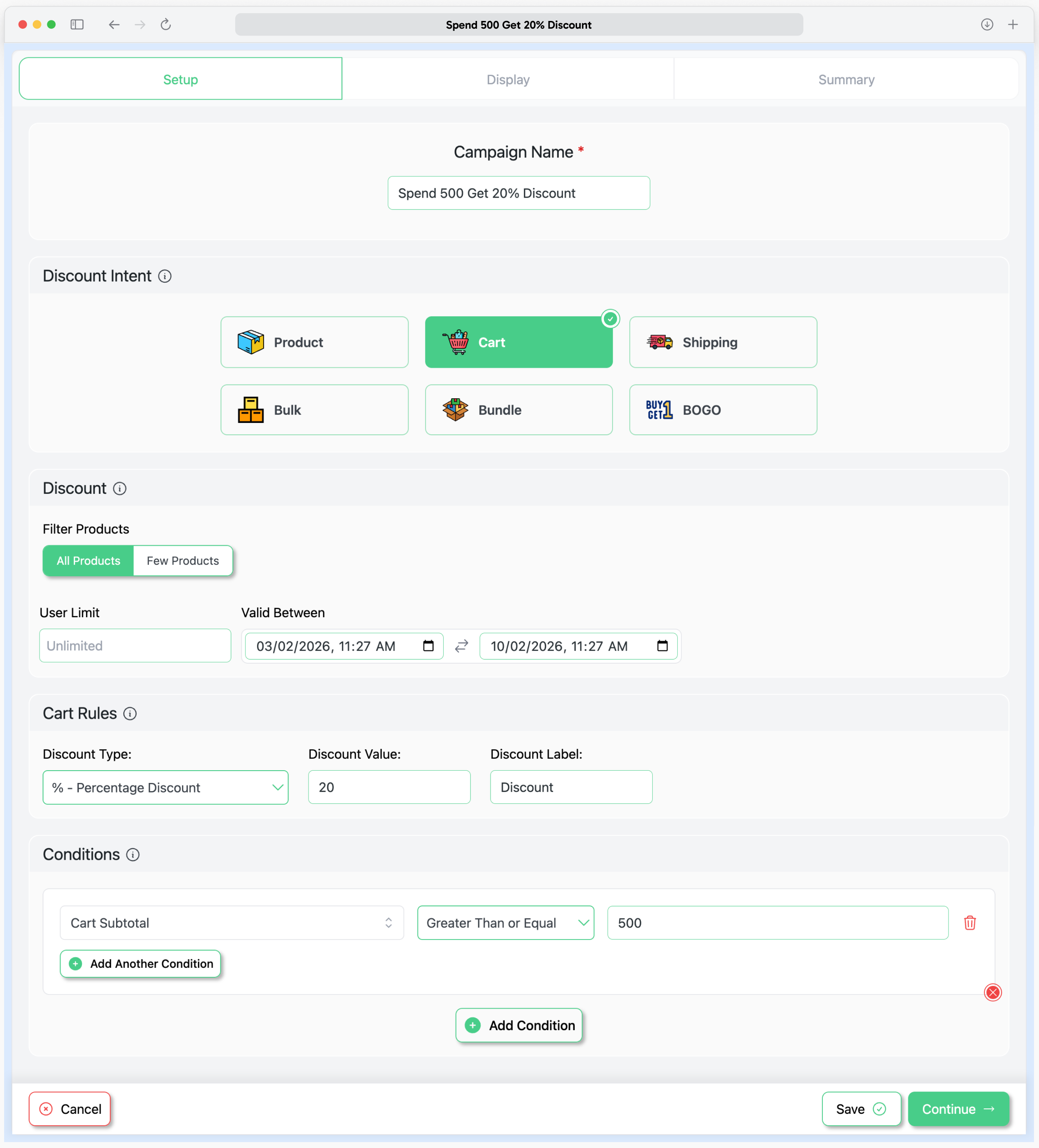
➡️ Cart-Based Discounts: Cart discounts apply to the entire shopping cart based on conditions like subtotal amount, total item count, or total quantity. These WooCommerce cart discounts encourage customers to add more items or spend more to unlock savings.
Cart discount examples:
- $15 off when cart subtotal exceeds $100
- 10% off entire order when cart contains 5 or more items
- $25 off when total quantity reaches 20 units
- 5% off when cart contains products from 3 or more categories
- $50 off orders over $300
➡️ Bulk Discounts for WooCommerce: Bulk discounts create tiered quantity-based pricing that encourages customers to purchase more units. This WooCommerce bulk discount feature shows customers exactly how much they save at each quantity tier.
You define quantity ranges and the discount percentage or amount for each range. Disco displays a bulk pricing table on product pages so customers understand the savings at each tier before they buy.
Bulk discount example:
- 1-4 units: Regular price ($20 each)
- 5-9 units: 10% off ($18 each)
- 10-24 units: 20% off ($16 each)
- 25-49 units: 30% off ($14 each)
- 50+ units: 40% off ($12 each)
➡️ Bundle Discounts: Bundle discounts offer savings when customers purchase specific product combinations together. This WooCommerce bundle discount feature helps you upsell complementary products and increase average order value.
You define which products make up a bundle and what discount applies when customers add all bundle items to their cart. Bundles can require specific products or products from specific categories.
Bundle discount examples:
- 5 units: Regular price ($20 each)
- 10 units: 10% off ($18 each)
- 20 units: 20% off ($16 each)
- 50 units: 30% off ($14 each)
- 80+ units: 40% off ($12 each)
➡️ BOGO Discounts (Pro Feature): Buy One Get One deals are among the most effective promotional strategies. Disco Pro lets you create flexible BOGO discount rules with various configurations.
Configure the buy quantity (how many items customers must purchase), the get quantity (how many discounted items they receive), and the discount on the get items (free, percentage off, or fixed amount off).
BOGO rules can apply within the same product or across different products (buy product X, get product Y discounted).
BOGO discount examples:
- Buy 1 T-shirt, get 1 T-shirt free
- Buy 2 pizzas, get 1 pizza free
- Buy 1 item at full price, get second item 50% off
- Buy any 3 items from Category A, get 1 item from Category B free
- Buy 2 pairs of shoes, get 3rd pair at $20 off
➡️ Free Shipping Discounts: Free shipping offers effectively reduce cart abandonment and increase conversions. Disco lets you create conditional free shipping rules based on cart value, specific products, customer attributes, or other criteria.
When customers qualify, Disco automatically sets shipping to free at checkout. Combined with messaging that shows You’re $X away from free shipping, you can motivate customers to add more items.
Free shipping rule examples:
- Free shipping on orders over $50
- Free shipping on all products in the Furniture category
- Free shipping for logged-in customers
- Free shipping for customers in specific countries or regions
- Free shipping when cart contains 10 or more items
- Free shipping on orders containing specific products
💯 Advanced WooCommerce Discount Conditions for Every Scenario 💯
The power of Disco lies in combining multiple conditions to create precisely targeted discount rules. You’re not limited to broad promotions – you can create sophisticated rules that target exactly the right products, customers, and timing.
☞ Product Conditions
Control which products qualify for discounts using:
- Specific products by name or product ID
- Product categories including parent and child categories
- Product tags for flexible grouping
- Product attributes and specific variations
- SKU patterns for inventory-based targeting
- Stock status targeting in-stock, out-of-stock, or backorder items
- Price ranges for products above or below certain price points
- Sale status targeting items already on sale or regular price only
☞ Cart Conditions
Apply discounts based on shopping cart contents:
- Cart subtotal thresholds before or after other discounts
- Total number of distinct items in cart
- Total quantity of all products combined
- Presence of specific products in cart
- Products from specific categories present in cart
- Cart weight for physical product shipping calculations
- Previous discount applications
☞ Price Conditions
Control discounts based on product pricing details:
- Currency-based targeting for multi-currency stores
- Regular, current, or sale price conditions
- Price rules including or excluding tax
- Sale schedule control with start and end dates
☞ Customer Conditions (Pro)
Target discounts to specific customer segments:
- WordPress user roles such as customer, subscriber, wholesale, or VIP
- Logged-in registered customers versus guest checkouts
- Specific customers identified by email address or user ID
- First-time customers with no previous order history
- Returning customers with one or more previous orders
- Order count thresholds based on customer purchase history
- Lifetime spend thresholds based on total customer value
- Customer registration date for new versus established customers
☞ Product Purchase History Based Conditions (Pro)
Create smart discounts based on a customer’s past purchases of specific products:
- Last order date of a specific product
- Number of orders made containing a specific product
- Total amount spent on a specific product
- Total quantity purchased of a specific product
☞ Schedule Conditions
Control precisely when discounts are active:
- Start date and specific start time
- End date and specific end time
- Specific days of the week for weekend or weekday promotions
- Recurring schedule options
☞ Usage Limits (Pro)
Prevent discount abuse and control promotional costs:
- Maximum uses per individual customer
- Maximum total uses across all customers combined
- Maximum discount amount cap per order
Campaign Display – Make your store sales 10X (Pro Features)
Disco’s campaign display features are designed to maximize discount visibility and drive higher conversions. By clearly showcasing offers across product, cart, and pricing displays, customers instantly understand the value of your promotions—turning casual visitors into confident buyers.
☞ Customized Product Badges: Customized product badges instantly highlight discounted products across your store. When a customer browses your shop, eye-catching badges like 20% OFF, Bulk Deal, or Bundle Offerclearly signal active discounts—ensuring promotions never go unnoticed.
Product badges are fully customizable in text, color, and style, making discounted products stand out in product listings, category pages, and product detail pages. This visual cue builds urgency and inspires customers to explore discounted items faster.
☞ Customized Promotional Text on Product Pages: Customized promotional text lets you communicate discount details directly on the product page. Display clear, persuasive messages such as Buy more and save up to 40% or Special bundle pricing available to guide customers toward higher-value purchases.
This feature helps educate customers about active campaigns without confusion, reinforcing the offer at the exact moment they’re deciding to buy.
☞ Customized Countdown Timer on Product Pages: Countdown timers create urgency by showing how much time is left before a discount expires. By visually displaying a live countdown on the product page, customers are encouraged to act quickly rather than postpone their purchase.
You can customize the countdown’s design, placement, and messaging to match your campaign style—perfect for flash sales, limited-time offers, and seasonal promotions.
☞ Customized Cart Notices: Customized cart notices reinforce discounts at checkout by displaying clear messages inside the cart. Inform customers when discounts are applied, remind them how close they are to unlocking a better deal, or encourage them to add more items to qualify for additional savings.
These notices reduce hesitation, increase average order value, and reassure customers that they’re getting the best possible deal.
☞ Customized Bulk Discount Table: The bulk discount table visually displays tiered pricing and quantity-based savings directly on the product page. Customers can easily compare price breaks at different quantity levels and see exactly how much they save as they buy more.
The table is fully customizable to match your store’s branding and campaign style, making bulk pricing easy to understand and highly effective at driving larger orders.
☞ Customized Bundle Discount Table: The bundle discount table clearly presents fixed-quantity bundle offers in a structured and easy-to-read format. Customers can quickly identify available bundle deals, required quantities, and discounted prices without confusion.
By simplifying bundle pricing and highlighting savings upfront, this feature increases trust and encourages customers to choose higher-value bundle options.
Compatible plugins with disco plugin (Pro Feature)
➡️ Advanced Custom Fields (ACF®): The Disco plugin works seamlessly with Advanced Custom Fields (ACF®), allowing you to create and apply discounts based on custom product fields. This makes it easy to build highly targeted pricing rules and promotional campaigns using your existing ACF data—giving you greater flexibility and control over how discounts are applied across your store.
➡️ Multicurrency Support with WPML: Disco Plugin works perfectly with WPML for multi-currency support. Now, you can set up discounts in different currencies, making it easy to sell globally.
➡️ Get Currency Switcher Professional with FOX: Our WooCommerce Discount Plugin works seamlessly with the Currency Switcher plugin, letting you create discounts in multiple currencies. Upgrade to Get Currency
Switcher Professional with FOX to manage your store’s pricing and discounts effortlessly, no matter where your customers are located.
➡️ CURCY – Multi Currency for WooCommerce:WooCommerce Discount Plugin (DISCO Plugin) is fully compatible with the Free Currency Exchange (CURCY) plugin. This ensures that your discount rules work seamlessly across multiple currencies, offering your customers a smooth shopping experience no matter where they are. With DISCO and CURCY, you can easily manage discounts and currency conversions together to boost sales globally.
➡️ WooCommerce Currency Switcher by Aelia: The Disco plugin works seamlessly with the Aelia plugin for multi-currency support. You can show prices and accept payments in different currencies while setting up flexible discount rules. This compatibility helps you offer discounts to a global audience without worrying about currency conversions, making it easy to increase sales across multiple regions.
Creating Targeted Discount Campaigns
Combining conditions lets you build sophisticated promotional campaigns. Here are examples of advanced discount rules:
➤ First-time customers who spend over $75 get 20% off
- Conditions: First order = yes, Cart subtotal > $75
- Discount: 20% off cart total
➤ VIP members get 15% off Electronics, weekends only
- Conditions: User role = VIP, Product category = Electronics, Days = Saturday and Sunday
- Discount: 15% off matching products
➤ Buy 3+ skincare products, get free shipping
- Conditions: Category = Skincare, Quantity from category ≥ 3
- Discount: Free shipping
➤ Loyal customers who’ve spent over $500 lifetime get permanent 10% off
- Conditions: Customer total spent > $500
- Discount: 10% off all products, no end date
➤ Flash sale: 40% off clearance items, today only
- Conditions: Tag = Clearance, Date = today
- Discount: 40% off matching products
How Discounted Prices Display to Customers
Disco ensures customers see their savings clearly at every step of the shopping journey:
Product Pages: Original prices display with strikethrough formatting, discounted prices show prominently beside them. Bulk discount tables display quantity tiers. Savings amount or percentage can display.
Category and Archive Pages: Discounted prices appear on product cards while browsing. Customers see savings without clicking into each product.
Cart Page: All applicable discounts show with clear labels explaining each discount. Line items display original and discounted prices. Cart totals reflect all discounts.
Checkout Page: …
Screenshots




Blocks
This plugin provides 1 block.
- block_name
Installation
Automatic Installation
- Go to Plugins Add New in your WordPress admin
- Search for “Disco”
- Click Install Now
- Click Activate
Manual Installation
- Download the plugin zip file
- Go to Plugins Add New Upload Plugin
- Select the zip file and click Install Now
- Activate the plugin
Creating Your First Discount
- Navigate to Disco in your WordPress admin menu
- Click Add New Campaign
- Choose your discount type
- Configure your product, cart, or customer conditions
- Set discount amount as percentage or fixed value
- Set optional schedule dates
- Publish your campaign
Your discount rules are now live. Qualifying customers will see discounted prices automatically.
FAQ
-
How is Disco different from WooCommerce coupons?
-
WooCommerce coupons require customers to obtain a code and enter it at checkout. If they forget or don’t have a code, they pay full price. Disco works completely differently. You create discount rules with conditions, and discounts apply automatically when those conditions are met. Customers see discounted prices on product pages and in their cart immediately without entering anything. This automatic approach removes friction and improves conversion rates.
-
What types of discounts can I create with Disco?
-
Disco supports six discount campaign types: Product discounts apply percentage or fixed discounts to specific products, categories, or tags. Cart discounts reduce the entire cart total based on subtotal or item count. Bulk discounts create tiered quantity pricing. Bundle discounts offer savings on product combinations. BOGO deals provide buy-one-get-one offers (Pro feature). Free shipping rules offer conditional free shipping.
-
Can I create percentage discounts and fixed amount discounts?
-
Yes. Every discount type in Disco supports both percentage-based discounts (such as 10% off or 25% off) and fixed amount discounts (such as $5 off or $20 off). You select which discount method works best for each campaign you create.
-
Does Disco work with variable products and product variations?
-
Yes. Disco fully supports WooCommerce variable products. Discount rules apply to all variations that match your specified conditions. You can also target specific variations using product attributes in your condition settings.
-
Can I apply discounts to specific categories only?
-
Yes. Product conditions allow you to target specific categories including both parent categories and child subcategories. You can also combine category conditions with other conditions such as customer role or cart value for precise targeting.
-
Can I create different discounts for different customer groups?
-
Yes. Customer conditions let you target discounts by user role (such as wholesale customers or VIP members), logged-in versus guest status, first-time versus returning customers, number of previous orders, and lifetime spend amount. This enables wholesale pricing, loyalty rewards, and new customer promotions.
-
Can I schedule discounts to start and end automatically?
-
Yes. Every discount campaign can have a specific start date and time plus an end date and time. Discounts activate and deactivate automatically based on your schedule. This is ideal for holiday sales, flash promotions, weekend specials, or any time-limited offers.
-
Can I limit how many times each customer uses a discount?
-
Yes. Usage limit settings let you specify maximum uses per individual customer and maximum total uses across all customers. This prevents discount abuse and helps you control promotional costs for limited offers.
-
Can multiple discounts apply to the same order?
-
Yes. When a customer qualifies for multiple discount rules, those discounts can stack together on the same order. You maintain control over discount priorities and can configure how multiple discounts interact.
-
Will Disco slow down my WooCommerce store?
-
No. Disco is performance-optimized with efficient database queries and intelligent caching mechanisms. Discount calculations execute quickly without impacting page load times. The plugin is tested on high-traffic WooCommerce stores to ensure reliable performance.
-
Is Disco compatible with my WooCommerce theme?
-
Yes. Disco works with any properly coded WooCommerce theme. The plugin uses standard WooCommerce hooks and filters to display discounted prices, ensuring compatibility with most themes and page builders including Elementor, Divi, and others.
-
Does Disco support multiple currencies?
-
Yes. Disco integrates with popular multi-currency plugins including WPML WooCommerce Multilingual, FOX Currency Switcher, CURCY Multi Currency for WooCommerce, and Aelia Currency Switcher. Discount rules calculate and display correctly across all configured currencies.
-
How do I create Buy One Get One (BOGO) offers?
-
BOGO deals are available in Disco Pro. The Pro version lets you create various BOGO configurations including buy-one-get-one-free, buy-two-get-one-free, buy-one-get-one-at-percentage-off, and cross-product deals where buying product X discounts product Y.
-
Do discounted prices show on product pages before checkout?
-
Yes. Product discounts display directly on product pages with the original price shown in strikethrough and the discounted price displayed prominently. Bulk discount pricing tables also display on product pages so customers see quantity tier savings before purchasing.
-
How do I get help if I have questions or issues?
-
Free plugin users can post questions in the WordPress.org support forum, where our team monitors and responds. Disco Pro users receive priority email support with faster response times at [email protected]. Complete documentation with tutorials is available at discoplugin.com/docs.
Reviews


Contributors & Developers
“Discount Rules for WooCommerce – Disco | Dynamic Pricing, Conditions, Bulk, Bundle, BOGO” is open source software. The following people have contributed to this plugin.
Contributors

“Discount Rules for WooCommerce – Disco | Dynamic Pricing, Conditions, Bulk, Bundle, BOGO” has been translated into 9 locales. Thank you to the translators for their contributions.
Interested in development?
Browse the code, check out the SVN repository, or subscribe to the development log by RSS.
Changelog
1.3.20(Feb 19, 2026)
- Fix: In conditions empty field validation issue.
- Update: Plugin title and readme file updated.
1.3.19(Feb 17, 2026)
- Update: Readme file updated with all latest features list and FAQs.
1.3.18(Feb 16, 2026)
- Refactored: Code quality improvement for product highlight feature.
- Tweak: WooCommerce version 10.5.1 compatibility checked.
1.3.17(Feb 09, 2026)
- Tweak: WooCommerce version 10.5.0 compatibility checked.
- Tweak: WordPress version 6.9.1 compatibility checked.
1.3.16(Feb 02, 2026)
- Added: Parent ID condition added for all discount intents.
- Added: Credits.txt file and plugin build process documentation added.
1.3.15(Jan 29, 2026)
- Added: Settings and Documentation link added in plugin action links.
- Added: Credits.txt file and plugin build process documentation added.
- Refactored: Code quality improvement and tested for BOGO discount rules.
1.3.14(Jan 26, 2026)
- Fix: Escaping and sanitization issue fix for campaign display section.
- Refactored: Campaign display code refactored for better performance.
1.3.13(Jan 20, 2026)
- Fix: Pro icon click not working issue.
- Refactored: Cart base discount code refactored for better performance.
1.3.12(Jan 15, 2026)
- Fix: Badge validity issue when start date is empty.
- Fix: Icon not showing issue in campaign list.
1.3.11(Jan 13, 2026)
- Fix: Price issue in conditions.
- Improvement: Code quality improvement.
1.3.10(Jan 08, 2026)
- Fix: Enqueue version issue.
- Tweak: PHP version 8.1 compatibility checked.
1.3.9(Jan 05, 2026)
- Fix: Cart loading issue when conditions added.
1.3.8(Jan 05, 2026)
- Removed: Holiday promotional banner removed.
- Improvement: Code quality improvement.
1.3.7(Jan 01, 2026)
- New: Discount apply upto 100% added.
1.3.6(Dec 29, 2025)
- Tweak: WooCommerce version 10.4.3 compatibility checked.
1.3.5(Dec 22, 2025)
- Updated: Plugin name updated.
1.3.4(Dec 22, 2025)
- Refactor: Code quality improvement.
1.3.3(Dec 18, 2025)
- Fix: Site slow loading issue in product archive page.
- Updated: Readme file updated.
1.3.2(Dec 15, 2025)
- Fix: Regular price settings issue for cart discount.
- Added: Holiday season promotional banner.
- Tweak: WooCommerce version 10.4.2 compatibility checked.
1.3.1(Dec 11, 2025)
- Fix: Footer button Z index issue.
- Fix: Summery page selected product issue.
- Fix: Notice not removing issue.
1.3.0(Dec 08, 2025)
- New: Bulk Discount table view.
- New: Bundle Discount table view.
- New: Summary view for all discount rules.
1.2.90(Dec 04, 2025)
- Added: Shop manager role capability to manage disco plugin.
- Fix: Cart discount label issue.
- Removed: Black Friday promotional banner.
- Tweak: WordPress version 6.9 compatibility checked.
1.2.89(Dec 01, 2025)
- Updated: Readme file updated.
1.2.88(Nov 25, 2025)
- Fix: Black Friday promotional date issue.
1.2.87(Nov 25, 2025)
- Added: Black Friday discount banner.
- Tweak: WooCommerce version 10.3.5 compatibility checked.
1.2.86(Nov 20, 2025)
- Fix: Banner dismiss issue.
1.2.85(Nov 17, 2025)
- Added: 10th anniversary celebration promotional banner.
1.2.84(Nov 10, 2025)
- Fix: Empty value validation issue.
1.2.83(Nov 06, 2025)
- Removed: Promotional custom link.
1.2.82(Nov 03, 2025)
- Tweak: WooCommerce version 10.3.4 compatibility.
- Removed: Halloween banner.
1.2.81(Oct 30, 2025)
- Tweak: WooCommerce version 10.3.3 compatibility.
1.2.80(Oct 27, 2025)
- Added: Custom meta link in plugin page.
- Tweak: WooCommerce version 10.3.0 compatibility checked.
1.2.79(Oct 23, 2025)
- Update: Readme file updated.
1.2.78(Oct 20, 2025)
- Added: Halloween Banner.
1.2.77(Oct 16, 2025)
- Fix: Pro button issue in dropdown.
1.2.76(Oct 14, 2025)
- Refactor: Code quality improvement.
1.2.75(Oct 09, 2025)
- Tweak: WooCommerce version 10.2.3 compatibility checked.
1.2.74(Oct 06, 2025)
- Tweak: WordPress version 6.8.3 compatibility checked.
1.2.73(Sep 29, 2025)
- Fix: On-sale badge showing issue.
- Fix: Product meta update and slow down issue.
1.2.72(Sep 25, 2025)
- Tweak: WooCommerce version 10.2.1 compatibility checked.
1.2.71(Sep 23, 2025)
- Improvement: Code quality improvement.
1.2.70(Sep 17, 2025)
- Fix: Cart product loading issue.
1.2.69(Sep 11, 2025)
- Removed: Subtotal with tax condition removed.
- Refactor: Item count and item quantity condition code.
1.2.68(Sep 8, 2025)
- Fix: Strike through price issue for variable product with same variations price.
1.2.67(Sep 4, 2025)
- Improvement: Code quality improvement.
1.2.66(Sep 1, 2025)
- Tweak: WooCommerce version 10.1.2 compatibility checked.
1.2.65(Aug 28, 2025)
- Added: BOGO free product note.
1.2.64(Aug 25, 2025)
- Fix: BOGO discount variation product issue fix.
- Tweak: WooCommerce version 10.1.1 compatibility checked.
1.2.63(Aug 21, 2025)
- New: Min max validation added for bulk and bundle intent.
- Fix: Min max validation issue for BOGO intent.
- Fix: Pro button issue in conditions.
- Improvement: User limit slow query improvement.
1.2.62(Aug 18, 2025)
- New: Compatible plugin notice added.
1.2.61(Aug 14, 2025)
- Fix: Bulk action popup issue, when no discount intent selected.
- Improvement: Code Quality improvement.
- Tweak: WooCommerce version 10.1.0 compatibility checked.
1.2.60(Aug 11, 2025)
- New: Product purchase history.
- Added: Last order date of a product.
- Added: Number of order made with a product.
- Added: Number of amount sold with a product.
- Added: Number of quantity sold with a product.
1.2.59(Aug 07, 2025)
- New: Customer History conditions.
- Added: Customer is first order condition.
- Added: Customer last order amount condition.
- Added: Customer last order date condition.
- Added: Number of orders made by customer condition.
- Added: Total spent by customer condition.
- Added: Total quantity purchased by customer condition.
1.2.58(Aug 04, 2025)
- Fix: Minimum and Maximum quantity value issue fix.
1.2.57(July 31, 2025)
- New: Settings added show or hide WooCommerce sale badge.
- New: Settings added show or hide strike-through for discounted price.
1.2.56(July 28, 2025)
- New: Subtotal with tax dropdown added in conditions.
- Fix: Discounted price not showing with tax issue.
- Tweak: WooCommerce version 10.0.4 compatibility checked.
1.2.55(July 24, 2025)
- New: Discount label added for cart discount.
- Fix: Variation product strikethrough price issue.
- Fix: Price condition issue for variation product discount.
1.2.54(July 21, 2025)
- New: WooCommerce coupon behavior settings added.
- Improvement: Code Quality improvement.
1.2.53(July 17, 2025)
- New: BOGO category based discount added.
- New: Discount value highlighted in cart.
- Fix: Filter product not filtering issue in BOGO discount.
- Fix: Conditions not working for filter products.
- Tweak: WooCommerce version 10.0.2 compatibility checked.
- Tweak: WordPress version 6.8.2 compatibility checked.
1.2.52(July 10, 2025)
- New: Cart item count and cart item count added in conditions.
- Fix: Cart total not working in conditions.
1.2.51(July 01, 2025)
- Fix: Cart discounted product reloading issue.
- Improvement: Code Quality improvement.
1.2.50(July 03, 2025)
- Removed: Promotional banner removed.
1.2.49(Jun 30, 2025)
- New: Conformation popup added for reset conditions.
- Fix: Reset condition issue, when discount intent changed to product.
1.2.48(Jun 26, 2025)
- Fix: WooCommerce coupon not working in cart issue.
- Tweak: WooCommerce version 9.9.5 compatibility checked.
1.2.47(Jun 24, 2025)
- Fix: Product price changing issue in WooCommerce all product page.
- Added: Promotion banner added.
1.2.46(Jun 23, 2025)
- Fix: Regular price settings issue.
- Tweak: WooCommerce version 9.9.4 compatibility checked.
1.2.45(Jun 17, 2025)
- Fix: Campaign not showing issue cause of plain permalink.
1.2.44(Jun 16, 2025)
- Tweak: WooCommerce version 9.9.3 compatibility checked.
1.2.43(Jun 02, 2025)
- New: Video tutorial added in readme file.
- New: New plugin icon added.
- Fix: String comparison issue in conditions.
1.2.41(May 29, 2025)
- New: New plugin icon added.
- Fix: Conditions issue in cart based discount.
1.2.41(May 26, 2025)
- New: Plugin deactivation popup added.
1.2.40(May 22, 2025)
- New: Product brand added in conditions(Pro).
- Fix: Pro Banner link issue.
1.2.39(May 19, 2025)
- Fix: Fatal error issue when selected product is empty.
- Fix: Variation product discount issue, when category or tags in conditions.
- Fix: Discount not applying in variations, when selected product is variable product.
- Fix: Attribute not working in conditions.
1.2.39(May 19, 2025)
- Bump: Version bumped due to test case.
1.2.37(May 15, 2025)
- New: Product in cart condition added.
- Tweak: WooCommerce version 9.8.5 compatibility checked.
1.2.36(May 12, 2025)
- Fix: Category not working on conditions in BuyXGetY.
- Fix: Fix BOGO item discount issue.
1.2.35(May 8, 2025)
- Fix: Parent category in list not working in conditions.
- Fix: Variation product regular price not showing issue.
1.2.34(May 5, 2025)
- New: Percentage, Fixed discount added for BOGO(Pro).
1.2.33(May 5, 2025)
- Bumped: Version bumped due to node version.
1.2.32(May 1, 2025)
- Tweak: WooCommerce version 9.8.3 compatibility checked.
- Tweak: WordPress version 6.8.1 compatibility checked.
1.2.31(April 22, 2025)
- Fix: Warning issue in percentage discount.
1.2.30(April 15, 2025)
- Fix: Empty condition save issue.
- Tweak: WooCommerce version 9.8.1 compatibility checked.
- Tweak: WordPress version 6.8 compatibility checked.
1.2.29(April 10, 2025)
- Fix: Cart subtotal warning issue.
1.2.28(April 07, 2025)
- Tweak: WooCommerce version 9.7.2 compatibility checked.
1.2.27(Mar 18, 2025)
- Fix: Empty product warning issue.
1.2.26(Mar 17, 2025)
- Fix: Cart item warning issue.
1.2.25(Mar 13, 2025)
- Tweak: WooCommerce version 9.7.1 compatibility checked.
1.2.24(Mar 10, 2025)
- Improvement: Code Quality improvement.
1.2.23(Mar 06, 2025)
- Fix: Admin component not loading, when have PHP warning issue.
1.2.22(Mar 03, 2025)
- Added: Review notice banner.
1.2.21(Feb 28, 2025)
- Tweak: WordPress version 6.7.2 compatibility checked.
1.2.20(Feb 24, 2025)
- Fix: Stock Quantity issue fix in conditions.
1.2.19(Feb 18, 2025)
- Fix: Discount type loading issue.
- Improvement: Code Quality improvement.
1.2.18(Feb 13, 2025)
- Fix: Bulk discount calculation issue, when max quantity is empty.
1.2.17(Feb 11, 2025)
- Fix: Product attribute not working on conditions issue.
1.2.16(Feb 06, 2025)
- Tweak: WooCommerce version 9.6.1 compatibility checked.
1.2.15(Feb 05, 2025)
- Fix: JS conflict issue for ACF.
1.2.14(Feb 03, 2025)
- Fix: Condition not working for author name and author email.
1.2.13(Jan 29, 2025)
- Fix: Product and cart amount type casting issue.
1.2.12(Jan 23, 2025)
- Fix: Invalid product issue for variation product, when cart discount active.
1.2.11(Jan 22, 2025)
- Fix: Condition dropdown not loading when ACF not active.
1.2.10(Jan 22, 2025)
- Added: Documentation url in learn more link.
1.2.9(Jan 14, 2025)
- Fix: Discount apply issue, when tax included with product price.
1.2.8(Jan 10, 2025)
- Fix: Discounted price not showing in variable product issue.
- Added: Disco Pro banner.
- Updated: Readme file updated.
1.2.7(Jan 06, 2025)
- Fix: Public js file loading issue.
1.2.6(Dec 30, 2024)
- Fix: Category not working in conditions.
1.2.5(Dec 19, 2024)
- Add: Discounted amount and convert price filter added.
1.2.4(Dec 13, 2024)
- Fix: Product price meta issue.
1.2.3(Dec 02, 2024)
- Fix: Discount issue for Bundle and Bulk intent.
- Fix: Fatal error issue, when select attribute name in condition.
1.2.2(Dec 02, 2024)
- Bumped: Version bumped due to node version.
1.2.1(Dec 02, 2024)
- Bumped: Version bumped due to tagging version.
1.1.10(Nov 13, 2024)
- Add: Discount intent documentation.
- Tweak: WordPress version 6.7 compatibility checked.
- Tweak: WooCommerce version 9.4 compatibility checked.
1.1.9(Oct 28, 2024)
- Update: User Interface Updated.
1.1.8(Oct 28, 2024)
- Bumped: Version bumped due to test failed.
1.1.7(Oct 11, 2024)
- Fix: Single variation product discount price.
- Fix: Discount not apply when valid to date is empty.
1.1.6(Sept 30, 2024)
- Fix: Discount value validation issue for free shipping.
- Fix: Discount value not showing for variable product.
1.1.5(Sept 25, 2024)
- Fix: Fatal error issue, when discount value is empty.
- Fix: Discount valid from and discount valid to not clear issue.
- Fix: Fixed discount types apply multiple times issue.
1.1.4(Sept 18, 2024)
- Fix: Fatal error issue fixed.
1.1.3(Sept 17, 2024)
- Fix: Warning on a bulk intent for fixed discount value.
1.1.2 (September 12, 2024)
- Fix: Discount type (Percentage) issue in Bulk Discount.
- Fix: Discount type (Percentage) issue Bundle Discount
- Fix: Max quantity empty value issue in Bulk Discount.
1.1.0 (September 09, 2024)
- Fix: Discount conditions not working issues fixed.
- Fix: Discount not working for product variation.
- Fix: Discount not apply for Cart, Free Shipping, Bulk Discount, Bundle Discount.
- Fix: Fatal error on multiple select on conditions.
- Fix: Discount user limit issue fixed.
- Tweak: WooCommerce version 9.2.3 compatibility checked.
- Improvement: Security & Code Quality improvement.
1.0.5 (August 07, 2024)
- Fix: Logo issue fix.
- Fix: Discount not working for product variation.
- Fix: API issue fix.
- Tweak: WordPress version 6.6 compatibility checked.
- Tweak: WooCommerce version 9.0 compatibility checked.
1.0.4 (June 10, 2024)
- Fix: Favicon issue fix.
1.0.3 (June 03, 2024)
- Added: Favicon added.
- Fixed: Discount price not effecting into cart.
1.0.2 (2024-05-29)
- Sidebar removed
1.0.1 (2024-05-28)
- Status message problem solve.
1.0.0 (2024-05-27)
- Initial Release.