

বৰ্ণনা
FM: QR Code Gateway for WooCommerce lets your customers pay using any UPI app by scanning a QR code.
This simple, lightweight gateway integrates directly into WooCommerce and supports both Classic and Block Checkout.
Customers scan the QR code, make payment, and enter their Transaction ID — which is securely saved in the order details.
Note: This plugin is an independent open-source project created and maintained by the developer.
It is not affiliated with, endorsed by, or dependent on any company or organization.
🔹 Features
- Accept UPI payments via any QR code.
- Works with both Classic and Block Checkout.
- Capture and store customer-entered Transaction ID.
- Add custom instructions for users during checkout.
- Secure, lightweight, and easy to configure.
- Fully integrated with WooCommerce Payment Settings.
🧩 Compatibility
- WordPress 5.8 or higher
- WooCommerce 6.0 or higher
- PHP 7.4 or higher
- Compatible with all UPI apps (Google Pay, PhonePe, Paytm, BHIM, etc.)
License
This plugin is free software: you can redistribute it and/or modify it under the terms of the GNU General Public License as published by the Free Software Foundation, version 2 of the License or any later version.
This plugin is distributed in the hope that it will be useful, but WITHOUT ANY WARRANTY; without even the implied warranty of MERCHANTABILITY or FITNESS FOR A PARTICULAR PURPOSE.
স্ক্ৰীনশ্বট
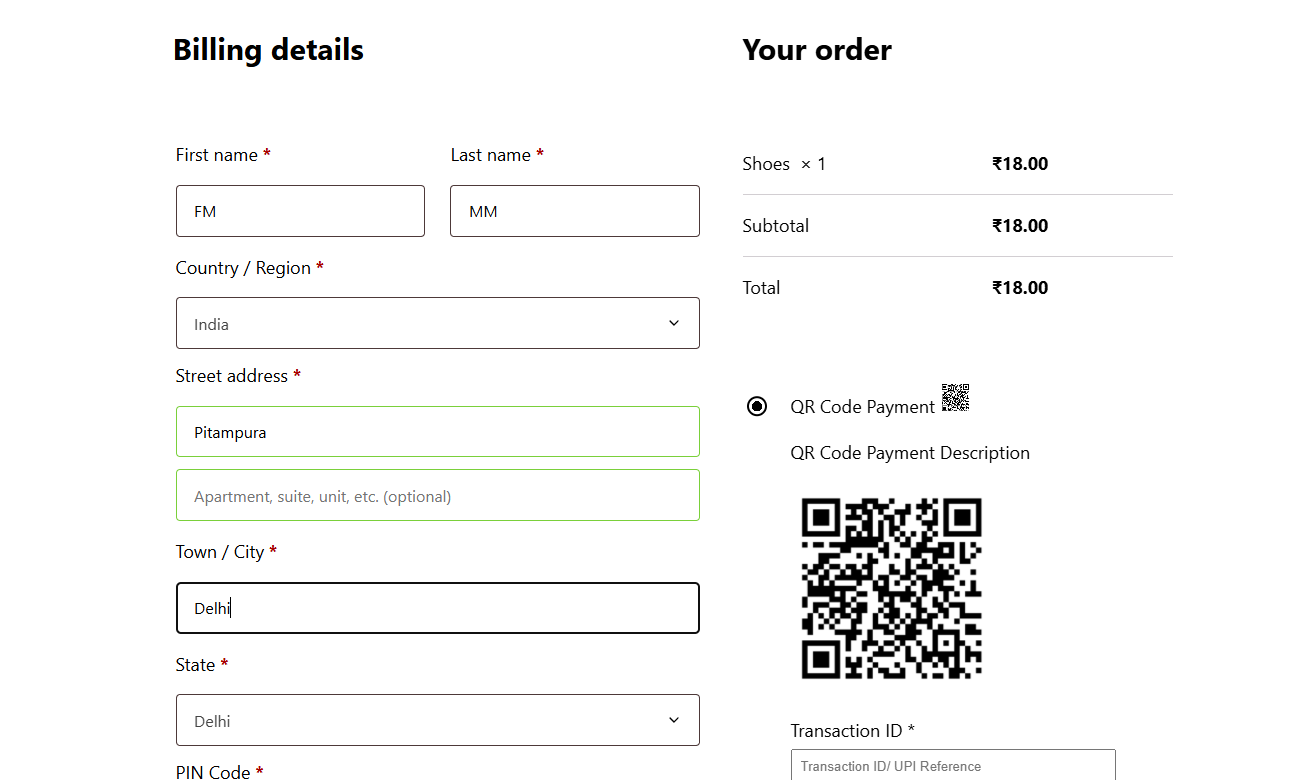
QR Code displayed at checkout. 
Customer entering Transaction ID. 
Payment Method Displayed in WooCommerce Payments section. 
Admin settings for QR code setup. 
Order details showing saved Transaction ID.
ইনষ্টলেশ্যন
- Upload the plugin folder to
/wp-content/plugins/fm-qr-code-gateway/, or install it directly through the WordPress “Plugins” screen. - Activate the plugin through the “Plugins” menu in WordPress.
- Go to WooCommerce Settings Payments.
- Enable FM: QR Code Gateway and configure your QR code image and payment instructions.
সঘনাই উত্থাপিত প্ৰশ্ন
-
Does this plugin verify UPI payments automatically?
-
No. Customers scan and pay manually. You can verify payments using the entered Transaction ID.
-
Can I use my own UPI QR code?
-
Yes. You can upload UPI QR code screenshot from your bank or payment provider.
-
Where can I view the Transaction ID?
-
The Transaction ID is saved with the order details and can be viewed in the WooCommerce admin order page.
-
Is it compatible with the new WooCommerce Block Checkout?
-
Yes, this plugin supports both Classic and Block Checkout experiences.
পৰ্য্যালোচনা
এই প্লাগিনৰ বাবে কোনো পৰ্য্যালোচনা নাই।
অৱদানকাৰী আৰু বিকাশকাৰীসকল
“FM: QR Code Gateway for WooCommerce” হৈছে মুক্ত উৎসৰ ছফ্টৱেৰ। এইসকল লোকে এই প্লাগিনত অৱদান আগবঢ়াইছে।
অৱদানকাৰীসকল
আপোনাৰ ভাষাত “FM: QR Code Gateway for WooCommerce” অনুবাদ কৰক।
বিকাশৰ প্ৰতি আগ্ৰহী?
ক’ড ব্ৰাউজ কৰক, SVN ৰিপজিটৰী চাওক নাইবা RSS-দ্বাৰা বিকাশৰ পঞ্জী ছাবস্ক্ৰাইব কৰক।
সলনি-পঞ্জী
1.0.1
- Fixed issues related to the textdomain.
1.0.0
- Initial release.
- Added support for Classic and Block Checkout.
- Added Transaction ID capture and display.