
বৰ্ণনা
Dashboard: Available Disk Space extends the built-in At a Glance widget on your WordPress Dashboard with a compact “Available Storage Space” row.
When you open Dashboard Home, you’ll immediately see:
- How much disk space is used and free
- A clear progress bar that fills up as your server disk gets full
- A quick visual indication when you’re running low on storage
This is useful if:
- You’re on shared hosting and want to avoid “out of disk space” surprises
- You manage multiple client sites and need a quick disk space check right after login
- You want a lightweight alternative to full server monitoring or security suites
The plugin is intentionally small and dependency-free:
- No extra admin menus
- No tracking or data collection
- Just one clean line in At a Glance with a visual bar and readable numbers
স্ক্ৰীনশ্বট
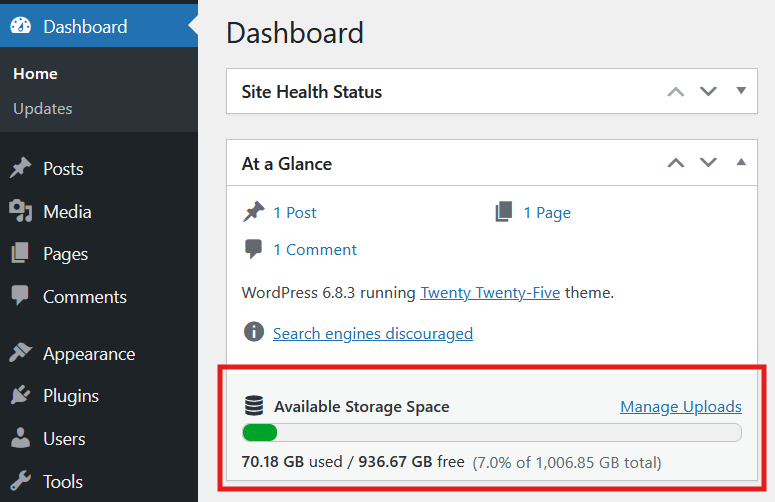
The At a Glance widget with the new “Available Storage Space” row showing a progress bar and human-readable disk usage (used, free, and total).
ইনষ্টলেশ্যন
- Upload the
dashboard-available-disk-spacefolder to the/wp-content/plugins/directory, or install the plugin via Plugins Add New and search for “Dashboard: Available Disk Space”. - Activate the plugin through the Plugins menu in WordPress.
- Go to Dashboard Home. In the At a Glance widget you’ll see a new “Available Storage Space” row with disk usage and a progress bar.
সঘনাই উত্থাপিত প্ৰশ্ন
-
How is disk space calculated?
-
The plugin uses PHP’s built-in
disk_total_space()anddisk_free_space()functions on the WordPress root path. This shows disk usage for the partition that hosts your WordPress installation. -
Will this work on any hosting provider?
-
It should work on most Linux-based shared hosting and VPS servers that allow PHP to read disk information. If
disk_free_space()is disabled on your server, the widget will show a warning instead of breaking your dashboard. -
Does this slow down my Dashboard?
-
No. The widget performs a single disk check when the Dashboard loads. There are no scheduled tasks or background processes.
-
Is this multisite compatible?
-
Yes. Network-activate the plugin and the disk space widget will be available on the Network Admin Dashboard.
-
Can I move it outside of At a Glance?
-
Not at the moment. The plugin is designed to keep things simple by integrating directly into the existing At a Glance widget instead of adding new Dashboard widgets.
পৰ্য্যালোচনা

অৱদানকাৰী আৰু বিকাশকাৰীসকল
“Dashboard: Available Disk Space” হৈছে মুক্ত উৎসৰ ছফ্টৱেৰ। এইসকল লোকে এই প্লাগিনত অৱদান আগবঢ়াইছে।
অৱদানকাৰীসকল
আপোনাৰ ভাষাত “Dashboard: Available Disk Space” অনুবাদ কৰক।
বিকাশৰ প্ৰতি আগ্ৰহী?
ক’ড ব্ৰাউজ কৰক, SVN ৰিপজিটৰী চাওক নাইবা RSS-দ্বাৰা বিকাশৰ পঞ্জী ছাবস্ক্ৰাইব কৰক।
সলনি-পঞ্জী
1.0
- Initial release
1.0.1
- open_basedir restriction error bug fixed
1.0.2
- Some visual improvements
- Added multilanguaginal support
- Added comments to methods
1.0.3
- WordPress 3.0 compatibility fixes
1.0.4
- Bugfixes
1.1.0
- Updated Dashboard integration to show disk information inside the core At a Glance widget.
- Added capability check for
upload_filesto control who sees the storage information. - Added safer escaping, i18n-friendly formatting, and an inline-styled progress bar consistent with current WordPress admin colors.
- Introduced lightweight admin CSS for the “Available Storage Space” row and cleaner markup with translatable labels.
1.1.1
- Moved dashboard widget styles into a dedicated
style.cssfile and enqueue it on the Dashboard for easier maintenance. - Improved PHPCS compatibility across the plugin files.
- Added open_basedir-safe checks before reading disk stats.