

Description
WP Post Redirect allows you to seamlessly redirect individual posts to external URLs or internal content. Once activated, a new metabox appears on the post edit screen, letting you specify a custom redirect URL or search for an internal post/page. Great for affiliate links, content curation, or moving content.
Features:
* Add a redirect URL to any post via a simple metabox.
* Search and select internal posts or pages for redirection.
* Set custom HTTP Status codes (301, 307, 308) globally or per post.
* Option to open redirects in a new tab and allow rel="nofollow".
* Highlight posts with active redirections in the admin area.
* Dashboard options page to manage all redirections with CSV Export.
* Backend column to mark posts with redirect enabled.
* Lightweight and easy to use.
* Fully compatible with the latest WordPress versions.
Screenshots
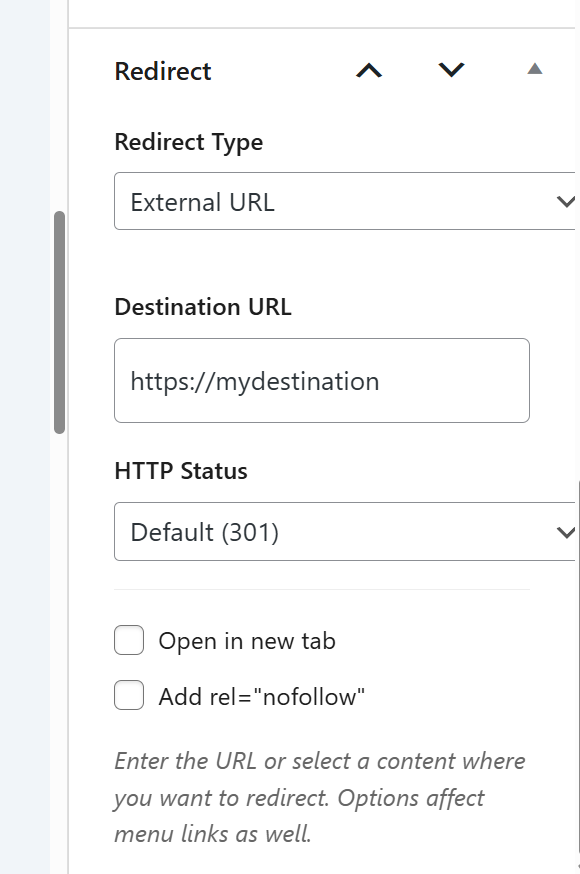
Easily set the target URL in the Post Editor. 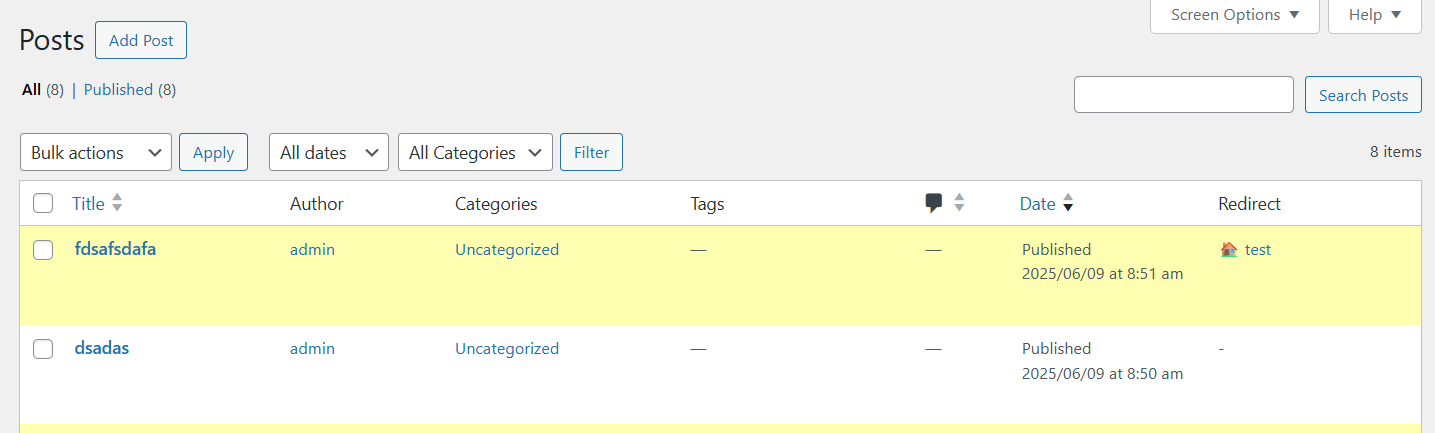
Quickly identify redirected posts in your list. 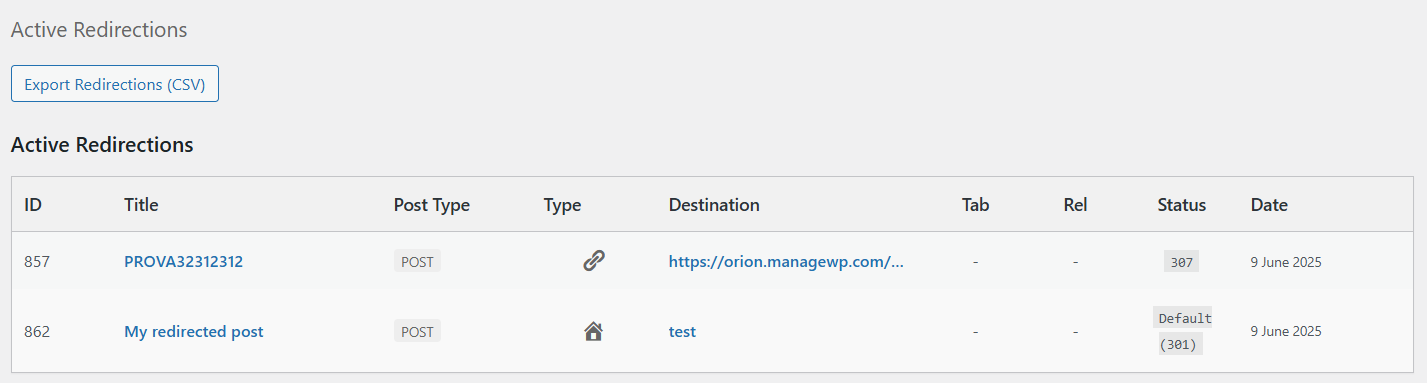
Manage and monitor all your links in one place.
Installation
- Upload the entire
wp-post-redirectfolder to the/wp-content/plugins/directory. - Activate the plugin through the ‘Plugins’ menu in WordPress.
- Edit any post and use the new “Redirect URL” metabox to set a redirect.
- Save your post. Visitors will be redirected to the specified URL.
FAQ
-
Where do I set the redirect URL?
-
On the post edit screen, look for the “Redirect” metabox. You can choose between “External URL” or “Internal Content”.
-
Can I remove a redirect?
-
Yes, simply switch to External and clear the URL, or remove the Internal selection, then update the post.
-
Does this affect SEO?
-
By default, redirection is 301 (Moved Permanently), which is best for SEO. You can change this to 307 or 308 in the settings or per-post.
Reviews


Contributors & Developers
“WP Post Redirect” is open source software. The following people have contributed to this plugin.
Contributors
Translate “WP Post Redirect” into your language.
Interested in development?
Browse the code, check out the SVN repository, or subscribe to the development log by RSS.
Changelog
2.2 – 2026-02-02
- [New] Support for Internal Content Redirection (search posts/pages).
- [New] Added options for “Open in new tab” and
rel="nofollow". - [New] Support for selectable HTTP Status Codes (301, 307, 308).
- [Improvement] Unified metadata storage for better efficiency.
- [Improvement] Enhanced Admin Dashboard with CSV Export support for new fields.
- [Fix] Metabox UI state preservation when switching tabs.
2.0.0 – 2025-05-26
- Major: You can now enable or disable the redirect metabox for any public custom post type (CPT) in the plugin settings. The “post” type is always enabled.
- The redirect metabox, frontend redirect, and permalink filtering are now only active for enabled post types.
- Added “Active Redirections” table and CSV export
- Inactive redirections (for disabled CPTs) are grouped and displayed separately in the settings page.
- Improved security and accessibility for the metabox and settings page.
- Improved styling for the settings page and tables.
- Code refactoring and object-oriented improvements.
1.5.1 – 2024-05-24
- WP 6.6 compatibility check.
- [New] Highlight posts with redirection in admin area.
- [New] Added options dashboard to manage all redirections.
- Minor improvements.
1.4.1 – 2023-05-18
- WP 6.2 compatibility check.
- [New] Backend column to mark posts with redirect enabled.
- Fixed PHP warning on some configurations. [Thanks to Andrea Smith]
1.3.2 – 2022-01-12
- WP 5.9 compatibility check.
1.3.1 – 2020-11-24
- WP 5.6 compatibility check.
- Minor improvements.
1.3 – 2018-04-23
- Version and compatibility update.
1.2 – 2015-09-14
- Plugin reload.
1.1 – 2013-07-13
- Repository readme fix.
- Added Presstrends I/O (modified version).
1.0 – 2013-07-12
- Initial release.