

الوصف
NextDash replaces the default WooCommerce My Account page with a modern customer dashboard.
Give your customers a faster, cleaner, and more intuitive account experience — without breaking WooCommerce compatibility or your WordPress theme.
Built with React and modern web technologies, NextDash improves usability, reduces friction, and makes your store feel professional and up to date.
Live demo
Visit our live demo to see how this plugin works.
Why NextDash?
The default WooCommerce My Account page is functional — but outdated.
NextDash modernizes the customer experience with:
* Faster navigation
* Clear visual hierarchy
* Mobile-friendly layouts
* A dashboard customers actually enjoy using
A better account experience leads to:
* Higher customer satisfaction
* Fewer support requests
* Increased repeat purchases
🚀 Key Features
- Modern Customer Dashboard – Clean, intuitive interface replacing WooCommerce’s default My Account page
- Dashboard Overview – Order statistics, recent orders, and account summary at a glance
- Order Management – Full order history with status badges, filtering, and pagination
- Order Details – Complete order information including items, billing, shipping, and payment details
- Downloads Center – Easy access to all downloadable products
- Address Management – Edit billing and shipping addresses inline
- Account Settings – Update name, email, and password
- Dark Mode Support – Light, dark, or system-based theme
- Mobile-First Design – Optimized for phones, tablets, and desktops
- Fast & Optimized – Loads only on WooCommerce My Account pages
- Developer Friendly – Hooks, filters, and extensibility
🔌 Compatibility
- Works with any WordPress theme
- Compatible with WooCommerce Blocks
- Supports WooCommerce HPOS (Custom Order Tables)
- Compatible with YITH WooCommerce Wishlist
- No conflicts with standard WooCommerce extensions
📱 Responsive & Accessible
- Mobile-first responsive layout
- Touch-friendly interface
- Keyboard navigation support
- Screen reader compatible
- WCAG-friendly contrast and structure
🚀 Performance
- Optimized React bundle
- Lazy-loaded components
- Minimal server load
- Only loads on WooCommerce My Account pages
Source Code
Important Note:
The files in the dist/ folder (such as dist/assets/nextdash-main.js) are minified and compressed production builds optimized for performance. These files are generated from the original source code using build tools.
Source Code Availability:
The WordPress.org plugin submission includes only the compiled production files in the dist/ folder. The complete, unminified source code (React components, TypeScript files, and CSS) is available in our public GitHub repository for review, study, and contribution.
GitHub Repository:
For development, contribution, and access to the original source code, visit our GitHub repository:
https://github.com/wenextcoder/nextdash
The src/ folder containing all source files is maintained in the GitHub repository and is not included in the WordPress.org plugin zip file.
Build Tools:
This plugin uses modern build tools to create optimized production files:
* Vite – Build tool and development server
* npm – Package manager for dependencies
* TypeScript – Type-safe JavaScript
* Tailwind CSS – Utility-first CSS framework
Building from Source:
To build the plugin from source code:
- Clone the repository from GitHub:
git clone https://github.com/wenextcoder/nextdash.git - Install Node.js 18+ and npm
- Navigate to the plugin directory
- Install dependencies:
npm install - Build for production:
npm run build - Development mode:
npm run dev(runs Vite dev server)
The source code in the src/ folder (available on GitHub) follows standard React/TypeScript conventions and is formatted for developer review and modification. The compiled files in dist/assets/ are generated from this source code using the build tools listed above.
For detailed development instructions, see the README.md file in the GitHub repository.
Privacy Policy
NextDash does not:
* Collect any user data
* Track user behavior
* Make external API calls
* Store data outside your WordPress installation
* Use cookies beyond standard WordPress authentication
All data remains on your server and follows WordPress and WooCommerce privacy standards.
لقطات الشاشة

Dashboard Overview – Modern customer dashboard with order summary 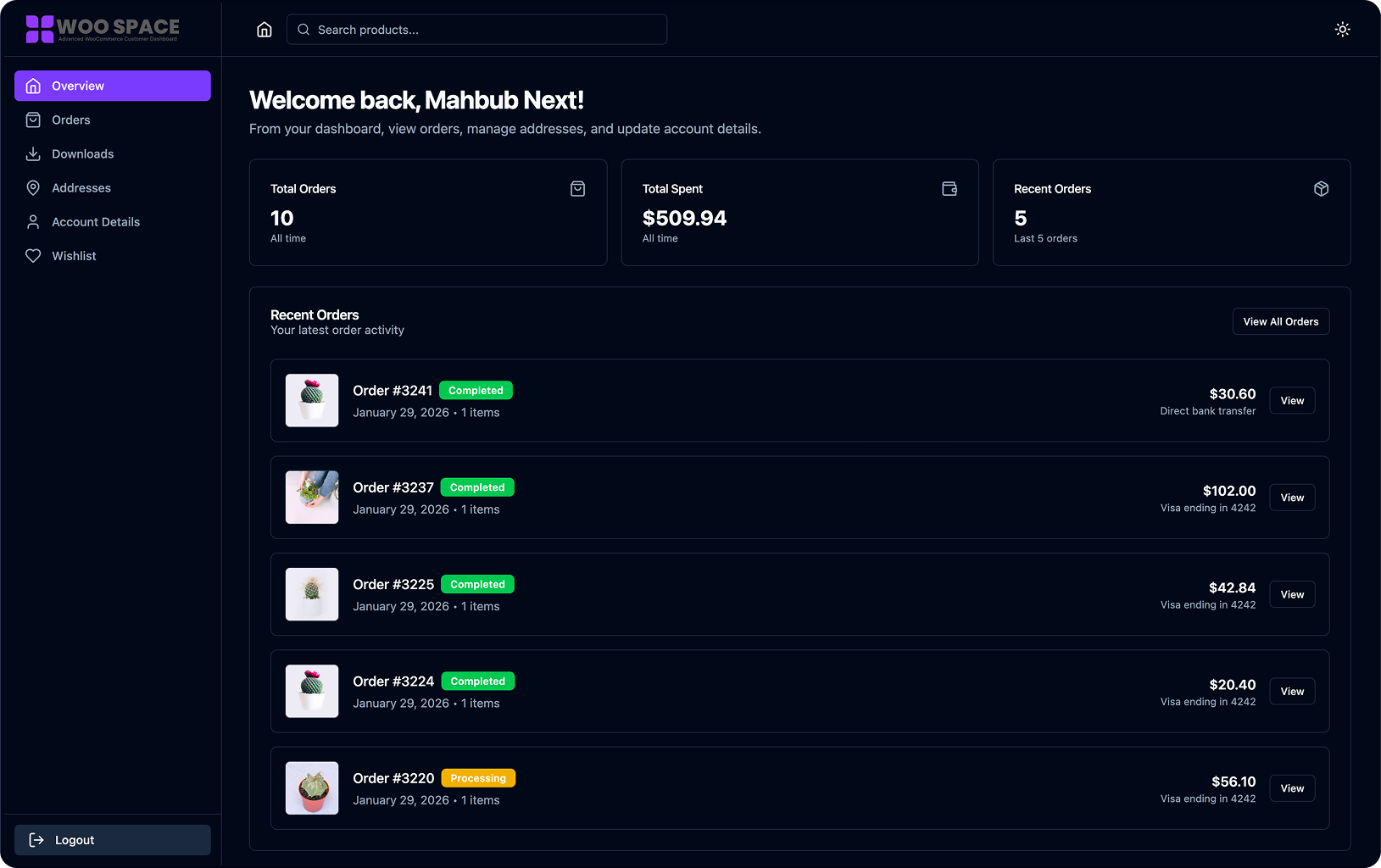
Order History – Clean, easy-to-scan order list with status badges 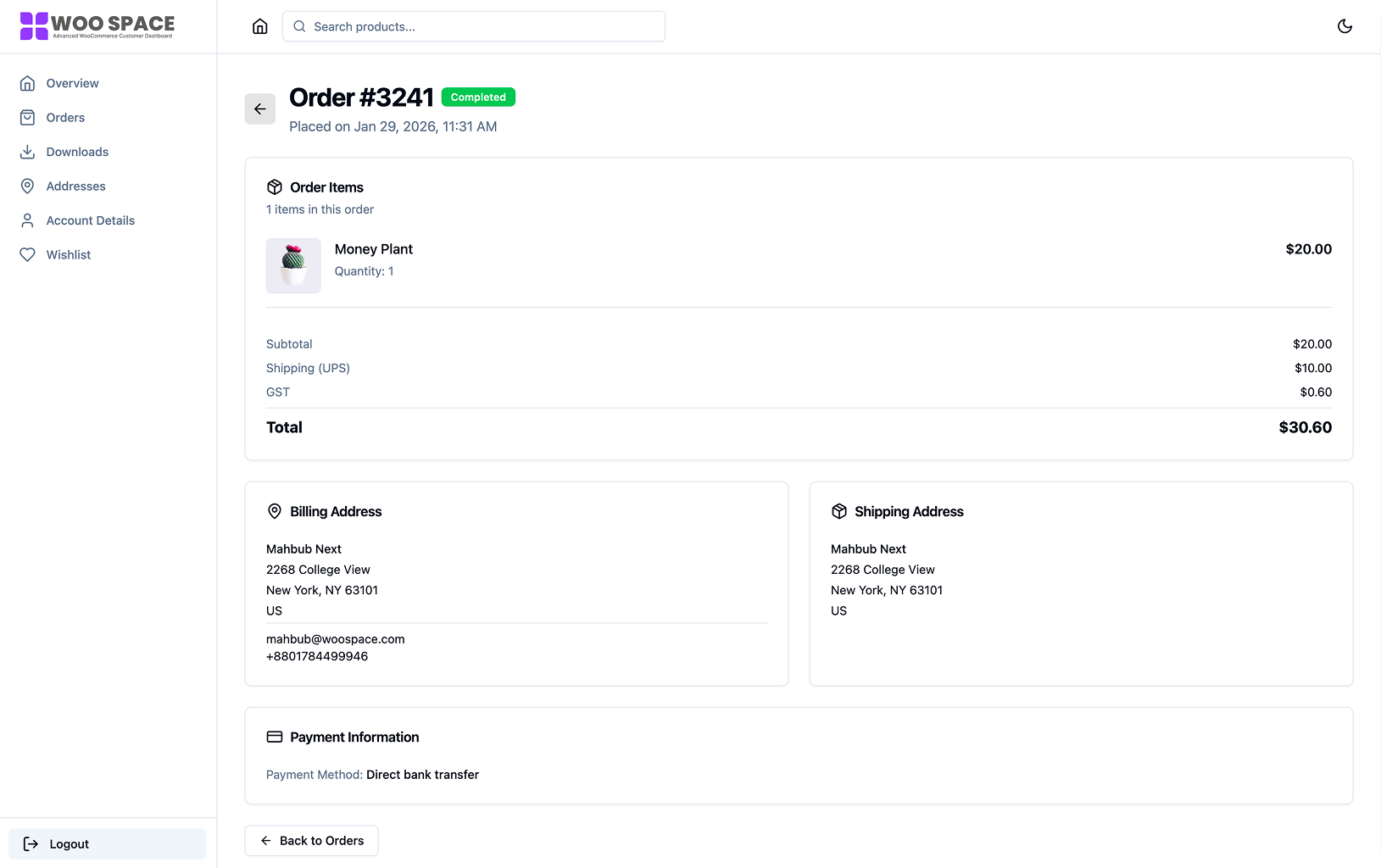
Order Details – Full order information with items and addresses 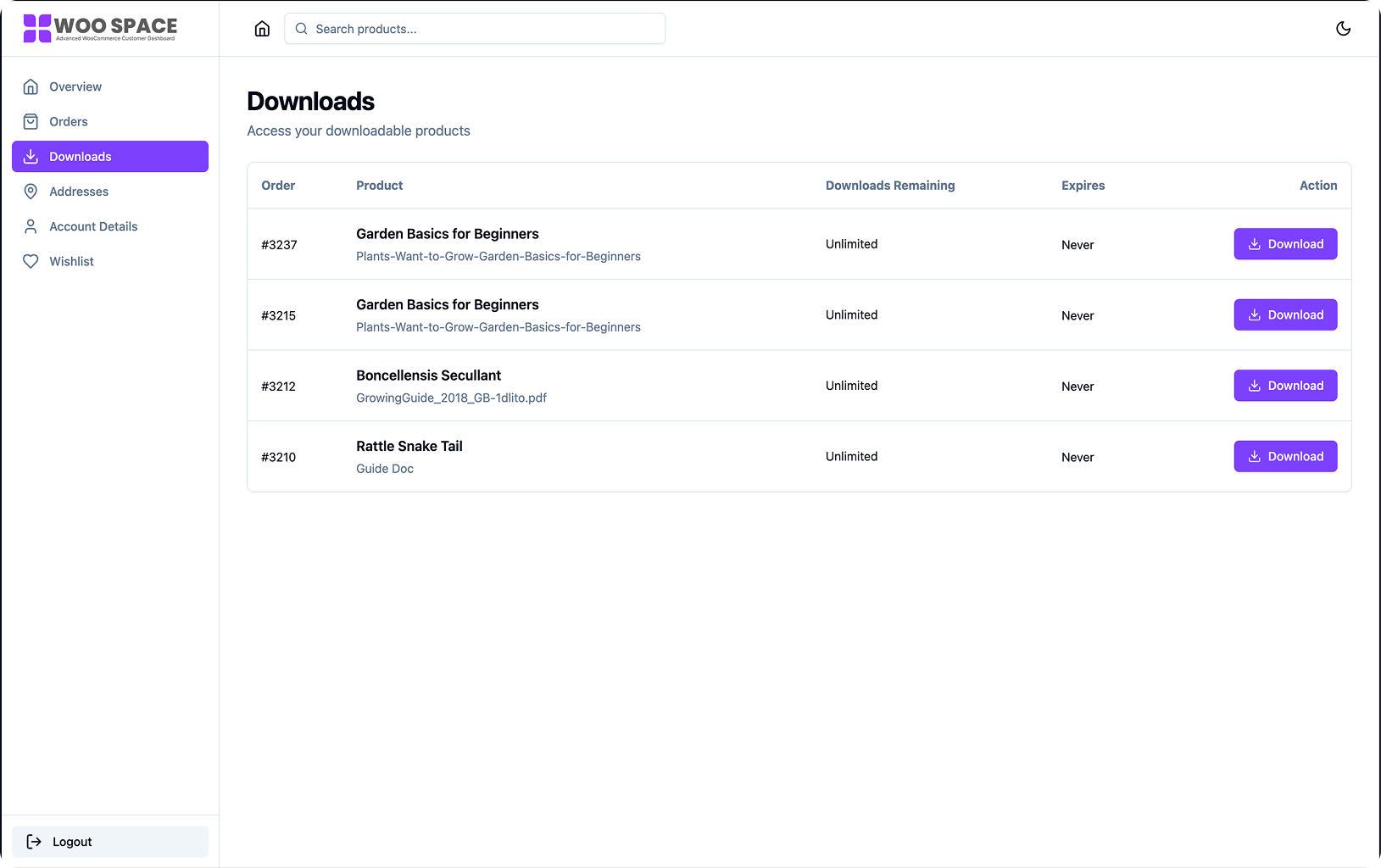
Downloads Center – Manage downloadable products 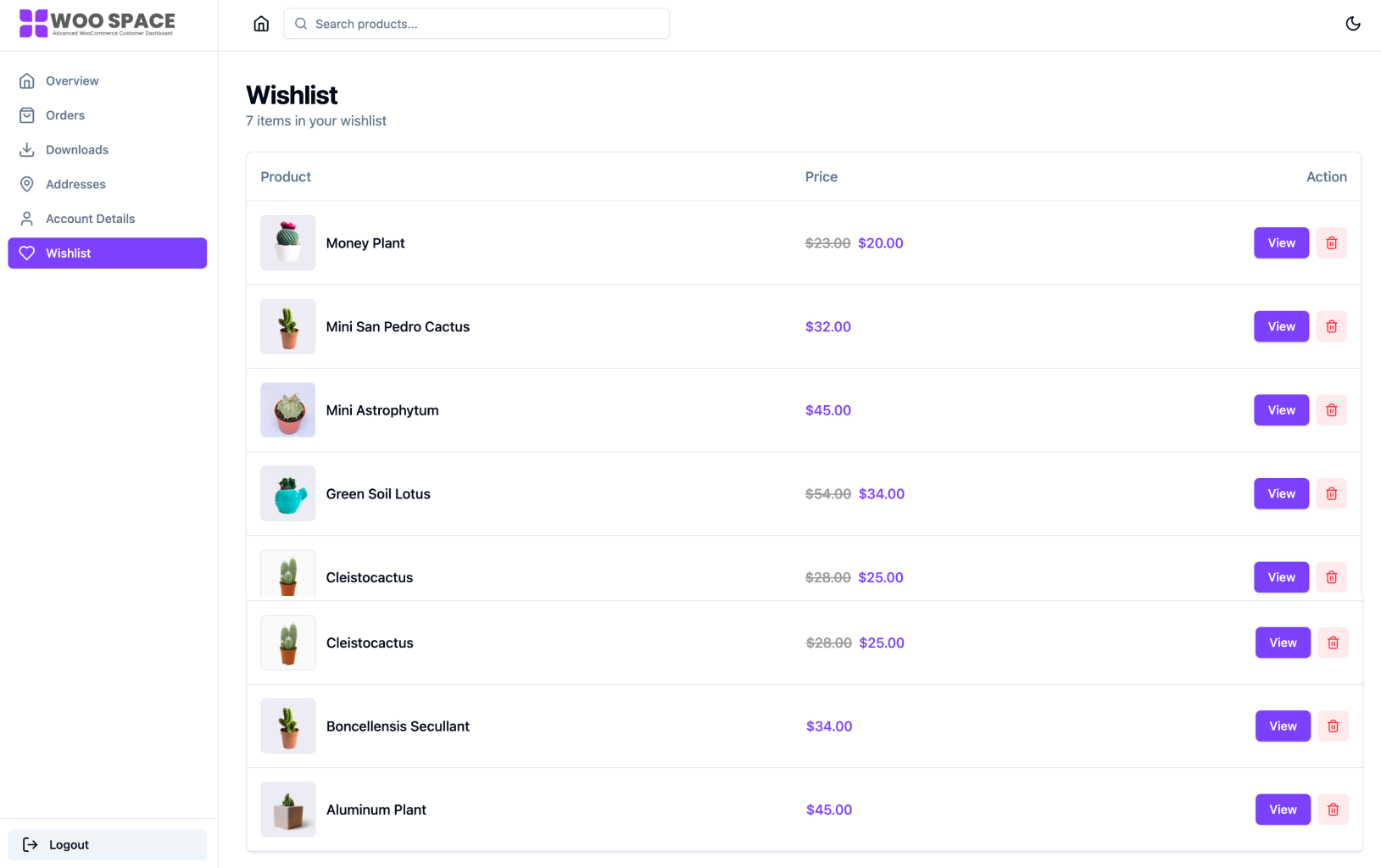
Wishlist – Wishlist Listed product 
Address Management – Edit billing and shipping addresses 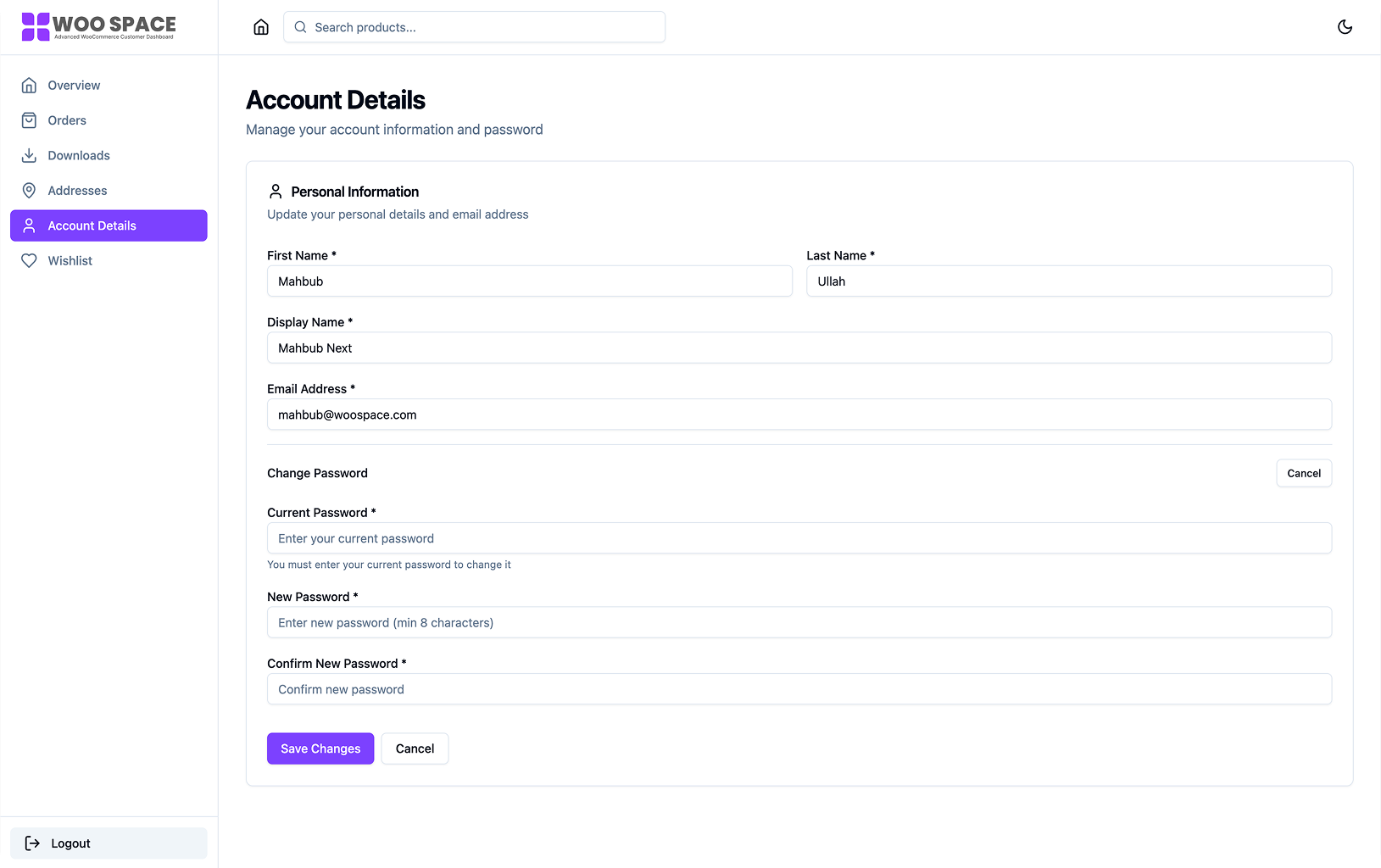
Account Settings – Update personal details and password 
Admin Settings – NextDash configuration panel
التنصيب
Automatic Installation
- Log in to your WordPress admin panel
- Navigate to Plugins Add New
- Search for “NextDash”
- Click “Install Now” and then “Activate”
Manual Installation
- Download the plugin zip file
- Go to Plugins Add New Upload Plugin
- Upload the zip file and click “Install Now”
- Activate the plugin
After Installation
- Go to NextDash in your WordPress admin
- Enable NextDash from the settings page
- Configure your preferences (theme mode, sections, etc.)
- Visit your WooCommerce My Account page
Shortcode
Use this shortcode to display the dashboard anywhere: [nextdash_dashboard]
الأسئلة المتكررّة
-
Will this work with my WordPress theme?
-
Yes. NextDash works independently of your theme and only affects the WooCommerce My Account page.
-
Does it work on mobile devices?
-
Absolutely. NextDash is built mobile-first and works smoothly on phones, tablets, and desktops.
-
Do I need coding knowledge?
-
No. NextDash works out of the box after activation. Simply enable it from the settings page.
-
Will it slow down my site?
-
No. NextDash only loads on WooCommerce My Account pages and is optimized for performance.
-
Does it support dark mode?
-
Yes. Users can choose light, dark, or system-based theme preferences.
-
Is it translation ready?
-
Yes. All strings are internationalized and a .pot file is included.
-
Is NextDash compatible with Wishlist?
-
Yes. Wishlist functionality integrates YITH WooCommerce Wishlist.
المراجعات
لا توجد مراجعات لهذه الإضافة.
المساهمون والمطوّرون
“NextDash – Modern Customer Dashboard” هو برنامج مفتوح المصدر. وقد ساهم هؤلاء الأشخاص بالأسفل في هذه الإضافة.
المساهمون
ترجمة ”NextDash – Modern Customer Dashboard“ إلى لغتك.
مُهتم بالتطوير؟
تصفّح الشفرة، تحقق من مستودع SVN، أو الاشتراك في سجل التطوير بواسطة RSS.
سجل التغييرات
1.0.0 – 2026-02-14
- Initial release
- React-based WooCommerce customer dashboard
- Order management and order details
- Downloadable products section
- Address management (billing and shipping)
- Account details editing
- Dark mode support