

الوصف
CodeAtoz Campaign Manager for WooCommerce is a lightweight WooCommerce plugin built for small and growing stores that want to run effective flash sales without complex marketing tools or recurring fees.
From a single, clean admin screen you can:
- Create multiple campaigns (Flash Sale, Weekend Deal, Clearance)
- Apply percentage or fixed amount discounts across your entire catalog – or limit discounts to selected product categories – without touching product data
- Schedule campaign start and end dates – including weekend promos and short flash drops
- Show a sticky announcement bar with countdown timer on all storefront pages
- Add urgency badges on product cards and an urgency message in the cart
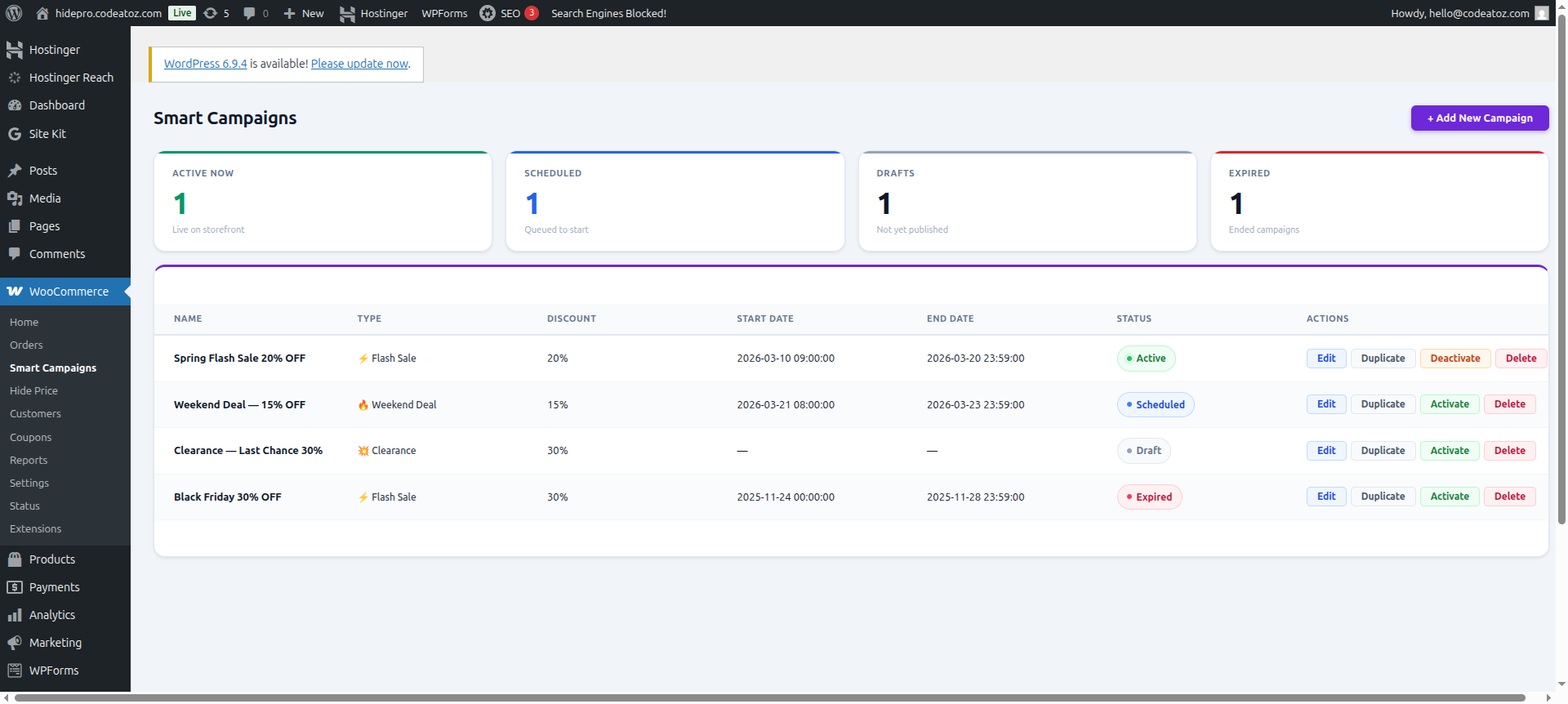
- See all campaigns in a simple dashboard list with status badges and quick actions
All pricing logic uses standard WooCommerce price filters – no direct database writes – so your original prices remain safe. The plugin is fully translatable and follows WordPress.org coding and security best practices.
Key Features
-
Flash Sale Engine
- Percentage or fixed discounts on all products, or only on selected product categories
- Works with simple and variable products
- Leaves original product prices intact (no direct DB changes)
-
Smart Campaign Scheduling
- Set start and end date/time for each campaign
- Scheduled campaigns auto-activate and auto-expire
- Cron health check with admin notice if WP-Cron or Action Scheduler is not running
-
Conversion-Focused Storefront UI
- Sticky announcement bar with live countdown timer
- Urgency badges on product cards (Flash Sale, Weekend Deal, Clearance)
- Cart urgency message with live countdown
- Product page “sale ends” message under the add to cart button
-
3 Built-In Templates
- ⚡ Flash Sale – 20% off, red bar, 24-hour flash sale style
- 🔥 Weekend Deal – 15% off, orange bar, ideal for Friday–Sunday promos
- 💥 Clearance – 30% off, purple bar, 7-day clearance style
- One-click template selection pre-fills the campaign form (you can still adjust all fields)
-
Performance & Compatibility
- Uses the WordPress Transients API to cache the active campaign
- WooCommerce HPOS compatible
- No external API calls and no tracking in the free version
Who Is It For?
CodeAtoz Campaign Manager for WooCommerce is perfect for:
- Small WooCommerce stores running occasional flash sales
- Brands that want a simple promotion tool instead of heavy marketing suites
- Store owners who care about performance, safety and clean code
Usage
Creating a new campaign
- Go to
WooCommerce Smart Campaignsand click Add New Campaign. - (Optional) Choose a template at the top (Flash Sale, Weekend Deal, Clearance) to prefill common settings.
- Fill out the Campaign Details card:
- Campaign Name – internal name shown in the admin list.
- Campaign Type – Flash Sale, Weekend Deal, or Clearance (used for labels and badges).
- Announcement Bar Text – the message shown in the storefront bar.
- Status – Draft, Scheduled, Active or Expired.
- Configure the Discount Settings card:
- Discount Type – Percentage or Fixed Amount.
- Discount Value – required; for example
20for 20% or15for a 15‑unit fixed discount. - Limit to Categories – leave blank to apply to all products, or select one or more product categories to target only those items.
- Configure the Schedule & Appearance card:
- Start Date & Time – when the campaign should begin (optional; leave empty to start immediately when set to Active).
- End Date & Time – when the campaign should end (optional; leave empty for open‑ended campaigns).
- Quick fill buttons – 24 hours, This Weekend, or Next 7 Days to speed up date entry.
- Bar Background Color & Countdown Timer Color – control the storefront bar appearance; the live preview updates as you type.
Advanced options
These options appear in the Discount Settings or Schedule & Appearance areas:
- Test Mode (checkbox) – when enabled, the campaign is only visible and applied to users who can manage WooCommerce (store admins). Use this to preview the bar, badges and discounts before going live.
- Minimum Cart Value – if set above zero, the discount only applies when the cart subtotal is at least this amount.
- Exclude Products Already On Sale – if enabled, products that already have a WooCommerce sale price keep their own sale and are not further discounted by the campaign.
- Social Proof Text – small line of text shown in the announcement bar (for example “Over 500 orders placed this week!”).
How discounts are applied
- Discounts are applied dynamically via WooCommerce price filters – the plugin never modifies product prices in the database.
- Only one active campaign is used for pricing at a time (the most recently created active campaign).
- If Limit to Categories is empty, discounts and urgency UI apply to all products (subject to minimum cart value, test mode and exclude‑on‑sale settings).
- If one or more categories are selected, discounts and urgency elements (badge, price HTML, product urgency text) only appear on products belonging to those categories.
Scheduled campaigns
- Set Status = Scheduled and fill Start Date and/or End Date.
- The plugin uses Action Scheduler to:
- Automatically switch the campaign to Active at the start time.
- Automatically switch it to Expired at the end time.
- If WP‑Cron or Action Scheduler are not running correctly, the Smart Campaigns admin screen shows a clear warning with a link to documentation.
لقطات الشاشة


التنصيب
-
Upload the plugin
- Download the plugin ZIP and upload via
Plugins Add New Upload Plugin, or - Upload the
codeatoz-campaign-managerfolder to/wp-content/plugins/via FTP.
- Download the plugin ZIP and upload via
-
Activate the plugin
- Go to
Plugins Installed Pluginsand click Activate on CodeAtoz Campaign Manager for WooCommerce.
- Go to
-
Verify WooCommerce
- Make sure WooCommerce is installed and activated. If not, the plugin will show an admin notice.
-
Create your first campaign
- Go to
WooCommerce Smart Campaigns. - Click Add New Campaign.
- Either pick a template at the top or fill the form manually:
- Campaign Name
- Type (Flash Sale, Weekend Deal, Clearance)
- Discount Type & Value
- Announcement Bar Text
- Bar Background Color & Timer Color
- Start Date & Time, End Date & Time
- Status (Draft, Scheduled, Active)
- Click Create Campaign.
- Go to
-
Test on the storefront
- Visit your shop and product pages.
- When a campaign is active you should see:
- Storefront announcement bar with countdown
- Sale prices and badges on products
- Urgency messages in the cart and on product pages
الأسئلة المتكررّة
-
Does this plugin modify my product prices in the database?
-
No. CodeAtoz Campaign Manager for WooCommerce uses standard WooCommerce price filters to apply discounts at runtime. Your original product prices remain unchanged in the database.
-
Can I run more than one campaign at the same time?
-
The plugin supports multiple campaigns but only one active campaign is applied
to pricing at a time — the most recently created active campaign takes priority.
Future Pro versions may add advanced targeting and multiple concurrent campaigns. -
What happens if WP-Cron or Action Scheduler is not working?
-
The plugin checks WP-Cron and Action Scheduler health on the Smart Campaigns admin screen. If something looks wrong (cron disabled or Action Scheduler not run recently), it shows a clear warning with a link to the official WordPress cron documentation.
-
Will this slow down my store?
-
CodeAtoz Campaign Manager for WooCommerce caches the active campaign using the Transients API for 60 seconds, so WooCommerce product price lookups don’t hit the database on every request. The frontend assets are small and loaded only on WooCommerce pages.
-
Does it work with WooCommerce HPOS (High-Performance Order Storage)?
-
Yes. The plugin declares compatibility with WooCommerce HPOS using
\WooCommerce\Utilities\FeaturesUtil::declare_compatibility(). -
Can I customize the templates or add my own?
-
Yes. The three default templates are defined in PHP and exposed through the
scm_campaign_templatesfilter. Developers can hook into this filter to add, remove or modify templates in custom code or a Pro add-on. -
Does the free version call any external APIs or track my store?
-
No. The free version does not make any outgoing HTTP requests or track usage. All logic runs inside your WordPress and WooCommerce installation.
المراجعات
لا توجد مراجعات لهذه الإضافة.
المساهمون والمطوّرون
“CodeAtoz Campaign Manager for WooCommerce” هو برنامج مفتوح المصدر. وقد ساهم هؤلاء الأشخاص بالأسفل في هذه الإضافة.
المساهمون
ترجمة ”CodeAtoz Campaign Manager for WooCommerce“ إلى لغتك.
مُهتم بالتطوير؟
تصفّح الشفرة، تحقق من مستودع SVN، أو الاشتراك في سجل التطوير بواسطة RSS.
سجل التغييرات
1.1.0
- Added test mode for previewing campaigns as admin before going live.
- Added minimum cart value condition — discount only applies when cart reaches threshold.
- Added exclude on-sale items option — protects already-discounted products.
- Added social proof text field displayed in the announcement bar.
- Improved admin UI with live preview, campaign templates, and modern card layout.
- Fixed scheduled campaign auto-activation and expiration.
1.0.0
- Initial release.
- Campaign CRUD admin UI with WP_List_Table.
- Flash sale discount engine using WooCommerce price filters.
- Storefront announcement bar with countdown timer.
- Action Scheduler integration for scheduled campaigns.
- Urgency badges, cart message and product page urgency text.
- 3 built-in templates for quick campaign setup.