

الوصف
AI Translator for Elementor is an AI-powered translation solution for WordPress.
No APIs and no complicated setup required.
Translate your Elementor-powered pages seamlessly using OpenAI’s advanced translation engine. The newest version also adds support for Gutenberg blocks and the WPML translation engine.
Features:
- One-click translation for Elementor pages (single page or bulk)
- Polylang integration (Free and Pro versions supported)
- WPML support added
- Gutenberg block-based pages supported
- OpenAI-powered translations for natural, contextual results
- No API setup needed – we do the rest!
- 1,800 words per week included for free
How it works:
- Add the required site languages in Polylang or WPML
- Go to the AI Translator for Elementor plugin page
- Select your Elementor, Gutenberg, or Classic Editor page
- Choose target language(s)
- Click Translate – the AI does the rest!
Want a higher word limit?
We offer affordable plans to fit your needs:
- Starter – $9.99/month – Perfect for landing pages, portfolios, and small business sites. 1 site, ~18,000 words per month.
- Agency – $34.99/month – Best for agencies, freelancers, and managing client sites. Up to 10 sites.
- Enterprise – $53.99/month – Scalable solution for large businesses. Up to 50 sites.
External Services & Privacy
This plugin connects to external services to provide AI-powered translations.
Services Used
MeepTech API (meeptech.com)
* Handles usage tracking and word count enforcement
* Receives: Website URL, word counts, language pairs
* Does NOT store your translated content
OpenAI (openai.com)
* Processes translation requests using AI language models
* Receives: Text content to be translated
* Content is sent for processing only, not stored by us
PostHog (posthog.com) – Optional
* Anonymous usage analytics (opt-in only)
* Disabled by default, requires explicit consent
What We Collect
✅ Website URL (for authentication)
✅ Word counts and language pairs (for plan limits)
What We Do NOT Collect
❌ Your translated content is not stored
❌ Personal information or email addresses
❌ User or visitor data
Privacy & Security
For data deletion, export, or GDPR/CCPA inquiries, contact [email protected] with your website URL.
لقطات الشاشة

Dashboard with translation stats and usage info. 
Translation in progress with real-time progress indicator. 
Page list with language status and quick translate buttons. 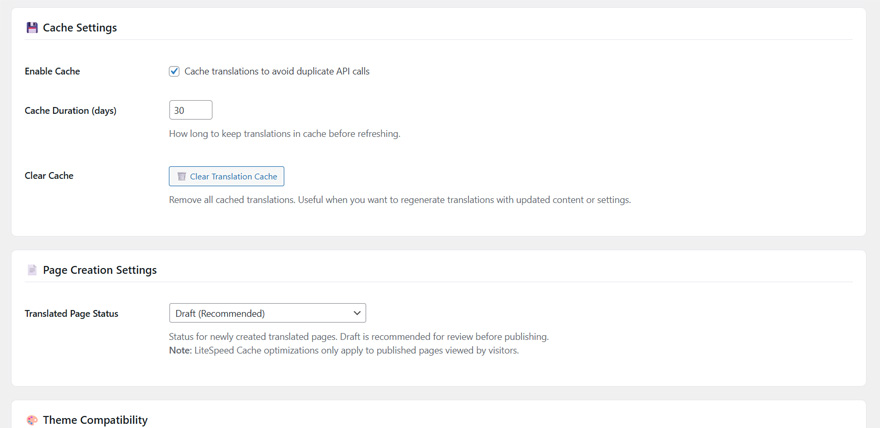
Settings page with cache management and advanced options.
التنصيب
- Upload the plugin folder to
/wp-content/plugins/or install via the WordPress Plugins screen. - Activate the plugin through the ‘Plugins’ screen in WordPress.
- Set up your languages:
- Polylang: Go to Languages Languages tab Add your languages
- WPML: Go to WPML Languages Add languages and configure
- Navigate to AI Translator plugin page.
- Start translating your Elementor, Gutenberg, and Classic Editor pages!
الأسئلة المتكررّة
-
How many words can I translate for free?
-
The free version includes 1,800 words per week. After reaching the limit, there’s a weekly cooldown period before you can translate again.
-
Does this require Elementor Pro?
-
No. It works with Elementor free and Elementor Pro.
-
Does this require Polylang Pro?
-
No. It supports both Polylang free and Polylang Pro.
-
Which AI provider do you use?
-
OpenAI via our secure translation API. We handle all API communication to ensure security and reliability.
-
Will this modify my existing content?
-
No. Translations are applied to translated copies in the target language. Your original content remains unchanged.
-
What happens when I reach my word limit?
-
You’ll need to wait for the weekly reset, or upgrade to a PRO plan for higher limits and no waiting periods.
-
How do I check how many words I have left?
-
Visit AI Translator Dashboard to see your current usage and words remaining.
المراجعات

المساهمون والمطوّرون
“AI Translator for Elementor” هو برنامج مفتوح المصدر. وقد ساهم هؤلاء الأشخاص بالأسفل في هذه الإضافة.
المساهمون
ترجمة ”AI Translator for Elementor“ إلى لغتك.
مُهتم بالتطوير؟
تصفّح الشفرة، تحقق من مستودع SVN، أو الاشتراك في سجل التطوير بواسطة RSS.
سجل التغييرات
1.2.5
- Improved onboarding experience when no multilingual plugin is installed
- Added friendly welcome screen with step-by-step setup guide
- Added language configuration detection – shows warning when languages not set up
- Updated installation instructions with Polylang and WPML setup details
- Updated “How it works” to include Gutenberg and Classic Editor support
- Fixed critical error on settings page when no multilingual plugin active
- Updated Enterprise plan to 50 sites limit
1.2.4
- Fixed critical batch translation bug – translations now apply correctly in first pass
- Fixed permanent deletion for translated pages (skips trash for cleaner workflow)
- Added auto-refresh after deleting translations to update available languages
- Fixed AI instruction artifacts appearing in translations (e.g., “Translating the text…”)
- Fixed PHP warning for levenshtein() with strings over 255 characters
- Added proper noun and acronym detection (names like “John Smith” and “CEO” no longer mistranslated)
- Improved translation quality for less common languages (Romanian, Bulgarian, Croatian, etc.)
- Added language-specific retry boost for rare languages
- Fixed WPML permalink caching issue – translation links now show correct language immediately
- Added Debug Mode toggle in settings to control verbose logging
- Improved delete confirmation messages for translations vs original pages
1.2.3
- Minor bug fixes
1.2.2
- Fixed license plan sync issue – Enterprise/Agency plans now correctly sync from Freemius
- Added auto-sync for plan mismatches (checks hourly)
- Added “Sync Plan” button in settings for manual plan synchronization
- Improved Luxembourgish translation support with language-specific instructions
- Fixed HTML structure corruption during translation (SVG elements, nested tags)
- Fixed issue where original text was appearing above translation
- Added language instructions for rare languages (Frisian, Breton, Occitan, Corsican, Romansh)
- Plugin now sends language-specific instructions to translation server for better accuracy
- Improved license activation to properly extract plan from Freemius license
1.2.1
- Added basic WPML support
1.2.0
- Added Gutenberg/Block Editor translation support
- Added “Manage Languages” button in settings for quick access to Polylang/WPML
- Plugin now visible in menu even when dependencies are missing (with setup guide)
- Fixed translation not being applied to Gutenberg content
- Fixed HTML tag corruption during translation
- Fixed API response mapping for translations
- Fixed HTML entity handling during text replacement
- Improved error messages with direct links to install required plugins
- Renamed plugin references to “AI Translator for Elementor” for consistency
1.1.5
- Added “Activate License” submenu for PRO version
- Users can now enter license key without reactivating plugin
- Improved license activation flow
1.1.4
- Fixed YouTube video error 153 in welcome popup
- Video now opens on YouTube instead of embed (more compatible)
- Fixed all remaining emoji encoding issues
- Fixed translation completion detection
1.1.3
- Fixed JavaScript syntax error causing dropdowns to not work
- Fixed language selector not responding to clicks
1.1.2
- Added server-side Freemius license validation
- License expired users are now properly downgraded to Free plan
- Added admin notice for expired licenses
- Dashboard now shows “Expired” status when license is invalid
- Updated pricing: Starter $9.99/month, Agency $34.99/month
- Added translated readme files for 9 languages
- Improved license status accuracy
1.1.1
- Added pricing plans to readme
- Improved PRO build script with automatic readme branding
- Minor improvements
1.1.0
- Fixed plugin name (removed PRO from free version)
- Updated readme for free version
- Added admin interface translations for 9 languages
- Added optional usage analytics with user consent
- Fixed WordPress plugin checker errors
- Performance improvements
1.0.8
- Bug fixes and improvements
1.0.7
- Initial public release
- Elementor + Polylang integration
- OpenAI translation engine
- Usage tracking and limits
- Clean admin interface