
Tired of playing bug report detective?
Helping you fix WordPress bugs|
It’s time to say goodbye to chaos across emails, Slack, and endless threads.
Say hello to Annotatr, the WordPress bug tracking plugin, that brings actionable, contextual website feedback into WordPress… automatically capturing everything you need to fix issues and launch your site quicker.
See how it works

The problem
Why bug tracking feels broken. And how we fix it
If you’ve ever launched a client project, you know the chaos:
Clients email screenshots that don’t make sense.
Testers dump bugs into messy spreadsheets.
Developers lose track of what’s “in progress” vs. “done.”
Conversations scatter across email, Trello, Slack, and DMs – with no single source of truth.
Critical bugs slip through the cracks because no one knows who’s responsible.
You spend more time managing feedback than actually fixing it.
The result? Missed deadlines, frustrated clients, and projects that drag on longer (and cost more) than they should.
The solution
Enter Annotatr.
A bug tracking plugin built for WordPress teams.
Capture issues, assign them, and track progress — without ever leaving the site you’re building.
Everything stays in one place, inside your dashboard, so you can focus on delivering projects — not chasing down bug reports.



Report issues directly where they’re spotted
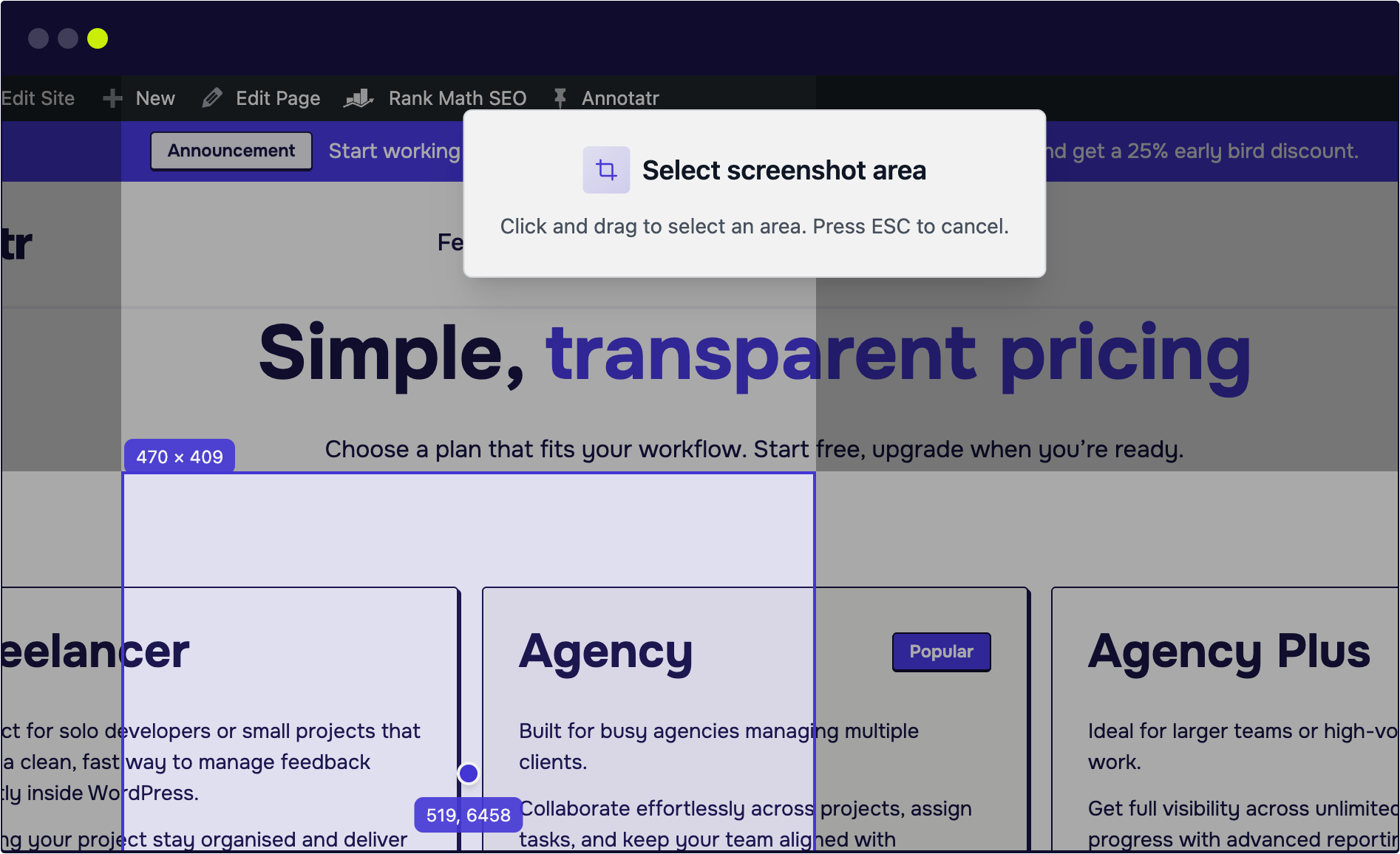
Install Annotatr on your WordPress site and let your team or client report bugs directly on the frontend of your website.
Just click Add Note and drag over the issue to take a screenshot.
You get a perfect visual reference instantly – no manual screenshots or messy email chains required.

No more “How did this happen?”
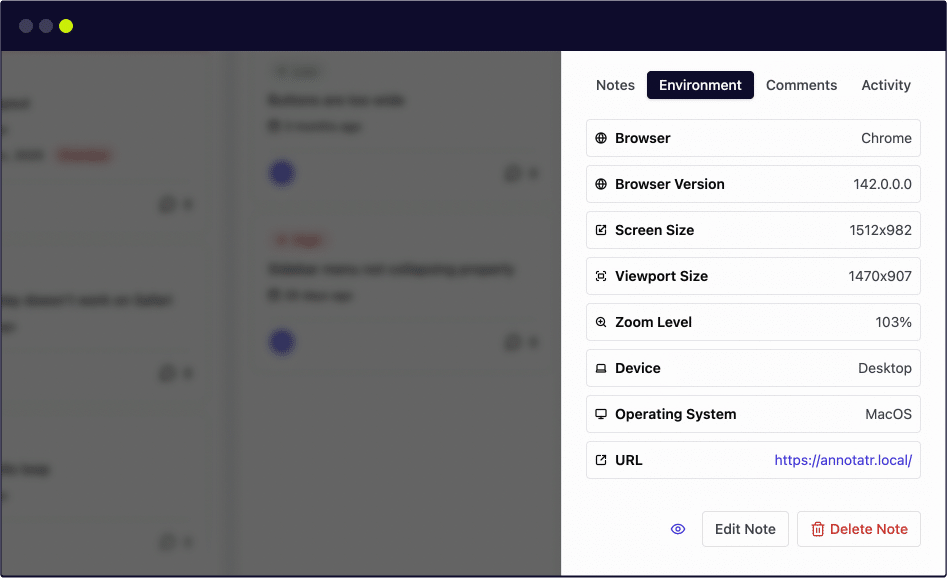
Every note automatically attaches the technical DNA of the bug.
Developers get the exact browser, OS, viewport size, and even console or network errors at the moment of capture.
You get the full picture without asking a single follow-up question.

Feedback that gets finished
Move from “open” to “done” in moments.
Transform visual feedback into structured tasks with:
- Priorities
- Status’
- Due dates
- Assignees
Break complex fixes into subtasks and keep the conversation organised with @mentions and internal comments with your team or client.

Your WordPress project’s command centre
Manage your entire backlog in one place.
Use the Kanban board to track status or the Timeline view to spot overdue tasks.
Whether it’s a frontend bug or an internal backend to-do, keep your team synchronised and your launch on track.
Plugin features
Your QA workflow, simplified
Annotatr gives you everything you need to ditch messy bug tracking tools.
Stop juggling multiple apps and creating endless accounts for developers and clients. Now you can keep your entire bug-fixing workflow simple, streamlined, and fully inside WordPress.
Point & Capture
Highlight any part of your site, screenshot it, and raise a bug instantly. No third-party apps needed.
Assign to your team
Add developers and testers so every bug has a clear owner.
No more “who’s fixing this?”
Visual kanban board
See bugs move from Open → In Progress → In Review → Done right inside your WordPress dashboard.
Keep in the loop
Automatic notifications keep your team updated whenever tasks are created, assigned, or resolved.
Team collaboration
Submit comments and @mentions to discuss issues right where they happen, upload files to provide context, and set priorities to keep everyone aligned.
Debug context
Automatically logs device type, browser version, screen resolution, console errors and more. Debug cross-browser issues with everything you need.
Easily find bugs
All bugs are tied to specific pages and elements. No more hunting through emails or Slack to find the right context.
Custom user colors
Assign custom avatar colors to team members for better visual identification on the board.
Subtasks for complex issues
Break complex bugs into manageable steps.
Create, track, and complete subtasks within each note with progress tracking.
Tag your notes
Create and apply tags to categorize notes by feature, priority, or content change requests.
Helping keep your workspace organized.
Set priority status’
Set high, medium, or low priority on any note to help your team focus on what matters most.
Client friendly
Let clients report bugs directly on your live or staging website. They see the same professional interface your team uses.
See it in action
See How easy bug tracking feels inside WordPress
Want to see how annotar bug reporting works before you install on your website?
Watch our quick video demo to see bug reporting in action – capture an issue, assign it, and track it across the Kanban board, all without leaving WordPress.

See how it works before jumping in!
Pro features
Go Pro. Unlock serious QA power
Need more muscle in your WordPress bug tracking workflow?
Pro adds real firepower. Unlimited members, custom views, better teamwork, and the flexibility to handle bigger projects without the chaos.
Unlimited members
No limits. Add as many testers and developers as your project requires.
Set due dates
Add due dates to notes and get reminders when tasks are overdue, keeping projects on track and clients happy.
List & Timeline views
Switch between kanban, list, or timeline views to manage bugs in the format that works best for you and your team.
Advanced filters & search
Filter by assignee, priority, due date, tags, or page URL.
Find what you need quickly with per-page note counts and multiple filter combinations.
Activity history
View complete activity log showing who changed what and when, with full pagination and detailed change history.
Unlimited annotations
Free users can annotate up to 10 notes; Pro users get unlimited annotations on all notes.
Right-click quick actions
Right-click any note for instant access to change status, priority, or assignees.
Speeding up your workflow without opening notes.
Bulk actions & updates
Change status, priority, or assignees across selected notes in one action. Save time on repetitive tasks and keep your board organized.
Whitelabel
Remove Annotatr branding from email communications.
Perfect for your client-facing projects.
Statistics dashboard
Visual reports show open vs. closed bugs, team workload, and project health – perfect for status updates and client reporting.
Priority support
Get priority support from the Annotatr team with faster response times and direct access to plugin experts.
Risk free trial
Try Annotatr Pro with confidence. If it’s not the right fit for you, we’ll refund you in full within 7 days.
See how it works
What users are saying
Real feedback from Annotatr users
Annotatr has helped teams streamline their content reviews, save time, and keep everyone on the same page. From project managers to editors, our users love how simple and intuitive annotation and feedback have become.
See how Annotatr is making collaboration easier, one note at a time.
Pricing plans
Simple, transparent pricing
Choose a plan that fits your workflow. Start free, upgrade when you’re ready.
Freelancer
Perfect for solo developers or small projects that need a clean, fast way to manage feedback directly inside WordPress.
Helping your project stay organised and deliver polished websites without endless back-and-forth messages.
$99
/year
$49
/year
Save 50%
- Single site license
- Unlimited team members
- Set note due dates
- Kanban, List and Timeline views
- Advanced note filtering
- Remove Annotatr branding
- Statistics dashboard views
- Email support
- 7 day money back guarantee
Agency
Popular
Built for busy agencies managing multiple clients.
Collaborate effortlessly across projects, assign tasks, and keep your team aligned with structured, visual feedback tools – all without leaving WordPress.
$259
/year
$129
/year
Save 48%
- 5 site license
- Unlimited team members
- Set note due dates
- Kanban, List and Timeline views
- Advanced note filtering
- Remove Annotatr branding
- Statistics dashboard views
- Priority email support
- 7 day money back guarantee
Agency Plus
Ideal for larger teams or high-volume client work.
Get full visibility across unlimited sites, track progress with advanced reporting, and keep projects on schedule with pro support and performance insights.
$489
/year
$249
/year
Save 49%
- Unlimited site license
- Unlimited team members
- Set note due dates
- Kanban, List and Timeline views
- Advanced note filtering
- Remove Annotatr branding
- Statistics dashboard views
- Priority email support
- 7 day money back guarantee
Never miss an update
New features, improvements and workflow tips. Straight to your inbox
No spam (we promise), unsubscribe anytime.
FAQs
Common questions
Curious about how Annotatr fits into your workflow? Here are some quick answers to the most common questions about using our WordPress bug-tracking tool.
Can I use Annotatr for free?
Yes! The free version is yours to use without time limits. Premium just unlocks more power.
Can I use Annotatr with any WordPress theme?
Absolutely. Annotatr works seamlessly with virtually all WordPress themes and page builders – if it runs WordPress, it runs Annotatr.
How is Annotatr different from other project management tools?
Unlike external tools, Annotatr lives inside WordPress – capturing on-page feedback with screenshots, metadata, and context automatically, so your team can fix issues faster without ever leaving your site.
Can clients or non-technical users leave feedback?
Yes. Anyone you invite to your WordPress website can leave visual feedback directly on the page – no training, or additional plugins needed on their side.
Can I assign and manage tasks within Annotatr?
Definitely. You can track issues on a built-in Kanban board, assign tasks to teammates, update statuses, and keep all communication in one place.
Can I customise Annotatr to match my workflow?
Annotatr adapts to your process – you can organise tasks, assign issues, and track progress in a way that fits your workflow perfectly.
