In the 1980’s and 90’s it seemed like everyone was making IBM PC compatible computers from Canon and AT&T to bigger names like HP and Dell. Of all these OEMs Gateway 2000 perhaps made one of the greatest of all these IBM compatibles. Enter the iconic 486 based Gateway 2000 4DX2-66V (Desktop) released around 1993 and retailing for a whopping $2995.
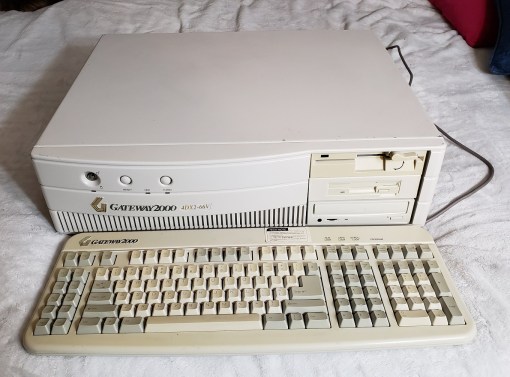
Not to say the other OEM companies didn’t make some impressive PC’s back in the day but the 4DX2-66V from Gateway 2000 really stood out as a massive and powerful PC of the time. This thing meant serious business and if the specs didn’t impress you the large case and relatively high build quality should have.
The model we’re looking at in this article is the desktop version although an even more impressive to look at tower version was also available for purchase.

The 4DX-66V (4DX standing for 486DX CPU and 66V standing for 66MHz with Vesa Local Bus slots) is a rather large desktop case and is fairly heavy with a mostly all metal case. To the left, we have a key lock with a green power LED located underneath followed by a reset button an HDD activity light and finally a turbo button. On the far right side of the case, we have three 5 1/4 external bays. One thing I do dislike about this case is the complete lack of any external 3 1/2 bays forcing you to use a 5 1/4 bay adaptor for the obligatory 1.44MB floppy drive.
I attempted to replicate the look as closely as possible to a stock 4DX-66V and placed my drives according to some older advertisement photos I found. On the top is a 1.2MB 5 1/4 drive with a 1.44MB 3 1/2 floppy drive taking up the middle bay and finally a CD-ROM drive at the bottom.
I want to note here that there seems to be some difficulty in determining the stock CD-ROM drive type. Although IDE would be the standard for an OEM PC like this I’ve read some sources claiming the original CD drive was actually a SCSI x1 or x2 drive. The machine in question here did, in fact, come to me with an SCSI card installed and no CD drive and I had a very hard time getting an IDE CD drive to install and work correctly. In the end I did opt to install an SCSI CD drive though the drive itself is a newer and faster Sony drive.
The front of the case also lacks any power button. There is a power switch located on the right back side. This is a design more in common with earlier 80’s machines like the 5150.

This design also makes it difficult to find and fit a replacement PSU should yours die since standard AT or ATX power supplies with AT adaptors lack this side switch and are of a smaller size.
Taking a look at the back.
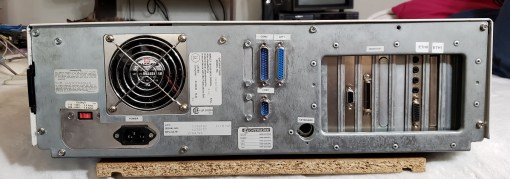
There is nothing too special about the rear of this PC and we have a pretty standard layout with parallel and serial connectors as well as an AT keyboard port and eight expansion slots.
Before we open the case I wanted to take a look at the keyboard Gateway sold with this machine.
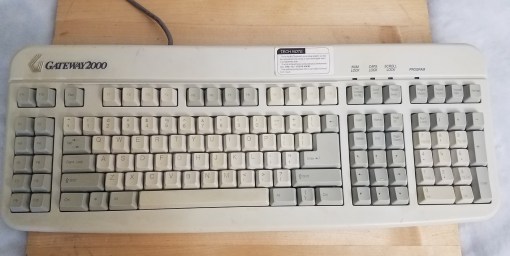
This PC came with a massive 124 key Gateway 2000 “Anykey” keyboard. This keyboard featured extra function keys on the far left as well as 8 directional keys and has macro keys for programming your own macro commands.
Opening the case is fairly easy and requires unscrewing screws at the rear of the case and sliding the top section of the case forward and then up and off.

To the left of the three 5 1/4 external bays we do have two internal 5 1/4 bays. As I stated earlier the design of this case certainly feels a little out modded for the 486 era and internal 3 1/2 bays would have been a much more useful option seeing as your going to need some adapters to properly install and secure a standard 3 1/2 hard drive.
The case also features a real cone speaker nestled in the front of the case as well as guide/support ridges for extra long expansion cards.

Lastly, as far as the case goes we do unfortunately have the “rail system” in effect on this case. Rather than using simple screws to hold drives in place you must first attach rails to your drives before installing and securing them. My PC came with several drives missing as well as missing rails so extra rails of roughly the same fit had to be salvaged from other builds.


Early magazine advertising listed a 340MB 13ms IDE hard drive as standard but the closest I had was a Western Digital 853MB Caviar 2850 manufactured in 1996 which installed with the help of a bay adapter into one of the internal bays.

Despite the case itself having some by even the early 90’s standards a relatively outdated design the motherboard itself featured some very advanced and useful features such as dual built-in IDE controllers and even a CPU upgrade socket.

The motherboard used in the 4DX-66V is a Micronics board and sports eight 16-bit ISA slots two of which double as VLB slots.
1) CPU – The standard CPU in the 4DX-66V was, obviously, an Intel 486DX running at 66MHz. This CPU was more or less the gold standard during the 486 era and offered excellent performance in a wide range of games while not being too slow or too fast as well as offering stable reliability. The DX2 CPU in the 4DX-66V came stock with a small heatsink but did not feature a fan for extra cooling.
Next to the CPU socket there is also a CPU upgrade socket to allow for easy upgrading of the CPU via chips such as the Intel Overdrive which greatly increased CPU power.

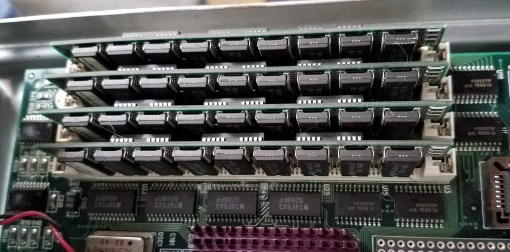
2) RAM – The 4DX-66V is capable of supporting a maximum of 64MB of FPM memory via four 72 pin memory sockets. Mine currently has 16MB installed which is still a rather healthy amount of memory for the early 90’s. The stock amount seems to of been 8MB.
3) L2 cache – Unlike most 486 era motherboards which used DIPP chips installed in several sockets on the motherboard the 4DX-66V employed a single socket which accepted a CoaST (Cache on a STick) module. This is the same method used by the infamous M919 socket 3 motherboard as well as many early Pentium motherboards. The 4DX-66V seems to of been sold standard with a 256K cache stick but mine only has a 64K module for some reason. I’m not sure why someone would have downgraded the L2 cache on my machine but perhaps at some point in the past the original L2 stick was damaged or lost and the former owner only had a 64K module as a replacement.


4) Switch – Behind the L2 cache module is a small switch block. Unfortunately, I did not have the manual for this PC nor could I find a guide to this switch block online. I did find a Video by Silicon Classics which did briefly display a page from the manual with some functions of the switch block which I was able to screen capture. switches 5-8 appear to set the CPU type.

 (Click to enlarge)
5) Battery – One thing I did find fairly odd for this motherboard is the seemingly complete lack of any kind of on-board CMOS battery to save BIOS settings. The only apparent method of installing a battery is an external battery connector located next to the Keyboard port. The 4DX-66V seems to of come standard with an external Rayovac 844 battery. Thankfully the battery is easy to replace and modern equivalents using three AAA batteries can be found cheaply on eBay. It is HIGHLY recommended to change the battery before tinkering with the 4DX-66V as it seems very finicky and you’re likely to run into many random problems when operating with a dead CMOS battery
6) IDE – The 4DX-66V motherboard came with two IDE controllers built-in for a total of four usable IDE devices. This was rather uncommon to see built into a socket 3 motherboard and a very welcome addition. On my machine though the IDE was extremely problematic and picky about both the hard drive and the CD-ROM drive. In the end I decided to forgo the built-in IDE altogether and opt for an ISA EIDE card.

Above the IDE connectors we have a standard floppy connector.
7) Finally to the left of the IDE and floppy we have I/O connectors for the serial and parallel as well as the AT power connector.
Expansion cards
For the various expansion cards I attempted to get this Gateway as close to stock as I could though I did take a few liberties in the name of power, convenience and necessity.
IDE – After getting fed up with the fickle nature of the built-in IDE I did finally give in and installed a SIIG SC-JE4012 16-bit ISA IDE controller card. This card offered faster access speeds then the built-in controller as well as made life much easier when choosing hard drives. I may be wrong but I believe the built-in IDE controller hits a 512MB limit when looking at hard drives and most of the time regardless of the size the built-in controller was just not seeing the drive or only sporadically seeing the drive. It’s quite possible the controller is failing with age but regardless, a more reliable IDE card like this SIIG card is certainly recommended.

SCSI – Even though my machine did come with a VLB SCSI controller card installed and I read sources that indicated that the stock CD drive was SCSI, my original plan was to remove the SCSI card and run both the hard drive and CD-ROM drive off the IDE controller. Unfortunately this was another element during the restoration of this PC that almost drove me insane as even with the separate IDE card installed my particular 4DX-66V was incredibly picky about what drives worked and what master/slave configuration they were in. The form factor and length of the IDE cables did not help this situation in the slightest. Eventually I decided to give up and run the CD drive off the VLB SCSI controller, which after being set up properly gave me no issues whatsoever.

The SCSI controller used was a Buslogic BT-440C/445C VLB card. I’ve used this card before in my main 486 PC and I’ve found them to be reliable and mostly trouble free cards. I did briefly consider going all out with SCSI and replacing my IDE hard drive with an SCSI drive but in the end decided to stay with the IDE drive since not only was it more “stock correct” but was already setup at this point.
Sound – The sound card is another area where I took a little bit of a liberty in choosing the card. Finding out what card came installed factory from Gateway proved to be a challenge and I never did find a concrete answer. Some sources cited the Sound Blaster Pro CT1330A as being sold along with the PC while other sources claimed early Sound Blaster 16 cards like the CT1770 would of been the stock card.
I also stumbled upon the Gateway 2000 branded 16MVCARD based on the JAZZ 16 chipset from Media Vision.
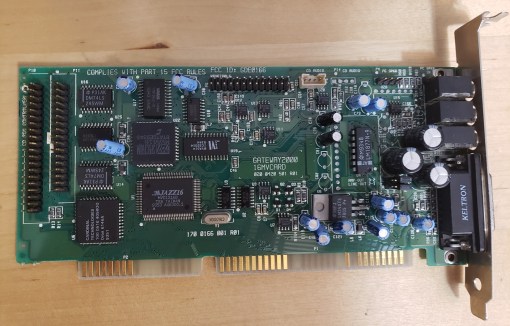
The seller of the card claimed it was pulled directly from a 4DX-66V though it’s completely possible it was a later replacement for the original card or it came from a similar but not exact Gateway model. I did decide to install the JAZZ 16 based card but unfortunately the card was non-working with audio being barely audible over extreme and constant audio “noise” and squealing.
The card I did finally settle on though was the Creative Sound Blaster AWE32 CT3910. Even though this by all accounts was not the stock sound card in the 4DX-66V I feel it does make a very good fit. The CT3910 is an earlier non-plug & play card with a real Yamaha OPL chip for authentic FM sound. It lacks a wavetable header but it does have a standard IDE connector (though again, I had no luck with mine when trying to setup an IDE CD-ROM drive on this machine). It’s more or less a cleaner sounding SB16 with built-in MIDI capabilities which is nice for playing games like DOOM and Duke3D on this PC.

Video – Lastly we have the video card and unlike the sound card it was actually extremely easy to find out what card came stock in the 4DX-66V. That card was a special cut down OEM version of the Mach32 card from ATI possibly known as the Mach32 XLR or CLX. This was a VLB card and differed from the retail version of the VLB Mach32 card by having a slower RAMDAC and only 1MB of video ram standard.
The card I have installed is the more capable retail version of the Mach32 for the VLB slot.

If you look to the right side of the card you’ll notice a large square socketed chip labeled ATI68875, this is the improved RAMDAC. On the OEM card this socket would be empty and instead the lower rectangular socket which is empty on this card would be populated with the slower RAMDAC chip. These cards support a full 2MB of RAM which mine is currently outfitted with.
Like any high-end VLB video card these days the Mach32 goes for a pretty penny on eBay. The card is fast, It came in right behind my ET4000 based VLB card in most benchmarks I performed and it also makes an excellent Windows 2D accelerator but unfortunately it does fall a little short when it comes to compatibility. For instance I had some pretty bad scrolling issues in Commander Keen 4 even with the option to fix scrolling issues checked in the options menu. To be fair my ET4000 also had some odd graphical issues as well but these went away completely by checking off the SVGA box under options and scrolling was silky smooth.

Despite the somewhat outdated case design and relatively minor issues like the use of rails and an awkward to replace power supply the 4DX-66V is an impressive PC for 1993 even with the stock configuration. The board is pretty easily upgradable and the CPU upgrade socket makes adding something like an Intel Overdrive CPU a cinch. I would of prefered at least one external 3 1/2 drive but the case does look very stylish. The Mach32, even the gimped stock version isn’t half bad though it’s worth considering replacing it in the name of better overall compatibility. Collectors seem to really love the 4DX-66V (especially in the tower form factor) and I expect prices to rise, so if you see one, even if it’s just a shell, snag it.


 ancientelectronics