
Today we will be looking at, yet again, another Compaq Deskpro. This machine is quite similar to the Deskpro EN we looked at a few months ago.
The case itself is a dual desktop/tower style and can be placed in either orientation. There is a power button as well as an LED for power and HDD activity near roughly center of the case. There are also dual 5 1/4 drive bays as well as a single molded 3 1/2 bay that looks like it only accepts floppy drives but it may be possible to mount a zip drive or something of a similar style.

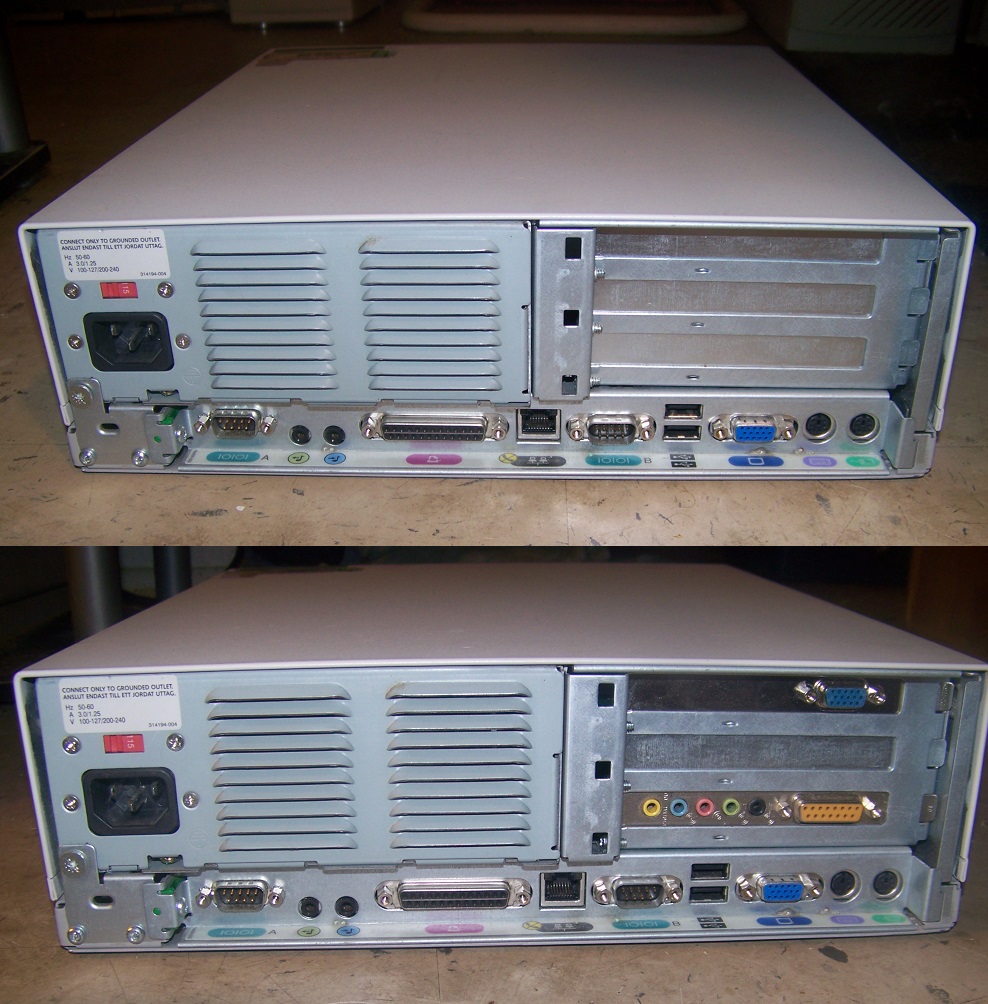
On the rear of the case, we have a standard 3-prong power connector. Looking at the rear connectors starting on the left we have dual USB (1 or 1.2), dual PS/2 ports for the keyboard and mouse, a parallel port, and dual serial ports. This is followed by six slots to add any expansion cards.
Taking off the case top we get a nice sticker with some switch settings.

Looking at the sticker it appears to only have settings for early 66MHz slot 1 processors.
And here is the motherboard with the case top removed.


The motherboard chipset is the Intel 440EX chipset, this is the budget version of the Intel 440LX. This budget chipset limits front side bus speeds to 66MHz and was primarily aimed at supporting the Intel Celeron budget CPU line.

1) CPU – As we could tell from the case sticker this machine was sporting a 300MHz Intel Celeron processor. Early celerons like the one I have installed lack any L2 cache and are known to be terrible performers though this board should be able to run later Mendocino core Celerons as well as 66MHz FSB Pentium IIs though I didn’t test any other CPUs. The 300MHz Celeron should be adequate for lighter Windows gaming and do well for older DOS titles. I’ve read of people putting some pretty fast CPUs in this type of machine via slot adaptors but test this at your own peril I’d say the risk of something catastrophic is fairly low. It should be noted I didn’t test any other processors due to the slot having physical plastic tabs in the way. To test any other CPUs would of required either breaking off pieces of the CPU slot or taking the shell entirely off of any processors I wanted to test.

I found the bare-bones heatsink on this processor to be a bit unusual and very ugly though it seemed to do its job.
2) RAM – There are only two slots for expanding memory via PC66 (or PC100/133 clocked down to 66MHz) SDRAM. If you are running DOS or Win9x maxing things out to 512MB via dual 256MB sticks is more than enough for anything this machine would run well. I went with a more reasonable 256MB via two 128MB sticks for my machine.
3) The complement of expansion slots on this board is quite nice with a single x1/x2 AGP slot as well as three PCI and three 16-bit ISA slots giving this machine a lot of options for being used as a retro gaming PC.

4) floppy connector as well as dual primary/secondary IDE connectors for four total IDE devices such as hard drives or CD-ROM drives

5) CMOS battery
The sound card that came with this machine was a Creative branded PCI Audio card. I’ve heard it said that these have decent DOS compatibility as far as PCI sound cards go but I’ve never had much luck with them in DOS or Windows. Always glitchy terrible quality in my opinion. If I was using this as a retro gaming build replacing this card with either a quality ISA card or something like a Sound Blaster Live! PCI card would be my first priority.

The video card was a bit more interesting in my opinion.
The card installed was an AGP Matrox G100. These are mostly known as business-oriented cards with excellent image quality but they are also known to be fairly competent at gaming as well. My personal experience has been with the later G200 cards and they have always run well for me but this was my first time experiencing the G100.

In my testing, the card performed surprisingly well in titles like Shogo: Mobile Armor Division for Windows and DOS titles like Simcity 2000. The card is known to have no Alpha blending and things like shadows or transparencies are not rendered correctly but overall it wasn’t a bad experience. Paired with a Voodoo 1 or 2 this would be an adequate card for a system like this. I’d still probably recommend replacing it with something more gaming-oriented like a TNT or maybe at least a cheap and more powerful G200 card. Until then though this card should be adequate to tide you over.
In conclusion, the Deskpro EN/SB can be built into a decent Windows or DOS gaming PC though it doesn’t really accel at either. It’s a bit too fast for DOS and a bit too slow for Windows 98. It would probably perform best as a Windows 95/late DOS build but that’s a bit niche and there are other builds that would fill the role better. regardless with some care and a few select parts, it should work fine for most people looking for some 90’s gaming fun.




 ancientelectronics