Skip navigation

Tag Archives: Celeron

Emachines was a computer brand that hit the market back in 1998. They were marketed as budget-friendly computers that could be easily used by the family for things like email, homework, and light gaming. They generally used lower-cost budget components and had a motherboard that, although capable, usually had fewer options and expandability to higher end offerings.

The emachine line did come with a branded mouse, monitor, and keyboard, but unfortunately, I only have the keyboard.

The keyboard features a number of special buttons to open up predetermined webpages. The overall quality is okay, but the keys feel a bit “squishy”.

The computer we will be taking a look at in this article is the Etower 600is from the year 2000. My particular machine is mostly stock, with very little upgrading done when I received it. Mine also seems to have the original CD-ROM drive, which, from what I’ve seen, is usually dead or has been replaced.

Let’s start by taking a look at the front of the case. These machines are somewhat infamous for their marketing stickers blazoned across the front panels. The most hilarious is the “never obsolete” sticker that is fairly common. Mine unfortunately only has a large sticker for a $75 rebate.

The case is a mini tower with only two 5.25-inch bays and a bay with a molded-in plate for a 1.44MB floppy drive. Mine actually has the original working CD-ROM drive, which seems to be fairly rare to find on these machines these days. The top of the case is slightly rounded, making stacking anything on top a precarious proposition. Below the floppy drive is a long horizontal HDD activity light, and under that a rather stiff power button with the power LED in its center.

I do really like the small door on the bottom of the case that opens to reveal a frontal USB 1.1 port and a joystick port.

Taking a look at the back of the case.

On the rear, we have dual PS/2 ports for keyboard and mouse, as well as one more USB 1.1 port. Below that, we have a single parallel and a single serial port, followed by a VGA port for the built-in video. Lastly, we have three audio jacks for line out, line in, and mic. At the very bottom of the case are four slots for expansion cards, though this particular motherboard only has three.

The Etower 600is came with Windows ME installed, but there’s nothing stopping you from installing an OS of your choice, such as Windows 98.

ok, let’s take a look inside

The power supply on this model, and from what I can gather, many Emachines have a mini PSU. It’s standard ATX, but the form factor is small. When these fail, that means replacing them with a standard PSU may be difficult due to the difficulty of mounting it properly.

My 600is fortunately, also came with its original and working 10GB TriGen hard drive.

The motherboard is a TriGem Anaheim-2. My board features three PCI slots, though I’ve read of variations with fewer PCI slots. There is space for an AMR slot above the top PCI slot.

1) CPU – Being a budget PC, the Etower 600is uses an Intel Celeron Processor as opposed to the more capable and expensive Pentium III in the motherboard’s Socket PGA370. The Celeron had half the L2 cache of the Pentium III and ran on a 66MHz front side bus as opposed to the 100MHz front side bus more common with the Pentium III. Theoreticlly an earlier Pentium III running on the 66MHZ FSB should work, but I was unable to test. The Intel 810 chipset and the PGA370 socket “should” allow for 100MHz FSB, but when I tried swapping the 600MHz Celeron out for either a 800MHZ Celeron or an 800MHZ Pentium III, the PC would not POST. If that’s the case, then the 766MHz Celeron running on a 66MHz FSB is the top CPU for this motherboard.

Despite being cut down, the Celeron in my tests performed pretty well for playing most games from around the year 2000, though you may need to reduce your graphical settings if you want better framerates. For older titles before 2000, most games shouldn’t be an issue.

2) Chipset – The 600is motherboard uses the Intel 810L “Whitney” chipset. This chipset does support 66MHz and 100MHz front side bus speeds, but I was unable to run any CPU at 100MHz on my 600is.

Video – The Intel 810 chipset has built-in video in the form of the integrated 2D/3D Intel 752i. This GPU is an evolution of the earlier Intel 740i GPU, which was available as a discrete video card. Despite being an integrated video, I found it to be fairly capable, and after testing a number of games from around the year 2000, I saw no graphical glitches or oddities, though performance wasn’t as good as you may get by upgrading to something like a PCI 3DFX Voodoo 3 or Nvidia TNT2. Be sure to install the latest video drivers if you want OpenGL support from the integrated video. Please note that there appears to be no way to disable the integrated video, so upgrading your video card may be a challenge. I experenced lock ups and conflicts and was not able to successfully install a discrete video card. I also confirmed with anouther emachine user with a similar model that they were unable to upgrade the video or even add a Voodoo 2 3D accelerator card to complement the integrated video.

3) RAM – The 600is motherboard has two slots for adding memory. Originally, the PC came with 32MB of installed RAM. Many spec sheets indicate that 256MB is the maximum amount of memory that can be installed via two 128MB SDRAM sticks, though I had no trouble maxing my memory up to 512MB via two 256MB RAM modules.

4) Sound – Sound is provided by a built-in CS4281 chip from Crystal. I didn’t find any issues with it in my limited testing, and it sounded okay, though upgrading to a Sound Blaster Live! would probably give better sound as well as EAX support.

5) I/O – dual IDE connectors for supporting up to four IDE devices, as well as a single floppy connector and a piezo speaker.

I did attempt to upgrade this machine, and to be honest, it was a bit of a nightmare. There appears to be no way to disable the integrated video, which seemed to give me a lot of issues when trying to upgrade the video card to a PCI Radeon 7000 and then a PCI Nvidia FX 5200. This resulted in a lot of headaches, such as OS lock-ups or no video at all. In the end, I gave up, though you may have more luck with an earlier PCI card, such as a TNT2 or Voodoo 3.

The Etower 600is is a budget PC, and you should expect budget performance. Despite that, I didn’t have an overall bad time with the PC in its mostly stock form, and it seemed to handle games from around its 2000 release adequately. The lack of ISA slots probably doesn’t make this machine the best build for a DOS PC, but as a Win9x PC, I think it does well.

The legendary Abit BP6, released in 1999 was the first dual-processor socket PPGA 370 motherboard and the first board to finally bring multi-processor boards at an affordable price to the consumer market. There were motherboards prior to the BP6 which featured more than one CPU on the board. Slot 1, Pentium Pro and even so far back as the 386 motherboards were available that could support multiple physical CPUs on board in what was known as SMP processing. Generally these setups were found in very high end and very expensive workstations and were more or less out of reach to the average consumer.

In 1998 the Mendocino Celeron CPUs were released which were intended to be Intel’s low cost alternative to the Pentium II and eventually the Pentium III. One interesting thing about these CPU’s was that they were released as SMP (Symmetric Processing) capable meaning that two Mendocino Celerons could be made to theoretically function together on a single motherboard. It doesn’t seem Intel intended consumers to find out about this function but regardless it was discovered and soon Abit decided to take advantage of this fact by releasing the SMP capable Abit BP6. It was soon found that users could, with the right operating system and with certain games that supported SMP get better performance at a lesser price with dual Celerons on the BP6 than with a single more expensive CPU. With that bit of history out of the way let’s take a closer look at the motherboard itself.

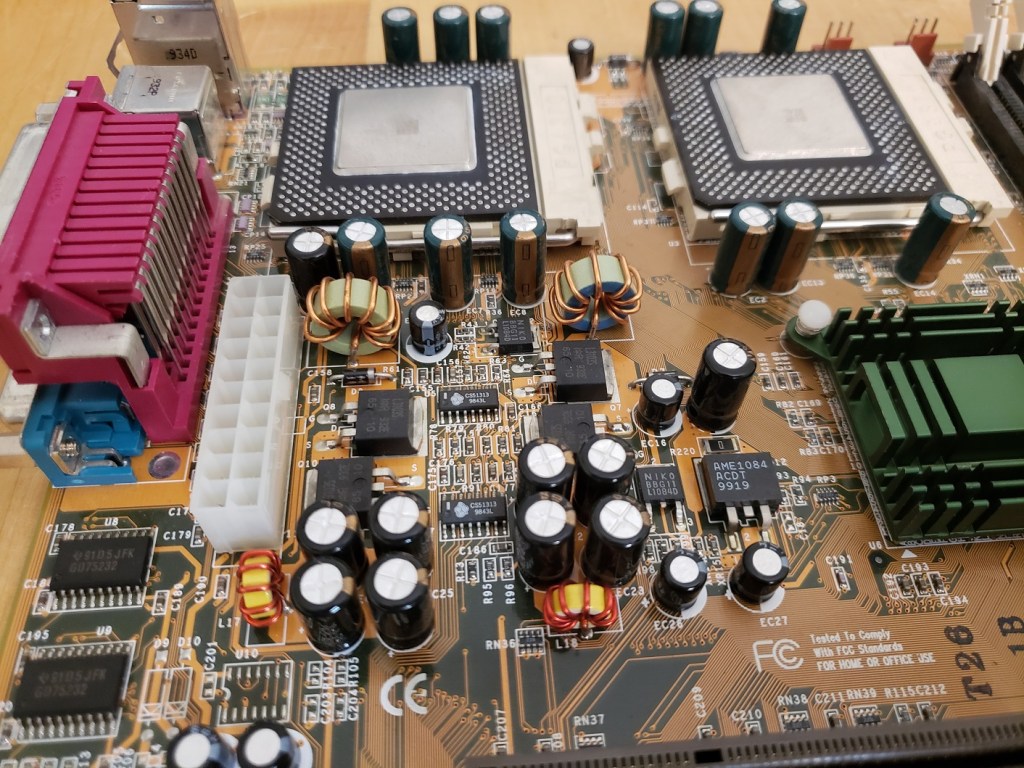
The Abit BP6 uses the Intel 440BX chipset and ONLY supports Mendocino Celeron CPUs. Users have had success upgrading to later CPU’s such as Coppermine Pentium IIIs and even reportedly Tualatin Celerons via adaptors such as the Neo s370 Powerleap adapter and various modifications. Only the Mendocino Celerons are confirmed to work in dual processor AKA SMP mode though there are many posts of uses getting later Coppermine and Tualatin CPUs working in these modes as well with adaptors and modifications. The BIOS on the BP6 has quite a bit of overclocking and tweaking features and allows for setting the CPU multiplier and front side bus via BIOS settings. default front side bus for the Mendocino Celerons is 66MHz but the board does allow for settings of 75MHz as well as 100MHz FSB and above via a very user friendly “Soft CPU II” option in BIOS.

Built in I/O on the board is pretty minimal with dual PS/2 for mouse and keyboard, dual USB 1.1, a parallel and dual serial ports.

1) CPU – The BP6 only officially supports the Mendocino Celeron from speeds of 300MHz up to the fastest released chip of 533MHz (with the newest BIOS version installed). Despite being budget CPUs the Mendocino Celerons were very competitive with Intels higher end Pentium offerings. My board with the latest BIOS update features dual 533MHz Celerons which are very capable of playing most any Win 9x era games as well as early XP games provided you lower some settings. With a decent heatsink and thermal paste it’s not hard to overclock to 600MHz but this is about the maximum you’ll get out of the Mendocino while maintaining any stability.

Be aware this board only functions in SMP (dual CPU) mode with operating systems and software that allow it. Even though operating systems such as MS-DOS and Windows 9x do not support dual processors these systems will happily run on this board in single CPU mode and dual booting OSes is always an option.

2) RAM – The BP6 features three memory sockets for installing up to 768MB of SDRAM of either the PC66 or PC100 variety. PC133 memory will work fine but it will downclock to PC100 speeds. Each slot will also only accept up to 256MB DIMMS with larger sticks only being detected as 256MB.

3) AGP – The AGP slot is a x2 slot 3.3v slot. You can safely use anything up to about a Radeon 9700 Pro or Geforce 4 though the AGP x2 is going to bottleneck the power these video cards could potentially provide.

4) Five PCI v2.1 and two 16-bit ISA slots

5) Floppy and IDE connectors – One standard floppy connector and two ATA 33 connectors supporting two devices each for a total of four IDE devices.

6) HighPoint HPT366 – This additional controller chip supports four extra IDE devices via the white connectors at ATA 66 speeds, double the speed of the two standard connectors. Together that means the BP6 can support up to eight IDE devices in total.

7) SB Link – The BP6 sports a Sound Blaster link connection. the purpose of this cable was to create better sound compatibility for PCI sound cards when operating in a DOS environment. Unfortunately, the connector is somewhat uncommon on PCI sound cards and Creative themselves only made one card, the AWE64 PCI that even supported the cable. The SB Link connector is made somewhat even more redundant since the board already supports two 16-bit ISA slots.

Now that we’ve taken a look at the motherboard itself let’s take a look at the PC I built around it.

Since the BP6 is kind of a “poor man’s workstation” I decided to go with this server style case. The case itself is quite tall with a 3 digit LED display as well as a panel that slides down to reveal five 5 1/4 drive bays and two 3 1/2 bays.

Here is a look at the rear as well as the side of the case.

And the three digit LED MHz display.

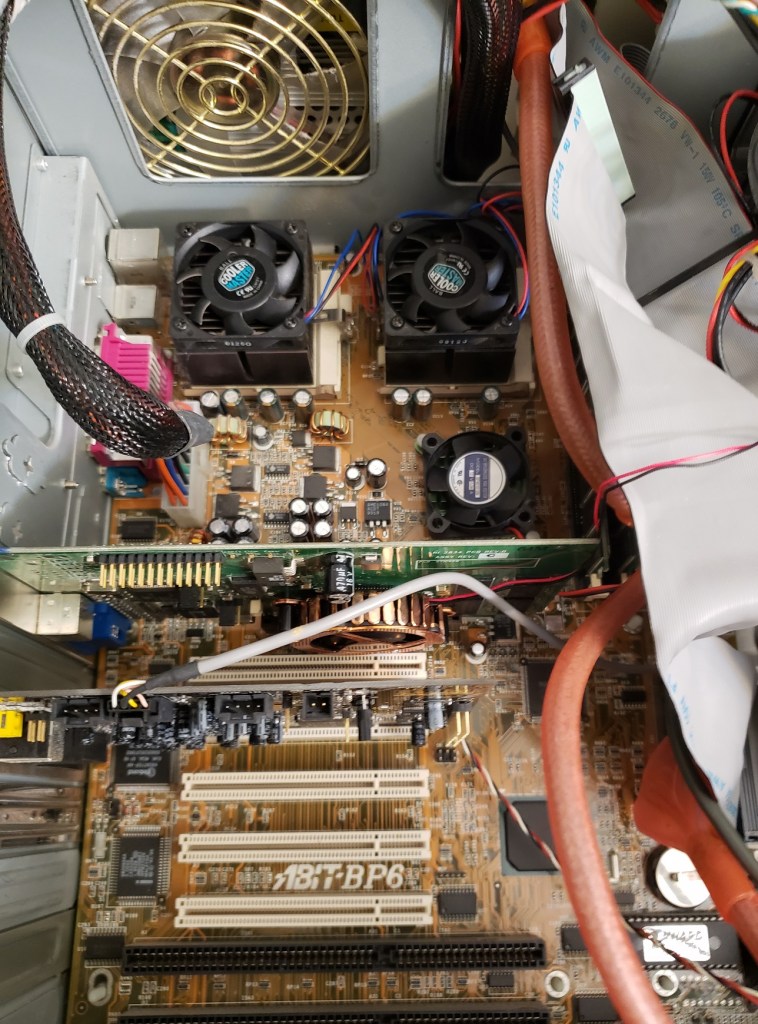
Here is a look at my Abit BP6 under the hood.

I used some quality thermal paste and cooler master heatsink/fans on my CPU’s as well as attached a small fan to the heatsink on the chipset to help with any overclocking I decided to do. I was able to overclock this particular board to 600MHz by raising my FSB to 75MHz but anything higher resulted in non posting or instability.

I am using the full 768MB of PC100 RAM as well as running the Windows 2000 operating system. Windows 9x does not support SMP processing AKA dual CPUs so my pre W2K OS choices were rather limited, especially if gaming is your priority. I went with W2K over XP simply because it is a bit of a lighter OS compared to XP as far as requirements go and should run a little better on this setup as well as allowing me to play all the games I’m looking to play. Be sure to upgrade to the latest W2K service pack if you go with this OS for your build as some games such as Quake III failed to run for me before updating.

My hard drive selection was a simple 40GB Western Digital IDE drive from around the early 2000’s. nothing spectacular but more than enough for this setup.

Let’s take a quick look at the two expansion cards I have added to this board.

For sound I went with the venerable Sound Blaster Live! although this motherboard does have two 16-bit ISA slots DOS was not the focus of this build since DOS can take not take advantage of the dual CPUs. The SB Live! cards are good all around Windows 9x and early XP cards that support EAX and even have decent DOS support for being PCI cards. I could have gone with a later Audigy card but I felt this was a great card for the time frame I was going with.

My initial choice for a video card was the Matrox G400 MAX which is a capable and IMO underrated card for gaming that also matched the workstation theme I was going with for this build. Unfortunately, even though its performance was good I wanted something a little more powerful and switched to a Geforce ti4600 though I found much of the power of that card wasted on the AGP x2 slot and weaker processors. I finally decided to try out the Geforce MX 400 which is roughly equivalent to the Geforce 256 in power and gave me framerates well below the Geforce ti4600 in some cases and noticeably better than the G400 MAX. This card just kind of “felt right” for me and what I was looking for from this build but your choice may differ.

I don’t know if I’ll keep this video card but I may try out the Geforce 2 Ultra or the PowerVR Kyro II in the future for this PC.

The Abit BP6 was in many ways ahead of its time as an affordable consumer level board. The main problem I have with the board is that it came out at a time when SMP processing was a niche area reserved for specific work tasks. The problem was that no mainstream OS supported the dual CPU configuration and while most users at the time were running Windows 95 or 98 only Windows NT, Linux and a few other less popular operating systems supported more than one CPU. When Windows 2000 and then XP were released this largely solved this problem as Windows XP quickly became a popular OS for home PCs and it supported dual CPUs. The other problem was software, specifically games. There was not a lot of dual CPU support written for games pre 2000 and even for a time after. Quake III is perhaps the best example of a game supporting dual CPUs but even though it did receive a noticeable FPS boost in dual CPU mode the mode could be glitchy on some setups. There were other games such as Falcon 4.0 but other than a few titles here and there users of the BP6 were stuck in single CPU mode. By the time dual CPU support and things like multi-core support were becoming more widely supported the Mendocino Celerons, even at 533 or 600MHz were woefully underpowered or lacked the code to run these games. Quake 4 from 2005 is another relatively early example of a dual CPU supporting game but the Mendocino CPU is incapable of running it at all due to lacking SSE code in the CPU.

In short the BP6 is a nice motherboard, even in single CPU mode. It was a pioneer in the consumer market but unfortunately, the whole gimmick of the dual CPU support was largely lost on the lack of software, specifically games, that supported it. In this sense as a gaming motherboard I couldn’t recommend the BP6 as there are better single CPU options available for early 2000s retro PC gaming that are more powerful and easier to find. As a cheaper workstation build of the time the board performs well and if your a collector of vintage hardware it’s a fun board to have and play around with.

Anyone that has read my Dell Dimension XPS D and R series post knows that I have a large soft spot for the Dell Dimension series. Here were going to look at the 4100, one of the final PC’s in the Dimension series to sport the classic beige case style before moving on to the black/grey rounded P4 cases that currently litter thrift store electronics sections.

The 4100 seems to of been released sometimes in the very early 2000’s. Although I do not know for sure the exact factory configuration these shipped in mine is a good example of something period correct.

d41001

The 4100 uses the same case as some of the older models in the Dimension line such as the XPS R450 I looked at in the earlier article mentioned above. I do like these case designs and I think they give a unique look. There are two 5 1/4 bays at the top for things like CD drives and two 3 1/2 bays below those plus another 3 1/2 bay for a floppy or zip drive below that. I also like how these Dimension series cases are thinner then average PC towers of the time so they tend to be able to fit into smaller nooks.

d41002

The rear ports from the motherboard are very basic with no built in video or audio which is typical of some of the Dimension series. This was because they generally were sold with higher quality add on video and sound cards rather then built in A/V. Mot serious PC enthusiasts now and then preferred expansion card video and sound as opposed to built in options which you were stuck with and were generally of lower quality to save on costs.

Built in we have the basic two PS/2 ports for keyboard and mouse as well as one serial and one parallel port and two USB ports. The number of ports is adequate for the times but I feel it gives the back a rather sparse look.

removing the side cover is very simple and only involves removing one thumb screw and pinching the latches with a pull back.

??????????????

Here we have a view of the motherboard fully populated with expansion cards from when I first brought it home. Notice the nice space for a vertical hard drive near the front of the case where a typical PC speaker or fan may go.  I like this and it’s a nice use of space allowing for more open bays if you want to add more hard drives, ect… The drive that came with my 4100 is a 40gb drive and I believe this was likely the original drive that came stock with this PC.

d41004

Here we have a view of the motherboard without any expansion cards as well as having that fan shroud removed which diverted air flow from the case fan down over the CPU for cooling. Like the rest of the machine this motherboard looks relatively sparse and is very similar to the motherboard used in the older D and R series just with no ISA, one less RAM slot and a socket 370 CPU rather then the older slot 1 CPU type. The lack of an ISA connector does hurt this machine in terms of using it as a DOS rig as older DOS era games tend to get along much nicer with ISA sound cards. The AGP port supports 2x and x4 AGP cards.

1) CPU – The CPU that originally was installed in this machine was 1.1ghz Pentium III Celeron. The Celeron line was seen as more of a budget friendly entry level CPU and was basically a cut down “Coppermine” Pentium III . The 1.1ghz model ran on a 100mhz front side bus as opposed to 133mhz for many “full” Pentium III’s and also only had half the L2 cache on-chip (128kb vs 256kb). Thankfully the motherboard is capable of supporting all but the later Tualatin Pentium III’s so replacing the Celeron with a standard “Coppermine” Pentium III is a simple CPU swap. I swapped mine out with a slightly slower clock rate but higher performing 1ghz Pentium III. All I had to do was swap CPU’s and the computer knew without having to make any adjustments. Even with the 100mhz slower clock rate on the Pentium III chip I received noticeable performance gains due to the higher 133mhz FSB and double on-chip L2 cache. I also used a later Pentium III 1ghz chip which incorporated an integrated heat spreader. There is no performance difference with these chips but I prefer the heat spreader as it seems to make the CPU’s a little more durable during installation.

Bechmarks

1.1ghz Celeron

3DMark 2000 – 3513

3DMark 2001SE – 1874

1ghz Pentium III

3DMark 2000 – 4321

3DMark 2001SE – 2023

d41005

There is also no fan cooler directly mounted on the heatsink as in this design the case fan is used with a plastic shroud that diverts the air flow down and onto the CPU. Above image is with shroud removed.

2) RAM – Total memory officially supported is 512mb of PC133 SDRAM. I currently have one 512MB PC133 stick of RAM installed in the image below but I had no trouble at all installing a second 512mb PC133 stick and running things completely fine under Windows 2000 Pro.

??????????????

3) The 4100 motherboard continues to use the Dell proprietary PSU connector as you can see directly behind the RAM slot. Adapters can be found cheaply on eBay though for well under $10 so you can use any AT  PSU. Also behind the RAM are two IDE connectors (fairly sure they are ATA-100) and one floppy connector.

Lastly I want to talk about expansion cards. I believe the sound and video cards That I found installed in this PC are the stock cards that this machine was sold at retail though configurations may have varied.

The machine I bought came with several connectivity cards installed such as a modem, ethernet and wireless adapter. Unfortunately I had heavy stability issues initially with this machine until I removed these cards. This was likely caused by driver conflicts but since I didn’t plan on using these cards anyways they were just eating space.

d41007

Video – The video card was a Geforce 2MX.

d41009

This was Nvidia’s entry level budget card for the Geforce 2 line and was cut down feature and performance wise from the standard GF2 cards. That said it is still a capable card and offered good performance for the price point offering hardware T&L as well as dual monitor capability.

Sound – lastly we have the sound card installed.

d41008

This is a Creative CT5807 and is a very basic budget card. It lacks a joystick port which to be honest were phasing out at the time in favor of USB gamepads but is just very sparse in features. for output it simply offers line out/in and mic. it gets the job done but not to exciting.

Its fairly obvious that between the Celeron CPU, Geforce 2MX and budget sound card that whomever built or ordered this PC back in the day was doing it on a budget. Despite this the great thing about the Dimension series is that they were very easy to upgrade. I was able to boost performance very easily with a CPU swap to a full fledged PIII and swapping out the video and sound cards would be a breeze. Even though I’m not a fan of OEM builds from the mid 90’s up the Dimension series has always appealed to me. I love the look of the case and relative ease to get inside. I would certainly recommend the 4100 series as one of the final “beige box” Dimensions for a retro gamer. The lack of ISA slots hurt DOS games but with the right upgrades it still makes a great rig for late DOS, win 98 and early XP gaming.

FDISKformat

A place for the pc collector

I ❤ Old Games!

Probabilmente il miglior blog bilingue al mondo*

Waltorious Writes About Games

Game-related ramblings.

NekoJonez's Gaming Blog

My Gaming Timeline

Evelynn Star

Lynn talks about video games, records and books ...

Retro Megabit

Sharing My Retro Video Game Collection.

133MHz's Junk Box

Random electronics and gaming crap

SNES A Day

Chronogaming project featuring reviews, screenshots, and videos of the entire Super Nintendo library in release order.

Retrocosm's Vintage Computing, Tech & Music Blog

Random mutterings on retro computing and music.

The PewPew Diaries.

Work(s) in Progress!

1001Up

1001 video games and beyond

retro computing and gaming plus a little more

sparcie

retro computers and stuff

jispylicious

Stay Jispy!

Design a site like this with WordPress.com
Get started