

Vmake (vmake.ai) started as a browser-based video and image enhancer and has since grown into a broader toolkit for creators and online sellers making short-form social content. The enhancement side handles the unglamorous cleanup work — upscaling blurry footage to 2K or 4K, reducing noise, correcting low-light shots, and removing watermarks or unwanted text — while a separate creation side generates UGC-style product videos, AI avatars, and viral-format recreations from a single product image or short prompt. Sellers on TikTok, Instagram, and Amazon, along with affiliate marketers and everyday content creators, make up the bulk of its user base.
What distinguishes Vmake from a narrower video enhancer is its generative-scene-reconstruction approach to upscaling, which rebuilds fine detail and texture that low resolution or heavy compression stripped out, rather than simply applying a sharpening filter. On the creation side, models like Seedance and Kling power text-to-video, image-to-video, and video-to-video generation, alongside AI dubbing and lip-sync for translating existing content into other languages. A functional free tier with limited feature access and generation history lets new users test the toolkit before committing to a subscription.
How Vmake Works
Enhancement tasks start with a straightforward upload — a video or image file dropped into the browser — after which Vmake applies a content-matched AI model (portrait, product, gaming, or a general-purpose option) to rebuild lost detail, correct color and lighting, and reduce noise or compression artifacts. The result can be previewed before committing to the full-resolution export, and unwanted watermarks, on-screen text, or backgrounds can be stripped out in the same pass. Creation tasks work differently: a product photo, script, or short prompt feeds into one of Vmake's generation tools, which produces a UGC-style video, AI avatar spokesperson clip, or a recreation of a trending video format with the user's own product swapped in. Finished assets can be batch-processed across multiple files at once on paid plans, and generation history is retained for a set number of days so past projects can be revisited or re-exported.
Key Features
- AI video and image enhancer: upscales footage to 2K, 4K, or an AI 4K+ mode, correcting low-light, noise, and compression artifacts using generative scene reconstruction
- Content-matched enhancement models: separate presets tuned for portrait, product, gaming, or animation footage for more accurate results than a single general filter
- Watermark and text removal: strips existing watermarks, captions, or on-screen text from uploaded video and images
- UGC video generation: turns a product image into a UGC-style promotional video without filming original footage
- AI avatars: generates spokesperson-style talking avatars for shoppable or explainer videos
- Text-to-video, image-to-video, and video-to-video generation: powered by models including Seedance and Kling, covering multiple starting points for new content
- Viral video recreation: rebuilds a trending video's format and pacing with a user's own product or content substituted in
- AI dubbing and lip-sync: translates and re-voices existing video content for reaching international audiences
- Batch-processing: processes up to 30 files at once on the Pro plan, useful for sellers with large product catalogs
- Generation history: keeps a rolling window of past creative outputs (30 days on Plus) for review or re-export
Vmake Pricing
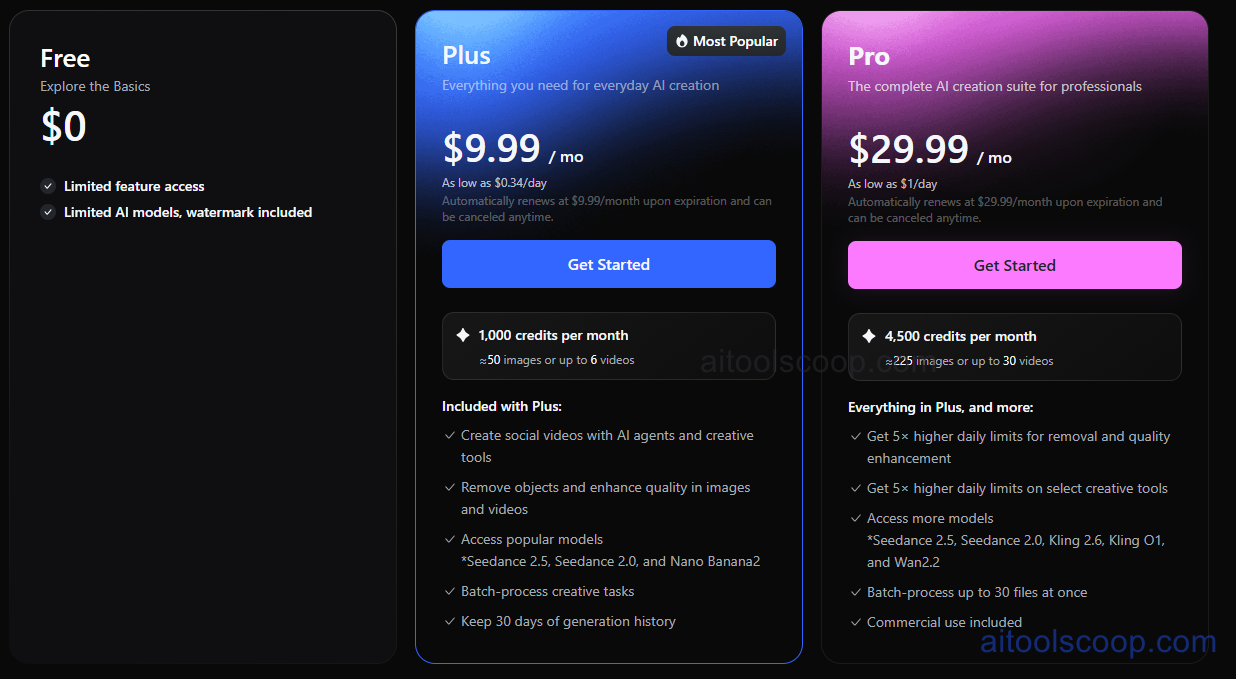
- Free — $0 — limited feature access, limited AI models, and generated output carries a watermark. Enough to sample the enhancement and creation tools before subscribing.
- Plus — $9.99/month (from $69.99/year, roughly $5.83/month) — 1,000 credits a month (about 50 images or 6 videos), social video creation with AI agents and creative tools, object removal and quality enhancement in images and video, access to popular models including Seedance 2.5 and Nano Banana 2, batch-processing of creative tasks, and 30 days of generation history retained.
- Pro — $29.99/month (from $209.99/year, roughly $17.50/month) — 4,500 credits a month (about 225 images or up to 30 videos), everything in Plus plus 5× higher daily limits on removal, quality enhancement, and select creative tools, access to more models (including Seedance 2.0, Kling 2.6, Kling O1, and Wan2.2), batch-processing up to 30 files at once, and commercial use rights included.
Paid plans auto-renew at the listed monthly rate upon expiration and can be cancelled anytime. Pricing verified from vmake.ai; rates may change — always confirm current pricing at vmake.ai.
Who Should Use Vmake?
Casual creators wanting to clean up a handful of blurry clips or remove a watermark from a downloaded video can get real use out of the free tier before ever paying. Social sellers and affiliate marketers producing regular UGC-style product videos for TikTok, Instagram, or Amazon listings are the clearest fit for Plus, where the monthly credit allowance and access to popular generation models cover a steady stream of short-form content. Agencies or high-volume sellers managing large product catalogs will get more value from Pro's higher daily limits, wider model access, and 30-file batch processing, especially once commercial licensing for client work becomes a factor. Anyone whose primary need is a single, deep video-editing timeline rather than AI-driven generation and enhancement may find a dedicated editor a better complement to Vmake's toolkit.
Frequently Asked Questions
Is Vmake free to use?
Yes. The free plan offers limited feature access and a limited set of AI models, with a watermark included on generated output, enough to test the platform before subscribing to Plus or Pro.
How do Vmake's credits work?
Each paid plan includes a monthly credit allowance — 1,000 on Plus and 4,500 on Pro — that can be spent on either image or video generations and enhancements, with images typically costing fewer credits than videos.
What's the difference between Plus and Pro?
Plus covers everyday AI creation with 1,000 monthly credits and access to popular models. Pro adds 4,500 monthly credits, 5× higher daily limits on removal and enhancement tools, access to more advanced models like Kling 2.6 and Wan2.2, batch-processing up to 30 files at once, and commercial use rights.
Can Vmake remove watermarks from existing videos?
Yes. Vmake includes a watermark and text removal tool that works on uploaded video and images, separate from its enhancement and generation tools.
Does Vmake support generating video from a product photo?
Yes. Vmake's UGC video generation and AI avatar tools can turn a single product image into a promotional or shoppable video without filming original footage, which is aimed particularly at online sellers and affiliate marketers.


