

VideoToBlog (videotoblog.ai) converts YouTube videos, uploaded video or audio files, and even bulk channel content into structured, publish-ready blog posts, aiming to solve the specific problem of creators who record but rarely write. A YouTuber, podcaster, or webinar host already has hours of spoken content sitting on their channel; VideoToBlog's job is to turn that into search-friendly text without the creator manually transcribing, outlining, and formatting each piece from scratch. Reviewers on G2 and Capterra consistently point to two things: the output requires noticeably less editing than a raw transcript dump, and the automatic screenshot extraction makes the resulting post feel like a real article rather than a wall of transcribed speech.
What distinguishes VideoToBlog from a basic transcription tool is that it doesn't just clean up spoken words into paragraphs — it restructures them into an actual blog format with headers, screenshots pulled from key visual moments, SEO metadata, and even FAQ sections generated from the video's content. An automation feature can also watch a YouTube channel and generate a new blog post automatically every time a fresh video goes live, which turns a one-time conversion tool into an ongoing content pipeline that runs without manual intervention.
How VideoToBlog Works
A blog post starts from a source — a YouTube link, an uploaded video or audio file, a Google Drive file, or even a pasted transcript — which VideoToBlog processes to extract both the spoken content and, for video sources, relevant visual screenshots at key moments. From there, a set of customization options controls the output: format (summary, listicle, tutorial, product review), tone, point of view, and a target keyphrase for SEO. The AI then assembles a structured draft complete with headers, a table of contents, FAQs, and internal links to a site's existing content, which a built-in editor lets users refine before publishing directly to WordPress or exporting as HTML, Markdown, PDF, or Word. The channel-watching automation feature repeats this entire process automatically whenever a monitored YouTube channel publishes something new.
Key Features
- Multi-source conversion: generate posts from YouTube links, uploaded video or audio files, Google Drive imports, or pasted transcripts
- Automatic screenshot extraction: pulls relevant visual moments from video sources and inserts them into the post, with options to swap or fine-tune each image
- SEO-optimized output: automatic metadata generation, keyphrase targeting, and internal link suggestions based on a site's existing content
- Format and tone customization: choose between summary, listicle, tutorial, interview, and review formats, with adjustable tone from casual to professional
- Channel-watching automation: monitors a YouTube channel and generates a blog post automatically every time a new video is published
- Built-in editor: refine AI-generated drafts inline, including direct HTML editing, before publishing
- One-click WordPress publishing: push finished posts directly to a connected WordPress site alongside export options in HTML, Markdown, PDF, and Word
- Multilingual generation: produce blog content in 30+ languages from the same video source
VideoToBlog Pricing
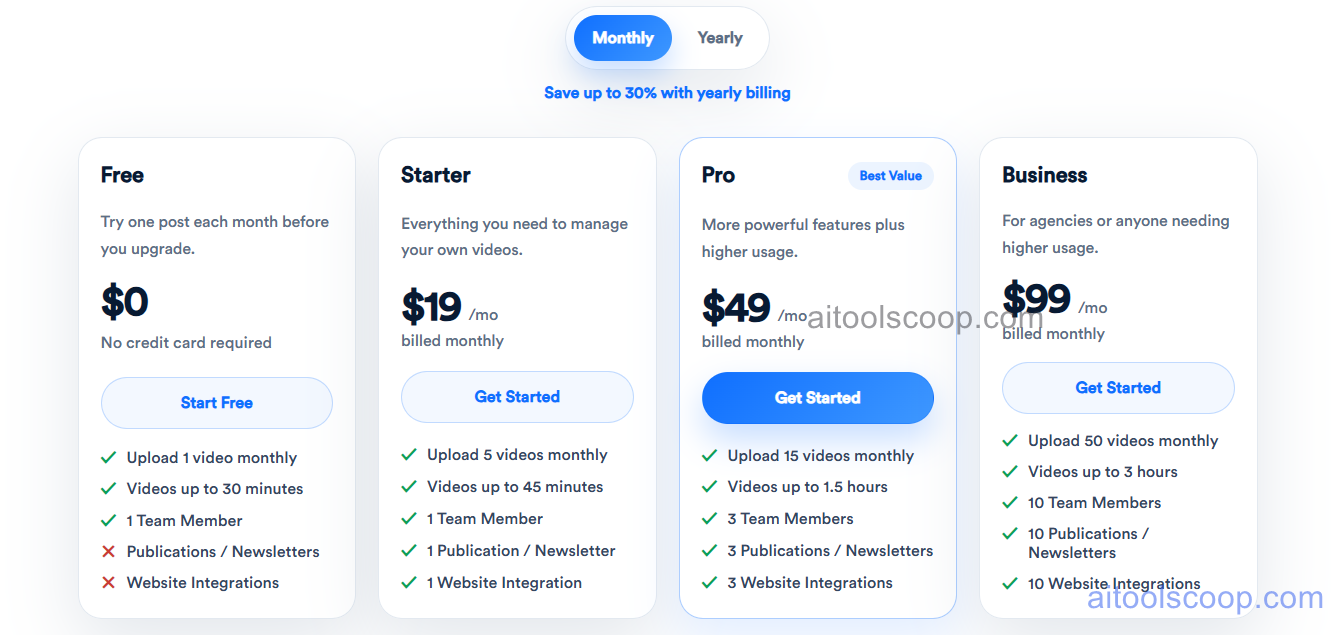
- Free — $0/month — one blog post per month, videos up to 30 minutes, one team member. No credit card required to start.
- Starter — $19/month (from $14/month billed annually) — 5 videos monthly, videos up to 45 minutes, one publication or newsletter, and one website integration.
- Pro — $49/month (from $39/month billed annually) — 15 videos monthly, videos up to 1.5 hours, 3 team members, 3 publications, and 3 website integrations. Marked as best value.
- Business — $99/month (from $69/month billed annually) — 50 videos monthly, videos up to 3 hours, 10 team members, and 10 publications and website integrations, built for agencies with higher-volume needs.
Monthly and yearly billing keep the same feature access per tier; only the effective monthly rate changes. Pricing is current as of publication and may change — confirm the latest rates at videotoblog.ai.
Who Should Use VideoToBlog?
YouTubers, podcasters, and webinar hosts who already produce regular video or audio content but rarely find time to also write blog posts from it are the clearest match, since the entire tool exists to close that specific gap. The Free plan is enough to test output quality on a single video, Starter suits an individual creator publishing a handful of posts monthly, and Pro's three-hour video limit and multi-user access make it the practical choice for a small content team — while Business scales that up for agencies managing several clients' channels at once. Anyone whose source material has no spoken audio, such as pure music or silent footage, won't get value here, since the tool depends on extracting and restructuring spoken content rather than analyzing visuals alone.
Frequently Asked Questions
Do I need a credit card to try VideoToBlog?
No. The Free plan allows one blog post per month with no credit card required, giving a direct way to evaluate output quality before subscribing to a paid tier.
What kinds of source material can generate a blog post?
YouTube links, uploaded video files, audio files, direct audio recordings, Google Drive uploads, pasted transcripts, and bulk-upload workflows for multiple videos at once are all supported as source input.
How is Pro different from Starter beyond just video length?
Pro raises the monthly video limit from 5 to 15, extends maximum video length from 45 minutes to 1.5 hours, and expands from a single team member and integration to three of each — making it the tier most reviewers point to for small content teams.
Can VideoToBlog automatically publish a post every time I upload a new video?
Yes. The channel-watching automation feature monitors a connected YouTube channel and generates a blog post automatically whenever a new video is released, sending it to a chosen destination such as a connected WordPress site.
Does unused monthly usage roll over to the next month?
No. According to user reviews, credits and video allowances that go unused in a given month don't carry forward, which is a common structure across most AI content tools with monthly usage limits.


