

Video Frame Extractor (frame-extractor.video) lets you pull still images out of a video, or convert a whole video into frames, entirely inside your browser. There is no upload and no signup: the video is processed locally on your device, so it never reaches a server. It accepts MP4, MOV, WebM and M4V files up to 2GB.
The core tool is free and offers three ways to capture frames: single-frame mode for precision, interval mode for frames at regular times, and scene detection for automatically picking the most visually distinct moments. Frames export as PNG, JPG or a ZIP package. Around that core extractor, the site also offers extra image tools and a guide builder, which sit behind optional credit plans.
How Video Frame Extractor Works
You drag your video into the page, and it loads locally using the browser's WebCodecs support, so nothing needs to be installed. You then choose an extraction mode: single frame for an exact moment, interval to capture frames at regular times or by count, or scene detection to grab keyframes automatically. You can step through the video frame by frame and capture a frame at a specific timestamp. Extracted frames appear as a preview where you select the ones you want and download them as PNG for lossless quality, JPG for smaller files (with quality adjustable from 1 to 100), or a ZIP of the full set. Frames are exported at the video's original resolution, whether that is HD, 4K or something else.
Key Features
- Browser-only processing — extract frames locally with no upload, no signup and no software to install; the site says it can keep working offline once loaded
- Single-frame, interval and scene-detection modes — capture one exact frame, frames at regular intervals or by count, or automatically detected scene changes
- Frame-by-frame navigation — seek to any exact moment and capture at a specific timestamp to avoid blur
- Original-resolution output — export frames at the full resolution of the source video
- PNG, JPG and ZIP export — choose lossless PNG, adjustable-quality JPG, or a ZIP of a complete batch
- Wide format support — MP4, MOV, WebM and M4V files up to 2GB
- Create Guide — turn selected frames into numbered, timestamped step-by-step guides with notes, exported as PDF or Markdown
- Related image tools — the site links to an AI photo editor, batch photo editor, background remover, image upscaler, image enhancer and bulk image resizer for working on extracted frames
- Extra pages and tools — dedicated pages for Video to PNG, Video to JPG, GIF frame extraction, contact sheets and sprite sheets
Video Frame Extractor Pricing
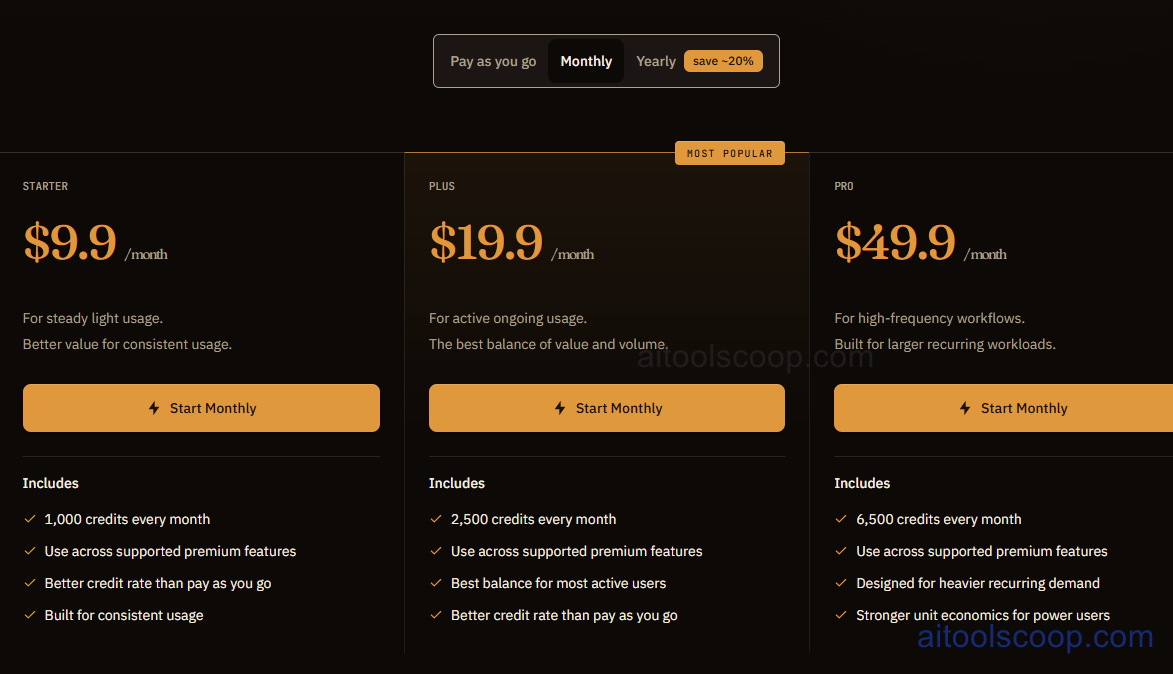
- Free — $0 — The browser-based frame extractor with no upload and no signup: single-frame, interval and scene-detection modes, and PNG, JPG or ZIP export.
- Starter — $9.9/month ($95/year, about $7.92/month billed annually) — For steady light usage. 1,000 credits every month, usable across supported premium features, at a better credit rate than pay as you go.
- Plus — $19.9/month ($191/year, about $15.92/month billed annually) — The most popular plan, for active ongoing usage. 2,500 credits every month, usable across supported premium features, at a better credit rate than pay as you go.
- Pro — $49.9/month ($479/year, about $39.92/month billed annually) — For high-frequency workflows and larger recurring workloads. 6,500 credits every month, usable across supported premium features, with stronger unit economics for power users.
The pricing page also offers a pay-as-you-go option alongside the monthly and yearly plans. Yearly billing saves about 20%. The credit plans cover premium features only; the core frame extractor is free. Pricing verified from frame-extractor.video; rates may change — always confirm current pricing at frame-extractor.video.
Who Should Use Video Frame Extractor?
Video Frame Extractor suits anyone who needs clean stills from a video without uploading private footage: content creators grabbing thumbnails and social visuals, designers and storyboard artists building mood boards, educators capturing slides and diagrams from tutorials, and researchers who need precisely timed frames. The free tool covers most extraction jobs on its own, so there is no need to pay just to export PNG or JPG frames. The credit plans are for people who also want the site's AI image tools or the guide builder as a follow-up step, and the larger plans make sense only for heavier recurring use. Because processing happens in your browser, speed depends on your device, and very large files may be slower on older machines. Anyone who needs full video editing will still want a separate editor.
Frequently Asked Questions
What is Video Frame Extractor?
Video Frame Extractor is an online tool that captures still frames from video files in your browser. You can pull a single frame, frames at intervals or scene-change frames, and export them as PNG, JPG or ZIP, with no upload and no signup.
Is Video Frame Extractor free?
Yes. The core frame extractor is free to use with no signup, supporting MP4, MOV, WebM and M4V files up to 2GB. Paid credit plans only apply to premium features beyond the basic extraction.
Is my video uploaded to a server?
No. Video is processed locally in your browser, so the file stays on your device. The site says no video data is sent to any server during extraction.
How much do the paid plans cost in 2026?
Billed monthly, Starter costs $9.9, Plus costs $19.9 and Pro costs $49.9. Billed yearly they cost $95, $191 and $479 a year, saving about 20%. They include 1,000, 2,500 and 6,500 credits a month respectively, and a pay-as-you-go option is also offered.
What formats can I export frames in?
You can export PNG for lossless quality, JPG for smaller files with quality adjustable from 1 to 100, or a ZIP package containing a full batch of frames. Frames are saved at the original resolution of your video.


