

Vibecode (vibecodeapp.com) is a mobile-first AI app builder that turns plain-language prompts into working native mobile apps, built and previewed right from a phone rather than a desktop IDE. It generates React Native and Expo code behind the scenes, so what starts as a text description becomes a real, testable app without the person writing a line of it by hand.
Beginners and indie builders who have an app idea but no development background make up Vibecode's primary audience, though developers use it too, since the underlying React Native and Expo code stays exportable and editable rather than locked inside a black box. The platform leans into building on the go — describing an app, testing it instantly on the same device, and refining it through short follow-up prompts instead of switching between a code editor and a simulator.
How Vibecode Works
A project starts with a written description of the app being built, which Vibecode's AI agent turns into working screens, navigation, and logic that can be previewed live on the same phone within moments. From there, refinement happens through short natural-language prompts or a gesture-based feature called Pinch to Build, which lets a user tweak design details, add haptic feedback, or slot in new functionality without retyping a full prompt each time. Vibecode Cloud can generate authentication, a database, and storage from a single prompt as well, covering the backend pieces an app typically needs beyond its interface. Once an app is ready, it can be published straight from the phone by connecting an Apple Developer account, or the full source code can be downloaded and connected to an editor like Cursor over SSH for developers who want to keep working outside the app.
Key Features
- Prompt-to-app generation: converts a plain-language app description into working React Native and Expo screens, navigation, and logic
- On-device live preview: test and interact with the generated app directly on the same phone used to build it
- Pinch to Build: a gesture-based way to tweak design, add haptics, and adjust features without writing a new prompt from scratch
- Vibecode Cloud: generates authentication, database, and storage infrastructure from a single prompt
- Instant AI and data integrations: connects to major AI APIs and data sources like stocks or weather without requiring separate API keys
- Downloadable source code and SSH to Cursor: export the full generated codebase and connect it to an external editor for deeper customization (Pro and Max)
- Direct App Store submission: publish a finished app to the Apple App Store from directly within the phone app
- Rolling AI credits: monthly credits carry over to the next billing cycle instead of expiring
Vibecode Pricing
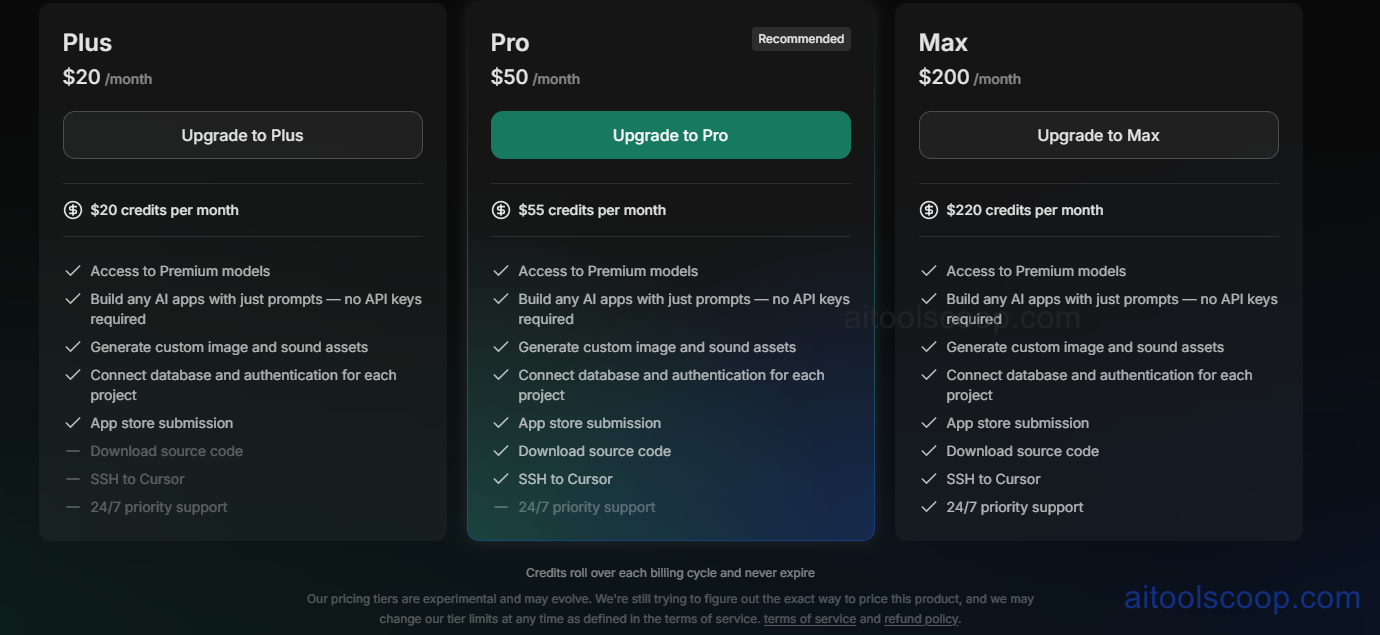
- Plus — $20/month (from $16.67/month billed annually) — $20 in monthly credits: access to premium models, building AI apps from prompts with no API keys required, custom image and sound asset generation, database and authentication connections per project, and App Store submission.
- Pro — $50/month (from $41.67/month billed annually) — $55 in monthly credits: everything in Plus, plus downloadable source code and SSH access to Cursor for external editing.
- Max — $200/month (from $166.67/month billed annually) — $220 in monthly credits: everything in Pro, plus 24/7 priority support for the highest-volume builders.
Credits roll over each billing cycle and never expire. Vibecode's own terms note that pricing tiers are experimental and may change, with limits subject to updates under its terms of service. Pricing verified from vibecodeapp.com; rates may change — always confirm current pricing at vibecodeapp.com.
Who Should Use Vibecode?
Non-developers with a clear app idea and no coding background get the most direct value from Vibecode, since the entire build-test-refine loop can happen on a single phone without ever opening a traditional IDE. Plus covers casual builders experimenting with personal tools, habit trackers, or small business utilities where the base $20 in monthly credits and App Store submission are enough. Pro is the natural upgrade for anyone who wants to eventually hand a project to a developer or take it further in a code editor, since source code download and SSH access to Cursor open that door. Max fits people running high-volume generation across many projects or client work, where the larger credit allotment and priority support justify the higher price. Teams needing deeply custom, production-grade native functionality beyond what React Native and Expo comfortably support will likely still need a traditional development process for their most complex features.
Frequently Asked Questions
What is Vibecode used for?
Vibecode is an AI app builder that turns plain-language prompts into working native mobile apps, built with React Native and Expo. It's designed to be used directly from a phone, with live preview and iterative prompting replacing a traditional code editor and simulator setup.
Do I need coding experience to use Vibecode?
No coding experience is required to start building, since apps are generated from written descriptions. That said, some React Native and Expo knowledge helps for deeper customization, and Vibecode does support downloading the full source code for developers who want that level of control.
How does Vibecode's credit system work?
Each plan includes a monthly credit allotment used for AI generation — $20 on Plus, $55 on Pro, and $220 on Max. Unlike many credit-based tools, Vibecode's credits roll over each billing cycle instead of expiring, though the company notes its pricing tiers are still experimental.
Can I publish an app built in Vibecode to the App Store?
Yes. All paid plans include direct App Store submission, which lets a finished app be published by connecting an Apple Developer account from within the phone app itself, without needing separate publishing tools.
What's the difference between the Pro and Max plans?
Pro and Max share the same core feature set, including downloadable source code and SSH access to Cursor. The main differences are credit allotment — $55/month on Pro versus $220/month on Max — and 24/7 priority support, which is exclusive to the Max plan.


