

UniScribe (uniscribe.co) turns spoken audio and video into text using a Whisper-based transcription engine, typically finishing an hour-long file in under a minute. Beyond a raw transcript, the platform layers on content-organization tools that go further than most transcription services: automatic summaries, visual mind maps of the content's structure, and extracted key questions and answers pulled straight from what was said. Students, journalists, researchers, and content creators are the platform's core audience, drawn by a free tier that includes 120 minutes of transcription a month with no credit card required.
Files can be uploaded directly or pulled from a pasted YouTube link, and UniScribe accepts a wide range of audio and video formats, including MP3, WAV, MP4, and MOV. Once transcribed, the text can be translated into another language, exported into formats like DOCX, SRT, or CSV, or shared as a viewable link. The mind-map and key-Q&A features stand out from typical transcription tools, turning a long recording into something closer to structured study notes than a flat wall of text.
How UniScribe Works
A file upload or a pasted YouTube link starts the process, after which UniScribe's speech-to-text engine converts the audio into a timestamped transcript, typically completing an hour of content in under a minute. Once the transcript is ready, users can generate an automatic summary condensing the main points, build a visual mind map showing how the content's ideas connect, or extract a set of key questions and answers drawn directly from what was said. The transcript itself can be reviewed and corrected in the platform, translated into another supported language, and exported into a range of document or subtitle formats, or shared through a direct viewing link without requiring the recipient to have an account.
Key Features
- Fast Whisper-based transcription: converts audio and video into text with high accuracy, typically finishing an hour-long file in under a minute
- Wide language support: transcribes and translates content across dozens of languages (up to 63 on lower tiers, more on higher plans), suited to international teams and multilingual research
- YouTube link transcription: transcribes video content directly from a pasted YouTube URL without downloading the file first
- Automatic summaries: condenses long transcripts into a short overview, making it faster to review lengthy recordings
- Visual mind maps: converts transcribed content into a structured, visual map of ideas for easier review and retention
- Key Q&A extraction: automatically pulls out important questions and answers discussed in the recording
- Multi-format export: exports transcripts as TXT, DOCX, PDF, SRT, VTT, or CSV, covering both document and subtitle needs
- AI translation: translates finished transcripts into other supported languages for international use or repurposing
- Speaker identification (paid plans): distinguishes between different speakers in a recording for interview and meeting transcripts
- API access (paid plans): connects UniScribe's transcription functionality into external tools and workflows via key-based authentication
UniScribe Pricing
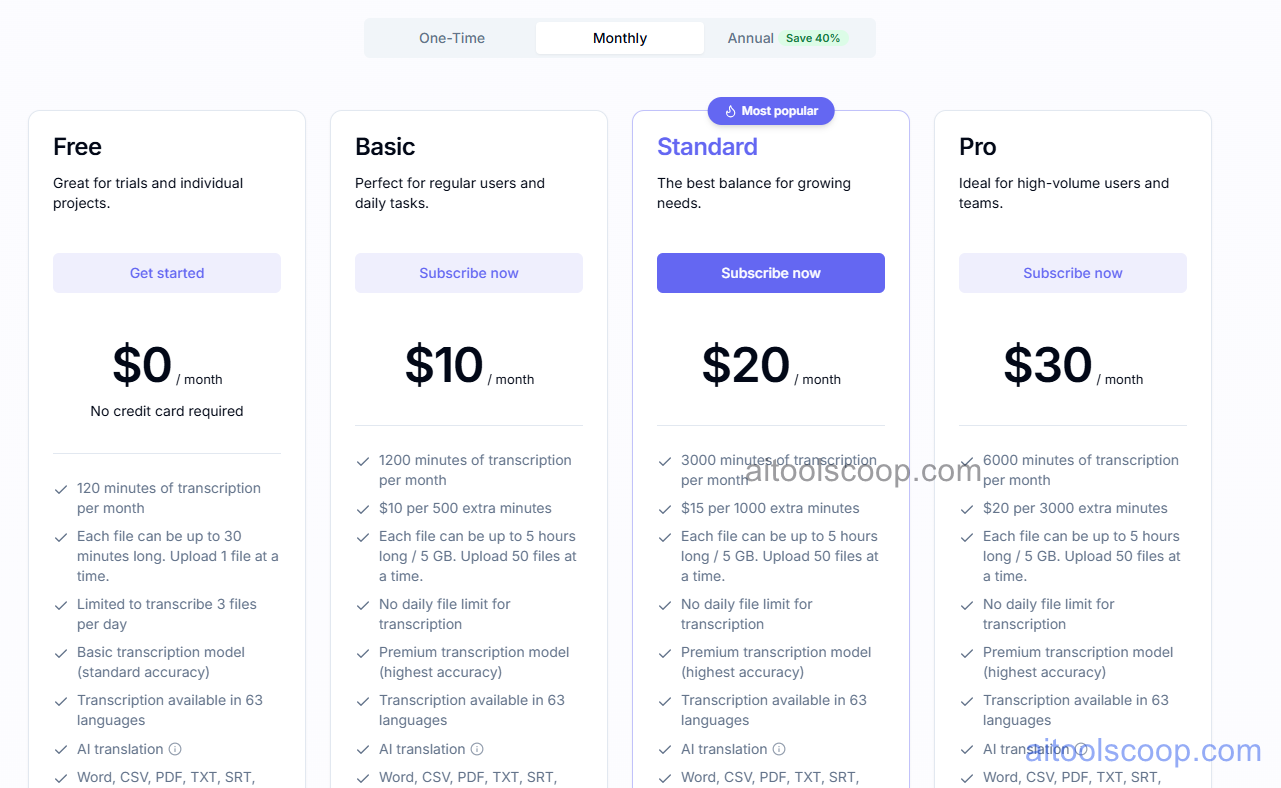
- Free — $0/month — 120 minutes of transcription a month, no credit card required, files up to 30 minutes long, up to 3 files transcribed a day, the basic transcription model, transcription in 63 languages, and AI translation.
- Basic — $10/month (from $6/month billed annually) — 1,200 minutes of transcription a month ($10 per 500 extra minutes), files up to 5 hours / 5GB, up to 50 files uploaded at a time, no daily file limit, and the premium (highest-accuracy) transcription model.
- Standard — $20/month (from $12/month billed annually) — 3,000 minutes of transcription a month ($15 per 1,000 extra minutes), with the same file-size, upload, and premium-model benefits as Basic, aimed at regular daily users.
- Pro — $30/month (from $18/month billed annually) — 6,000 minutes of transcription a month ($20 per 3,000 extra minutes), for high-volume users and teams, plus the same premium transcription model and language coverage.
All paid plans support transcription in 63 languages, AI translation, and export to Word, CSV, PDF, TXT, and SRT. Pricing verified from uniscribe.co; rates may change — always confirm current pricing at uniscribe.co.
Who Should Use UniScribe?
Students and researchers transcribing lectures, interviews, or focus groups get immediate value from the free tier's 120 monthly minutes, especially combined with the automatic summaries and mind maps that turn a raw transcript into review-ready notes. Journalists and content creators processing regular audio or video, such as podcast episodes or recorded interviews, are better matched to Basic or Standard, where the larger monthly minute allowance and premium transcription model reduce both manual correction and the risk of running out of minutes mid-project. Teams handling high volumes of recorded meetings or multi-hour source material, or anyone who wants speaker identification and API access, will get the most out of Pro. Anyone who only needs an occasional short transcript can likely stay on the free plan indefinitely without needing to upgrade.
Frequently Asked Questions
Does UniScribe have a free plan?
Yes. The free plan includes 120 minutes of transcription per month with no credit card required, covering files up to 30 minutes long and up to 3 transcriptions a day using the basic transcription model.
How accurate is UniScribe's transcription?
UniScribe runs on an optimized Whisper-based speech-to-text model. The free plan uses a standard-accuracy model, while Basic, Standard, and Pro all include the premium, highest-accuracy transcription model.
What's the difference between the Basic, Standard, and Pro plans?
The three paid plans mainly differ in monthly transcription minutes: Basic includes 1,200 minutes, Standard 3,000 minutes, and Pro 6,000 minutes. All three share the same premium transcription model, 5-hour/5GB file limits, and export options, with pricing scaling accordingly.
Can UniScribe transcribe YouTube videos directly?
Yes. Users can paste a YouTube video link directly into UniScribe instead of downloading and uploading the file manually, and the platform will transcribe the video's audio content.
What can UniScribe do beyond basic transcription?
Beyond converting speech to text, UniScribe can generate automatic summaries, build visual mind maps of the content, extract key questions and answers, and translate the finished transcript into another language.


