

Transkriptor (transkriptor.com) positions itself as an all-in-one transcription and AI note-taking tool rather than a bare speech-to-text converter. Meetings, voice memos, lectures, and video content can all be uploaded or recorded directly inside the app, and the resulting transcript comes with AI-generated summaries, custom meeting templates, and a chat interface for asking questions about what was said instead of scrolling through the raw text. Students, journalists, researchers, and business teams handling regular recorded conversations make up the platform's primary audience, with claimed accuracy above 99% across more than 100 languages.
Beyond individual transcription, Transkriptor's meeting-focused tools include calendar integration that automatically joins and records scheduled Zoom, Microsoft Teams, and Google Meet calls, as well as an in-person recording mode for capturing conversations with no shared call link — client visits, field interviews, or physical meetings — with offline recording that syncs once a connection is available. Speaker diarization, sentiment analysis, and talk-time distribution extend the tool from plain transcription into meeting analytics for teams that want more than a text record of what was said.
How Transkriptor Works
A transcript starts one of several ways: uploading an existing audio or video file, recording directly inside the app using the built-in recorder, or connecting a calendar so Transkriptor's AI bot automatically joins and records a scheduled video call. Once the audio is captured, the platform's speech recognition engine converts it into a timed, speaker-labeled transcript, trained to recognize industry terminology and technical jargon alongside general speech. From there, the AI assistant can generate a summary using a built-in or custom template suited to the meeting type, draft a follow-up email based on what was discussed, or answer direct questions about the transcript through the AI chat interface. Finished transcripts can be exported as PDF, DOCX, or SRT, and shared via email or a link with adjustable viewing and editing permissions.
Key Features
- High-accuracy AI transcription: converts audio and video into text with claimed accuracy above 99% across 100+ languages, including speaker labeling
- AI meeting bot with calendar sync: automatically joins and records scheduled Zoom, Microsoft Teams, and Google Meet calls without manual setup per meeting
- In-person meeting recording: captures physical meetings, client visits, and field interviews with no shared call link, including offline recording that syncs once reconnected
- AI summaries and custom templates: generates meeting summaries using pre-built or user-created templates suited to different meeting types
- AI chat with transcripts: lets users ask direct questions about a transcript's content and get relevant answers without manually searching the text
- Speaker diarization and sentiment analysis: distinguishes between speakers and analyzes talk-time distribution and tone across a conversation
- Video-to-text conversion: transcribes video content directly, useful for turning webinars or YouTube videos into captions or written notes
- AI voice memo transcription: captures lectures, personal notes, or spoken thoughts through an integrated audio recorder
- Custom vocabulary: supports specialized terminology recognition for industry-specific or technical transcription needs (Pro and Team)
- Compliance certifications: GDPR, HIPAA, ISO 27001, and SOC 2 compliant, suited to regulated industries handling sensitive recordings
Transkriptor Pricing
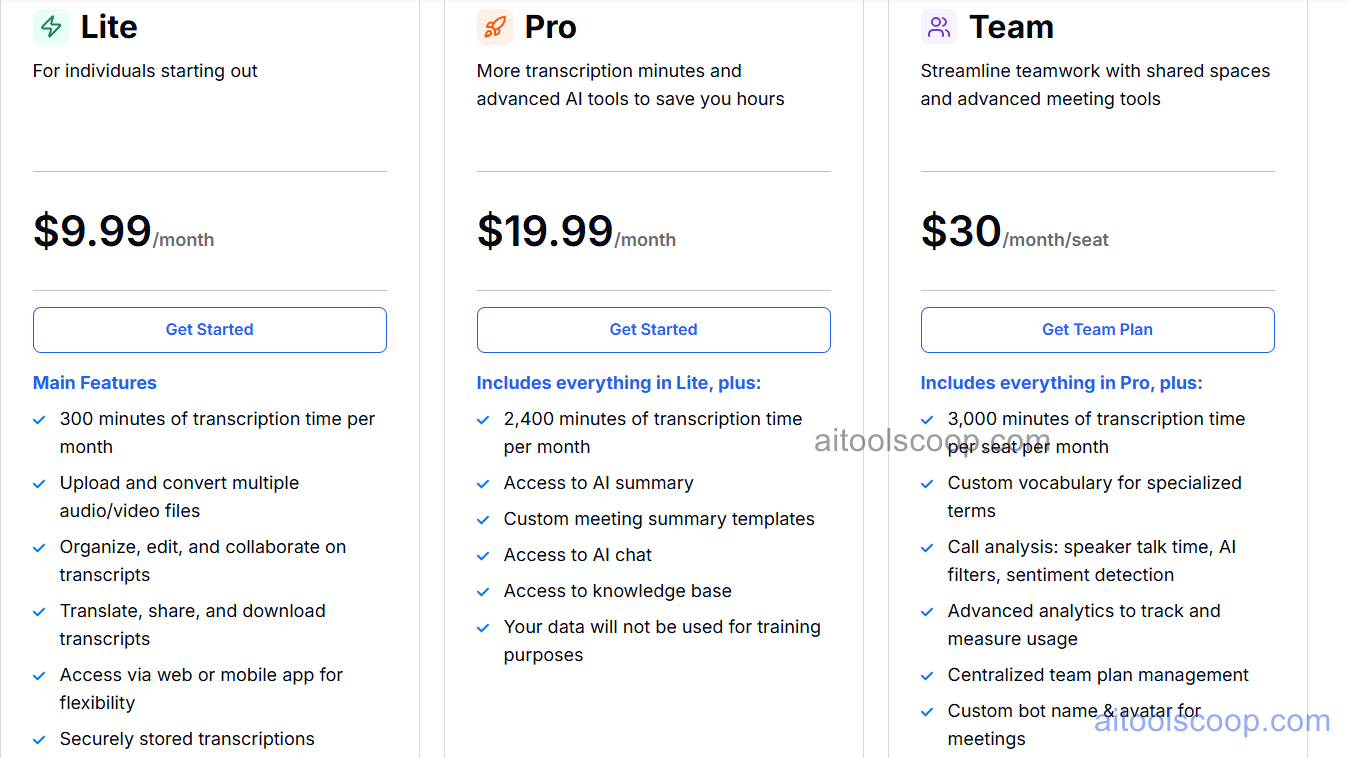
- Free — 90 minutes of transcription — enough to explore core features including AI chat and AI summary before subscribing to a paid plan.
- Lite — $9.99/month — 300 minutes of transcription a month, uploading and converting multiple audio/video files, organizing, editing, and collaborating on transcripts, translating, sharing, and downloading transcripts, access via web or mobile app, and securely stored transcriptions.
- Pro — $19.99/month (from roughly $9.33/month billed annually) — everything in Lite, plus 2,400 minutes of transcription a month, access to AI summary, custom meeting summary templates, AI chat, a knowledge base, and a guarantee that user data will not be used for training purposes.
- Team — $30/month per seat (from roughly $20/month per seat billed annually) — everything in Pro, plus 3,000 minutes of transcription per seat per month, custom vocabulary for specialized terms, call analysis (speaker talk time, AI filters, sentiment detection), advanced usage analytics, centralized team plan management, and custom bot name and avatar for meetings.
Pricing verified from transkriptor.com; rates may change — always confirm current pricing at transkriptor.com.
Who Should Use Transkriptor?
Students and occasional users who only need transcription now and then can get real value from the 90-minute free plan before deciding whether the paid minute allowances are worth it. Freelancers, journalists, and researchers transcribing regular interviews or lecture recordings are a solid fit for Lite, which covers a moderate monthly volume along with collaboration and translation tools. Professionals running frequent virtual meetings — sales reps, consultants, recruiters — get the most direct benefit from Pro's AI summaries, custom templates, and calendar-synced meeting bot, which together remove most manual note-taking from a busy schedule. Teams standardizing meeting documentation across multiple people, or needing call analytics like sentiment detection and talk-time distribution, should look at Team, where per-seat pricing scales with headcount and centralized management keeps everyone's transcripts organized in one place.
Frequently Asked Questions
Does Transkriptor offer a free trial?
Yes. The free plan includes 90 minutes of transcription, giving new users enough room to test core features, including AI chat and AI summary, before subscribing to Lite, Pro, or Team.
Can Transkriptor automatically join and record video calls?
Yes. With calendar integration connected, Transkriptor's AI bot automatically joins and records scheduled meetings on Zoom, Microsoft Teams, and Google Meet, and a no-bot recording option is also available so nothing visibly joins the call.
What's the difference between the Lite, Pro, and Team plans?
Lite covers 300 monthly transcription minutes with core organizing and sharing tools. Pro expands that to 2,400 minutes and adds AI summaries, custom templates, and AI chat. Team is priced per seat with 3,000 minutes per seat, plus call analytics, custom vocabulary, and centralized team management.
How accurate is Transkriptor's transcription?
Transkriptor reports accuracy above 99% across 100+ languages, with the AI trained to recognize industry terminology and technical jargon in addition to general conversational speech, and multiple speakers can be distinguished automatically.
Can Transkriptor be used for in-person meetings without a video call link?
Yes. Transkriptor's in-person meeting mode records physical conversations directly through a device's microphone, including offline recording that automatically syncs and transcribes once an internet connection is available.


