

Stripo (stripo.email) is a dedicated email template builder that sits between fully manual HTML coding and generic drag-and-drop design tools, purpose-built specifically for the quirks of email design — cross-client compatibility, responsive layouts, and interactive AMP elements that most general design software wasn't built to handle. Marketers, designers, and developers can switch freely between a no-code drag-and-drop editor and a full HTML/CSS mode, then export the finished template directly to more than 90 email service providers rather than manually copying code between platforms. Solo email creators, small teams, and agencies producing regular email campaigns make up the platform's core user base, and companies including Maersk, eBay, Adobe, Microsoft, and Spotify are listed among its customers.
Beyond the core editor, Stripo includes tools that address recurring email production pain points: a brand kit generator for consistent styling across templates, module synchronization so editing a reusable block updates every template that uses it, and an embeddable plugin version for SaaS platforms wanting to build email design directly into their own product. An AI Assistant can draft email copy from a prompt, and a free Chrome extension plus MCP-style integrations let coding tools like Claude, Cursor, and VS Code search, read, and export template content directly.
How Stripo Works
A project starts by picking one of Stripo's 1,600+ free and paid templates or beginning from a blank canvas, then dragging content blocks — banners, product grids, buttons, text sections — onto the working canvas and rearranging them as needed. Colors, fonts, and layouts can be adjusted visually, and for finer control, the editor switches into HTML/CSS mode without losing any of the work done in the visual view. Stripo's Smart Elements let dynamic content, like live product details, update automatically rather than requiring manual edits, and module synchronization means updating one reusable block propagates that change across every template built with it. Before sending, the platform tests the email across roughly 98 mobile, desktop, and web clients, generating shareable preview links and screenshots so a colleague or client can review the design without needing editor access. Finished templates export directly to any of Stripo's 90+ supported ESPs in a couple of clicks.
Key Features
- Drag-and-drop email editor: builds responsive HTML emails visually with no coding required, alongside a full HTML/CSS mode for advanced customization
- 1,600+ ready-made templates: a library covering promotional, informational, transactional, and trigger-based email categories
- AMP for Email support: adds interactive elements like carousels, forms, and accordions directly inside supported email clients
- Module synchronization: editing a reusable content block once automatically updates every template that uses it
- 90+ ESP integrations: exports finished templates directly to major email service providers in a couple of clicks
- Cross-client testing: tests how an email renders across roughly 98 mobile, desktop, and web email clients before sending
- AI Assistant: drafts email copy based on a written prompt to speed up content creation
- Sharing preview links: generates a shareable link so colleagues or clients can review a design without needing editor access
- Team collaboration: invites writers, designers, proofreaders, or viewers with role-specific access levels to a shared workspace
- Embeddable plugin: lets SaaS platforms integrate Stripo's editor directly into their own product for their end users
Stripo Pricing
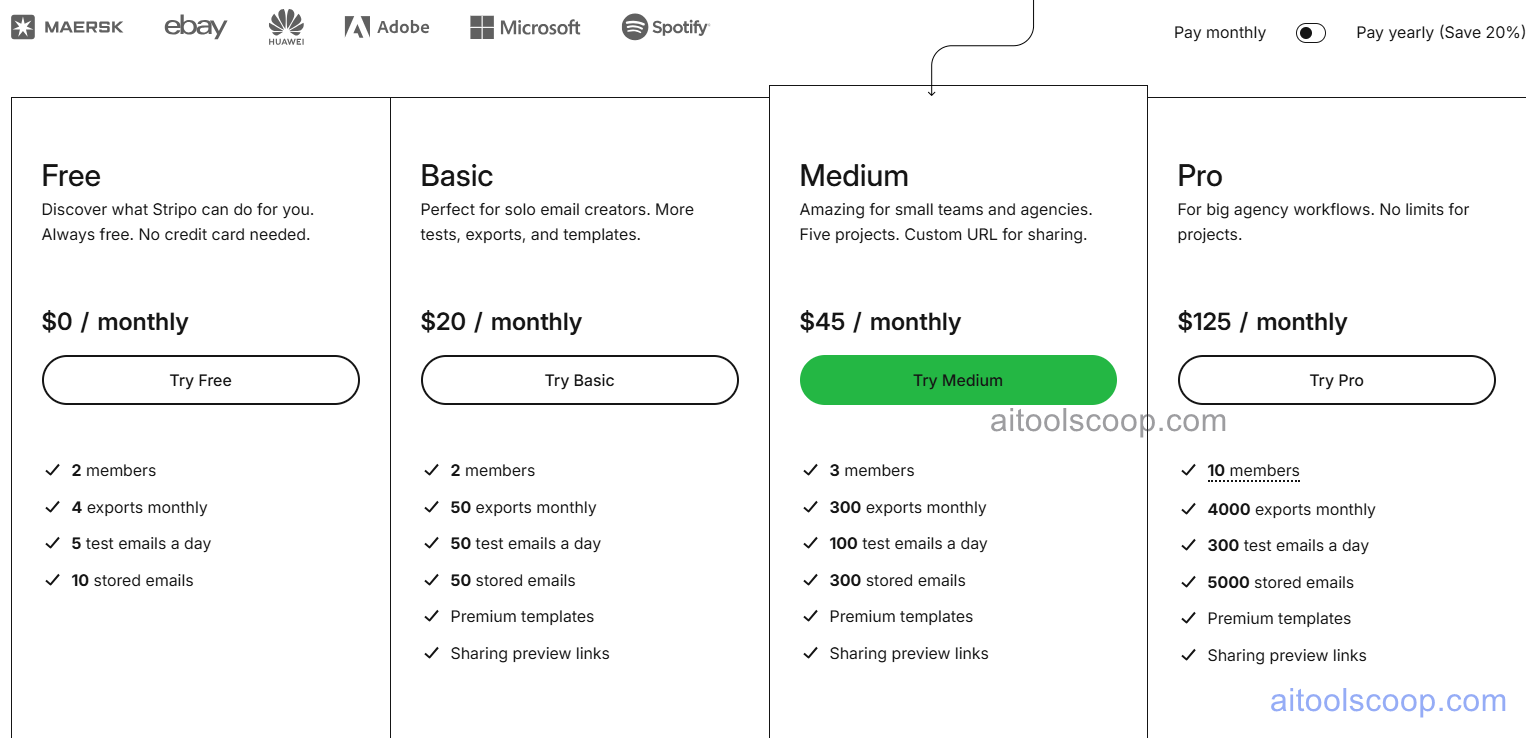
- Free — $0/month — 2 members, 4 exports monthly, 5 test emails a day, and 10 stored emails. Always free, no credit card needed, enough to explore the core editor.
- Basic — $20/month (from ≈$16.67/month billed annually, $200/year) — 2 members, 50 exports monthly, 50 test emails a day, 50 stored emails, premium templates, and sharing preview links. Aimed at solo email creators who need more tests, exports, and templates.
- Medium — $45/month (from ≈$37.50/month billed annually, $450/year) — 3 members, 300 exports monthly, 100 test emails a day, 300 stored emails, premium templates, and sharing preview links, plus a custom URL for sharing. Positioned for small teams and agencies running five projects at once.
- Pro — $125/month (from ≈$104.17/month billed annually, $1,250/year) — 10 members, 4,000 exports monthly, 300 test emails a day, 5,000 stored emails, premium templates, and sharing preview links. Built for big agency workflows with no limits on projects.
Annual billing saves 20% compared to paying monthly across all paid tiers. Pricing verified from stripo.email; rates may change — always confirm current pricing at stripo.email.
Who Should Use Stripo?
Solo marketers and small business owners sending occasional email campaigns can get real, ongoing use out of the free plan, since most core editing features remain available without a subscription. Independent email creators producing more frequent campaigns who need higher export and test limits, along with premium templates, are the clearest fit for Basic. Small marketing teams and agencies juggling a handful of active projects at once will find Medium's five-project structure and custom sharing URL better suited to collaborative, client-facing work. Larger agencies running high-volume, multi-client email production with bigger teams should look at Pro, where the higher member count, exports, and stored email limits remove most of the friction that smaller plans would introduce at that scale.
Frequently Asked Questions
Is Stripo actually free, or a limited trial?
Stripo's free plan is genuinely free forever, not a time-limited trial, and no credit card is required to sign up. It includes 2 members, 4 monthly exports, 5 daily test emails, and 10 stored emails.
How many email service providers does Stripo export to?
Stripo supports direct export to more than 90 email service providers, letting a finished template move from the editor into a sending platform in just a couple of clicks rather than requiring manual code copying.
What's the difference between the Basic, Medium, and Pro plans?
The plans scale mainly by team size and usage limits: Basic supports 2 members with 50 monthly exports, Medium supports 3 members with 300 exports and adds a custom sharing URL, and Pro supports 10 members with 4,000 exports and no project limits for larger agency workflows.
Can Stripo generate email copy automatically?
Yes. Stripo's AI Assistant can draft email copy based on a written prompt, helping speed up content creation directly inside the editor rather than requiring copy to be written separately and pasted in.
Does Stripo support interactive elements inside emails?
Yes. Stripo supports AMP for Email, a Google-backed framework that adds interactive elements like carousels, accordions, and forms directly inside supported email clients rather than linking out to a separate page.


