

SlidesGPT (slidesgpt.com) converts a plain-text prompt into a complete, structured slide deck in well under five minutes, using ChatGPT's API to handle outline creation, slide content, layout, and image selection in a single pass. The interface centers on a single text input field, which keeps the learning curve minimal compared to more design-heavy AI presentation tools.
Students, teachers, consultants, and employees across companies of every size make up SlidesGPT's user base, and the platform reports generating more than 10 million presentations while holding the top spot among AI PowerPoint generators listed in the ChatGPT store. Its straightforward, research-heavy approach to content generation makes it a common first stop for anyone who needs a competent first draft of a deck fast, rather than a tool for extensive visual customization.
How SlidesGPT Works
A user types a topic or description into SlidesGPT's single input field and selects a design theme, after which the AI generates a slide outline — typically 8 to 12 titles — for review before the full deck gets built. Editing the outline at this stage, either by hand or by asking the AI to refine specific sections, tends to save meaningful cleanup time later, since it's easier to fix structure before content generation than after. Clicking through to generate the full deck typically takes 30 to 90 seconds, drawing on ChatGPT's research capabilities to produce well-structured, informative content with accurate details and automatically selected high-quality images from Unsplash. The finished deck opens in an in-browser editor where text can be changed, images swapped, and layouts switched from SlidesGPT's template library, with AI available to update individual slides on request; from there, it can be shared as a public link, presented directly from the browser, or exported for offline editing in PowerPoint, Google Slides, or PDF.
Key Features
- Text-to-presentation generation: converts a plain-text prompt or written document into a complete, structured slide deck
- Editable AI-generated outline: review and refine an 8-to-12 slide outline before the full deck is generated, saving cleanup time
- Fast generation: builds a complete deck from outline to finished slides in roughly 30 to 90 seconds
- Automatic image selection: pulls high-quality, relevant images from Unsplash automatically for each slide
- In-browser editor: change text, swap images, and switch layouts from a template library without leaving the browser
- Multi-format export: download finished decks as PowerPoint (PPT/PPTX), Google Slides, or PDF
- Custom theme support: access to multiple design themes with monthly template releases, expanded on paid plans
- Custom PowerPoint template upload: upload a branded template so generated decks match an existing company style (paid plans)
- ChatGPT store integration: usable directly as an app inside the ChatGPT store, in addition to the standalone web platform
SlidesGPT Pricing
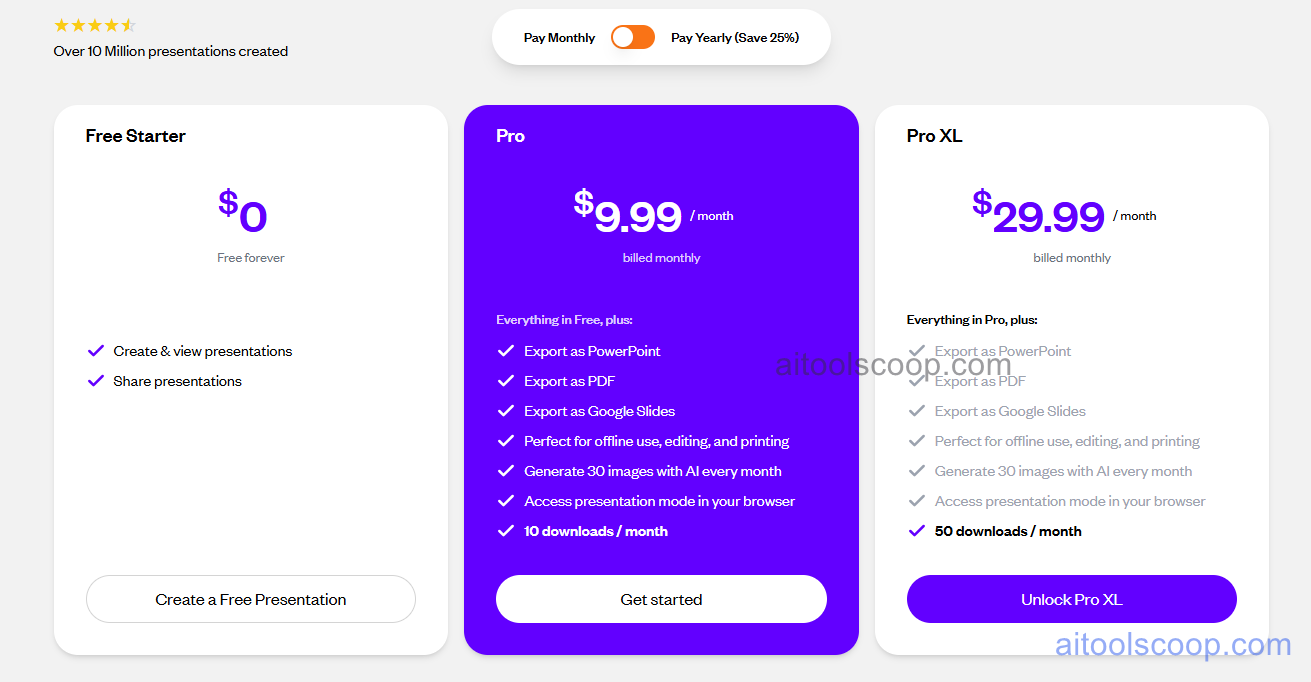
- Free Starter — $0/month, free forever — create and view presentations, and share presentations, viewable directly in-browser.
- Pro — $9.99/month (billed monthly) — everything in Free, plus export as PowerPoint, PDF, or Google Slides, offline use, editing, and printing, 30 AI-generated images per month, presentation mode in the browser, and 10 downloads per month.
- Pro XL — $29.99/month (billed monthly) — everything in Pro, plus 50 downloads per month, with the same export formats, offline capability, and AI image generation allotment as Pro.
Yearly billing saves 25% off the monthly rate on both paid plans. Free Starter allows creating and viewing presentations without any download or export capability. Pricing verified from slidesgpt.com; rates may change — always confirm current pricing at slidesgpt.com.
Who Should Use SlidesGPT?
Anyone who needs a competent first-draft deck fast — a student prepping a class presentation, a consultant putting together talking points before a meeting — will get real value out of SlidesGPT's simple, single-input workflow. Free Starter is enough to create and view a presentation and share it as a link, but the lack of export or download capability limits it mainly to browser-based presenting rather than offline use. Pro becomes necessary the moment someone needs to actually download a deck as a PowerPoint file, present offline, or edit it further in their own software, and its 30 monthly AI images and 10 downloads cover regular individual use comfortably. Pro XL fits people producing a higher volume of decks each month who need more than 10 downloads, without needing additional features beyond that higher cap. Teams that need deep visual customization, brand kit integration, or interactive slide elements like embeds and live links may find a more design-focused AI presentation tool better matches their needs than SlidesGPT's streamlined, content-first approach.
Frequently Asked Questions
Is SlidesGPT actually free to use?
Yes, the Free Starter plan is free forever and lets users create, view, and share presentations directly in the browser. Downloading a deck as a PowerPoint, PDF, or Google Slides file requires either purchasing a single deck for $2.99 or upgrading to the Pro subscription.
How long does it take to generate a full presentation?
After reviewing and adjusting the AI-generated outline, the full deck typically generates in about 30 to 90 seconds, with the entire process from initial prompt to finished slides usually completing in under five minutes total.
Can I upload my own template or brand it for my company?
Yes, paid plans allow uploading a custom PowerPoint template so generated decks match an existing brand style, which is one of the most practically useful features for anyone working within an established company design system.
What formats can I export a SlidesGPT presentation to?
On paid plans, finished decks can be exported as PowerPoint (PPT/PPTX), Google Slides, or PDF, letting users continue editing offline in their preferred presentation software rather than being limited to SlidesGPT's own browser-based editor.
What's the difference between Pro and Pro XL?
Pro and Pro XL share the same export formats, offline editing capability, and 30 monthly AI-generated images. The main difference is download volume — Pro includes 10 downloads per month, while Pro XL increases that to 50 downloads per month for higher-volume users.


