

SignMeUp AI (signmeup.ai) turns form creation into a one-line prompt instead of a page-builder session. Describe what's needed — "a feedback form for my app" or "a waitlist for my product launch" — and the AI reads the intent behind the request, then generates the appropriate fields, layout, and copy, including headline and call-to-action suggestions designed to convert. Creators collecting newsletter subscribers, startup founders launching product waitlists, and event organizers building RSVP pages make up the platform's primary users, all drawn by a no-code workflow that skips manual field-by-field setup entirely.
Once a form is generated, it isn't locked to the AI's first draft — field labels, colors, and layout remain fully editable through a drag-and-drop interface, with more than 20 field types available for further customization. Beyond signup and waitlist pages, the same generator handles contact forms, surveys, feedback forms, job applications, and event registrations, adapting fields and tone to whichever purpose is described. Integrations with tools like Google Sheets, Mailchimp, Notion, and Zapier route submitted responses wherever a team already manages its data.
How SignMeUp AI Works
A form starts with a short written prompt describing its purpose — the AI parses that description to determine whether the goal is a signup, feedback collection, event registration, or another form type, then automatically generates the matching fields, structure, and copy, including suggested headlines and call-to-action text. The generated form opens in a drag-and-drop editor where field labels, colors, and layout can be adjusted to match branding, and additional fields can be added from a library of more than 20 types covering text, email, dropdowns, and more. Once finalized, the form publishes as a hosted, shareable page, and submitted responses flow into a built-in dashboard where they can be charted, filtered, and exported without leaving the platform. Connected integrations push the same response data into external tools like Google Sheets or Mailchimp automatically as submissions come in.
Key Features
- AI form generation from a text prompt: describes the form's purpose in plain language and generates matching fields, structure, and copy automatically
- AI-suggested headlines and CTAs: generates conversion-focused headline and call-to-action copy alongside the form fields themselves
- Drag-and-drop customization: edits field labels, colors, and layout after generation to match branding, with no coding required
- 20+ field types: supports text, email, dropdowns, and other common field types for building out any form structure
- Multi-purpose form generation: creates signup forms, contact forms, surveys, feedback forms, job applications, and event registrations from the same tool
- Hosted, shareable pages: publishes each form as a standalone page with a shareable link, with no separate hosting setup required
- Real-time response dashboard: charts trends, filters submissions, and exports data directly from within the platform
- Third-party integrations: connects with Google Sheets, Mailchimp, Notion, and Zapier for automated data routing
- Custom domains and branding (Pro): removes SignMeUp branding and adds a custom domain for a fully white-labeled form experience
- Real-time analytics and reporting (Pro): provides deeper insight into form performance beyond the basic dashboard available on the free plan
SignMeUp AI Pricing
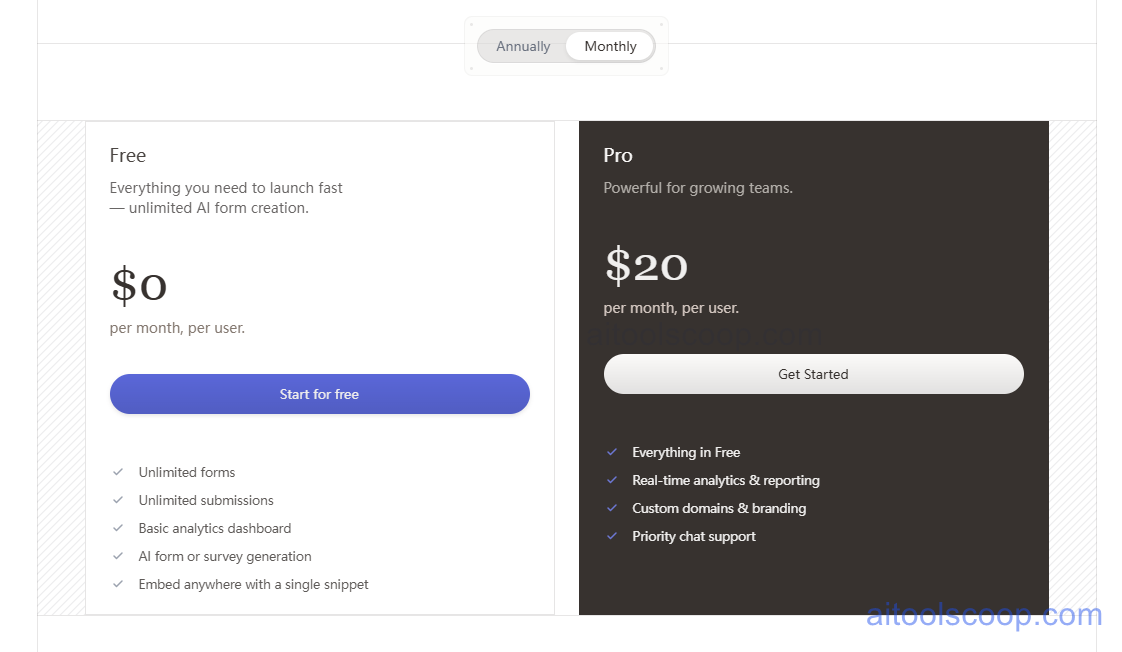
- Free — $0/month, per user — unlimited forms and unlimited submissions, a basic analytics dashboard, AI form or survey generation, and the ability to embed any form anywhere with a single snippet.
- Pro — $20/month per user (from $16/month billed annually) — everything in Free, plus real-time analytics and reporting, custom domains and branding, and priority chat support.
The free plan includes unlimited AI form creation with no cap on forms or submissions, unusual for a free tier in this category. Pricing verified from signmeup.ai; rates may change — always confirm current pricing at signmeup.ai.
Who Should Use SignMeUp AI?
Creators and solo founders collecting newsletter subscribers or building a single product waitlist can stay comfortably on the free plan, since unlimited forms and submissions are included without a subscription. Startup teams launching multiple campaigns — waitlists, beta signups, event RSVPs — at once, or wanting real-time analytics to track which forms are converting best, are the clearest fit for Pro. Businesses that need a form to carry their own branding rather than SignMeUp's, particularly for external-facing lead capture or client-facing surveys, will find custom domains and branding worth the upgrade. Teams needing deep multi-step form logic, complex conditional branching, or enterprise-grade compliance features may find a more specialized form or survey platform better suited to those specific needs, since SignMeUp AI is built primarily around speed and simplicity rather than maximum configurability.
Frequently Asked Questions
How does SignMeUp AI generate a form from a prompt?
The AI reads a short written description of the form's purpose, determines whether it's a signup, survey, feedback form, or another type, and automatically generates the appropriate fields, structure, and copy, including suggested headlines and call-to-action text.
Is the free plan actually unlimited, or is there a submission cap?
The free plan includes unlimited forms and unlimited submissions, along with a basic analytics dashboard and AI form generation — there's no submission cap that forces an upgrade for basic use.
What does upgrading to Pro actually add?
Pro adds real-time analytics and reporting, custom domains and branding for a white-labeled form experience, and priority chat support, on top of everything already included in the free plan.
Can SignMeUp AI create more than just signup forms?
Yes. The same AI generator builds contact forms, surveys, feedback forms, job applications, and event registration forms, adapting the fields and tone to whichever purpose is described in the prompt.
Does SignMeUp AI integrate with other tools?
Yes. Forms can be connected to tools like Google Sheets, Mailchimp, Notion, and Zapier, so submitted responses automatically flow into a team's existing systems rather than staying siloed in SignMeUp AI's own dashboard.


