

ShortsMonkey (shortsmonkey.com) is a YouTube research tool for creators and content teams looking for video ideas backed by observed performance. It helps users discover Shorts and long-form videos that stand out relative to the size of the channels publishing them. Researchers can compare views with subscriber counts, apply niche filters, inspect historical results, and export findings as CSV files.
The workflow is useful for studying small-channel breakouts, comparing topics, and building a shortlist of examples before planning original content. A high views-to-subscriber ratio is a research signal, not a guarantee that a topic will work for another channel. ShortsMonkey also provides an MCP integration for Cursor Agent and compatible AI assistants, supporting exploring trending Shorts, searching for outlier videos, and analyzing a single video, with setup documentation available on the ShortsMonkey site. ShortsMonkey is a research service; it does not generate or edit videos. A permanent free plan is available, with paid access starting at $19.90 per month.
How ShortsMonkey Works
Research starts with a keyword search, which surfaces Shorts and long-form videos that ShortsMonkey identifies as outliers based on their view count relative to the publishing channel's subscriber base. Niche filters help narrow results to a specific content category, and historical results let users track how a topic or channel has performed over time. Findings can be exported as CSV files for further analysis or shared with a content team, and search history is saved so past research can be revisited without repeating a search. For assistant-driven workflows, the MCP integration lets Cursor Agent and other compatible AI assistants explore trending Shorts, search for outlier videos, and analyze individual videos directly.
Key Features
- YouTube Shorts and long-form video research: covers both short-form and long-form content discovery
- Small-channel outlier discovery: surfaces videos that overperform relative to channel size
- Views-to-subscriber ratio comparison: core research signal for identifying breakout content
- Niche filters: narrows research results to a specific content category
- Historical research results: tracks performance data over time
- CSV exports: exports findings for further analysis or sharing
- MCP access for compatible AI assistants: integrates with Cursor Agent and similar tools
- Trending Shorts exploration and single-video analysis: available through the MCP integration
ShortsMonkey Pricing
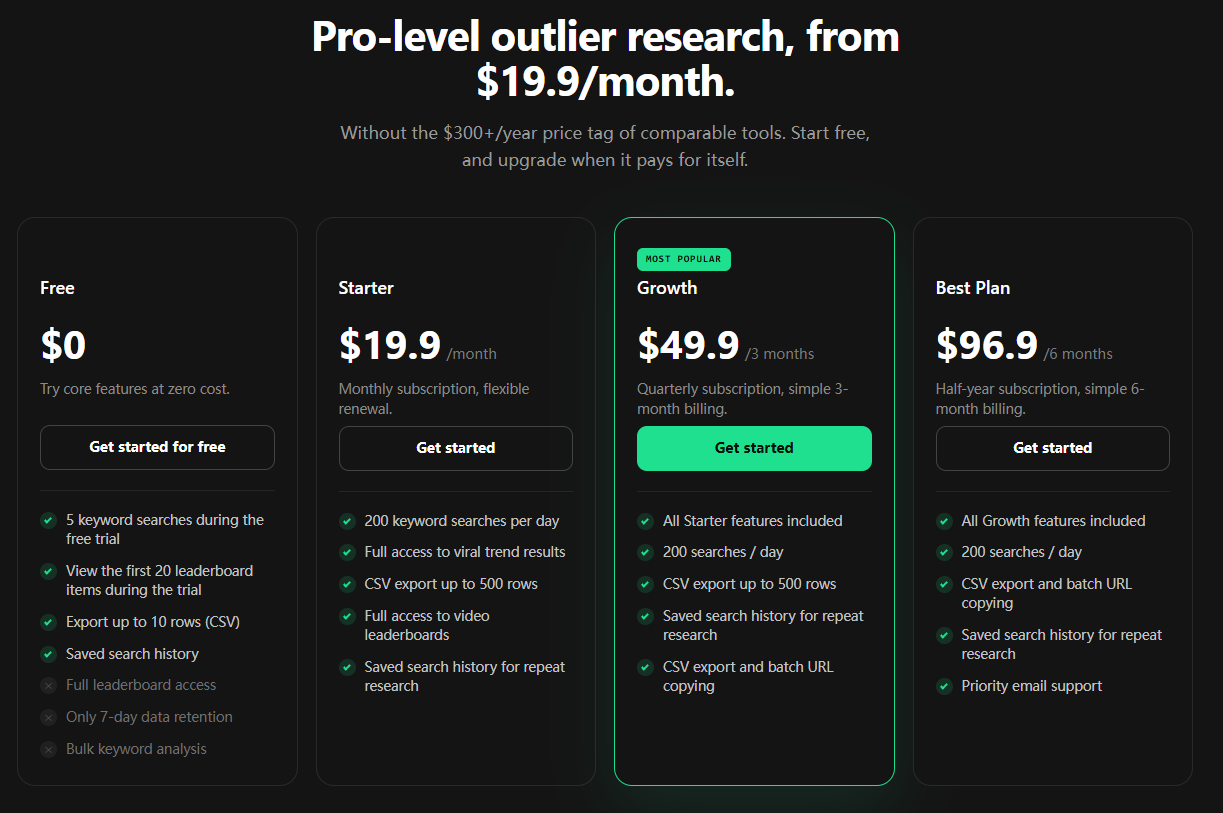
- Free — $0 — 5 keyword searches during the free trial, view the first 20 leaderboard items during the trial, export up to 10 rows as CSV, and saved search history. Full leaderboard access, extended data retention beyond 7 days, and bulk keyword analysis are not included. Built for trying core features at zero cost.
- Starter — $19.9/month — monthly subscription with flexible renewal: 200 keyword searches per day, full access to viral trend results, CSV export up to 500 rows, full access to video leaderboards, and saved search history for repeat research.
- Growth — $49.9/3 months — quarterly subscription with simple 3-month billing: everything in Starter, 200 searches/day, CSV export up to 500 rows, saved search history for repeat research, and CSV export with batch URL copying. Marked as the most popular plan.
- Best Plan — $96.9/6 months — half-year subscription with simple 6-month billing: everything in Growth, 200 searches/day, CSV export and batch URL copying, saved search history for repeat research, and priority email support.
ShortsMonkey positions itself as pro-level outlier research from $19.9/month, without the $300+/year price tag of comparable tools, with the option to start free and upgrade later. Pricing verified from shortsmonkey.com; rates may change — always confirm current pricing at shortsmonkey.com.
Who Should Use ShortsMonkey?
Creators and content teams looking for video ideas backed by observed performance, rather than guesswork, are the core audience. Anyone just getting started can try the Free plan's limited keyword searches and leaderboard preview before committing to a paid tier. Creators doing regular topic research who need full leaderboard access, larger CSV exports, and saved search history are the clearest fit for Starter, while teams wanting the most popular Growth plan or the longer-committed Best Plan benefit from batch URL copying and, on the Best Plan, priority email support. Because a high views-to-subscriber ratio is a research signal rather than a guarantee, ShortsMonkey suits idea generation and shortlisting rather than promising specific results for a new channel.
Frequently Asked Questions
Is there a free plan?
Yes. The Free plan offers 5 keyword searches during a trial, a view of the first 20 leaderboard items, CSV export up to 10 rows, and saved search history, at zero cost.
Does ShortsMonkey generate or edit videos?
No. ShortsMonkey is a research service focused on finding outlier videos and trends; it does not generate or edit video content.
What is the MCP integration used for?
The MCP integration connects ShortsMonkey to Cursor Agent and compatible AI assistants, supporting exploration of trending Shorts, searching for outlier videos, and analyzing a single video directly through the assistant.
What's the difference between Starter, Growth, and Best Plan?
All three include 200 searches per day and CSV export, but they differ in billing period and added extras: Growth adds batch URL copying on a quarterly cycle, and Best Plan adds priority email support on a half-year cycle.
Does a high views-to-subscriber ratio guarantee a topic will work?
No. ShortsMonkey treats a high views-to-subscriber ratio as a research signal, not a guarantee that a similar topic will perform the same way on another channel.


