

PDF To Brainrot (pdftobrainrot.org) exists because a huge share of Gen Z study habits now happen on a phone screen, in short vertical clips, not on a printed page. The tool takes any PDF — a lecture slide deck, a chapter of a textbook, a dense research paper — and rewrites it into a narrated script laid over the kind of hypnotic backdrop that dominates TikTok and YouTube Shorts feeds: Subway Surfers runs, Minecraft parkour, satisfying slime or soap-cutting loops. The output is a short video built to hold attention long enough for the actual information to sink in, which is the whole premise behind the "brainrot" trend it borrows its name from.
The people actually opening this tool skew toward students cramming before exams, but the user base has widened. Teachers use it to turn a syllabus reading into something students will watch before class instead of skipping it, and a growing number of educational content creators run their scripts through it to produce study-account videos without touching a video editor. Because the whole workflow runs on a credit system rather than a subscription, it also draws in people who want to test the format on one or two documents without committing to a monthly plan.
How PDF To Brainrot Works
The process starts with a document upload — a PDF is the default, though the platform also accepts notes, essays, and plain URLs. An AI layer reads through the material, pulls out the concepts that actually matter, and condenses them into a script sized for a 30-to-90 second clip rather than a full narration of every paragraph. That script is then paired with a synthetic voiceover, auto-generated captions timed to the audio, and a looping background video chosen from the platform's library of attention-grabbing formats. Each credit spent corresponds to one generated video, and users can preview, regenerate, or tweak the script before the final render is locked in and made available to download.
Key Features
- AI content extraction: scans an uploaded PDF and identifies the core facts, definitions, or arguments worth turning into a script, filtering out filler text automatically
- Multi-format input: accepts PDFs, plain text, essays, and web URLs, so a source doesn't need to be a formatted document to become a video
- Trending background library: a set of looping gameplay and ASMR-style clips (parkour runs, satisfying cutting loops, and similar formats) designed to match what's currently performing on short-form platforms
- Auto-generated voiceover and captions: synthetic narration synced with on-screen text, removing the need for manual voice recording or subtitle timing
- Credit-based rendering: each video draw down a set number of credits rather than counting against a monthly quota, which lets occasional users pay only for what they generate
- Vertical, platform-ready export: videos render in the 9:16 aspect ratio used by TikTok, YouTube Shorts, and Instagram Reels, with no separate cropping step needed
- Script preview before render: the extracted script can be reviewed and edited prior to final generation, giving some control over tone and length before credits are spent
- No-ads output on paid credits: videos generated on the Basic and Popular credit packs download without watermarks or platform branding
PDF To Brainrot Pricing
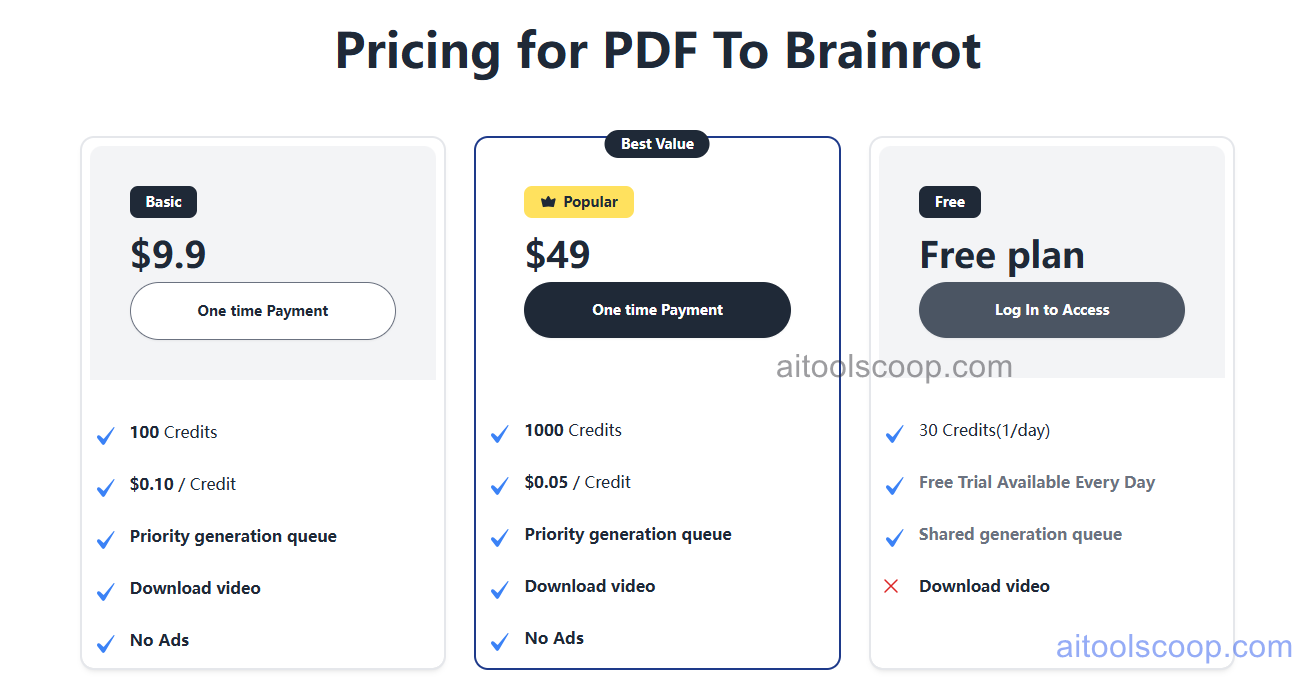
- Free — $0 — 30 credits total at a rate of 1 per day, with a daily free trial generation, a shared (slower) generation queue, and no downloadable video output.
- Basic — $9.9 one-time payment — 100 credits at $0.10 per credit, a priority generation queue, downloadable video files, and no ads on the rendered output.
- Popular — $49 one-time payment — 1,000 credits at $0.05 per credit (the lowest per-credit rate on the platform), the same priority queue and downloadable, ad-free video output as Basic, marked as the site's best-value tier.
Both paid tiers are one-time credit purchases rather than recurring subscriptions, so credits don't expire on a monthly cycle in the way a typical SaaS plan would. Pricing verified from pdftobrainrot.org; rates and credit allowances may change — always confirm current pricing at pdftobrainrot.org.
Who Should Use PDF To Brainrot?
Students who already scroll TikTok more than they read textbooks are the obvious fit — turning a dense reading into a clip they'll actually finish beats a PDF that sits unopened. The Free tier's one-credit-a-day allowance is enough to try the format on a single assignment before deciding whether it's worth paying for, though the lack of a download option on Free means those clips can't leave the platform. Teachers producing recap content for a class, or study-account creators publishing daily educational shorts, get more mileage from the Basic or Popular credit packs, since both unlock downloads and a faster render queue — Popular's lower per-credit cost makes more sense once someone is generating videos regularly rather than one-off. People looking for a tool to convert long-form professional documents into polished explainer video, on the other hand, will likely find the fast-paced, meme-driven style too casual for that context.
Frequently Asked Questions
What exactly does PDF To Brainrot do with an uploaded file?
It reads the uploaded PDF (or text, essay, or URL), extracts the key points using AI, and turns them into a short narrated script. That script is layered over a fast-paced background video with auto-generated captions, producing a vertical clip formatted for TikTok, Reels, or YouTube Shorts.
How much does PDF To Brainrot cost in 2026?
The Free plan includes 30 credits total, granted at 1 per day, with no video download. Basic is a $9.9 one-time purchase for 100 credits, and Popular is $49 one-time for 1,000 credits — both unlock downloads, a priority queue, and ad-free output.
Can videos generated on the Free plan be downloaded?
No. The Free tier is limited to generating and previewing clips inside the platform; downloading the finished video requires either the Basic or Popular credit pack.
Do credits expire on a monthly cycle?
Basic and Popular are one-time payments rather than subscriptions, so purchased credits aren't tied to a recurring monthly renewal the way a typical SaaS plan works. The Free plan's credits, by contrast, are capped at a daily rate.
Is PDF To Brainrot only useful for students?
Students are the core audience, but teachers building recap content and educational creators producing study-account videos also use it regularly, since the credit system works for occasional use as well as daily posting schedules.


