

Omni Video Gen (omnivideogen.ai) is an independent browser-based AI video creation platform. Users start with a written scene description or a reference image, select an available video model, and generate a short clip. The homepage combines a creation interface with a public library of example prompts that serve as starting points for cinematic scenes, product concepts, social posts, and visual experiments.
Creators can describe a subject, action, camera movement, lighting, and visual style, or use an image to guide the composition. Available model parameters and the credit cost can be reviewed before generation, and users can adapt a prompt, generate a variation, and review the resulting clip before using it in their own editing workflow. The site also links to an image generator and a dedicated video generator. Generation requires an account and credits, and the service is not advertised as unlimited or permanently free. Omni Video Gen is not affiliated with Google or DeepMind, and model names belong to their respective owners.
How Omni Video Gen Works
A project begins with either a text prompt describing the subject, action, camera movement, lighting, and style, or a reference image that guides the composition. Users then choose from the available video models, check the model's parameters and the credit cost shown before generating, and run the generation. The resulting short clip can be reviewed, and users can tweak the prompt or produce a variation. The public library of example prompts offers a quick way to get started, and the linked image-generation workspace supports creating reference visuals. Because generation is credit-based and requires an account, usage scales with the chosen plan or credit option.
Key Features
- Text-to-video generation: creates short clips from written scene descriptions
- Image-to-video generation: uses a reference image to guide composition
- Selection of video models and settings: choose from available models and review their parameters
- Visible credit cost: see the generation cost before creating a clip
- Public prompt examples: starting points for cinematic scenes, product concepts, and social posts
- Linked image-generation workspace: create images alongside video work
Omni Video Gen Pricing
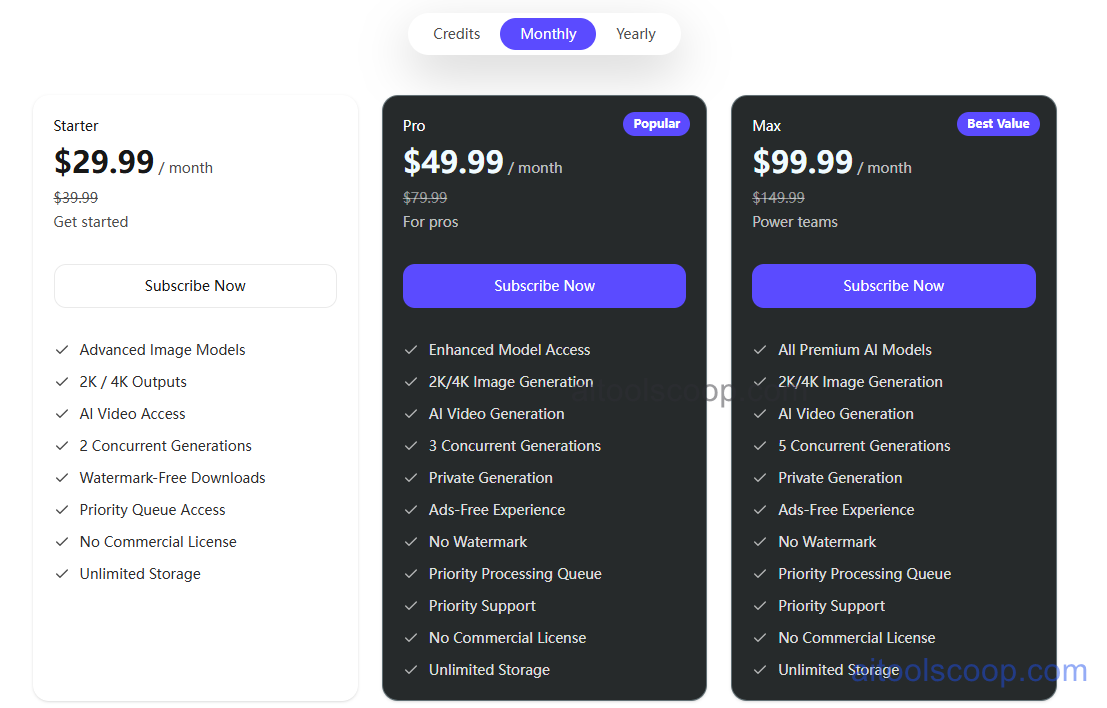
- Starter — $29.99/month (listed at $39.99 before discount; $96/year on yearly billing) — advanced image models, 2K/4K outputs, AI video access, 2 concurrent generations, watermark-free downloads, priority queue access, and unlimited storage. Does not include a commercial license. A good starting point for getting going.
- Pro — $49.99/month (listed at $79.99 before discount; $288/year on yearly billing) — enhanced model access, 2K/4K image generation, AI video generation, 3 concurrent generations, private generation, ads-free experience, no watermark, priority processing queue, priority support, and unlimited storage. Does not include a commercial license. Marked as popular, aimed at pros.
- Max — $99.99/month (listed at $149.99 before discount; $588/year on yearly billing) — all premium AI models, 2K/4K image generation, AI video generation, 5 concurrent generations, private generation, ads-free experience, no watermark, priority processing queue, priority support, and unlimited storage. Does not include a commercial license. Marked as best value, aimed at power teams.
A credits option is also available alongside monthly and yearly billing. Pricing verified from omnivideogen.ai; rates may change — always confirm current pricing at omnivideogen.ai.
Who Should Use Omni Video Gen?
Creators who want to turn a written idea or a reference image into a short AI clip, and who are comfortable working with a credit-based model, are the clearest fit. Individual creators getting started with AI video can begin with Starter, while those who want private generation, priority support, and a bit more concurrency should look at Pro. Teams producing a higher volume of clips, or who want access to all premium models and the most concurrent generations, are best served by Max. Since the listed plans do not include a commercial license, anyone planning commercial use should check the current terms on the official site first.
Frequently Asked Questions
Can I create videos from images as well as text?
Yes. Omni Video Gen supports both text-to-video from written prompts and image-to-video using a reference image to guide the composition.
Do I need an account to generate videos?
Yes. Generation requires an account and credits, and the service is not advertised as unlimited or permanently free.
Can I see the cost before generating a clip?
Yes. Available model parameters and the credit cost can be reviewed before generation starts.
What is the difference between the plans?
Starter allows 2 concurrent generations, Pro allows 3 and adds private generation, ads-free use, and priority support, and Max allows 5 concurrent generations with access to all premium AI models.
Is Omni Video Gen affiliated with Google or DeepMind?
No. Omni Video Gen is an independent platform, and model names belong to their respective owners.


