

Mito (trymito.io) is a spreadsheet interface that lives directly inside a Jupyter notebook, letting people who think in spreadsheets do real data analysis in Python without already knowing Pandas syntax. Every edit made in the Mito spreadsheet — filtering, pivoting, merging, formatting — is automatically converted into the equivalent Python code, which appears in the notebook cell right below.
Analysts and citizen data scientists who are comfortable in Excel but new to Python make up much of Mito's audience, alongside data scientists who want to move faster through routine cleaning and exploration steps. The tool positions itself as a bridge rather than a replacement: someone who already knows Pandas well may not need it day to day, but for teams standardizing on Python for reporting, Mito removes a real barrier to entry.
How Mito Works
Mito installs as a Jupyter extension and adds a spreadsheet view directly into an existing notebook, JupyterLab, JupyterHub, or SageMaker environment, with a separate integration for Streamlit and Dash apps. A user imports a CSV, Excel file, or a dataframe already in memory, then works with it the way they would in a normal spreadsheet — writing formulas like VLOOKUP, applying filters, building pivot tables, and formatting cells. Every one of those actions is mirrored automatically as generated Python code in the cell beneath the spreadsheet, so a workflow completed once in Mito becomes a reusable script that can be rerun on new data without repeating the manual steps. Mito AI sits alongside this as a chat interface that understands the current dataframe's structure, letting a user ask for a transformation in plain language and get code that executes immediately in context rather than needing to be copied in from a separate chatbot.
Key Features
- Spreadsheet-to-Python code generation: every edit made in the Mito spreadsheet is automatically converted into equivalent, reusable Python code
- Mito AI chat: a context-aware AI assistant that understands the active dataframe and generates code for requested transformations directly in the notebook
- 100+ built-in transformations: filters, pivot tables, merges, aggregations, and Excel-style formulas like VLOOKUP available without writing Pandas manually
- Error debugging assistance: AI-assisted help for diagnosing and fixing errors in generated or existing notebook code
- Streamlit and Dash integration: adds a full spreadsheet interface to a dashboard app in as little as two lines of code
- Graphing and summary statistics: builds interactive graphs and pivot-based summaries directly from the spreadsheet view
- Advanced Mito Spreadsheet (Pro+): additional formatting, transformation options, and custom Python snippet support
- Bring-your-own LLM (Enterprise): connects Mito AI to custom databases and internal or on-premise language models instead of a shared cloud API
Mito Pricing
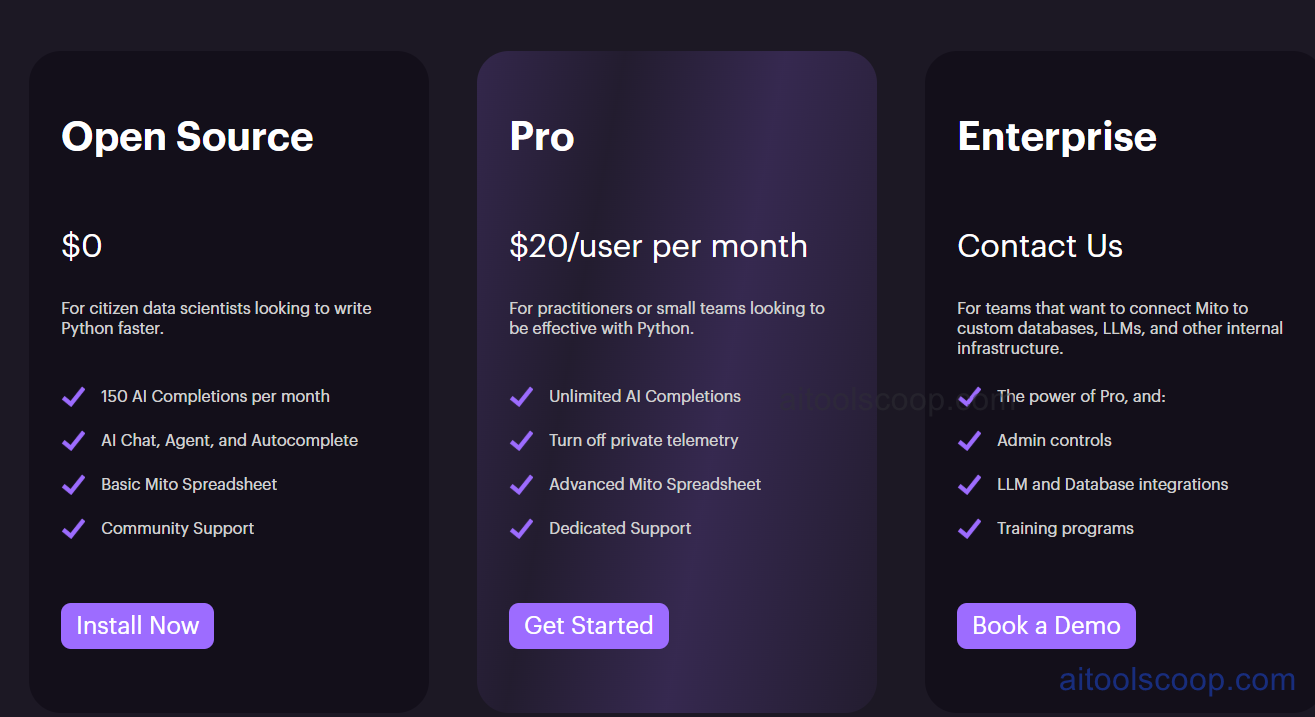
- Open Source — $0 — for citizen data scientists writing Python faster: 150 AI completions per month, AI chat, agent, and autocomplete, the basic Mito spreadsheet, and community support.
- Pro — $20/user/month — for practitioners or small teams working seriously with Python: unlimited AI completions, the option to turn off private telemetry, the advanced Mito spreadsheet, and dedicated support.
- Enterprise — Custom, contact sales — for teams connecting Mito to custom databases, LLMs, and internal infrastructure: everything in Pro plus admin controls, LLM and database integrations, and training programs.
The Open Source plan requires no payment and can be installed directly via pip. Enterprise pricing is custom and quoted directly by Mito. Pricing verified from trymito.io; rates may change — always confirm current pricing at trymito.io.
Who Should Use Mito?
Analysts who are fluent in Excel but still learning Python are the clearest fit for Mito, since the spreadsheet interface removes the pressure to know Pandas syntax before getting real work done, while the generated code becomes a genuine learning tool over time. The free Open Source plan is enough for individuals doing occasional analysis, capped by 150 AI completions a month before needing to upgrade. Pro becomes worthwhile once someone is using Mito AI regularly enough to hit that monthly cap, or once turning off telemetry and getting dedicated support start to matter. Enterprise is aimed at organizations that need Mito AI running against their own databases and internal language models rather than a shared cloud API, along with admin controls and structured training for rolling the tool out across a team. Data scientists who are already comfortable writing Pandas directly may find less day-to-day value here, since Mito's core benefit is speeding up the transition from spreadsheet thinking to Python code.
Frequently Asked Questions
What is Mito used for?
Mito is a spreadsheet interface that runs inside Jupyter notebooks, letting people manipulate data the way they would in Excel while Mito automatically generates the equivalent Python code. It's aimed at analysts who want to adopt Python without first mastering Pandas syntax.
Is Mito free to use?
Yes, the Open Source plan is free and includes 150 AI completions per month, the basic Mito spreadsheet, and community support. Pro removes the AI completion cap for $20 per user per month, and Enterprise is custom-priced for teams needing database and LLM integrations.
Does every spreadsheet edit really generate Python code?
Yes. Filtering, pivoting, merging, formatting, and any other transformation made in the Mito spreadsheet is automatically mirrored as Python code in the notebook cell below, so a workflow completed once becomes a reusable, rerunnable script.
Can Mito connect to my organization's own AI models?
On the Enterprise plan, yes. Mito AI can be configured to use a locally deployed or organization-specific large language model instead of a shared cloud API, so no data has to leave the organization's own infrastructure.
Does Mito work outside of Jupyter notebooks?
Yes. In addition to JupyterLab, Jupyter notebooks, JupyterHub, and SageMaker, Mito offers a separate integration that adds a full spreadsheet interface to Streamlit and Dash applications in just a couple of lines of code.


