

Memento Database (mementodatabase.com) is a no-code database builder that lets people design their own tracking system instead of forcing their data into a fixed app's structure. Fields, forms, and views are configured by the user, so the same platform can hold a home inventory, a book collection, a small business's CRM, or a field research log without separate software for each. It's built for individuals organizing personal information as well as small businesses replacing several single-purpose apps with one flexible one.
The free no-code database angle is where Memento distinguishes itself from spreadsheet-based tracking: fields carry real data types, camera and barcode inputs feed directly into records, and the whole structure can be exported as a reusable template. Small teams and solo users who've outgrown a spreadsheet but don't need a dedicated CRM or inventory system tend to land here, drawn by the combination of flexibility and a genuinely usable mobile app.
How Memento Database Works
Everything in Memento starts with a Library — a custom table defined by whatever fields a project needs, built from scratch or from one of the thousands of community templates in the online catalog. Records get added through the mobile or desktop app, through a shareable web form for people without the app installed, or via CSV import from an existing spreadsheet. Libraries sync automatically across devices through Memento Cloud, and the mobile apps work fully offline, queuing changes to sync once a connection returns. For anyone wanting to go past the basic no-code layer, JavaScript scripting adds custom triggers and calculations, SQL queries pull precise data sets for analysis, and built-in reporting exports formatted PDFs straight from a library's records.
Key Features
- No-code library builder: defines custom fields, forms, and views for any tracking need without writing code
- Cross-platform sync: libraries stay current across Android, iOS, desktop, and web through Memento Cloud
- Template catalog: thousands of community-built templates across personal, business, and specialized categories as a starting point
- Offline-first mobile use: full functionality without a connection, with changes syncing automatically once back online
- Camera, barcode, and GPS capture: logs photos, scans barcodes, and tags location directly into records from the mobile app
- JavaScript scripting: custom triggers, calculations, and data manipulation for users who want to extend default behavior
- SQL queries and custom reports: precise data extraction plus PDF-exportable reports with flexible layouts and charts
- Web forms: shareable public forms for collecting data from people who don't have the app installed
- Google Sheets and Docs integration: two-way sync for teams that still work partly in spreadsheets
- AI Assistant and centralized user management (Business): AI-assisted data entry alongside access control for teams sharing libraries
Memento Database Pricing
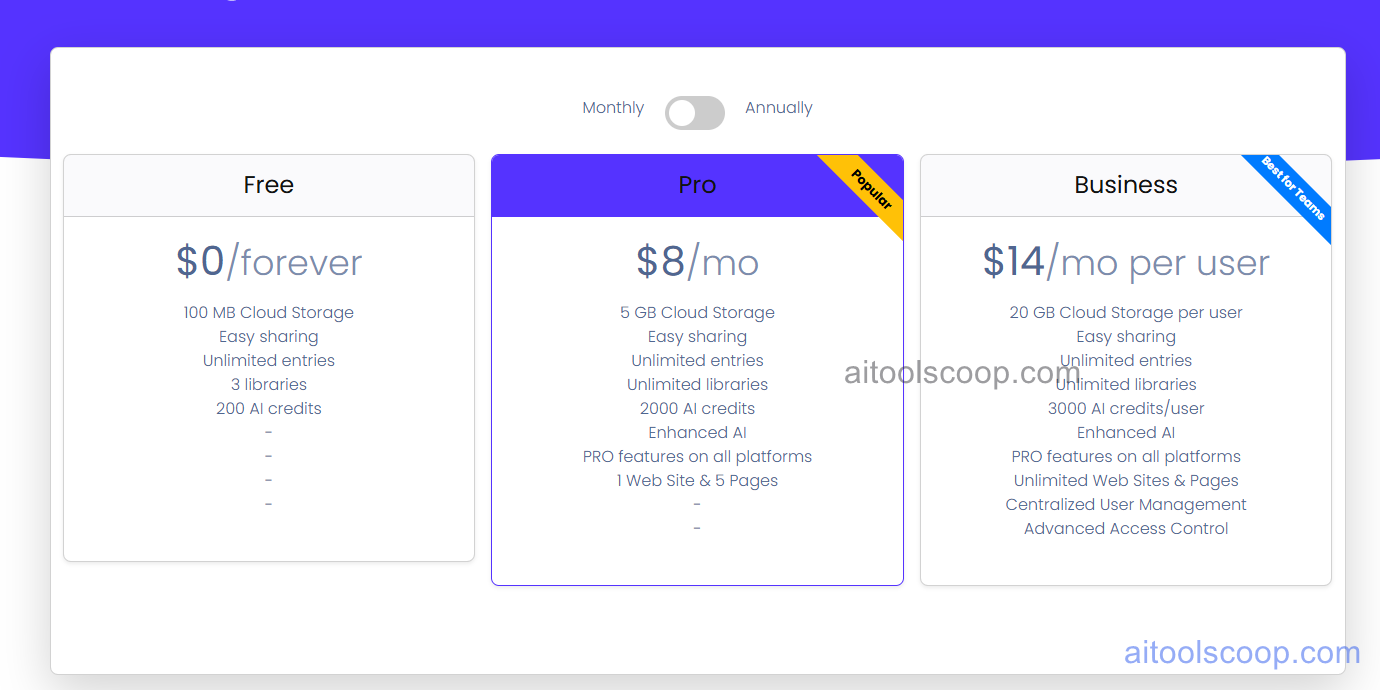
- Free — $0/forever — 100 MB cloud storage, easy sharing, unlimited entries, and up to 3 libraries with 200 AI credits. Covers straightforward personal tracking without any payment.
- Pro — $8/month (from $6/month billed annually) — 5 GB cloud storage, unlimited entries and libraries, 2,000 AI credits, enhanced AI, Pro features across all platforms, and one connected website with 5 pages.
- Business — $14/month per user (from $11/month per user billed annually) — 20 GB cloud storage per user, unlimited entries, libraries, and websites/pages, 3,000 AI credits per user, centralized user management, and advanced access control.
Annual billing lowers the effective monthly rate on both paid tiers. Pricing verified from mementodatabase.com; rates may change — always confirm current pricing at mementodatabase.com.
Who Should Use Memento Database?
People tired of forcing personal collections, home inventories, or side-project data into generic spreadsheet rows are the clearest fit for Memento Database, especially anyone who wants camera or barcode input built directly into the workflow. The Free plan comfortably handles single-user personal tracking within its 3-library and 100 MB limits; Pro suits someone managing multiple active libraries or wanting unlimited websites and higher AI credit allowances; Business fits small teams that need centralized access control and per-user storage across shared libraries. Field researchers, collectors, and small business owners replacing several specialized apps with one configurable system get the most long-term value, while anyone needing a dedicated, out-of-the-box CRM or ERP with minimal setup may find building a custom structure here takes more upfront effort than a purpose-built tool.
Frequently Asked Questions
Can I use Memento Database without paying anything?
Yes. The Free plan includes unlimited entries, easy sharing, and up to 3 libraries with 100 MB of cloud storage, which is enough for most personal tracking projects without ever upgrading.
What's the difference between the Pro and Business plans?
Pro is built for individual users and includes unlimited libraries, 5 GB of storage, and one connected website. Business is priced per user and adds per-user storage, centralized user management, and advanced access control for teams sharing libraries together.
Does Memento Database work without an internet connection?
The mobile apps for Android and iOS work fully offline, and any changes made without a connection sync automatically to Memento Cloud once the device reconnects. Desktop versions require an internet connection to access cloud libraries.
How technical do I need to be to build a library?
Building a basic library requires no technical skill — fields, forms, and views are configured through the app's interface, and thousands of ready-made templates exist as starting points. JavaScript scripting and SQL queries are available for advanced users but aren't required for everyday use.
Is Memento Database suitable for team or business use?
Yes, particularly on the Business plan, which adds centralized user management and advanced access control for teams sharing libraries. Small businesses use it for inventory, CRM, project tracking, and similar workflows without adopting a dedicated ERP system.


