

Maestra AI (maestra.ai) is an AI transcription and dubbing platform built for teams that need spoken content turned into text, subtitles, or a second language quickly. Beyond straightforward audio-to-text conversion, it performs audio-to-text and video-to-text transcription while exporting SRT and VTT subtitle files, and it can generate dubbed voiceovers in place of, or alongside, the original audio. Live transcription is also part of the platform, so the same tool covers pre-recorded files and real-time speech.
Video editors, podcasters, educators, training teams, and media publishers who localise content for global audiences make up Maestra AI's typical user base. Maestra supports transcription, subtitling, AI dubbing, and real-time speech translation across 125+ languages, which is enough breadth to cover most international audiences without switching to a separate translation tool. Teams running webinars, courses, or multilingual marketing content are a particularly close fit, since transcription, subtitles, and dubbing all live in the same workspace.
How Maestra AI Works
Getting a transcript starts with uploading an audio or video file, or opening a live session for real-time captioning. Maestra converts the spoken content into a searchable, timestamped transcript inside its browser-based editor, where wording, timestamps, and speaker labels can all be corrected by hand. From there, the same transcript can be turned into exportable subtitles, translated into another supported language, or sent through Maestra's dubbing engine to produce a synthetic voiceover — including a cloned version of a speaker's own voice on higher tiers. Finished files export as SRT or VTT subtitles, plain transcripts, or dubbed audio and video, and API integrations with platforms like YouTube, Zoom, and Slack allow the same workflow to run automatically for recurring content.
Key Features
- AI transcription: converts audio or video into searchable, timestamped text across common formats like MP3, MP4, M4A, and WAV
- Multilingual translation and dubbing: translates transcripts and generates dubbed voiceovers across 125+ languages
- Subtitle generation and export: creates editable subtitles and exports them as SRT or VTT files
- Live transcription and captioning: provides real-time text and translated captions for meetings, streams, and events
- Voice cloning: produces a synthetic replica of a speaker's voice for use in dubbed content
- Built-in transcript editor: allows manual correction of wording, timestamps, and speaker labels
- AI summary and custom dictionary (Basic and above): condenses long transcripts and improves accuracy for specialised terminology
- API and platform integrations (Premium and above): connects with YouTube, TikTok, Zoom, Slack, and OBS for automated workflows
- Team collaboration and centralised billing (Premium and above): supports shared projects and simplified account management
Maestra AI Pricing
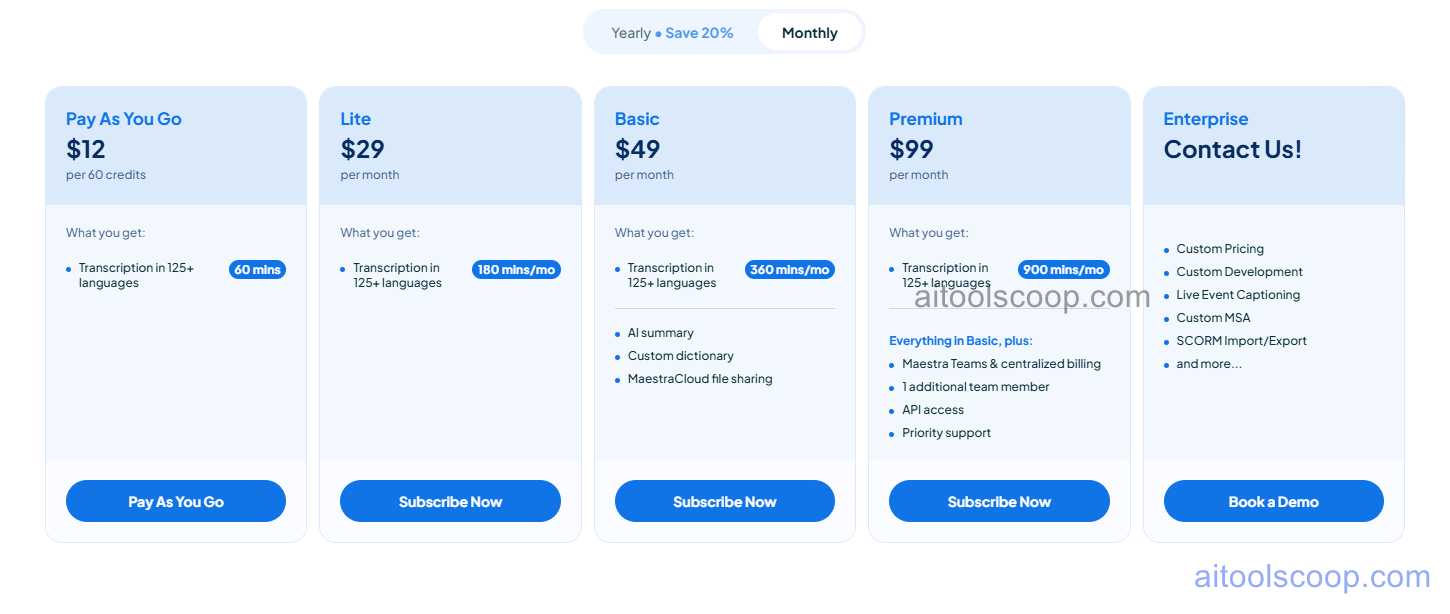
- Pay As You Go — $12 per 60 credits — transcription in 125+ languages, covering roughly 60 minutes of audio or video, with no recurring subscription.
- Lite — $29/month (from $23/month billed annually) — transcription in 125+ languages, covering roughly 180 minutes of content per month.
- Basic — $49/month (from $39/month billed annually) — roughly 360 minutes of transcription per month, plus AI summary, a custom dictionary, and MaestraCloud file sharing.
- Premium — $99/month (from $79/month billed annually) — roughly 900 minutes of transcription per month, plus everything in Basic along with Maestra Teams and centralised billing, one additional team member, API access, and priority support.
- Enterprise — custom pricing — custom pricing and development, live event captioning, a custom MSA, SCORM import/export, and additional capabilities by request.
Annual billing is marked as saving 20% versus paying monthly on the Lite, Basic, and Premium plans. There is no permanent free plan; the lowest-cost option is the pay-as-you-go credit pack. Prices shown were verified from maestra.ai and may change — always confirm current pricing at maestra.ai.
Who Should Use Maestra AI?
Anyone transcribing content only occasionally is better served by the Pay As You Go credit pack than a monthly subscription, since it avoids paying for unused minutes. Lite covers light, regular transcription needs for individual creators or freelancers, while Basic's AI summary and custom dictionary make it a better match for professionals handling specialised terminology or longer recordings on a consistent basis. Premium is built for small teams that need shared billing, an extra seat, and API access for automating recurring transcription work, and Enterprise exists for organisations running live events or requiring custom contractual terms. Solo users with very light, one-off transcription needs may find the pay-as-you-go tier is all they ever need.
Frequently Asked Questions
Does Maestra AI have a free plan?
There's no permanent free subscription tier. The lowest-cost option is Pay As You Go, a $12 one-time credit pack covering about 60 minutes of transcription, with no recurring charge.
How many languages does Maestra AI support for transcription and dubbing?
Maestra supports 125+ languages for transcription, subtitling, AI dubbing, and real-time speech translation, covering the large majority of commonly spoken languages worldwide.
What's included with the Basic plan that Lite doesn't have?
Basic adds AI summary generation, a custom dictionary for improving accuracy on specialised terms, and MaestraCloud file sharing, on top of a larger monthly transcription allowance than Lite.
Can Maestra AI transcribe live audio, or only uploaded files?
Both. Alongside uploaded audio and video files, Maestra AI offers live transcription and real-time captioning for meetings, streams, and events.
Is API access available on the lower-priced plans?
No — API access is included starting with the Premium plan, along with team collaboration features and priority support. Lower tiers are limited to the standard web-based editor and export options.


