

ImageTextTools (imagetexttools.com) edits words that are already baked into a photo, instead of layering new text on top. You upload an image, the tool detects and numbers the text it finds, and you retype a price, date, label or menu line. AI then redraws that region so the new text keeps the surrounding color, angle and grain of the original picture.
It is built for the common case where you have a finished photo but no source file: a product shot with an outdated price, a menu with a changed item, a sign with the wrong date. There is nothing to install and no font matching or layer work to do, because everything runs in the browser. Credits are one-time purchases that never expire, so there is no subscription to manage.
How ImageTextTools Works
You start by uploading a photo. ImageTextTools detects the text in it and numbers each piece, so you can pick the line you want to change and type the replacement. The AI then redraws just that area to match the original style and returns three candidate versions, which you can compare using a before/after slider and keep the one that holds up best at full size. One credit covers one edit and all three versions. Previews are unlimited at low resolution, and downloads are PNG files up to 1280px on the long edge. Because the redrawn area is generated, it is worth checking edges and fine details before publishing.
Key Features
- Edit text inside a photo — detects and numbers the text already printed in an uploaded image so you can retype it
- Style-matched redraw — the AI redraws the edited region so it keeps the surrounding color, angle and grain
- Three versions per edit — every edit returns three candidates, so you can pick the one that holds up best
- Before/after slider — compare each version against the original before downloading
- Unlimited previews — preview as much as you like at low resolution before spending a credit on a download
- PNG download up to 1280px — export the finished edit as a PNG on the long edge limit
- Browser-based — no install, and no source file or font matching needed
- One-time credits — each credit is one complete edit with three generated versions, and credits never expire
ImageTextTools Pricing
- Free — $0 — One HD PNG download per device after sign-in, with unlimited low-resolution previews.
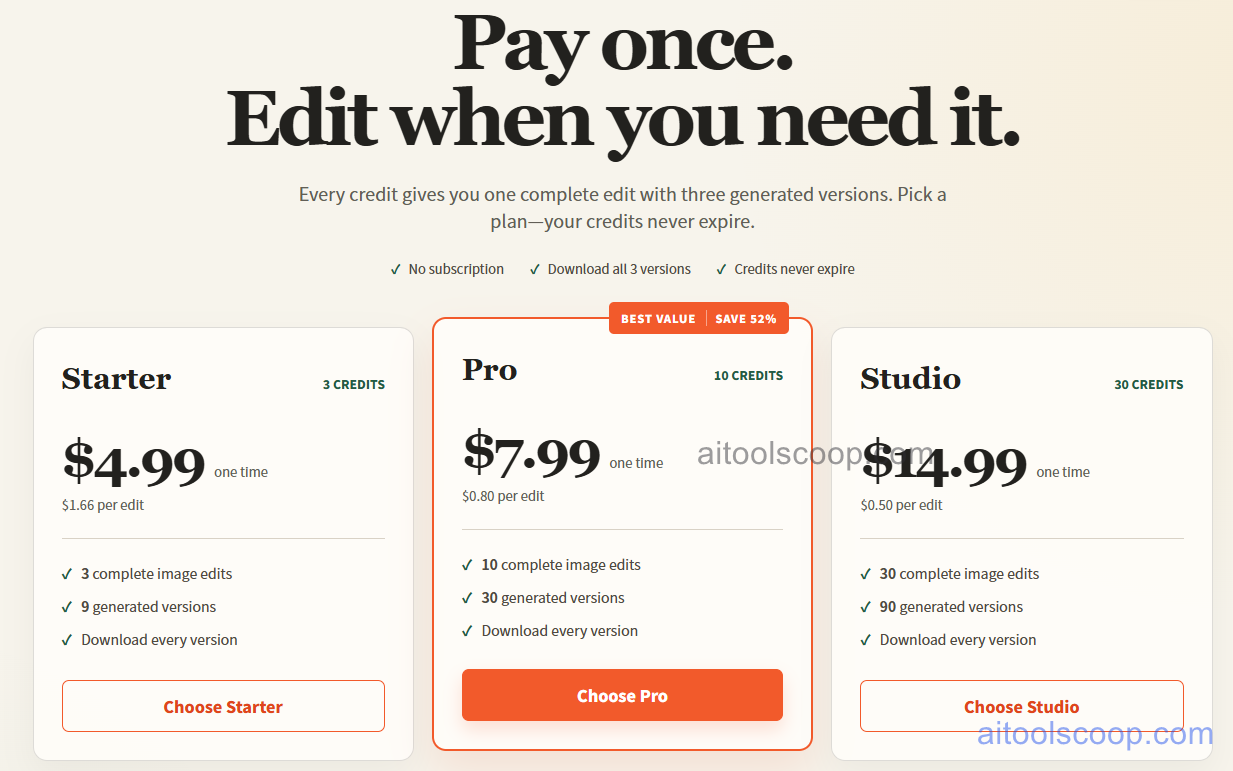
- Starter — $4.99 one-time — 3 credits, about $1.66 per edit. Includes 3 complete image edits and 9 generated versions, and you can download every version.
- Pro — $7.99 one-time — 10 credits, about $0.80 per edit. Marked best value, saving 52% per edit compared with Starter. Includes 10 complete image edits and 30 generated versions, and you can download every version.
- Studio — $14.99 one-time — 30 credits, about $0.50 per edit. Includes 30 complete image edits and 90 generated versions, and you can download every version.
Credits are one-time purchases, not recurring, and never expire. There is no subscription. Pricing verified from imagetexttools.com; rates may change — always confirm current pricing at imagetexttools.com.
Who Should Use ImageTextTools?
ImageTextTools is useful for anyone who needs to change a few words in an existing photo without the original design file: small businesses fixing a price or date on a product photo or menu, marketers updating a label or sign, and designers making a quick mock-up. Because the AI redraws the area instead of overlaying text, results can blend into the original much better than a simple text box. The free download is a good way to test the quality on one image. Paid credits suit occasional editing, and the per-edit price falls as you move up from Starter to Pro or Studio. Output is limited to 1280px on the long edge, and redrawn areas can drift slightly, so it is not a replacement for editing the source file when you have one, and anything that will be printed or published at large size should be checked carefully first.
Frequently Asked Questions
What is ImageTextTools?
ImageTextTools is an online tool for editing text that is already printed in a photo. You upload an image, retype a price, date, label or menu line, and AI redraws that area in the original style, giving you three versions to choose from.
Is ImageTextTools free?
You can start free: after signing in you get one HD PNG download per device, plus unlimited low-resolution previews. More downloads need a paid credit pack.
How much does ImageTextTools cost in 2026?
Credits are sold as one-time packs: Starter is $4.99 for 3 credits, Pro is $7.99 for 10 credits and Studio is $14.99 for 30 credits. One credit covers one edit with three generated versions, and credits never expire.
Do I need the original design file?
No. ImageTextTools works directly on an existing photo, so you do not need a source file, layers or matching fonts. It detects the text in the image and redraws the area you edit.
What is the maximum output size?
Downloads are PNG files up to 1280px on the long edge. Because redrawn areas can drift slightly, check edges and fine details before publishing.


