

GTranslate (gtranslate.io) solves a fairly narrow but common problem: a site owner wants their content readable in other languages without hiring translators or rebuilding their site around a full localization system. Installing GTranslate adds a language selector widget to an existing WordPress, Shopify, or other CMS-based site, and machine and AI translation handles the rest automatically. It's positioned as a plug-and-play layer on top of a site rather than a content management overhaul, which is part of why it shows up so often on smaller business and blog sites that need multilingual reach without a large budget.
Site owners looking for basic accessibility for international visitors can get by on the free tier, while businesses that actually want multilingual traffic to show up in search results need to move into GTranslate's paid plans, where search engine indexing and URL translation come into play. Ecommerce stores, content publishers monetizing through international ad traffic, and multi-region brands make up the bulk of paying customers, since SEO visibility in additional languages is usually the actual reason to upgrade past the free widget.
How GTranslate Works
After installing GTranslate on a site, the widget presents visitors with a language selector, and machine translation converts page content automatically the moment a language is chosen. On paid plans, AI translation improves on raw machine output, and a manual editing interface lets a site owner go in and correct specific phrases or terms that didn't translate the way they intended. The more significant shift on higher tiers is how translated pages are served to search engines: rather than translating content only on the fly for a visitor, GTranslate can generate indexable, crawlable versions of each language — including translated URLs on the Business plan and fully hosted alternate-language domains on Enterprise — so search engines can actually rank those pages instead of only ever seeing the original-language version.
Key Features
- Customizable language selector widget: a floating or embedded selector that lets visitors switch a site's display language instantly
- Machine and AI translation: automatic translation into all supported languages, upgrading from base machine translation on Free to AI-enhanced translation on paid tiers
- Search engine indexing: makes translated pages crawlable and indexable by search engines, available starting on the Custom plan
- Manual translation editing: an inline editor for correcting specific words or phrases that the automatic translation gets wrong
- URL translation: translates page URLs themselves for stronger multilingual SEO, available from the Business plan up
- Language hosting: serves a translated version of a site on its own subdomain or domain (Enterprise only), which can support better regional search rankings than a generic subdirectory setup
- Unlimited words and pageviews: included even on the Free plan, so translation volume itself isn't the limiting factor between tiers
- CMS integrations: works across WordPress, Shopify, Joomla, Drupal, and other common platforms without custom development
GTranslate Pricing
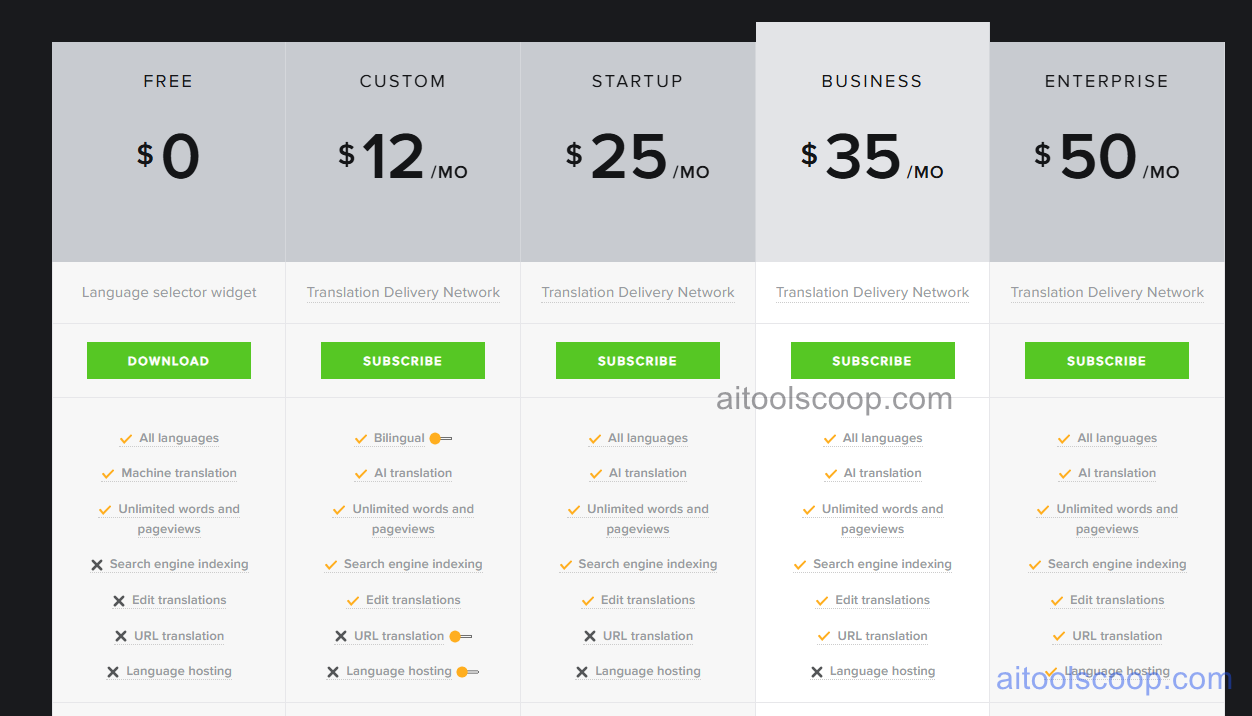
- Free — $0 — the language selector widget with basic machine translation and unlimited words and pageviews, downloadable directly with no search engine indexing, translation editing, URL translation, or language hosting.
- Custom — $12/month (from $10/month billed annually, $120/year) — bilingual translation, AI translation, unlimited words and pageviews, search engine indexing, and translation editing, without URL translation or language hosting by default.
- Startup — $25/month (from ~$20.83/month billed annually, $250/year) — all languages instead of just bilingual, AI translation, search engine indexing, and translation editing, still without URL translation or language hosting.
- Business — $35/month (from ~$29.17/month billed annually, $350/year) — everything in Startup, plus URL translation for stronger multilingual SEO, though language hosting is still not included.
- Enterprise — $50/month (from ~$41.67/month billed annually, $500/year) — everything in Business, plus language hosting, allowing translated content to be served on its own subdomain or domain.
Annual billing works out to roughly two months free compared to paying monthly across every paid tier. Pricing verified from gtranslate.io; rates may change — always confirm current pricing at gtranslate.io.
Who Should Use GTranslate?
A small blog or portfolio site that just wants visitors to be able to switch languages can reasonably stay on the Free plan, since unlimited words and pageviews are included even without a subscription — the tradeoff is that search engines won't index or rank those translated pages. Businesses hoping international visitors actually find them through search, rather than just being able to read the site once they arrive, need at least the Custom or Startup tier for search engine indexing, with Startup's full language coverage suiting sites targeting more than one or two markets. Ecommerce stores and content sites monetizing through multilingual SEO traffic get the clearer payoff from Business, where URL translation supports keyword targeting in each language. Enterprise's language hosting is really only worth the jump for brands establishing a strong regional presence, since running a dedicated subdomain or domain per language is more infrastructure than smaller sites typically need.
Frequently Asked Questions
Does the free version of GTranslate show up in search engine results?
No. The Free plan doesn't include search engine indexing, so while visitors can switch languages and read translated content, those translated pages won't be crawled or ranked by search engines the way a paid plan's indexed pages are.
How much does GTranslate cost with annual billing?
Annual billing brings the effective monthly cost down to roughly $10 for Custom, $20.83 for Startup, $29.17 for Business, and $41.67 for Enterprise — around two months free compared to the standard monthly rates of $12, $25, $35, and $50.
Which plan is needed for URL translation?
URL translation is available starting on the Business plan ($35/month), which translates page URLs themselves alongside the content, supporting a stronger multilingual SEO setup than translated content alone.
Can translations be manually corrected if the automatic version is wrong?
Yes, on paid plans. GTranslate includes an inline editing interface for adjusting specific words or phrases, which is useful for fixing terminology, brand names, or idioms that machine translation doesn't handle naturally.
What does language hosting actually provide on the Enterprise plan?
Language hosting lets a translated version of a site run on its own subdomain or a completely separate domain, rather than a subdirectory of the main site. This can support better regional search rankings, since search engines sometimes treat a localized domain as a stronger local signal than a generic path-based translation.


