

Glotera AI (glotera.ai) is a macOS translation app built around a single idea: translating shouldn't mean copying text out of your work, pasting it into a separate tool, and pasting the result back. Type a language trigger like @en or #ja after a sentence in Gmail, Discord, or practically any other input field, and Glotera AI replaces the text in place, without switching windows. That in-place mechanic is the app's core selling point, and it's reflected directly in how a free real-time translator is positioned against tools that still rely on copy-paste.
Because it lives system-wide rather than inside one app, Glotera AI tends to attract people who communicate across languages as a routine part of their day — remote workers on international teams, customer support agents fielding messages in several languages, and anyone regularly texting or emailing contacts who don't share a first language. The WhatsApp-specific Translation Copilot feature in particular makes it a natural fit for anyone managing personal or business conversations on that platform.
How Glotera AI Works
Glotera AI runs quietly in the background on macOS and activates through a few different triggers depending on the situation. While typing, appending a language code like @en or #ja and double-tapping the space bar (or pressing Enter in chat apps) translates and replaces the text instantly. For reading rather than writing, selecting any text on the desktop or inside a browser brings up a floating translation window without needing to type anything. A separate Translation Copilot feature watches WhatsApp conversations specifically, automatically detecting the language of incoming messages, translating them into the user's set language, and translating outgoing replies back into the sender's language — all without a manual trigger. A newer Image Translation feature extends this to visual content, letting users capture part of the screen and get an instant translation of any text found inside.
Key Features
- Inline trigger translation: type a language code like @en or #ja and get instant in-place translation in any app or input field, without copy-paste
- Selection translation: select existing text anywhere on the desktop or in a browser for an instant floating translation popup
- WhatsApp Translation Copilot: auto-detects and translates incoming WhatsApp messages, and translates outgoing replies back into the sender's language, with no manual trigger needed
- Image Translation (New): captures any part of the screen and translates text found inside screenshots, photos, or diagrams
- System-wide compatibility: works across virtually any macOS app, from Gmail to TikTok to native software, without per-app setup
- 100+ supported languages: covers major world languages with context-aware output rather than literal, word-for-word translation
- Key Words Explanation and Background Knowledge: surfaces definitions and relevant context for unfamiliar terms encountered during a conversation
- Follow-up Questions: lets users ask clarifying questions about a translation without leaving the app
- Encrypted, non-stored data: translation data is encrypted in transit, and personal content isn't stored remotely
- Lightweight footprint: an installation package under 5MB that runs in the background with minimal system impact
Glotera AI Pricing
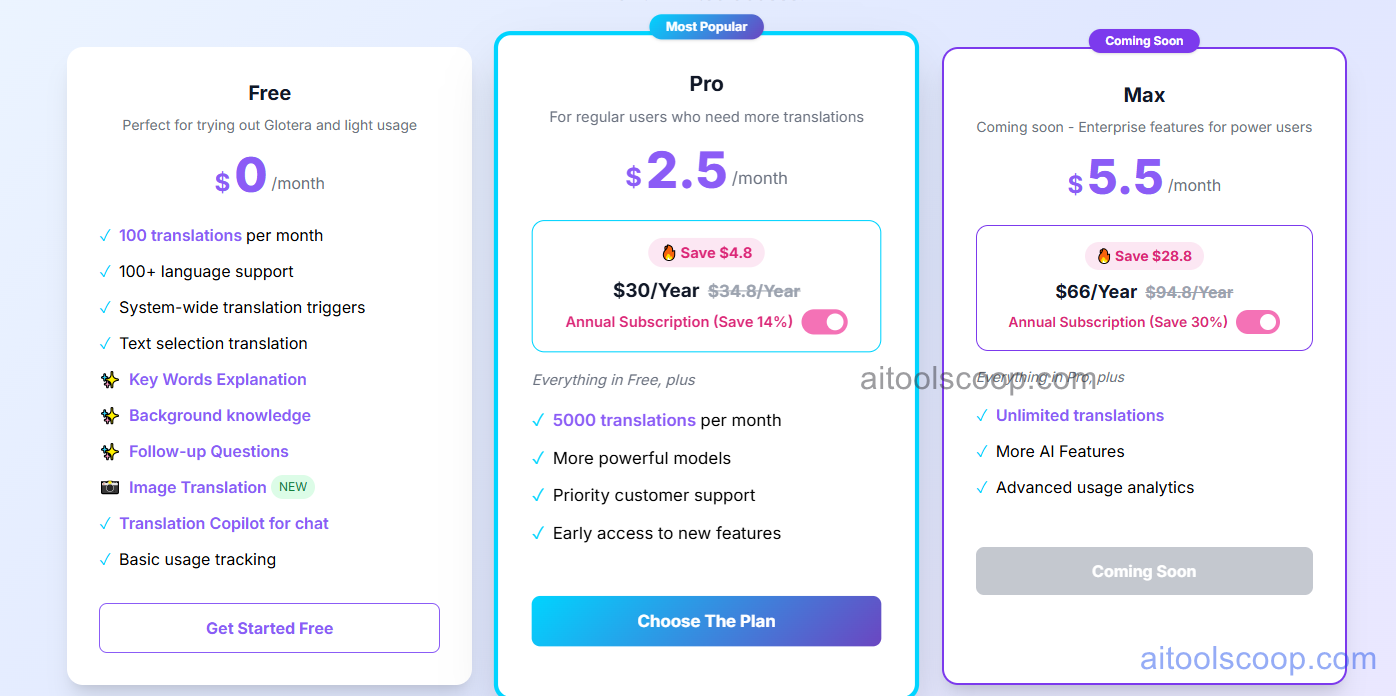
- Free — $0/month — 100 translations per month, 100+ language support, system-wide translation triggers, text selection translation, Key Words Explanation, Background Knowledge, Follow-up Questions, Image Translation, Translation Copilot for chat, and basic usage tracking.
- Pro — $2.5/month billed annually ($30/year, down from $34.8/year) — everything in Free, plus 5,000 translations per month, more powerful AI models, priority customer support, and early access to new features.
- Max (Coming Soon) — $5.5/month billed annually ($66/year, down from $94.8/year) — everything in Pro, plus unlimited translations, additional AI features, and advanced usage analytics. Not yet open for signup.
Prices shown reflect annual billing (a roughly 14–30% discount versus paying month to month). The Max plan is listed as "Coming Soon" and isn't currently purchasable. Pricing verified from glotera.ai; rates may change — always confirm current pricing at glotera.ai.
Who Should Use Glotera AI?
Anyone who occasionally needs to read or reply to messages in another language can get real value out of the Free plan's 100 monthly translations, especially combined with the WhatsApp Copilot for casual cross-language chats. Pro becomes worthwhile once that volume grows past casual use — international sales reps, support agents, or remote employees fielding messages daily will burn through the free allowance quickly. The Max plan's unlimited translations are aimed at power users with constant cross-language communication, though it isn't available to purchase yet. One clear limitation worth flagging: Glotera AI currently only runs on macOS, so anyone working primarily on Windows or Linux will need a different tool entirely.
Frequently Asked Questions
What makes Glotera AI different from a normal translation app?
Glotera AI translates text directly inside whatever app you're typing in, replacing the original text in place using a language trigger, instead of requiring you to copy text into a separate translator and paste the result back.
Is Glotera AI free to use?
Yes. The Free plan includes 100 translations per month along with core features like selection translation and the WhatsApp Translation Copilot, at no cost.
Does it work on Windows or only macOS?
Glotera AI is currently built specifically for macOS. The company has indicated other platforms are in development, but no release date has been confirmed.
How does the WhatsApp Translation Copilot work?
It automatically detects the language of incoming WhatsApp messages, translates them into your set language, and translates your replies back into the sender's language — all without needing to type a manual trigger for each message.
When will the Max plan become available?
Max is listed as "Coming Soon" on Glotera AI's pricing page and isn't currently open for signup. Pro remains the highest tier available for purchase today.


