

GeniusPal (geniuspal.app) is an AI study tool that turns material a student already has, such as lecture notes, a textbook PDF or a set of slides, into practice questions. The idea is that revision works better as self-testing than as re-reading: you upload a file and GeniusPal writes a study set of exam-style questions based on that file, so what you practise is what you were actually taught.
It is aimed at students who want to test themselves before exams without writing their own questions. A study set can be taken as a multiple-choice quiz, as flashcards or in active-recall mode, and any set can be re-sat as often as you like. Questions you keep getting wrong come back in a daily review, and a built-in coach points out the patterns in your mistakes. The Free plan gives every account two study sets with no card required.
How GeniusPal Works
You start by uploading your own material: lecture notes, a textbook PDF, a Word document or PowerPoint slides. GeniusPal reads the file and generates a study set of exam-style questions written from it, with up to 30 questions per set on paid plans. You then choose how to study the set: a multiple-choice quiz, flashcards or active-recall mode. Written quiz answers are marked for you on paid plans, and past papers can be used as a question style. Because you can re-sit a set as often as you want, the same upload supports repeated practice. Questions you keep missing are brought back in a daily review, and the coach summarises the patterns behind your mistakes so you know what to revise next. Plan limits apply to how many study sets you can generate in a week or a month.
Key Features
- Exam-style questions from your own files — generate practice questions from notes, PDFs, Word documents and PowerPoint slides rather than generic question banks
- Three study modes — study any set as a multiple-choice quiz, as flashcards or in active-recall mode
- Unlimited re-sits — retake any study set as often as you like
- Daily review — questions you keep missing are brought back so weak spots get repeated practice
- Mistake-pattern coach — a coach names the patterns in your mistakes; paid plans include personalised coaching across all three study modes
- Written answers, marked for you (paid plans) — type your own answers to quiz questions and have them marked automatically
- Past papers as question styles (paid plans) — use unlimited past papers to shape the style of the questions you get
GeniusPal Pricing
- Free — $0 — No card required. Two study sets per account.
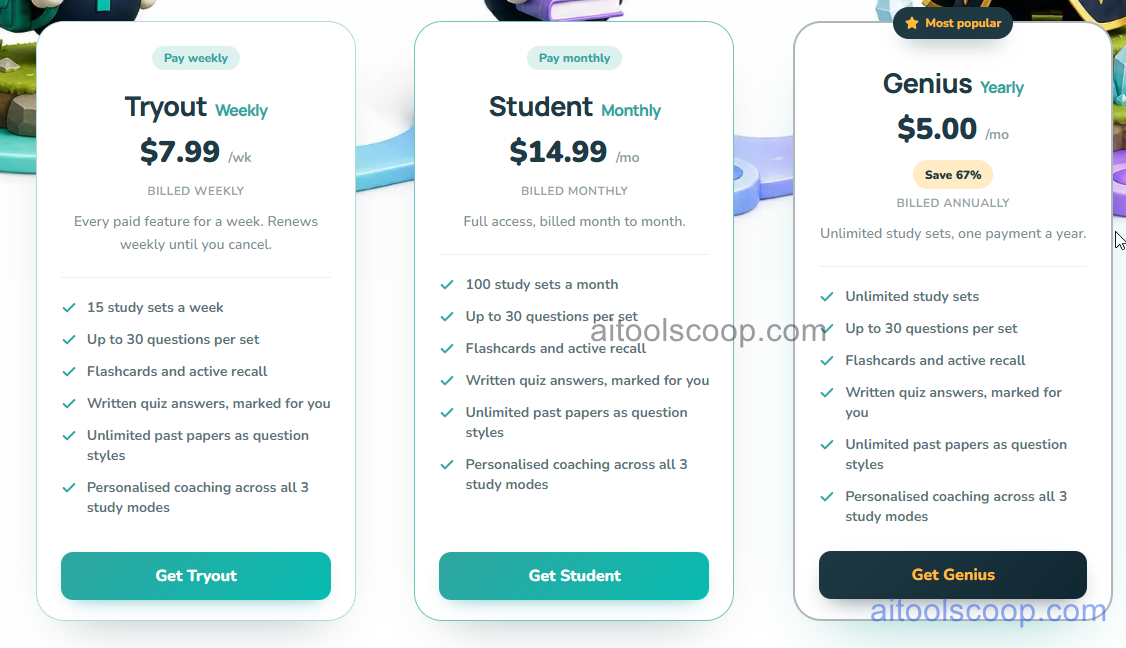
- Tryout — $7.99/week — Every paid feature for a week, renewing weekly until canceled. 15 study sets a week, up to 30 questions per set, flashcards and active recall, written quiz answers marked for you, unlimited past papers as question styles, and personalised coaching across all 3 study modes.
- Student — $14.99/month — Full access, billed month to month. 100 study sets a month, up to 30 questions per set, flashcards and active recall, written quiz answers marked for you, unlimited past papers as question styles, and personalised coaching across all 3 study modes.
- Genius — $5.00/month, billed annually ($60 per year) — The most popular plan, saving 67% compared with the monthly price. Unlimited study sets, up to 30 questions per set, flashcards and active recall, written quiz answers marked for you, unlimited past papers as question styles, and personalised coaching across all 3 study modes.
The Free plan is limited to two study sets. Tryout renews weekly until you cancel, and Genius is a single yearly payment. Pricing verified from geniuspal.app; rates may change — always confirm current pricing at geniuspal.app.
Who Should Use GeniusPal?
GeniusPal is best for students who already have notes, slides or PDFs and want exam practice built from them, especially in the weeks before tests when self-testing matters most. School and university students with a lot of content to cover will get the most from the daily review and coaching features. The Free plan is enough to try the question quality on two files, but anyone studying regularly will need a paid plan. Tryout suits a short cram before an exam, Student fits ongoing monthly study with a cap of 100 sets, and Genius is the cheapest option per month for anyone who will study across a full year. Because questions are generated from your uploads, the quality depends on the material you provide, and it is not a replacement for checking answers against your course texts.
Frequently Asked Questions
What is GeniusPal?
GeniusPal is an AI study tool that turns your notes, PDFs, Word documents and PowerPoint slides into exam-style practice questions. You can study them as a multiple-choice quiz, as flashcards or in active-recall mode.
Does GeniusPal have a free plan?
Yes. Every account gets two study sets for free, with no card required. Paid plans raise the limit on study sets and add features such as written-answer marking, past-paper question styles and personalised coaching.
How much does GeniusPal cost in 2026?
Tryout costs $7.99 per week, Student costs $14.99 per month, and Genius costs $5.00 per month billed as one annual payment, saving 67% compared with the monthly price.
What's the difference between Tryout, Student and Genius?
All three paid plans include the same study features and up to 30 questions per set. They differ in billing and volume: Tryout gives 15 study sets a week, Student gives 100 a month, and Genius gives unlimited study sets on a yearly payment.
What files can I turn into quizzes?
You can upload lecture notes, textbook PDFs, Word documents and PowerPoint slides. GeniusPal then writes exam-style questions based on the contents of that file.


