

Footage (footage.com) positions itself as more than a single-prompt video generator. According to the platform itself, it writes the creative brief, generates the clips, and refines individual frames, effectively automating several steps of a video production workflow that would otherwise involve separate tools or a back-and-forth briefing process. The idea is to let someone describe a creative direction in plain language and get back a produced sequence rather than one isolated clip they still have to assemble themselves.
Access runs on a credit-based system, which is common across AI video platforms but matters more here since project output scales directly with the plan tier chosen. That structure suits people who want to try AI video generation without committing money upfront, as well as teams whose usage genuinely varies month to month and would rather pay for volume than a flat unlimited seat they might not fully use.
How Footage Works
The workflow starts with a prompt or creative brief describing the video someone wants — a concept, tone, or specific scene. Footage's AI interprets that brief, generates candidate clips, and gives users a way to refine individual frames rather than only regenerating the whole sequence from scratch when something isn't quite right. Each action inside the platform, from generating a new clip to refining a frame, draws down credits from the account's monthly allowance, with the exact number of credits varying by the complexity of the request. Finished projects can be created, edited, and produced entirely inside Footage, then hosted, shared, or published directly from the same platform.
Key Features
- AI creative brief generation: interprets a plain-language prompt and expands it into a structured brief guiding the video's direction
- Clip generation from that brief: produces video footage aligned with the interpreted creative direction rather than a single literal prompt-to-clip render
- Frame-level refinement: allows adjustments to specific frames instead of forcing a full regeneration for small changes
- Credit-based usage system: monthly credit allowances scale by plan, letting usage match project volume rather than a flat unlimited seat
- Commercial-use content: generated videos on paid plans are cleared for promotional and commercial use
- Hosting, sharing, and publishing tools: finished projects can be distributed directly from the platform without exporting to a separate host first
- Access to multiple AI models: paid plans unlock the platform's full model set rather than a restricted subset available on Free
- Tiered usage limits: Standard, high-volume, and highest usage limits scale across the Pro, Max, and Ultra plans respectively
Footage Pricing
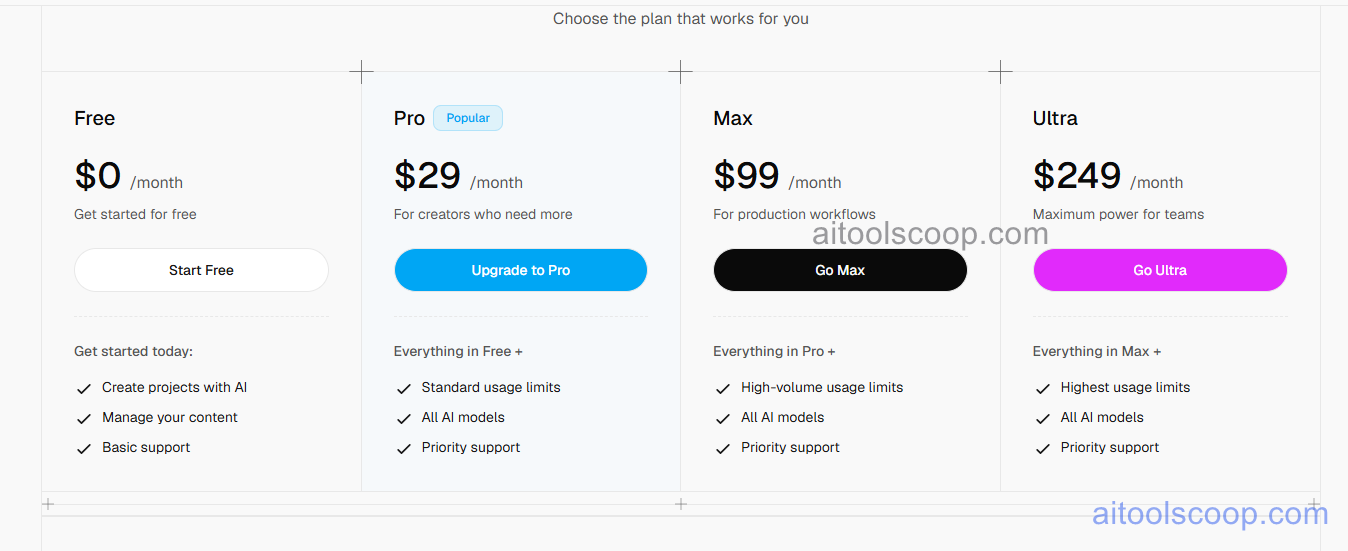
- Free — $0/month — get started creating projects with AI, manage content inside the platform, and basic support. Suited to exploring the workflow before committing to a paid tier.
- Pro — $29/month — everything in Free, plus standard usage limits, access to all AI models, and priority support. Marked as the platform's most popular plan for creators who need more than the free allowance.
- Max — $99/month — everything in Pro, plus high-volume usage limits, the same access to all AI models, and priority support, aimed at production workflows generating content regularly.
- Ultra — $249/month — everything in Max, plus the highest usage limits available on the platform, all AI models, and priority support, positioned as maximum capacity for teams.
Footage's own credit system means the Free plan includes a capped monthly credit allowance, and content created on Free is not retained indefinitely, so anything worth keeping should be downloaded promptly. Pricing verified from footage.com; rates and included credits may change — always confirm current pricing at footage.com.
Who Should Use Footage?
People experimenting with AI video generation for the first time can reasonably start on Free, since it covers the core create-and-manage workflow without a payment method, though the capped credits and basic support mean it works better for testing the concept than for regular output. Individual creators and small teams producing content on a consistent basis get more practical value from Pro, where standard usage limits and priority support remove the friction of running out of credits mid-project. Max suits production-focused teams generating video at real volume, and Ultra exists for organizations that need the platform's highest capacity tier, where the cost is justified by scale rather than by any features exclusive to that plan alone, since Pro, Max, and Ultra all include the full AI model set. Anyone with highly specific, frame-perfect creative requirements should treat Footage's AI-driven brief interpretation as a strong starting point rather than a replacement for a dedicated professional editor when precision matters most.
Frequently Asked Questions
What makes Footage different from a typical text-to-video generator?
Footage frames its process around writing a creative brief from a prompt first, then generating clips and allowing frame-level refinement, rather than producing a single literal clip directly from a one-line prompt with no intermediate structure.
Is there a genuinely free way to try Footage?
Yes, the Free plan at $0/month allows creating and managing projects with AI and includes basic support, making it possible to test the platform before choosing a paid tier.
What separates the Pro, Max, and Ultra plans?
All three include access to every AI model and priority support; the difference is usage limits, which scale from standard on Pro ($29/month) to high-volume on Max ($99/month) to the highest available tier on Ultra ($249/month).
How does Footage's credit system affect how far a plan goes?
Actions like generating a clip or refining a frame draw from a monthly credit allowance tied to the chosen plan, so higher tiers support more generations and edits per month rather than unlocking a different feature set entirely.
Can finished Footage projects be published without leaving the platform?
Yes. Footage includes tools for hosting, sharing, and publishing generated content directly, so a finished project doesn't necessarily need to be exported to a separate service first.


