

CaptureLab (capturelab.gg) is aimed squarely at streamers who don't want to spend the hours after a broadcast scrubbing through VOD footage looking for the three clips worth posting. Sign in with a Twitch account and the platform automatically fetches finished streams, runs them through computer-vision-based highlight detection, and surfaces the moments — kills, clutch plays, big reactions — most likely worth turning into a shareable clip. From there, editing and cross-posting to social platforms happens inside the same dashboard, without exporting footage into a separate editor first.
The tool leans hard on accessibility: the entry-level plan costs nothing and only requires a Twitch login to start analyzing streams, which has made it a common starting point for smaller streamers who aren't ready to pay for a full content pipeline. As channels grow and start streaming across more platforms or need higher production quality, CaptureLab's paid tiers layer on the resolution, branding, and multi-platform tools that a bigger operation typically needs.
How CaptureLab Works
After a streamer connects their Twitch account, CaptureLab auto-fetches new broadcasts as soon as they finish airing, no manual upload required. Computer vision then scans the footage in real time, watching for the visual and audio signals that typically mark an exciting moment — kills, close calls, big reactions — and flags those segments as candidate clips. Each flagged moment can be reviewed inside CaptureLab's editor, trimmed or adjusted, and then published directly to connected social accounts or downloaded for manual posting. On paid tiers, the same pipeline extends into live production tools: custom overlays, chat commands, and multi-platform streaming that let a channel go out to more than one destination at once.
Key Features
- Auto-fetch from Twitch: broadcasts are pulled in automatically once a stream ends, with no manual file upload step
- AI highlight detection: computer vision scans footage for standout gaming moments and flags them as clip candidates
- Built-in clip editor: trim, adjust, and finalize flagged highlights inside the same dashboard used for detection
- Direct social publishing: edited clips can be shared to connected social accounts without exporting to a separate app
- Custom scene templates and overlays: paid tiers add configurable stream layouts and branded overlays, scaling from 2 templates on Starter to unlimited on Business
- Multi-platform streaming: Pro and Business plans support streaming to more than one destination simultaneously
- Custom chat commands: viewer-triggered commands beyond the basic set available on the free tier
- Analytics dashboard: viewer engagement and performance data available on Pro and above
- Tiered streaming resolution: output quality scales from 720p on Starter up to 4K on Business
CaptureLab Pricing
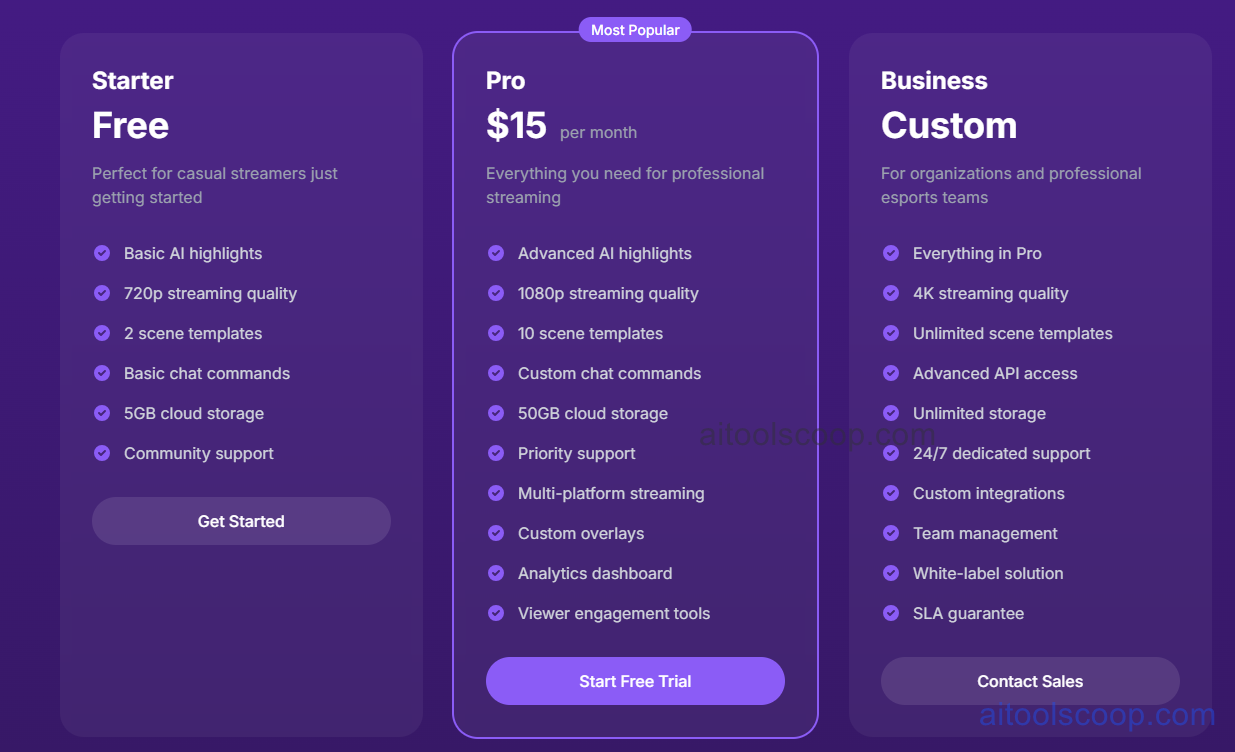
- Starter — Free — basic AI highlights, 720p streaming quality, 2 scene templates, basic chat commands, 5GB cloud storage, and community support. Meant for casual streamers just getting started.
- Pro — $15/month — advanced AI highlights, 1080p streaming, 10 scene templates, custom chat commands, 50GB cloud storage, priority support, multi-platform streaming, custom overlays, an analytics dashboard, and viewer engagement tools. A 14-day free trial is available with no credit card required.
- Business — Custom pricing — everything in Pro plus 4K streaming, unlimited scene templates, advanced API access, unlimited storage, 24/7 dedicated support, custom integrations, team management, a white-label option, and an SLA guarantee. Aimed at organizations and professional esports teams; pricing is quoted directly by CaptureLab's sales team.
Plans can be changed at any time, with adjustments taking effect on the next billing cycle, and there's a 30-day money-back guarantee on paid plans according to CaptureLab's own FAQ. Pricing verified from capturelab.gg; rates and included features may change — always confirm current pricing at capturelab.gg.
Who Should Use CaptureLab?
New and casual streamers are well covered by the free Starter plan, since it already includes AI highlight detection and enough storage and chat functionality to run a small channel without paying anything. Growing channels streaming more regularly, or wanting to push output to more than one platform at once, are the clearer audience for Pro — the jump to 1080p, custom overlays, and an analytics dashboard matters once a channel is trying to look and perform more professionally rather than just capturing clips for fun. Business exists for organizations rather than individuals: esports teams or agencies managing several streamer accounts under one roof, where white-labeling, API access, and dedicated support carry more weight than they would for a solo streamer. Anyone hoping for granular manual control over highlight selection should note that the detection is fully automated, so it works best as a first-pass filter rather than a frame-accurate editing tool.
Frequently Asked Questions
Is CaptureLab actually free to use?
Yes, the Starter plan costs nothing and only requires signing in with a Twitch account. It includes basic AI highlight detection, 720p streaming quality, 2 scene templates, and 5GB of cloud storage.
What do you get by upgrading to CaptureLab Pro?
Pro, at $15/month, adds advanced AI highlights, 1080p streaming, 10 scene templates, custom chat commands, 50GB of storage, priority support, multi-platform streaming, custom overlays, and an analytics dashboard, along with a 14-day free trial.
How does CaptureLab decide which moments to turn into clips?
It uses computer vision to scan finished Twitch broadcasts for visual and audio patterns typically associated with exciting gameplay moments, then flags those segments as candidate highlights for review inside the built-in editor.
Who is the Business plan built for?
Business is priced through a custom quote and targets organizations and professional esports teams that need 4K streaming, unlimited storage, API access, team management tools, white-labeling, and an SLA — features beyond what an individual streamer typically needs.
Can a CaptureLab plan be cancelled or changed easily?
According to CaptureLab's own FAQ, plans are month-to-month with no long-term commitment, upgrades or downgrades apply on the next billing cycle, and a 30-day money-back guarantee is offered on paid plans.


