

Canvid (canvid.com) is a desktop screen recorder for Windows and Mac built around a simple premise: a recording should come out of the app looking close to finished, without a separate trip through editing software. Click-aware framing tracks where the cursor moves and applies automatic zooms in real time, while AI tools clean up background noise, replace or blur webcam backgrounds, and generate instant, editable captions. The result is aimed at tutorial creators, course builders, product teams recording demos, and support teams documenting bug reports — anyone who needs a polished screen recording without opening a full video editor afterward.
Where Canvid distinguishes itself from typical Loom-style recorders is its "generative AI retakes" tool, which lets a user fix a misspoken line by re-recording or typing the correction and having the audio lip-synced back onto the existing webcam footage, avoiding a full re-shoot. The app also runs a meaningful share of its AI processing locally rather than exclusively in the cloud, which matters for anyone recording sensitive internal content. Licensing splits between a monthly subscription and a one-time lifetime purchase, a structure less common among cloud-first screen recording competitors.
How Canvid Works
Recording starts from Canvid's desktop app, where a user selects the screen area or window to capture, along with resolution, frame rate, and audio source settings, and can enable a webcam overlay recorded alongside the screen. As the recording plays out, Canvid's click-aware engine converts each click into a keyframe, which becomes the basis for the automatic zooms and framing adjustments applied afterward. Once recording stops, the built-in editor supports trimming, adjusting the automatic zooms, and applying AI voice clarity to strip out background noise, along with automatic background removal or replacement for the webcam feed. A time-stamped transcript is generated automatically, which can be edited directly and exported as captions, or used to navigate straight to any moment in the recording. Finished videos export locally as MP4 or GIF, or render through Canvid Cloud for an instant shareable link.
Key Features
- Click-aware automatic zooms: converts recorded clicks into keyframes and applies smooth zoom transitions around them without manual keyframing
- 4K recording: captures screen recordings at up to 4K resolution with hardware-accelerated encoding on both Windows and Mac
- AI voice clarity: removes background noise and enhances voice quality, running locally for privacy-sensitive recordings
- Webcam background removal and replacement: blurs or swaps the webcam background without a physical green screen
- Generative AI retakes: lip-syncs a corrected line of audio onto existing webcam footage, avoiding a full re-recording when a mistake is made
- Editable auto-generated transcripts: produces a time-stamped, clickable transcript for precise editing, navigation, and caption export
- Edit-while-record keyframes: supports trimming and zoom adjustment directly from the same clicks captured during recording, without needing external editing software
- Reusable style presets: saves preferred zoom, background, and branding styles to apply instantly to future recordings
- Local and cloud AI processing: most AI features run on-device by default, with an optional cloud AI mode for heavier processing
- Instant share links: renders and uploads a finished recording to Canvid Cloud with a one-click shareable link for platforms like Slack or LinkedIn
Canvid Pricing
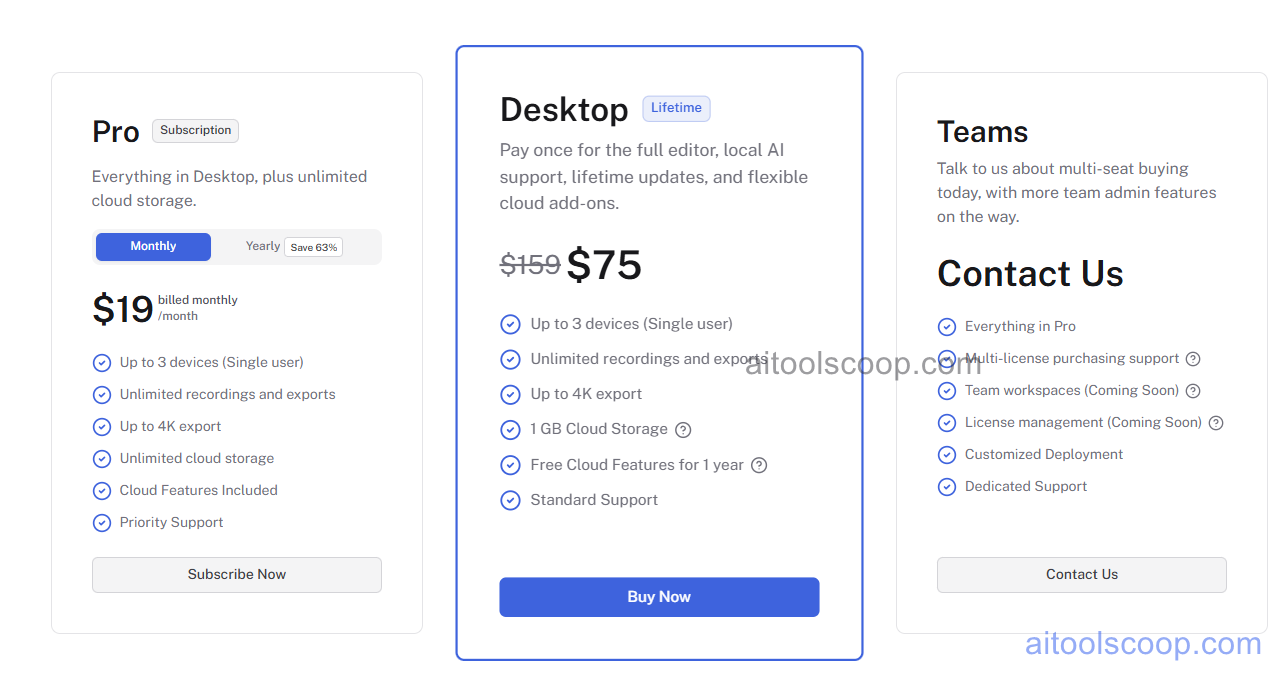
- Desktop — $75 one-time (lifetime, discounted from $159) — the full editor, local AI support, and lifetime updates for up to 3 devices under a single user, unlimited recordings and exports, up to 4K export, 1GB of cloud storage, one free year of cloud features, and standard support.
- Pro — $19/month (from $7/month billed annually) — everything in Desktop, plus unlimited cloud storage, for users who want ongoing cloud capacity rather than the fixed 1GB included with the lifetime license.
- Teams — custom pricing — everything in Pro, plus multi-license purchasing support, team workspaces (coming soon), license management (coming soon), customized deployment, and dedicated support.
All features can be explored without purchasing a license, except exporting videos and creating quick share links, which require an active Desktop or Pro license. Pricing verified from canvid.com; rates may change — always confirm current pricing at canvid.com.
Who Should Use Canvid?
Course creators, tutorial authors, and support teams that record consistently but don't need unlimited cloud storage are well served by the one-time Desktop license, which covers the full editor and local AI tools for a flat cost rather than an ongoing subscription. Teams and individuals with larger libraries of recordings, or anyone who wants cloud storage without managing local file space, are a better match for Pro, especially at the discounted annual rate. Organizations standardizing screen recording across multiple people should look at the Teams plan, though its team-admin features are still rolling out. Because Canvid requires opening the desktop app to start a recording rather than a quick menu-bar shortcut, users who need instant, always-on recording access may find a lighter browser-based tool faster for spontaneous captures.
Frequently Asked Questions
Can Canvid be tried before buying?
Yes. Every feature in Canvid can be explored without a license, with the exception of exporting finished videos and creating quick share links, both of which require an active Desktop or Pro license.
What's the difference between the Desktop and Pro plans?
Desktop is a one-time $75 lifetime purchase covering the full editor, local AI features, and 1GB of cloud storage. Pro is a $19/month subscription (from $7/month billed annually) that includes everything in Desktop plus unlimited cloud storage instead of the fixed 1GB allowance.
Does Canvid process recordings locally or in the cloud?
Most of Canvid's AI features, including voice clarity and background effects, run locally on-device by default, so recording data doesn't leave the machine. An optional cloud AI mode is available for features that benefit from additional processing power.
What does the "generative AI retakes" feature actually do?
If a line is misspoken during recording, generative AI retakes lets the user re-record or type a corrected version of the line, then lip-syncs the new audio onto the existing webcam footage — avoiding the need to re-record the entire video from scratch.
Can I switch from a Pro subscription to the lifetime Desktop license?
Yes. Canvid allows users on the Pro subscription to switch to the one-time Desktop license if they'd rather own the app outright than continue paying monthly.


