

BuildMuse (buildmuse.design) is a curated design inspiration library paired with a lightweight AI ideation companion, built for designers, indie hackers, product builders, and vibe coders who want strong visual references close at hand while they work. Rather than a generic inspiration feed, it pulls interface videos, websites, motion examples, app screenshots, app icons, Apple App Store signals, product launches, open-source trends, skills, and rankings into one calm, editorial-feeling discovery experience.
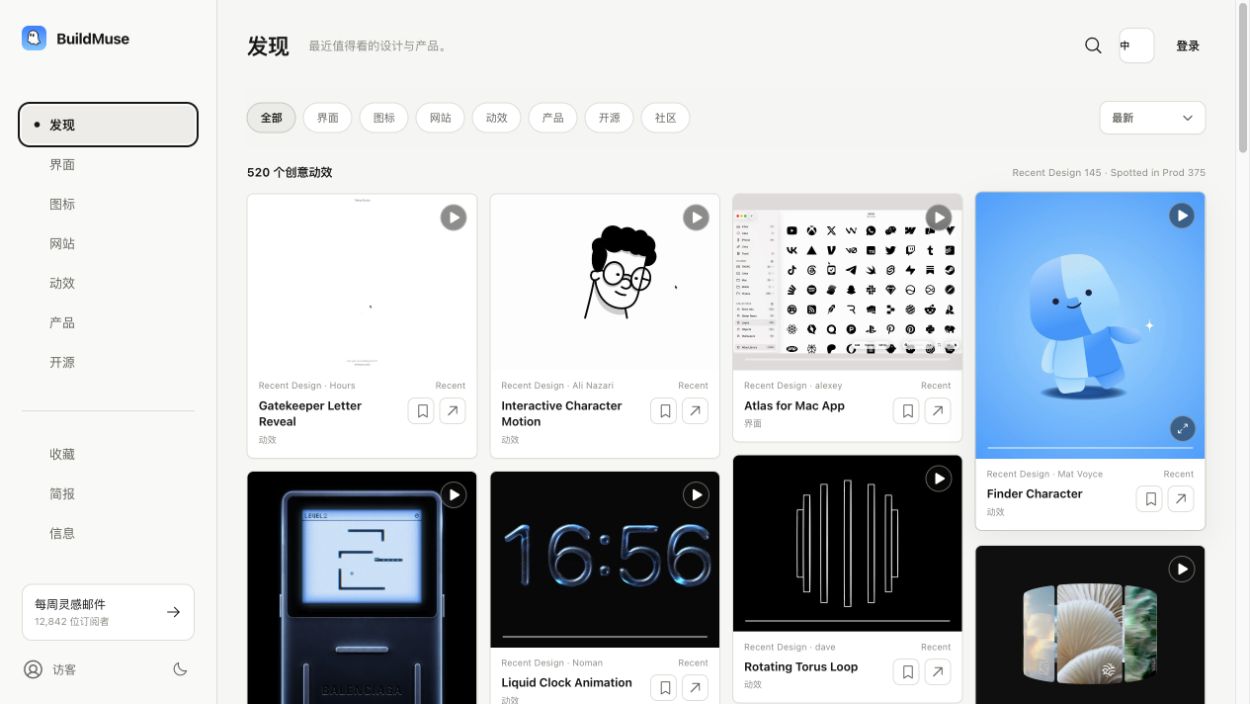
Designers looking for real, sourced creative examples and AI-assisted builders who need a visual direction before or during a build make up BuildMuse's core audience. The Discover feed's always-playing masonry layout is built for quick scanning rather than doom-scrolling, letting users filter by design discipline, open an example in a focused viewer, save favorites, and come back to useful references later — the kind of workflow BuildMuse describes as the moment before and during making, when finding the right pattern matters more than browsing endlessly.
How BuildMuse Works
Opening BuildMuse drops a user straight into the Discover feed, where interface videos, websites, and motion examples play automatically in a masonry grid that can be filtered by discipline — web, interface, branding, product, typography, motion, illustration, 3D, editorial, print, or packaging. Clicking into any example opens a focused viewer with a link back to the original source, so inspiration always traces back to real, credited creative work rather than an anonymous AI-generated gallery. Alongside the visual library, BuildMuse tracks an app icon collection with color filtering, Apple App Store discovery signals and category views, and ongoing product, open-source, and design-resource rankings for spotting what's trending. For the ideation side, a dedicated VibeCoding chat takes a rough product idea and turns it into creative directions, references, and implementation options, deliberately staying lightweight rather than functioning as a full planning or project-management workspace. Free visitors can browse the most recently added examples, while a BuildMuse Plus membership unlocks the complete historical library, rankings, skills, favorites syncing, and a curated weekly inspiration email.
Key Features
- Curated interface and motion-design video library: real interface, website, and motion examples collected and organized for quick browsing
- Always-playing masonry discovery feed: a scan-friendly layout showing motion examples in motion, rather than static thumbnails
- Discipline filters: narrow the feed by web, interface, branding, product, typography, motion, illustration, 3D, editorial, print, or packaging design
- Focused video viewer with source links: every example links back to its original creator or source rather than staying anonymous
- App icon library with color filtering: browse app icon design examples and filter by color palette
- Apple App Store discovery signals: category views and signals surfaced from App Store trends and listings
- Product, open-source, and design-resource rankings: ongoing trend rankings for spotting what's gaining traction
- Lightweight VibeCoding idea chat: an AI chat that turns a rough product idea into creative directions and implementation options
- Favorites and curated email digest: save references for later and receive a weekly curated inspiration email
- Light and dark themes with bilingual navigation: supports both English and Chinese navigation across the interface
BuildMuse Pricing
- Weekly — $1.99/week — full BuildMuse Plus membership billed weekly, for anyone wanting to try the complete library before committing longer-term.
- Monthly — $4.99/month — full BuildMuse Plus membership billed monthly, the standard ongoing subscription option.
- Annual — $32/year (about $2.67/month, most popular) — full BuildMuse Plus membership billed once a year at a lower effective monthly rate than Weekly or Monthly.
- Lifetime — $79.99 one-time (best value) — a single one-time payment for permanent access to BuildMuse Plus, with no recurring billing afterward.
Every paid tier unlocks the same BuildMuse Plus membership: the complete inspiration history, trend rankings, Skills, favorites syncing, and the weekly inspiration email. Checkout is handled securely through Dodo Payments, and subscriptions can be cancelled anytime. Pricing verified from buildmuse.design; rates may change — always confirm current pricing at buildmuse.design/membership.
Who Should Use BuildMuse?
Designers who want a fast, credible way to scan real creative work — not an endless generic feed — will likely appreciate BuildMuse's editorial approach and the fact that every example links back to its original source. Vibe coders and indie hackers building products with AI assistance get a specific benefit from the VibeCoding chat, since it's built to hand over creative directions and implementation options rather than trying to be a heavyweight planning tool competing with dedicated project workspaces. Anyone just getting a feel for the product can start with free browsing of the most recent additions, then try BuildMuse Plus at $1.99 for a single week before deciding whether to commit further. Given the $79.99 lifetime option sits below roughly 16 months of the monthly plan, anyone confident they'll use BuildMuse regularly may find lifetime the most economical path in, while the $32 annual plan offers the best ongoing value for someone who isn't ready to commit to a one-time payment. Because BuildMuse is still an early-stage, growing catalog, users looking for an exhaustive, long-established inspiration archive covering every niche might find some categories thinner than more mature competitors, though the combination of design references, tools, app data, and trend signals in one place is a distinctive angle few other inspiration sites offer.
Frequently Asked Questions
What is BuildMuse used for?
BuildMuse is a curated design inspiration library that brings interface videos, websites, motion examples, app icons, App Store signals, and trend rankings into one browsable feed, paired with a lightweight AI chat that turns a rough product idea into creative directions and references.
How much does BuildMuse Plus cost?
BuildMuse Plus is available as $1.99 billed weekly, $4.99 billed monthly, $32 billed annually (about $2.67/month, marked as most popular), or a $79.99 one-time lifetime payment marked as the best value. Visitors can browse the most recently added examples for free without any of these plans.
What is the VibeCoding chat, and does it write code for me?
VibeCoding is BuildMuse's lightweight AI ideation chat, designed to turn a rough product idea into creative directions, visual references, and implementation options. It's focused on ideation rather than end-to-end code generation or hosting, so it's a companion for finding direction rather than a full development environment.
Does every example on BuildMuse link back to its original source?
Yes. BuildMuse's focused viewer includes a link back to the original creator or source for each interface, website, or motion example shown, which the platform emphasizes over generic AI-generated galleries with no real attribution.
Can I filter BuildMuse by a specific design discipline?
Yes, the Discover feed can be filtered by discipline, including web, interface, branding, product, typography, motion, illustration, 3D, editorial, print, and packaging design, making it easier to scan for a specific kind of reference instead of browsing everything at once.


