

Animatable.ai (animatable-ai.com) restyles an uploaded video into a new animated look while preserving the source footage's original motion, rather than generating a scene from a text prompt alone. A user uploads a clip, describes the desired style through prompts covering details like hair, eye colour, or clothing, and the platform applies that transformation across the video. Because the underlying motion comes from real footage, the resulting animation keeps the timing and movement of the original performance instead of relying entirely on AI-generated motion.
The tool is aimed at video creators and visual storytellers who want a distinct animated style applied to existing footage — music videos, short films, or social clips — without hand-rotoscoping every frame. Every generation runs on a credit system, with video-to-video animation costing more credits per second than a still image preview, so users can check a style on a single frame before committing credits to the full clip.
How Animatable.ai Works
A source video is uploaded first, and a style prompt describes exactly how the output should look — specific hair colour, clothing, background details, or an overall artistic direction. Before committing to a full render, an image preview can be generated for a single credit, giving a quick look at how the style will apply without spending the larger credit pool a full video conversion requires. Once the style is confirmed, the video-to-video engine processes the whole clip, and Animatable.ai states that a typical transformation takes around ten minutes to complete, after which the finished animation is ready to download.
Key Features
- Video-to-video animation: restyles uploaded footage into a new animated look while keeping the original motion and timing
- Detailed style prompting: adjusts specific visual details such as hair, eye colour, and clothing rather than only an overall style tag
- Image preview mode: generates a single-frame preview for 1 credit before spending credits on a full video conversion
- Full commercial use: generated animations can be used commercially on both paid plans
- Fast generation: typical video conversions complete in around ten minutes
- Style library: a range of preset animation styles to start from before customising with prompts
Animatable.ai Pricing
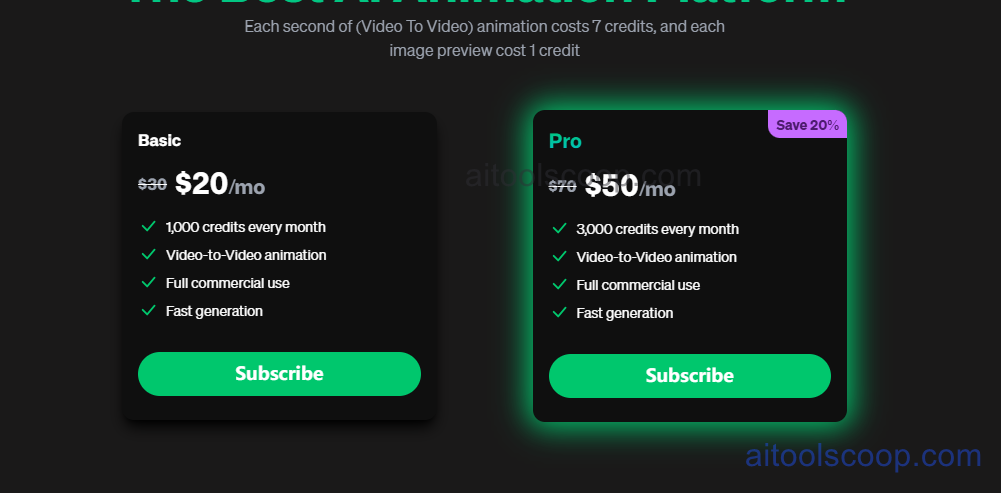
- Basic — $20/month (discounted from $30/month) — 1,000 credits every month, video-to-video animation, full commercial use, fast generation.
- Pro — $50/month (discounted from $70/month, Save 20%) — 3,000 credits every month, video-to-video animation, full commercial use, fast generation.
Each second of video-to-video animation costs 7 credits, and each image preview costs 1 credit. There is no permanent free plan. Pricing verified from animatable-ai.com; rates may change — always confirm current pricing at animatable-ai.com.
Who Should Use Animatable.ai?
A creator working on a single short clip or two per month will find Basic's 1,000 monthly credits reasonable, since 1,000 credits covers roughly two and a half minutes of video-to-video animation at 7 credits per second, plus room for preview checks along the way. Pro suits someone producing longer or more frequent content, such as a recurring music video series, where the tripled credit allowance covers more total render time without upgrading mid-month. Anyone whose main need is generating video from a text prompt with no source footage will want a text-to-video tool instead, since Animatable.ai's whole workflow depends on transforming existing video rather than creating motion from nothing.
Frequently Asked Questions
What does Animatable.ai do?
Animatable.ai converts uploaded video footage into a restyled animation while preserving the original motion, letting users apply a new visual style — including specific hair, eye, and clothing details — through prompts.
How much does Animatable.ai cost?
Basic is $20/month for 1,000 credits, discounted from $30/month. Pro is $50/month for 3,000 credits, discounted from $70/month, a 20% saving.
How many credits does a video conversion use?
Each second of video-to-video animation costs 7 credits. A single-frame image preview, used to check a style before committing to a full render, costs 1 credit.
Is there a free plan for Animatable.ai?
No. Animatable.ai currently offers two paid monthly plans, Basic and Pro, with no permanent free tier.
Can Animatable.ai output be used commercially?
Yes. Full commercial use is included on both the Basic and Pro plans.


