

AirBrush Studio (airbrush.com) grew out of the long-running AirBrush selfie app and repackages its retouching engine as a browser and desktop workflow built for creators who need consistent portrait results without touching layers or masks. The pitch is narrow on purpose: skin, faces, and framing, handled automatically, so a photographer editing dozens of client headshots or a creator prepping a week's worth of content doesn't have to open Photoshop for routine cleanup.
What separates AirBrush Studio from a typical filter app is how it treats the retouch as a job to be automated rather than a set of sliders to be dragged manually. Presets are tuned for specific outcomes — headshots, product photography, real estate interiors — and generative tools like Face Fix and Magic Expand fill in or reconstruct parts of an image that a manual eraser tool would struggle with. A free core plan covers basic smoothing and cleanup, while the paid tiers unlock the heavier generative features and let edits sync across an entire project at once.
How AirBrush Studio Works
A photo or a batch of photos is uploaded into a project, and the person picks a task-specific preset before making any manual adjustment. The AI handles skin smoothing, wrinkle and blemish removal, and tone balancing in one pass, while separate tools cover background cleanup, object removal, and image extension through Magic Expand. Because presets can be applied across an entire batch, a change made to one photo's style can be pushed to the rest of a project through bulk sync, which is the part of the workflow AirBrush leans on most for people editing in volume.
Key Features
- AI Portrait Retouch: automated skin smoothing, wrinkle and blemish removal, and even skin-tone correction that preserves natural texture rather than flattening it
- Face Fix and Magic Expand: generative-credit tools that reconstruct facial detail or extend an image's frame to recover shots that would otherwise need a reshoot
- Premium Presets and Magic Retouch styles: signature looks tuned for specific jobs like headshots, product photography, and real estate listings
- Batch Processing: apply the same retouch settings across an entire project of photos instead of editing each one individually
- Cross-platform access: a browser-based editor plus dedicated Windows, macOS, iOS, and Android apps, with device-limited sync on paid plans
- Background and object cleanup: AI-powered background removal and an eraser tool for removing unwanted people or items from a scene
- Team and Enterprise tooling: seat management, multi-device access, and dedicated support built for studios, agencies, and larger creative teams
AirBrush Studio Pricing
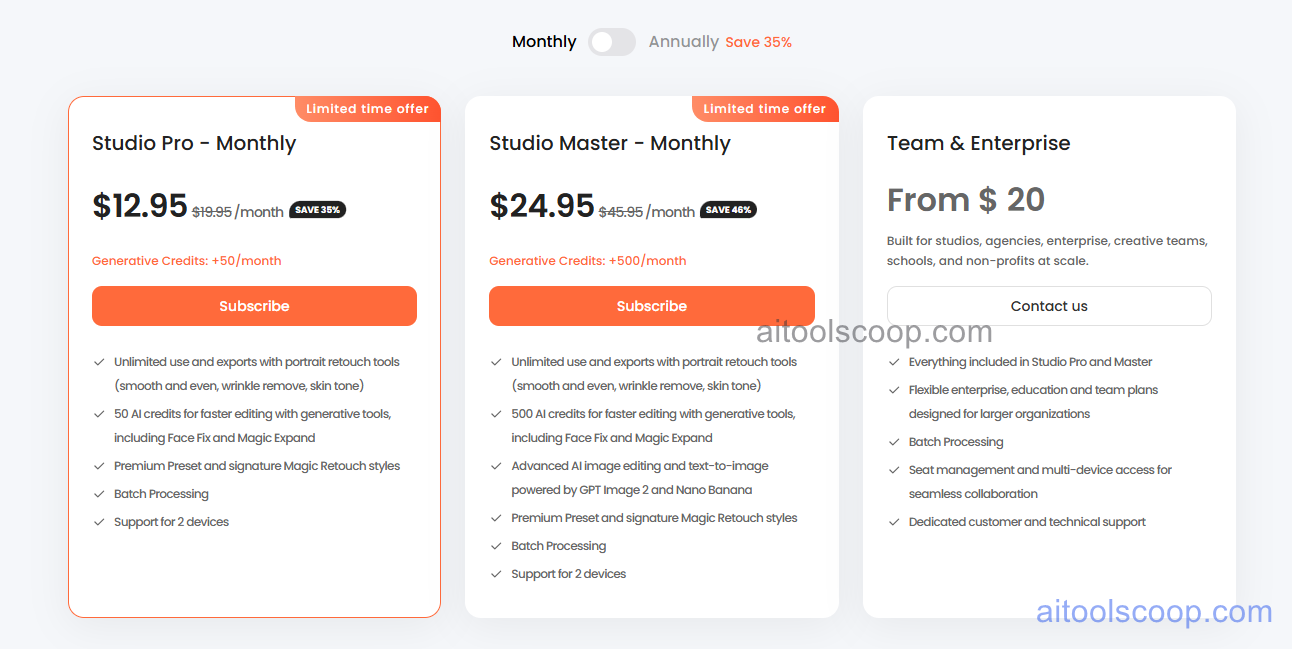
- Free — core retouch tools for basic skin smoothing, wrinkle removal, and skin-tone correction, useful for testing the interface before upgrading.
- Studio Pro — $12.95/month (from $8.33/month billed annually, limited-time discount off $19.95/month) — unlimited use of the portrait retouch tools, 50 generative credits a month for Face Fix and Magic Expand, premium presets, batch processing, and sync across 2 devices.
- Studio Master — $24.95/month (from $16.66/month billed annually, limited-time discount off $45.95/month) — everything in Studio Pro, plus 500 monthly generative credits and access to advanced AI image editing and text-to-image generation powered by GPT Image 2 and Nano Banana.
- Team & Enterprise — from $20/month — everything in Studio Pro and Master, with flexible seat plans for studios, agencies, schools, and non-profits, batch processing at scale, multi-device access for teams, and dedicated support. Pricing is quote-based through the sales team.
The Studio Pro and Studio Master discounts are marked as limited-time offers on AirBrush's pricing page, so the standard rate may be higher once the promotion ends. Pricing verified from airbrush.com; rates may change — always confirm current pricing at airbrush.com.
Who Should Use AirBrush Studio?
Photographers delivering client headshots in volume get the most out of Studio Pro, since batch processing removes the need to retouch dozens of near-identical portraits one at a time. Creators who lean on Magic Expand or Face Fix to rescue cropped or awkwardly framed shots will find the extra generative credits on Studio Master worth the jump, especially if they're also generating new visuals from text prompts. Studios and agencies coordinating several editors across shared projects are the intended audience for the Team & Enterprise tier, where seat management and multi-device access matter more than any single feature. Anyone who only needs the occasional smoothing pass can get by on the free plan without ever entering a card number.
Frequently Asked Questions
What exactly does AirBrush Studio do?
AirBrush Studio is an AI-powered photo editor focused on portrait retouching, background cleanup, and image reconstruction. It automates tasks like skin smoothing, blemish removal, and extending a cropped photo's frame, aiming for results that still look like the original subject rather than an obviously edited one.
Is there a free version of AirBrush Studio?
Yes. AirBrush offers a free core plan covering basic retouch tools like skin smoothing and tone correction. Generative features such as Face Fix and Magic Expand, along with batch processing and premium presets, require a Studio Pro or Studio Master subscription.
How is Studio Master different from Studio Pro?
Studio Pro includes unlimited use of the portrait retouch tools plus 50 generative credits a month for Face Fix and Magic Expand. Studio Master raises that to 500 monthly credits and adds advanced AI image editing and text-to-image generation through GPT Image 2 and Nano Banana, which suits heavier or more creative workloads.
Can multiple people on a team share one AirBrush account?
Studio Pro and Studio Master are limited to sync across 2 devices, which covers an individual working across a laptop and phone but not a full team. Studios and agencies needing seat management and broader multi-device access should look at the Team & Enterprise plan, which is priced by quote.
Does AirBrush Studio run on both desktop and mobile?
AirBrush is available as a browser-based editor plus dedicated apps for Windows, macOS, iOS, and Android. Heavier batch and generative work tends to be more comfortable on desktop, while the mobile apps are handy for quick retouches on the go.


