

AI STL Generator (aistlgenerator.com) turns text prompts and 2D reference images into production-ready, watertight, 3D printable STL models in seconds. Users describe the object they want in plain language, or upload a photo or sketch, and get a slicing-ready mesh without touching CAD software. It's built for 3D printing enthusiasts and makers, fitting straight into existing workflows with Bambu Lab, Creality, PrusaSlicer, OrcaSlicer, and Cura.
Beyond generation, the toolkit includes Text to STL, Image to STL, an in-browser STL Viewer, 3MF to STL conversion, and STL Studio for quick edits, covering the full journey from idea to printed part. The free plan lets anyone start creating immediately, with affordable upgrades for higher resolution output and commercial use. Whether the goal is tabletop miniatures, replacement parts, prototypes, or custom gifts, AI STL Generator is built as a fast path from idea to print-ready STL.
How AI STL Generator Works
Getting a printable model starts with either typing a plain-language description of the object or uploading a reference photo or sketch. AI STL Generator processes the input through its 3D AI models and returns a watertight STL mesh ready for slicing, no manual CAD cleanup required. The in-browser STL Viewer lets users preview the model interactively before downloading it, and STL Studio provides quick editing tools for making small fixes or adjustments directly in the browser. A 3MF to STL converter is also included for handling that specific file format conversion. Each generation or conversion consumes credits, with credit allowances and processing priority scaling up by plan tier.
Key Features
- Text to STL generation: creates a printable STL model from a plain-language prompt
- Image to STL conversion: converts an uploaded photo or sketch into a 3D printable model
- Watertight, slicing-ready meshes: no CAD skills needed to get a usable print file
- In-browser STL Viewer: instant interactive 3D preview of generated models
- 3MF to STL converter: included free for converting between file formats
- STL Studio: quick model edits and fixes without leaving the browser
- Slicer compatibility: works with Bambu Studio, Cura, PrusaSlicer, and OrcaSlicer
- Free plan: lets anyone start creating immediately with daily credits
AI STL Generator Pricing
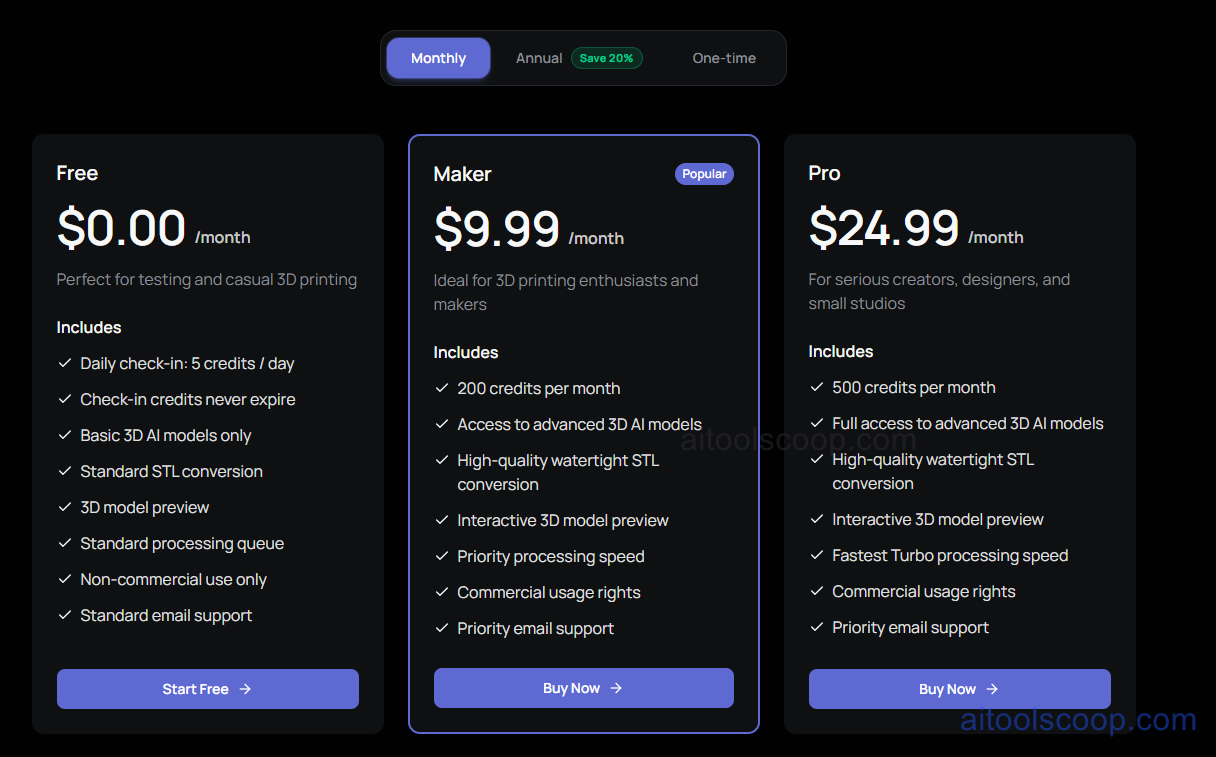
- Free — $0.00/month — daily check-in of 5 credits/day (check-in credits never expire), basic 3D AI models only, standard STL conversion, 3D model preview, standard processing queue, non-commercial use only, and standard email support. Perfect for testing and casual 3D printing.
- Maker — $9.99/month (or $7.99/month billed annually, saving 20% vs monthly) — 200 credits per month (2,400 credits/yr on the annual plan), access to advanced 3D AI models, high-quality watertight STL conversion, interactive 3D model preview, priority processing speed, commercial usage rights, and priority email support. Marked as the popular plan, ideal for 3D printing enthusiasts and makers.
- Pro — $24.99/month (or $19.99/month billed annually, saving 20% vs monthly) — 500 credits per month (6,000 credits/yr on the annual plan), full access to advanced 3D AI models, high-quality watertight STL conversion, interactive 3D model preview, fastest Turbo processing speed, commercial usage rights, and priority email support. Built for serious creators, designers, and small studios.
A one-time purchase option is also available alongside monthly and annual billing. Pricing verified from aistlgenerator.com; rates may change — always confirm current pricing at aistlgenerator.com.
Who Should Use AI STL Generator?
Hobbyists testing out AI-generated 3D prints or doing casual, non-commercial printing can start on the Free plan's daily check-in credits. 3D printing enthusiasts and makers who want commercial usage rights, access to advanced 3D AI models, and priority processing are the clearest fit for Maker, especially at the discounted annual rate. Serious creators, designers, and small studios generating a higher volume of models each month, who want the fastest Turbo processing speed and the largest credit allowance, should look at Pro. Because complex mechanical parts may still need CAD refinement, it suits creative and decorative prints, replacement parts, and prototypes better than precision engineering components.
Frequently Asked Questions
Is AI STL Generator free to use?
Yes. The Free plan gives 5 credits per day through daily check-in, which never expire, and includes basic 3D AI models, standard STL conversion, and 3D model preview for non-commercial use.
Do I need CAD software to use it?
No. AI STL Generator produces watertight, slicing-ready meshes directly from a text prompt or image, with no CAD skills or software required.
Can I use generated models commercially?
Commercial usage rights are included on the Maker and Pro plans; the Free plan is limited to non-commercial use only.
How much can I save by paying annually?
Both Maker and Pro offer 20% savings when billed annually: Maker drops from $9.99 to $7.99/month, and Pro drops from $24.99 to $19.99/month.
Which slicers does AI STL Generator work with?
Generated STL files work with Bambu Studio, Cura, PrusaSlicer, and OrcaSlicer, fitting directly into existing 3D printing workflows.


