In previous post we learnt how to write Writing Build Phase Jenkins Plugin, now in this article we will learn how to write a Jenkins CI Plugin that executes post build process. The complete source code is hosted on github post-build-jenkins-plugin
Step 1: Edit the settings.xml in .m2 directory or if it is not there create it with below content:
<settings>
 <pluginGroups>
 <pluginGroup>org.jenkins-ci.tools</pluginGroup>
 </pluginGroups>
 <profiles>
 <profile>
 <id>jenkins</id>
 <activation>
 <activeByDefault>true</activeByDefault>
 </activation>
 <repositories>
 <repository>
 <id>repo.jenkins-ci.org</id>
 <url>http://repo.jenkins-ci.org/public/</url>
 </repository>
 </repositories>
 <pluginRepositories>
 <pluginRepository>
 <id>repo.jenkins-ci.org</id>
 <url>http://repo.jenkins-ci.org/public/</url>
 </pluginRepository>
 </pluginRepositories>
 </profile>
 </profiles>
</settings>
Step 2: Create a Maven project and edit the pom.xml as:
<project xmlns="http://maven.apache.org/POM/4.0.0" xmlns:xsi="http://www.w3.org/2001/XMLSchema-instance" xsi:schemaLocation="http://maven.apache.org/POM/4.0.0 http://maven.apache.org/maven-v4_0_0.xsd">
 <modelVersion>4.0.0</modelVersion>
 <parent>
 <groupId>org.jenkins-ci.plugins</groupId>
 <artifactId>plugin</artifactId>
 <version>1.580.1</version>
 <relativePath />
 </parent>
 <groupId>com.jenkins</groupId>
 <artifactId>post-build-jenkins-plugin</artifactId>
 <packaging>hpi</packaging>
 <version>0.0.1</version>
 <name>Email Plugin</name>
 <url>http://wiki.jenkins-ci.org/display/JENKINS/post-build-jenkins-plugin</url>
 <dependencies>
 </dependencies>
 <build>
 <finalName>post-build-jenkins-plugin</finalName>
 </build>
</project>
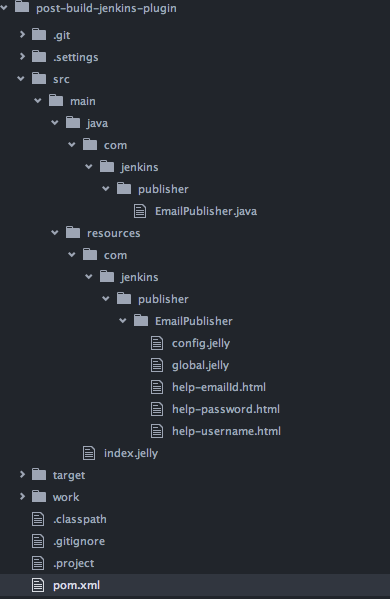
Step 3: Create a folder under src/main/java for me it’s com.jenkins.publisher and copy the EmailPublisher java class with below content inside it:
package com.jenkins.publisher;

import hudson.Extension;
import hudson.Launcher;
import hudson.model.BuildListener;
import hudson.model.AbstractBuild;
import hudson.model.AbstractProject;
import hudson.tasks.BuildStepDescriptor;
import hudson.tasks.BuildStepMonitor;
import hudson.tasks.Notifier;
import hudson.tasks.Publisher;

import java.util.Properties;

import javax.mail.Message;
import javax.mail.PasswordAuthentication;
import javax.mail.Session;
import javax.mail.Transport;
import javax.mail.internet.InternetAddress;
import javax.mail.internet.MimeMessage;

import net.sf.json.JSONObject;

import org.kohsuke.stapler.DataBoundConstructor;
import org.kohsuke.stapler.StaplerRequest;

public class EmailPublisher extends Notifier {

 private final String emailId;

 private static Properties properties = new Properties();
  static {
   properties.put("mail.smtp.auth", "true");
   properties.put("mail.smtp.starttls.enable", "true");
   properties.put("mail.smtp.host", "smtp.gmail.com");
   properties.put("mail.smtp.port", "587");
  }

 @DataBoundConstructor
 public EmailPublisher(final String emailId) {
  this.emailId = emailId;
 }

 public String getEmailId() {
  return emailId;
 }

 @Override
 public boolean perform(
 @SuppressWarnings("rawtypes") final AbstractBuild build,
 final Launcher launcher, final BuildListener listener) {
 // logic to be executed by plugin
 try {
 // logger which prints on job 'Console Output'
 listener.getLogger().println("Starting Post Build Action");
  sendMail();
 } catch (Exception e) {
 listener.getLogger().printf("Error Occurred : %s ", e);
 }
 listener.getLogger().println("Finished Post Build Action");
  return true;
 }

 @Override
 public DescriptorImpl getDescriptor() {
  return (DescriptorImpl) super.getDescriptor();
 }

 @Extension
 public static class DescriptorImpl extends BuildStepDescriptor<Publisher>   {

 /**
 * Global configuration information variables. If you don't want fields
 * to be persisted, use <tt>transient</tt>.
 */
 private String username;
 private String password;

 public String getUsername() {
  return username;
 }

 public String getPassword() {
  return password;
 }

 /**
 * In order to load the persisted global configuration, you have to call
 * load() in the constructor.
 */
 public DescriptorImpl() {
  load();
 }

 @Override
 public boolean configure(StaplerRequest req, JSONObject formData)
 throws FormException {

 // To persist global configuration information, set that to
 // properties and call save().
 username = formData.getString("username");
 password = formData.getString("password");
 save();
  return super.configure(req, formData);
 }

 @Override
 public boolean isApplicable(
 @SuppressWarnings("rawtypes") Class<? extends AbstractProject> jobType) {
  // Indicates that this builder can be used with all kinds of project
  // types.
  return true;
 }

 @Override
 public String getDisplayName() {
  return "Send Email";
 }
 }

 public BuildStepMonitor getRequiredMonitorService() {
 return BuildStepMonitor.NONE;
 }

 private void sendMail() throws Exception {
  final String username = getDescriptor().getUsername();
  final String password = getDescriptor().getPassword();

  Session session = Session.getInstance(properties,
   new javax.mail.Authenticator() {
     protected PasswordAuthentication getPasswordAuthentication() {
    return new PasswordAuthentication(username, password);
   }
 });

 Message message = new MimeMessage(session);

  message.setFrom(new InternetAddress("[email protected]"));
  message.setRecipients(Message.RecipientType.TO,

  InternetAddress.parse(emailId));
   message.setSubject("Jenkins Post Build Mail");
   message.setText("Jenkins Post Build Mail");

 Transport.send(message);
 }
}
Step 4: Create a index.jelly file under src/main/resources folder and copy the below content to it:
<?jelly escape-by-default='true'?>
<!-- This view is used to render the installed plugins page. -->


<div>
 This plugin send mail post build.
</div>
Step 5: Create a folder with same name as of Java class under src/main/resources/ in my case it’s
com/jenkins/publisher/EmailPublisher and then create config.jelly, global.jelly, help-emailId.html, help-username.html and help-password.html inside it with below content:
config.jelly
<?jelly escape-by-default='true'?>
<j:jelly xmlns:j="jelly:core" xmlns:st="jelly:stapler" xmlns:d="jelly:define" xmlns:l="/lib/layout" xmlns:t="/lib/hudson" xmlns:f="/lib/form">
 <!-- Creates a text field that shows the value of the "emailId" property. When submitted, it will be passed to the corresponding constructor parameter. -->
 <f:entry title="Email Id" field="emailId">
 <f:textbox />
 </f:entry>
</j:jelly>
global.jelly
<?jelly escape-by-default='true'?>
<j:jelly xmlns:j="jelly:core" xmlns:st="jelly:stapler" xmlns:d="jelly:define" xmlns:l="/lib/layout" xmlns:t="/lib/hudson" xmlns:f="/lib/form">
 <!-- This Jelly script is used to produce the global configuration option. -->
 <f:section title="Email Publisher">
 <f:entry title="Username" field="username">
 <f:textbox />
 </f:entry>
 <f:entry title="Password" field="password">
 <f:textbox />
 </f:entry>
 </f:section>
</j:jelly>
help-emailId.html
<!-- Help file for fields are discovered through a file name convention. This file is help for the "emailId" field. -->


<div>Specify the email id to which mail to be sent. For example,
 you can specify as [email protected]
</div>
help-username.html
<!-- This HTML fragment will be injected into the configuration screen when the user clicks the 'help' icon of filed 'username'. -->


<div>Specify the username of gmail account from which mail to be
 sent. For example, you can specify as [email protected]
</div>
help-password.html
<!-- This HTML fragment will be injected into the configuration screen when the user clicks the 'help' icon of filed 'password'. -->


<div>Specify the password of gmail account from which mail to be
 sent. For example, you can specify as password@gmail
</div>
After performing all the above steps, your project structure should look like as:
Step 6: Compile and package the plugin:
$ cd post-build-jenkins-plugin
$ mvn package
After packaging the plugin you should find a .hpi file in the target folder.
 Arpit Aggarwal Blog