
Sporting Android 4.1 and dual ARM Cortex A9 cpu’s the Samsung Galaxy S3 Mini (GT-I8190) is no longer competitive with any mid-range smartphones currently found in stores (read more). However, because of its wide community the smartphone has become a interesting target for creating custom ROM’s. In this guide I’ll go through some commands which will help you upgrading the S3 mini from stock Android 4.1 to Android Lollipop 5.1!
Notice that for performing this modification I’ll be using and SD-card and my laptop with Ubuntu 16.4 operating system installed. Before we get along make sure to visit the NovaFusion.pl website, head over to the download page and download following files:
If the site offers you the choice between Recovery and Oden take the Recovery option. It means we’re going to perform the flash through the recovery menu which is build inside the device. The Odin option is used for flashing the ROM through the Odin utility for Samsung smartphones. Caynogenmod 12.1 is the custom ROM we’re going to install and features Android Lollipop 5.1. TWRP Recovery is an enhanced software tool which is more feature rich than the S3 Mini’s default recovery tool. We need it to flash to custom ROM. Also head over to the opengapps.org website and download the latest Google Apps application suite compiled for your platform. To be sure you have the correct version select following checkboxes before hitting the download button: “ARM Platform”, “Android 5.1”, “stock variant”. This stock variant of Google Apps (often referred to as Gapps) includes a whole list of Google applications: Play Store, Chrome browser, Calculator, Drive, Docs, Keep, Fitness, Keyboard, Maps, YouTube, … See the complete list here. You can also use following link which will take you directly start downloading Gapps for you Samsung S3 Mini: Gapps for Samsung S3 Mini.
Now grab your SD-card, head over to your computers download folder and copy the Gapps and Cyanogenmod zipfiles onto your SD-card. After copying has been completed install the SD-card into your S3 Mini. Next we’re going to boot or reboot the smartphone into “download” mode (sometimes also referred to as “Odin” mode). You can this by holding Power + Volume Down + Menu buttons at the same time when powering up your smartphone. You can also reboot into download mode when your phone is on by installing Google’s ADB debug tool (sudo apt-get install android-tools-adb android-tools-fastboot) and issuing following command: adb reboot download. Note that must have USB debugging enabled and you must be connected to your device.

booting Samsung Galaxy S3 Mini into “download/Odin” mode
The download mode is specific to Samsung smartphones, but it is similar to the Fastboot mode found on many different smartphones with unlocked bootloader.
Next we’ll use the Heimdall tool to flash the TWRP recovery tool into our smartphone’s memory. On Ubuntu you can install it by issuing following command: sudo apt-get install heimdall. On your computer head over to you download folder and unzip the twrp’s zipfile. Inside the unzipped folder you’ll find a “recovery.img” image file which we’ll flash. Open a command terminal from this location and issue following command:
sudo heimdall flash –Kernel2 recovery.img –no-reboot
We’ll get following outcome:
Heimdall v1.4.0

Copyright (c) 2010-2013, Benjamin Dobell, Glass Echidna
http://www.glassechidna.com.au/

This software is provided free of charge. Copying and redistribution is
encouraged.

If you appreciate this software and you would like to support future
development please consider donating:
http://www.glassechidna.com.au/donate/

Initialising connection...
Detecting device...
Claiming interface...
Setting up interface...

Initialising protocol...
Protocol initialisation successful.

Beginning session...

Some devices may take up to 2 minutes to respond.
Please be patient!

Session begun.

Downloading device's PIT file...
PIT file download successful.

Uploading Kernel2
100%
Kernel2 upload successful

Ending session...
Releasing device interface...
This command flashes the TWRP’s binary image “recovery.img” into the “Kernel2” recovery partition. On your smartphone a blue bar will appear that will show the progress. If for some reason this “Kernel2” partition is not available on your S3 Mini you can discover the target partition by yourself by issuing following command:
sudo heimdall print-pit –verbose
It will result in following outcome (the target partition is marked in blue and can be found because it is the partition holding the recovery.img Flash filename):
Heimdall v1.4.0

Copyright (c) 2010-2013, Benjamin Dobell, Glass Echidna
http://www.glassechidna.com.au/

This software is provided free of charge. Copying and redistribution is
encouraged.

If you appreciate this software and you would like to support future
development please consider donating:
http://www.glassechidna.com.au/donate/

Initialising connection...
Detecting device...
 Manufacturer: "SAMSUNG"
 Product: "SAMSUNG USB DRIVER"
 Serial No: " "

length: 18
 device class: 2
 S/N: 3
 VID:PID: 04E8:685D
 bcdDevice: 0100
 iMan:iProd:iSer: 1:2:3
 nb confs: 1

interface[0].altsetting[0]: num endpoints = 1
 Class.SubClass.Protocol: 02.02.01
 endpoint[0].address: 83
 max packet size: 0010
 polling interval: 09

interface[1].altsetting[0]: num endpoints = 2
 Class.SubClass.Protocol: 0A.00.00
 endpoint[0].address: 81
 max packet size: 0200
 polling interval: 00
 endpoint[1].address: 02
 max packet size: 0200
 polling interval: 00
Claiming interface...
Setting up interface...

Initialising protocol...
Protocol initialisation successful.

Beginning session...

Some devices may take up to 2 minutes to respond.
Please be patient!

Session begun.

Downloading device's PIT file...
PIT file download successful.

Entry Count: 25
Unknown 1: 1598902083
Unknown 2: 844251476
Unknown 3: 28519
Unknown 4: 25708
Unknown 5: 28261
Unknown 6: 0
Unknown 7: 0
Unknown 8: 0


--- Entry #0 ---
Binary Type: 0 (AP)
Device Type: 2 (MMC)
Identifier: 1
Attributes: 2 (STL Read-Only)
Update Attributes: 1 (FOTA)
Partition Block Size/Offset: 0
Partition Block Count: 256
File Offset (Obsolete): 0
File Size (Obsolete): 0
Partition Name: MBR,GPT
Flash Filename:
FOTA Filename:


--- Entry #1 ---
Binary Type: 0 (AP)
Device Type: 2 (MMC)
Identifier: 2
Attributes: 2 (STL Read-Only)
Update Attributes: 1 (FOTA)
Partition Block Size/Offset: 256
Partition Block Count: 768
File Offset (Obsolete): 0
File Size (Obsolete): 0
Partition Name: MasterTOC
Flash Filename: STE_boot.bin
FOTA Filename:


--- Entry #2 ---
Binary Type: 0 (AP)
Device Type: 2 (MMC)
Identifier: 70
Attributes: 5 (Read/Write)
Update Attributes: 1 (FOTA)
Partition Block Size/Offset: 1024
Partition Block Count: 2048
File Offset (Obsolete): 0
File Size (Obsolete): 0
Partition Name: PIT
Flash Filename: goldenxx.pit
FOTA Filename:


--- Entry #3 ---
Binary Type: 0 (AP)
Device Type: 2 (MMC)
Identifier: 71
Attributes: 5 (Read/Write)
Update Attributes: 1 (FOTA)
Partition Block Size/Offset: 6144
Partition Block Count: 2048
File Offset (Obsolete): 0
File Size (Obsolete): 0
Partition Name: MD5HDR
Flash Filename: md5.img
FOTA Filename:


--- Entry #4 ---
Binary Type: 0 (AP)
Device Type: 2 (MMC)
Identifier: 3
Attributes: 2 (STL Read-Only)
Update Attributes: 1 (FOTA)
Partition Block Size/Offset: 8192
Partition Block Count: 1024
File Offset (Obsolete): 0
File Size (Obsolete): 0
Partition Name: STEboot1
Flash Filename: STE_boot1.img
FOTA Filename:


--- Entry #5 ---
Binary Type: 0 (AP)
Device Type: 2 (MMC)
Identifier: 4
Attributes: 2 (STL Read-Only)
Update Attributes: 1 (FOTA)
Partition Block Size/Offset: 9216
Partition Block Count: 1024
File Offset (Obsolete): 0
File Size (Obsolete): 0
Partition Name: STEboot2
Flash Filename: STE_boot2.img
FOTA Filename:


--- Entry #6 ---
Binary Type: 0 (AP)
Device Type: 2 (MMC)
Identifier: 5
Attributes: 2 (STL Read-Only)
Update Attributes: 1 (FOTA)
Partition Block Size/Offset: 10240
Partition Block Count: 1024
File Offset (Obsolete): 0
File Size (Obsolete): 0
Partition Name: Dnt
Flash Filename: dnt.ssw
FOTA Filename:


--- Entry #7 ---
Binary Type: 0 (AP)
Device Type: 2 (MMC)
Identifier: 6
Attributes: 2 (STL Read-Only)
Update Attributes: 1 (FOTA)
Partition Block Size/Offset: 11264
Partition Block Count: 1024
File Offset (Obsolete): 0
File Size (Obsolete): 0
Partition Name: reserved
Flash Filename:
FOTA Filename:


--- Entry #8 ---
Binary Type: 0 (AP)
Device Type: 2 (MMC)
Identifier: 7
Attributes: 5 (Read/Write)
Update Attributes: 1 (FOTA)
Partition Block Size/Offset: 16384
Partition Block Count: 2048
File Offset (Obsolete): 0
File Size (Obsolete): 0
Partition Name: CSPSAFS
Flash Filename: cspsa.img
FOTA Filename:


--- Entry #9 ---
Binary Type: 0 (AP)
Device Type: 2 (MMC)
Identifier: 8
Attributes: 5 (Read/Write)
Update Attributes: 1 (FOTA)
Partition Block Size/Offset: 18432
Partition Block Count: 2048
File Offset (Obsolete): 0
File Size (Obsolete): 0
Partition Name: CSPSAFS2
Flash Filename: cspsa2.img
FOTA Filename:


--- Entry #10 ---
Binary Type: 0 (AP)
Device Type: 2 (MMC)
Identifier: 9
Attributes: 5 (Read/Write)
Update Attributes: 5 (FOTA)
Partition Block Size/Offset: 20480
Partition Block Count: 32768
File Offset (Obsolete): 0
File Size (Obsolete): 0
Partition Name: EFS
Flash Filename: EFS.img
FOTA Filename:


--- Entry #11 ---
Binary Type: 0 (AP)
Device Type: 2 (MMC)
Identifier: 10
Attributes: 5 (Read/Write)
Update Attributes: 5 (FOTA)
Partition Block Size/Offset: 53248
Partition Block Count: 32768
File Offset (Obsolete): 0
File Size (Obsolete): 0
Partition Name: ModemFS
Flash Filename: modemfs.img
FOTA Filename:


--- Entry #12 ---
Binary Type: 0 (AP)
Device Type: 2 (MMC)
Identifier: 11
Attributes: 5 (Read/Write)
Update Attributes: 5 (FOTA)
Partition Block Size/Offset: 86016
Partition Block Count: 32768
File Offset (Obsolete): 0
File Size (Obsolete): 0
Partition Name: ModemFS2
Flash Filename: modemfs2.img
FOTA Filename:


--- Entry #13 ---
Binary Type: 0 (AP)
Device Type: 2 (MMC)
Identifier: 12
Attributes: 5 (Read/Write)
Update Attributes: 1 (FOTA)
Partition Block Size/Offset: 118784
Partition Block Count: 102400
File Offset (Obsolete): 0
File Size (Obsolete): 0
Partition Name: Fota
Flash Filename: ssgtest.img
FOTA Filename:


--- Entry #14 ---
Binary Type: 0 (AP)
Device Type: 2 (MMC)
Identifier: 13
Attributes: 5 (Read/Write)
Update Attributes: 1 (FOTA)
Partition Block Size/Offset: 380928
Partition Block Count: 128
File Offset (Obsolete): 0
File Size (Obsolete): 0
Partition Name: IPL Modem
Flash Filename: ipl.bin
FOTA Filename:


--- Entry #15 ---
Binary Type: 0 (AP)
Device Type: 2 (MMC)
Identifier: 14
Attributes: 5 (Read/Write)
Update Attributes: 1 (FOTA)
Partition Block Size/Offset: 385024
Partition Block Count: 28672
File Offset (Obsolete): 0
File Size (Obsolete): 0
Partition Name: Modem
Flash Filename: modem.bin
FOTA Filename:


--- Entry #16 ---
Binary Type: 0 (AP)
Device Type: 2 (MMC)
Identifier: 15
Attributes: 2 (STL Read-Only)
Update Attributes: 1 (FOTA)
Partition Block Size/Offset: 417792
Partition Block Count: 4096
File Offset (Obsolete): 0
File Size (Obsolete): 0
Partition Name: Loke4
Flash Filename: normal.bin
FOTA Filename:


--- Entry #17 ---
Binary Type: 0 (AP)
Device Type: 2 (MMC)
Identifier: 16
Attributes: 2 (STL Read-Only)
Update Attributes: 1 (FOTA)
Partition Block Size/Offset: 421888
Partition Block Count: 4096
File Offset (Obsolete): 0
File Size (Obsolete): 0
Partition Name: 2ndLoke4
Flash Filename: normal2.bin
FOTA Filename:


--- Entry #18 ---
Binary Type: 0 (AP)
Device Type: 2 (MMC)
Identifier: 17
Attributes: 5 (Read/Write)
Update Attributes: 1 (FOTA)
Partition Block Size/Offset: 425984
Partition Block Count: 32768
File Offset (Obsolete): 0
File Size (Obsolete): 0
Partition Name: PARAM
Flash Filename: param.lfs
FOTA Filename:


--- Entry #19 ---
Binary Type: 0 (AP)
Device Type: 2 (MMC)
Identifier: 18
Attributes: 5 (Read/Write)
Update Attributes: 1 (FOTA)
Partition Block Size/Offset: 458752
Partition Block Count: 32768
File Offset (Obsolete): 0
File Size (Obsolete): 0
Partition Name: Kernel
Flash Filename: boot.img
FOTA Filename:


--- Entry #20 ---
Binary Type: 0 (AP)
Device Type: 2 (MMC)
Identifier: 19
Attributes: 5 (Read/Write)
Update Attributes: 1 (FOTA)
Partition Block Size/Offset: 491520
Partition Block Count: 32768
File Offset (Obsolete): 0
File Size (Obsolete): 0
Partition Name: Kernel2
Flash Filename: recovery.img
FOTA Filename:


--- Entry #21 ---
Binary Type: 0 (AP)
Device Type: 2 (MMC)
Identifier: 20
Attributes: 5 (Read/Write)
Update Attributes: 5 (FOTA)
Partition Block Size/Offset: 524288
Partition Block Count: 2457600
File Offset (Obsolete): 0
File Size (Obsolete): 0
Partition Name: SYSTEM
Flash Filename: system.img
FOTA Filename:


--- Entry #22 ---
Binary Type: 0 (AP)
Device Type: 2 (MMC)
Identifier: 21
Attributes: 5 (Read/Write)
Update Attributes: 5 (FOTA)
Partition Block Size/Offset: 2981888
Partition Block Count: 1720320
File Offset (Obsolete): 0
File Size (Obsolete): 0
Partition Name: CACHEFS
Flash Filename: cache.img
FOTA Filename:


--- Entry #23 ---
Binary Type: 0 (AP)
Device Type: 2 (MMC)
Identifier: 22
Attributes: 5 (Read/Write)
Update Attributes: 5 (FOTA)
Partition Block Size/Offset: 4702208
Partition Block Count: 655360
File Offset (Obsolete): 0
File Size (Obsolete): 0
Partition Name: HIDDEN
Flash Filename: hidden.img
FOTA Filename:


--- Entry #24 ---
Binary Type: 0 (AP)
Device Type: 2 (MMC)
Identifier: 23
Attributes: 5 (Read/Write)
Update Attributes: 5 (FOTA)
Partition Block Size/Offset: 5357568
Partition Block Count: 0
File Offset (Obsolete): 0
File Size (Obsolete): 0
Partition Name: DATAFS
Flash Filename: userdata.img
FOTA Filename: remained

Ending session...
Rebooting device...
Releasing device interface...
Sometimes you might bump into issues where the command line returns an error like “ERROR: Failed to receive handshake response. Result: -7“. To resolve this issue simply repeat the command or reboot your device into download mode once again.
When flashing has completed we should reboot the phone into recovery mode. You can do this by powering up your S3 Mini and holding the power + Volume Up + Menu buttons at the same time.

booting Samsung Galaxy S3 Mini into “recovery” mode
Note that you should make sure to reboot into recovery directly after flashing TWRP. If for some reason your smartphone would have booted into normal mode again instead of recovery, the boot subsystem might have a protection system which restores the default recovery image into the recovery partition in place of our custom TWRP recovery image.
Once TWRP recovery is loaded you’ll be presented with following user interface:
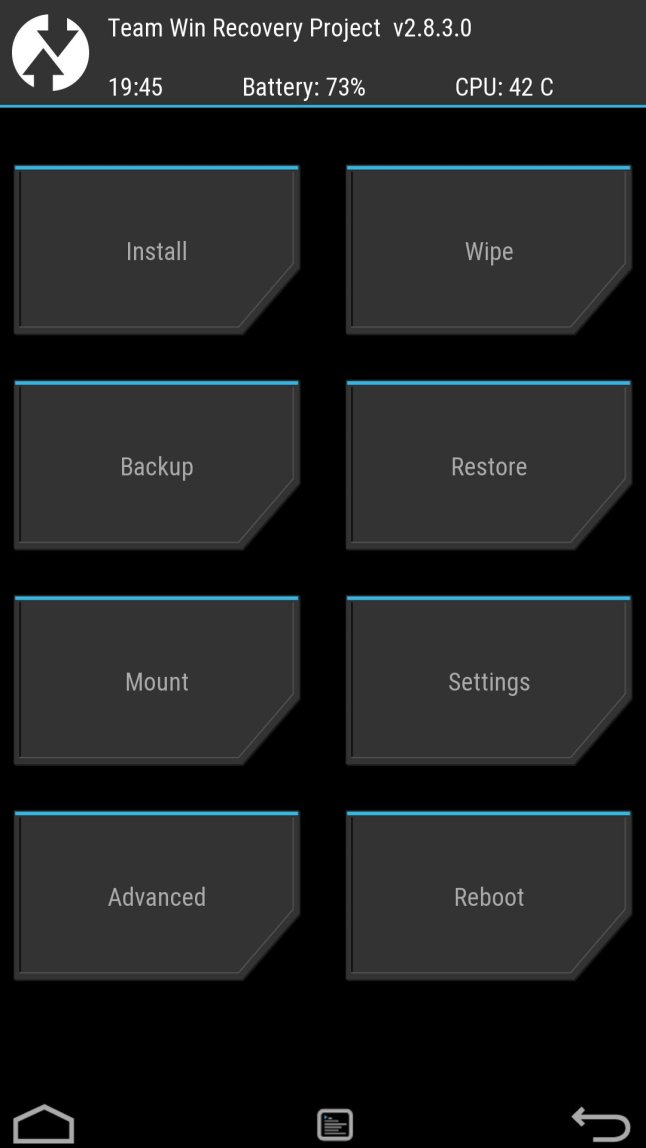
TWRP recovery graphical interface
Before actually flashing Cyanogemod on your device it is best to make a backup. You can do this though the Backup button. Once this had completed you should perform a factory reset. This will wipe data, cache and dalvik cache. It can be done by using the Wipe button, next chose Factory Reset. To install Cyanogemod hit the Install button and select the cmXXX.zip file from you external storage device (SD-card). This process might take a while. Once this has completed redo the same process but this time install the gapps zip file that we also copied to the SD-card. Once installation has finished, return to the main menu and select Reboot, then System. The device will now boot into CyanogenMod 12.1 (Lollipop). The first boot into CM12 might take an addition large amount of time as some software still needs be installed automatically in the background. Before actually entering the Android main screen the Google’s setup wizard will also ask you for your google account and so on. Once you’ve completed the wizard the Android main menu will arise and you can go on using Android Lollipop on your Samsung Galaxy S3 Mini!

CyanogenMod 12.1 for Samsung Galaxy S3 Mini
 after hours coding