
Overview
Advanced Form Integration plugin allows you to integrate Elementor Form to GetResponse. When a user fills a form on your website, the plugin will send the data to your GetResponse account and create a contact.
Supported Features
- Create a new contact with basic fields (Name, Email).
Requirement
- The feature requires a Pro license. BUY NOW!
- Make sure that the Pro version of the Advanced Form Integration plugin is installed and activated. You should have got the links in the email after purchase. You can also download it anytime by logging into the user dashboard.
- Read plugin documentation for Elementor Form and GetResponse. It is not required but helpful for a better understanding.
Obtaining GetResponse API Key
Before start, you are required to save the API Token in plugin settings.
- Go to the WordPress admin area, click AFI > Settings.
- Select the GetResponse tab.
- Click on the link and you’ll be taken to the Integrations & API page. Click on Generate API Key & copy it.
- Paste the Key in the API Key input box and click Save Changes.
Create New Integration
Elementor forms are directly created as a block in posts or pages. To integrate a form check the Post ID in the URL. See the attachment below.

Title
A default title will be auto-generated with an auto incremental number. You can rename it to something related to the task. It will help you to quickly recognize the correct one when there is multiple integrations setup.
Trigger
Select Elementor Pro Form in From Provider dropdown. Elementor plugin must be installed and activated otherwise you won’t see it listed. After selecting Elementor Pro Form , all forms built under Elementor Pro Form will be fetched and auto-populated in the Form/Task Name dropdown. Select the form that you want to integrate.

Action
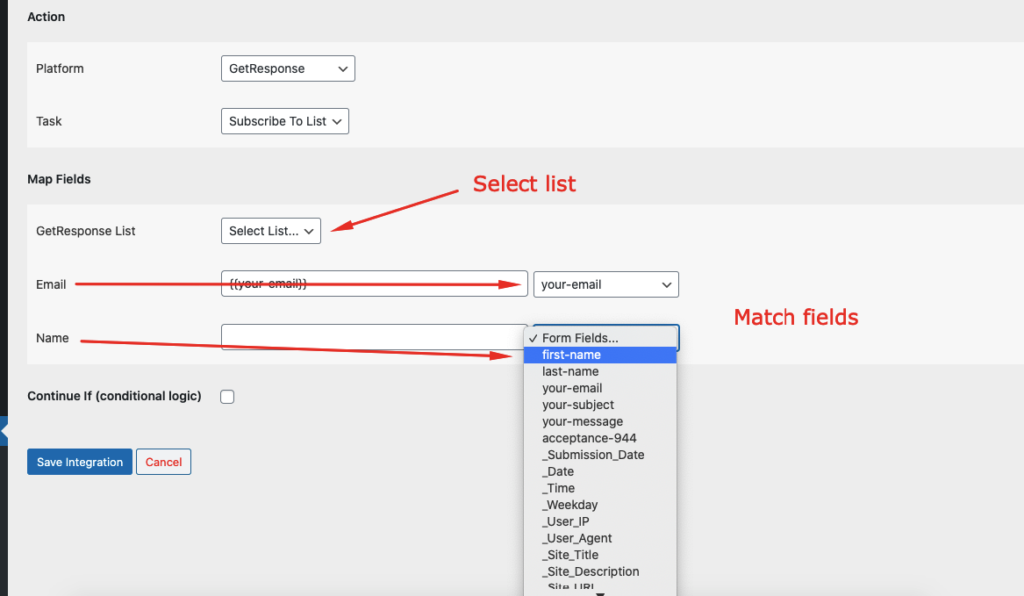
Select GetResponse in Platform dropdown.
Map Fields
Available contact lists will be auto-populated. Select the desired one. Map Email, Name, etc. Skip the fields that not needed. Finally, click the Save Integration button.
Frequently asked questions
Troubleshooting
Still need help?
Reach our support team at su*****@*********************on.com


