3-Step Guide to Google Business Profile Optimization
As we step into 2025, local visibility is everything. A strong website is still your foundation, but your Google Business Profile (GBP) is your front door. It’s what potential customers see first when searching for businesses like yours. If your profile is incomplete or inaccurate, you’re handing leads to your competitors.
Optimizing your Google Business Profile helps your business appear in local searches and on Google Maps, attracts more qualified customers, and strengthens your overall SEO strategy. Below, the team at Adam Grubb Media breaks down how to make your GBP work harder for you in three simple steps.
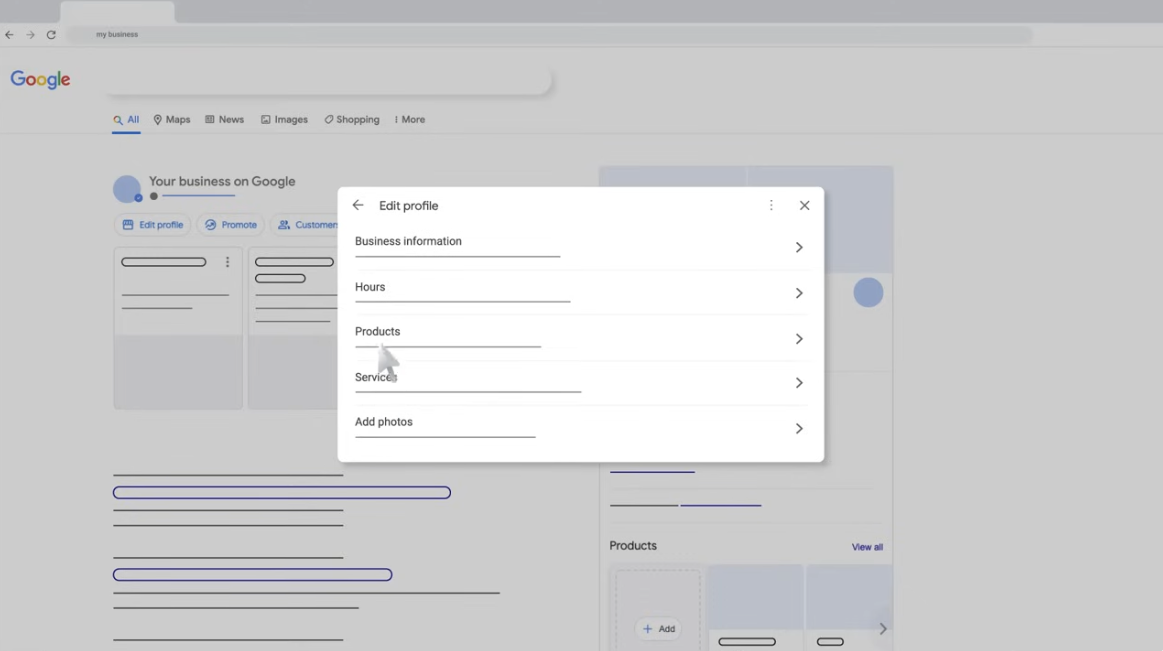
Step 1: Profile Management
Claim and Verify Your Business Profile
Start by claiming your business on Google. Even if you haven’t created a profile, Google may already have one for you. Search your business name and look to the right-hand side of the results. You’ll see a section with your business information and a link that says “Own this business.” Click it and follow the steps to verify your account. Once verified, you’ll have full control over your profile details.
Add Product and Service Descriptions
Include clear descriptions of what you offer. This helps customers understand your services and gives Google context for ranking your business. Be specific about your services and use the keywords your ideal customers would search for.
Fine-Tune Your Business Details
These details tell both customers and search engines who you are and what you do.
- Business Categories
Choose the categories that best fit your core services. They act as your business’s identity tags and help you show up in relevant searches. - Opening Date
This builds credibility. A long history shows experience, while a recent opening signals freshness and growth. - Website Link
Link to your homepage or most relevant service page. Make sure it loads quickly and reflects your brand well. - Service Area
Add the exact locations you serve. This ensures you show up in local searches from nearby customers. - Hours of Operation
Keep your hours up to date. Customers rely on this information, and inconsistent hours can hurt your reputation. - Service Options
Let users know if you offer in-person visits, virtual consultations, or other options. - Language Options
If you serve multilingual communities, list those languages. It makes your business more welcoming and accessible.
Step 2: Information Accuracy
Keep Your NAP Consistent
Your Name, Address, and Phone Number (NAP) must be identical everywhere online, from your website to directories and review platforms. Consistency signals credibility to Google and prevents customer confusion.
Why It Matters
- Improves Local SEO: Google rewards businesses that maintain uniform information across the web.
- Avoids Confusion: Mismatched details can frustrate customers and cost you leads.
- Strengthens Directory Listings: When your business info is clean and consistent, directories are more likely to rank and display your listings prominently.
Write a Strong Business Description
Your “From the Business” section is prime real estate. Use it to describe what you do and who you serve. Include relevant keywords naturally, this helps Google understand your business and boosts your visibility for local searches.
For example, a home services company in Noblesville might write:
“Adam Grubb Media helps home service brands in Central Indiana grow through smart digital marketing and local SEO strategies.”
This kind of description hits both clarity and keyword relevance.
Step 3: Engagement and Interaction
Encourage Reviews
Positive reviews build trust and improve rankings. Ask happy customers to share feedback directly on Google. Respond to every review (good or bad) with professionalism. This shows you’re engaged and customer-focused.
Upload High-Quality Photos
Photos make a big impact. Upload images that represent your business, products, or services. Add location data (geotags) so Google knows where they were taken. The more active your profile is with photos and updates, the better it performs in search results.
Add Keywords and Alt Tags to Images
When uploading images, include descriptive file names, alt text, and keywords that reflect your business. This improves accessibility and helps Google understand your content.
Post Regular Updates
Use your profile like a social feed. Post about promotions, events, project highlights, or new offerings. Fresh content shows Google that your business is active and gives customers a reason to revisit your profile.
Three Quick Tips:
- Post consistently, at least once a week.
- Include a call to action like “Learn More” or “Call Today.”
- Pair your posts with photos to increase engagement and visibility.
Final Thoughts
Optimizing your Google Business Profile isn’t optional anymore. It’s the foundation of your local digital presence. By managing your profile, maintaining accurate information, and staying engaged with your audience, you’ll earn trust and visibility where it matters most — in local search results.
If you want help building or optimizing your Google Business Profile, Adam Grubb Media can handle it as part of a complete local SEO strategy that actually drives results.
How to edit your Business Profile on
Important: To edit your business info, you need to sign in to the Google Account that’s linked to your Business Profile.
you mightalso like...

Allow External Users to Email Google Groups
Learn how to allow external users to email a Google Group in Google Workspace.…

Google Search, AI Overviews, AEO, and Google Ads: What Businesses Need to Know
Google Search is changing with AI Overviews, AEO, FAQ schema updates, and new…

Google Verified Badge: What Changes for Local Services Ads in 2025
Google has replaced all Local Services Ads trust icons with one Verified badge.…